Month: February 2012

  • Apple Wins German Injunction Against Most of Motorola’s Slide-to-Unlock Implementations

    Florian Mueller:
    >Today’s ruling and the revelation of this new Microsoft lawsuit show that the noose keeps tightening around Android’s neck in many ways. With more and more patents being asserted against Android in different courts, Google needs to come up with a better way to address its intellectual property issues than possibly trying to reach a state of mutually assured destruction on the basis of FRAND-pledges standard-essential patents, a kind of misconduct that antitrust regulators won’t tolerate because standard-essential patents are a fundamental issue, unlike Google’s desire to get away with infringement.

    The mutual destruction path seems to be where all this is headed for now, but what a win for Apple. I can’t imagine not having “slide-to-unlock” on any touchscreen smartphone.

  • ‘Apple to Take on Windows 8 With OS X Mountain Lion’

    Paul ‘Supersite’ Thurrott on the OS X Mountain Lion release:
    >There were absolutely no rumors to indicate such a release was coming, and given the timing, one can logically assume that Apple is trying to steal some thunder from Microsoft’s eagerly-awaited Windows 8.

    [Apple CEO Tim Cook to the Wall Street Journal](http://online.wsj.com/article/SB10001424052970204880404577226864202052768.html):

    >I don’t really think anything Microsoft does puts pressure on Apple

    Who to believe, who to believe…

  • Daring Fireball on Mountain Lion

    John Gruber:
    >And then the reveal: Mac OS X — sorry, OS X — is going on an iOS-esque one-major-update-per-year development schedule.

    That’s going to be great.

    Be sure to read Gruber’s entire post about this — he offers a lot of great insight.

  • OS X Mountain Lion. Innovation Comes Back to the Mac.

    Apple on the new OS X:
    >Messages, Reminders, Notification Center, Twitter, and more. You love them on iPad. Now you’ll love them on your Mac. And with iCloud, they all work better together.

    “Mountain Lion”? Really?

  • Messages Beta

    Say goodbye to iChat and hello to Messages (with support for iMessage).

  • Samsung Galaxy Note Review by Walt Mossberg

    Walt Mossberg’s conclusion:

    >The Samsung Galaxy Note isn’t for everyone, and I can’t recommend it as the main mobile phone for most people. But as a stylus-driven small tablet, it might be just what some users are looking for.

    *I’ve been dying to get my hands on a “stylus-driven small tablet” that’s at once too big to use as a phone and too small to replace an iPad. Sounds fantastic.*

  • ‘Apple: App Access to Contact Data Will Require Explicit User Permission’

    John Paczkowski:
    >“Apps that collect or transmit a user’s contact data without their prior permission are in violation of our guidelines,” Apple spokesman Tom Neumayr told AllThingsD. “We’re working to make this even better for our customers, and as we have done with location services, any app wishing to access contact data will require explicit user approval in a future software release.”

    That’s about the *only* response Apple could give at this point.

  • ‘Female Passengers Say They Were Targeted for TSA Body Scanners’

    Kim Zetter reporting for Wired.com on the alleged targeting of attractive women for the porno scanners:
    >“She says to me, ‘Do you play tennis?’ And I said, ‘Why?’‘You just have such a cute figure,’” Ellen Terrell recalled to CBS News in Dallas.

    The best part of this though is that there are over 500 complaints — so the TSA responded by:

    >When asked about the complaints, the TSA released a statement to CBS saying that scanners at the Dallas-Ft. Worth airport, as well as at the Love Field airport, had been upgraded so that they now showed only a generic body outline, rather than a detailed image.

    Why even bother with these scans then? Wasn’t the point, from the get go, to have a detailed accurate scan to see if there is hidden contraband on the persons body? How then does this make sense?

    Also: “Upgraded”???? I think the word you are looking for is “downgraded”.

    My mind hurts.

  • You Can Buy Stuff From Ikea on Amazon!

    Holy amazing. Prime shipping here I come. ((The wife and I are moving right now.))

  • At the Speed of OmniFocus

    Shawn Blanc perfectly sums up, in his review of Clear, [why I am using both Clear and OmniFocus on my iPhone](https://brooksreview.net/2012/02/clear/):
    >But the biggest caveat with OmniFocus is its speed. It takes more than a few seconds to launch the iPhone app and enter something in. New OmniFocus items beg to be given contexts, projects, start dates, and due dates. While this is OmniFocus’s greatest strength, but there are moments when this is also OmniFocus’s greatest weakness.

    I love OmniFocus and if forced to pick between Clear and OmniFocus, the latter will win every time — no hesitation. Luckily I don’t have to choose one or the other.

  • Clear

    [Clear is a new task management app from Realmac Software](http://www.realmacsoftware.com/clear/) and it had quite the attention while I was down at Macworld. I was shown a demo from Nik Fletcher and was blown away by how nice it looked and how fun the interactions are.

    The folks over at Realmac sent me a promo code, and an early look at the app, so let’s take a peek.

    [](http://c276381.r81.cf1.rackcdn.com/clear-1.jpg)
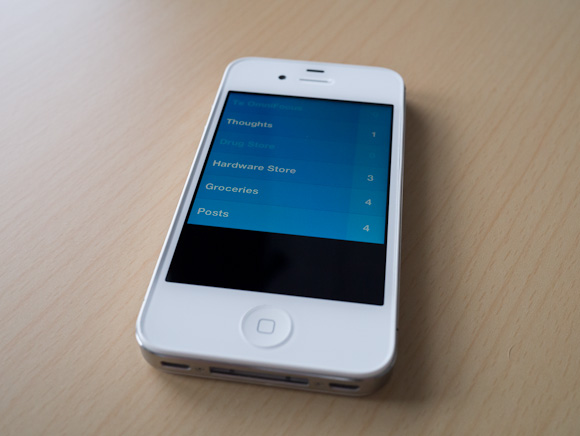
    There is literally no UI chrome in Clear. No status bar, tabs — hell there aren’t even any buttons in the app. The entire app is driven by gestures, movements, and taps.

    [](http://c276381.r81.cf1.rackcdn.com/clear-2.jpg)
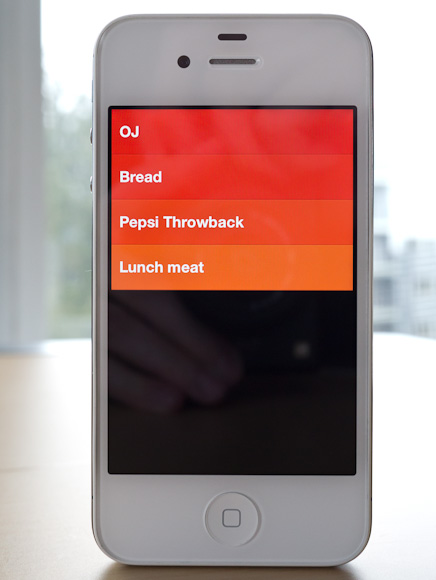
    The idea of no buttons may sound confusing, but it is surprisingly intuitive to use Clear once you get going with it.

    The biggest advantages to Clear over just about any other app I have used: it is concise and fast. You can’t get buried in the details with the app because there are no details to get lost in. You can actually only enter in a task that is under 30 characters long. Clear forces you to be *clear*.

    Clear is the fastest way to enter in new tasks on my iPhone: swipe down/pinch open/tap to create a new item, start typing, pull down to create another, type, pulldown… and so on. It’s fast — faster than OmniFocus.

    But Clear doesn’t sync, there are no backups of your data (beyond iCloud/iTunes backups). There is no Mac/PC client. So your data, your tasks, are only on your iPhone. This is what ultimately will keep a lot of people from trying Clear, but I think I have found a pretty neat use for it.

    ### Where it Fits

    The biggest question for me is: where do I use Clear if I am already using OmniFocus for everything? Within 5 minutes I found my answer: location specific lists. I am pretty tired of location reminders from OmniFocus and Reminders.app popping up at times when I can’t, or don’t want to, act on them — so I turned that feature off.

    I still want those lists though, I just want and need those lists to be passive — and easy to dump lots of things into quickly.

    Here’s the system I came up with:

    [](http://c276381.r81.cf1.rackcdn.com/clear-ss-3.jpg)
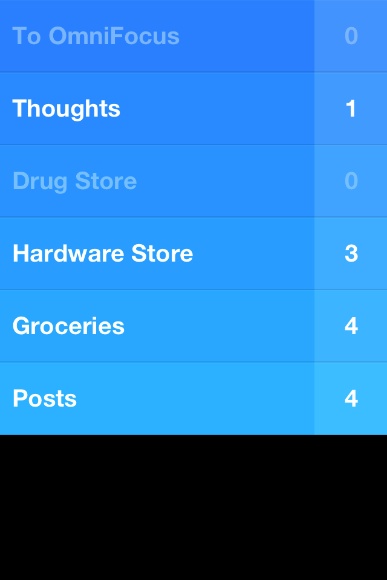
    That’s five lists in Clear that I don’t use/need in OmniFocus.

    – To OmniFocus: this is pretty simple, but why not just input into OmniFocus? Clear is faster, so if I am in a meeting and want to input a lot of things fast, Clear is going to be a better option. I also can’t get distracted by adding due dates and contexts and creating projects. I can do that later on my iPad, for now let’s just get the tasks down.
    – Thoughts: random things I think of that I may want to remember? Check. The length limitation is also helpful in paring down the thought to the lowest denominator. Keeping these non-actionable thoughts out of OmniFocus, but somewhere more handy that Notesy is great.
    – Drug Store: Next time I go, I need to buy…
    – Hardware Store: Next time I go, I need to buy…
    – Groceries: I will be hungry if I don’t buy…
    – Posts: I want to write about…

    All of this could be done in OmniFocus. All of it used to be done in OmniFocus. With Clear I hope to not get tangled up in the planning of these tasks. I just jot them down and walk away. Nothing I put in Clear is time sensitive, but all are things I want to remember.

    [](http://c276381.r81.cf1.rackcdn.com/clear-ss-1.jpg)
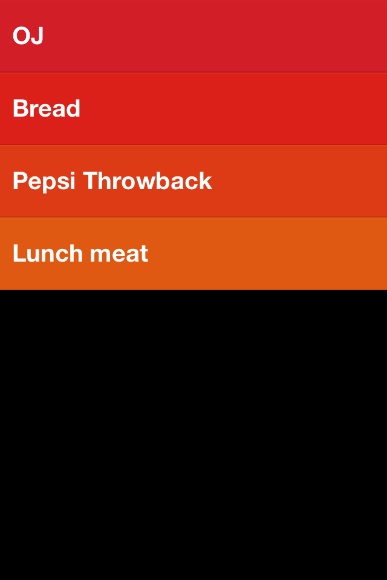
    The icon is actually pretty great. It pops more than any other icon on my home screen — and there are a lot of great icons on my home screen. The design of Clear alone is worth the download — I suspect Clear just started a new trend in iPhone app design.

    Ultimately, for me, Clear has earned a seat on my home screen. I love the no interface-interface. I love how clever and fast it is. I just have to remember to not think of Clear as a task manager — instead looking at Clear as a list making app.

    And it’s fantastic at making lists.

    Here’s the App Store link: Clear

  • Apple CEO Tim Cook Speaks at Goldman Sachs Technology Conference

    Apple CEO Tim Cook on the iPad market:
    >We started using it [the iPad] at Apple well before it was launched. We had our shades pulled so no one could see us, but it quickly became that 80-90% of my consumption and work was done on the iPad. From the first day it shipped, we thought that the tablet market would become larger than the PC market and it was just a matter of the time it took for that to occur. I feel that stronger today than I did then. As I look out and I see all of these incredible usages for it, I see the incredible rate and pace of innovation, and the developers — If we had a meeting at this hotel, and we invited everyone doing cool stuff on PC, we wouldn’t have anyone here.

    If he did 80-90% of his work/consumption on the iPad *before* it launched — do “we” think he even uses a Mac anymore?

  • The Lack of Consistency in Twittelator Neue

    An astute observation from Will Simons.

  • Quote of the Day: Alex Payne

    “The factors that appear to make a business successful change from week to week, article to article, tweet to tweet, blog post to blog post.”
  • ‘You Can Buy Motorola, but We Still Don’t Trust You’

    Jon Brodkin reporting on the Google acquisition of Motorola:
    >But regulators on both sides of the pond went out of their way to warn Google not to abuse the patents, with the Justice Department comparing Google’s patent statements unfavorably with what Justice views as more responsible statements made by Apple and Microsoft.

    Read that again: “more responsible statements made by Apple and Microsoft”. In 2003 I would have bet money that such a statement would never have been said — let alone be true.

  • ‘Two Contradictory Thoughts About Apple and Path’

    Watts Martin on Apple’s responsibility to users of iOS (with the Path address book hubbub as the central issue):
    >Apple has explicitly made the case that a platform advantage of iOS is that Apple does verify that developers aren’t being shady dipshits.
    […]
    >Once you’re pitching that as an essential platform differentiator—and I think it’d be hard to argue Apple doesn’t make that pitch—then “is it Apple’s job to keep developers from being shady dipshits” is not the right question. “Why do apps only have to inform of you of some potential privacy issues, not all” is the right question.

    That’s a really good question. Also see his comments on those dialog boxes that people are suggesting (like the ones used for location services) because he brings up a damned good point there.

  • Samsung’s Super-sized Galaxy Note

    Abdel Ibrahim and Jon Dick:
    >The Galaxy Note’s tagline asks if the device is a tablet or a smartphone, but like a girl in Spanx, it’s so much more.

    That maybe the best line I have ever seen on a blog.

  • Sleazy Promotions

    Matt Gemmell on those annoying “I entered to win” tweets:
    >It’s bad enough trying to artificially turn a prospective customer into a delivery mechanism for your marketing, but requiring that they advertise to their chosen social circle is nothing less than appalling. The customer’s credibility, impartiality, judgement, taste and sense of personal ethics are all assaulted if they choose to take part in such a promotion, and the existence of the promotion invites such an assault.

  • China’s Proview Seeks iPad Trade Ban in Apple Trademark Row

    Artemisia Ng in Hong Kong and Melanie Lee in Shanghai:
    >A Chinese tech firm claiming to own the “iPad” trademark plans to seek a ban on shipments of Apple Inc’s computer tablets into and out of China, a lawyer for the company, Proview Technology (Shenzhen), said on Tuesday.

    It’s a boring legal dispute, but imagine the repercussions of Proview winning this.

    1. No one would be getting iPads — the import **and** export will be blocked.
    2. Foxconn workers would be laid off.

    Basically this is more than just not being able to buy an iPad, or seeing iPad delays — it would have a huge impact on the Chinese work force and one of the largest employers: Foxconn.

    Should be interesting to watch.

    (Apple, of course, says they already own the trademark from Proview.)

  • Verizon, AT&T to Sell 4G iPad

    Spencer E. Ante and Jessica E.Vascellaro:
    >Verizon Wireless and AT&T Inc. will sell a version of the coming iPad that runs on their newest fourth-generation wireless networks, according to people familiar with the matter, as the battle to cash in on big investments in mobile broadband heats up.

    If true, and the iPad also gets a retina display, then I want to know one thing: where is all this battery life coming from? (My assumption being that Apple wouldn’t sell a new iPad with less battery life than the device it is replacing.)