Month: February 2012

  • InVision Prototyping Tool [Sponsor]

    The UI prototyping phase of the design process is crucial to get right. It’s about figuring out how your product will work, and ensuring everyone is aligned before moving into building.

    [InVision](http://invisionapp.com/) is a web-based [prototyping tool](http://invisionapp.com/) that lets you paint an accurate and realistic picture that anyone can understand.

    InVision lets you design in your tool of choice. It simply requires .jpg, .png or .gif files. Create them however you want. Take your static files and drop them right into InVision all at once. The bulk uploader makes adding files a snap. Then use the web GUI to draw Hotspots and link them up.

    As a special offer for our readers, [InVision is offering](http://www.invisionapp.com/february/) a 30 day free trial along with a special discount for the first six months.

    Design anywhere. Bring it to life with [InVision](http://www.invisionapp.com/).

  • Twittelator Neue for iPhone

    I am, without a doubt, a diehard Twitter for iPhone user because I really like that app. I do however admit that the latest updates to the official Twitter app, on the iPhone, made the app less — for the lack of a better word — powerful. To many this was the burying DMs, but for me what hurt was having to open a link in the browser before I can send it to Instapaper.

    That, I felt, was a crap move. It put me in my own personal hell.

    Still I stuck with the official app for one reason: I strongly feel that, in the not to distant future, the only app that will truly work with Twitter is their official app(s). I have no inside knowledge of this, it is just the feeling I get given their public moves with the company.

    I apologize for not remembering, but one of my Twitter followers pointed me to [Twittelator Neue](http://stone.com/neue/) a while back. I played with it out of curiosity and dismissed it because it wasn’t quite ‘polished’ enough for me. [Last week though, John Gruber reminded us all of the app](http://daringfireball.net/linked/2012/02/09/twittelator-neue), so I decided to give it another go.
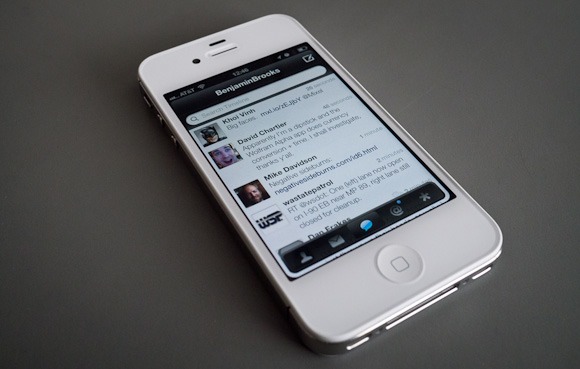
    Since then I have been using it everyday as my main Twitter app on my iPhone.

    So far I have found it to be one of the more interesting Twitter apps that I have tried and because of that I don’t really know what to make of it. So here’s my somewhat random thoughts on the app.

    ### Design

    [](http://c276381.r81.cf1.rackcdn.com/twittelator-neue-5.jpg)
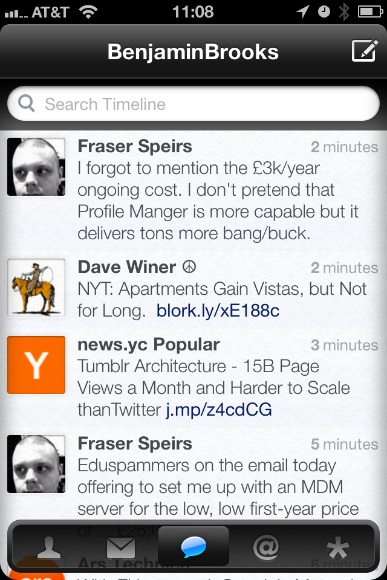
    Let’s just get this out of the way right now: the icon is hideous. It’s ugly to the point where I almost don’t want to use the app because of its icon.

    Ok, now that I have said my piece on that issue we can get into the rest of the design.

    I think the best way to describe the UI design is with the word: light. Both in the sense of the visual color/brightness and in the overall feel of the UI. The app feels like a bundle of plastic to me, from the gloss stylings to the way it “feels” when you move about in the app and that gives it a very light feeling.

    I also think that Twittelator Neue spent some time paying attention to the look of text in the app because I find the text clean and easy to read.

    [](http://c276381.r81.cf1.rackcdn.com/twittelator-neue-2.jpg)
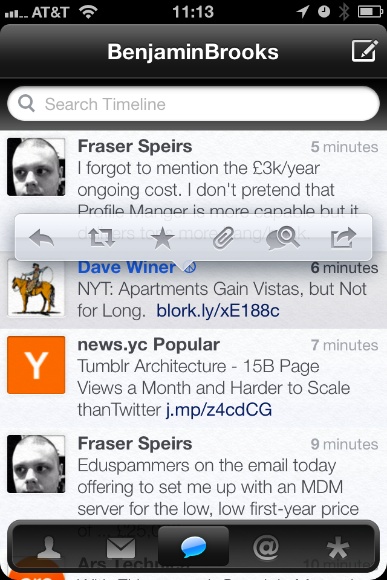
    But the app is also pretty low contrast. The pop-over for adding links to Instapaper is very low contrast — in fact when you really look at the app most of the design is rather low contrast. That’s not a deal breaker, but it can be difficult if you are trying to fly through the app.

    For an app that is just about the most opposite of skeuomorphic that you can get, it has this little detail:

    [](http://c276381.r81.cf1.rackcdn.com/twittelator-neue-8.jpg)
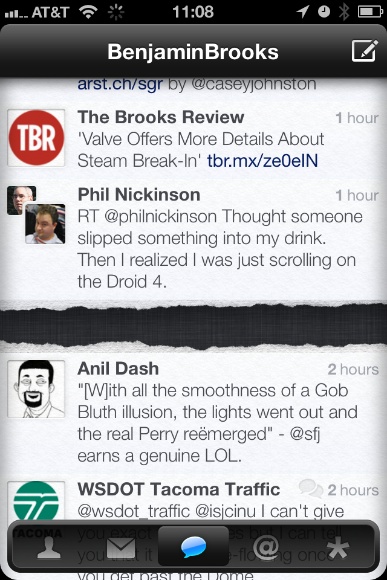
    Wow, really? I don’t so much object on the grounds of skeuomorphism, but on the grounds that this detail just doesn’t fit with the rest of the app.

    As I said above, I can’t really decide if I like this app or not — the design doesn’t *do anything* for me. I could take it or leave it.

    There are areas where it is better than the Twitter app and areas where it is worse, overall I don’t think the design of Twittelator Neue alone will sell you the app.

    ### Navigation

    The navigation for Twittelator Neue will certainly set it apart from any other Twitter app. While it has the standard navigation tabs at the bottom, well truthfully, those tabs aren’t even standard.

    The navigation tabs at the bottom actually are confusing because they can be hidden away with a downward swipe — and pulled back up from the little tab that is left behind. This is, at the same time, very clever and very confusing. I never think: “oh I lost the navigation tabs”, but when scrolling through my timeline I tend to think: “woah there, almost hid the navigation tabs”.

    The difference is that I don’t care if the tabs get hidden, but when scrolling I notice them start to hide away and my reaction is always to jerk them back up in place. It’s like knocking `X` over (that doesn’t matter if you knock it over or not), but that you still actively try to prevent `X` from getting knocked over.

    Now here’s a real annoyance that I have: the top navigation bar moves. When new tweets arrive the top navigation bar drops down to show you the count of new tweets, same too when you add something to Instapaper. So the navigation bar completely bucks the iOS standard behavior of always staying put and that is off-putting.

    I find this movement to be one of the more annoying aspects of the app. It is just something that does not and should not move.

    I do, however, like that you can swipe left and right pretty much anywhere to move about the different tab views — I think that is really great as a small time saving touch. But for as much time as this action saves you, you lose it all once you try to switch from one account to another.

    Account switching is just buried too deep for me, not to mention slower to get at then on the official app. I also find it annoying that you always start back at your profile when you switch between accounts.

    The navigation is something that will take more time to get used to than what I have spent with the app and even still I am not sure if it will be worth getting used to in the end.

    ### Instapaper

    Truthfully I can, and do, ignore all of those problems with the app because it does one thing really, really, well for me: it sends links to Instapaper much faster than the Twitter app does. More than that it adds the link back to the tweet in the Instapaper description so that I can properly attribute the item.

    I need not load up a webpage first before sending to Instapaper.

    One odd thing is that when you have a Tweet in the main timeline with more than one link in it — there is no prompt for which link you want to send to Instapaper, you just get all the links. I don’t mind this, but I do wish I was given the option to choose.

    ### Avatar Power

    There’s one last thing about this app that I find kind of odd: its obsession with Twitter Avatars.

    This is an awful lot of Matt:

    [](http://c276381.r81.cf1.rackcdn.com/twittelator-neue-prof-.jpg)
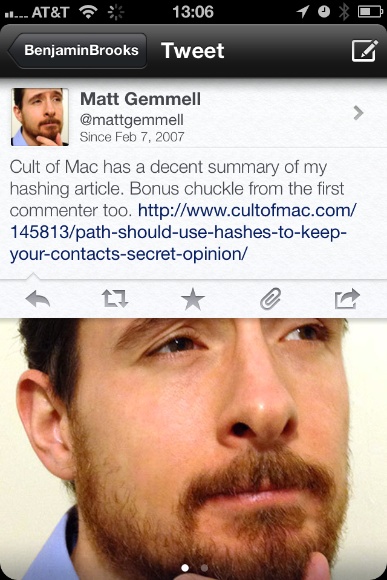
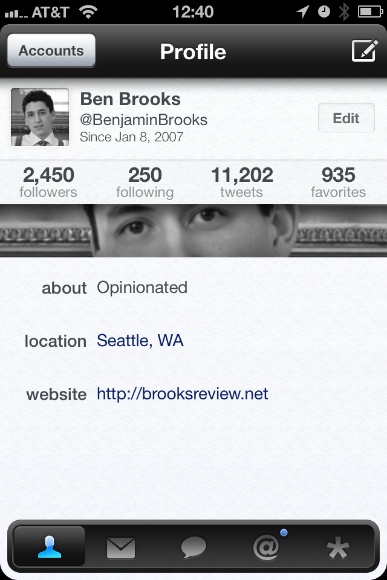
    This isn’t that big of a deal to me, but I find it odd how obsessed the app is with showing you huge avatars, take the profile page for example (that is *your* profile page when you install the app):

    [
    ](http://c276381.r81.cf1.rackcdn.com/twittelator-neue-1.jpg)

    Why is my avatar shown twice, and how creepy is it just seeing my eyes? So odd, I feel like I am constantly being spied on with all this avatar love in Twittelator Neue.

    ### Concluding, Something

    So is Twittelator Neue better than the official Twitter app? It only is in the implementation of Instapaper and for me that is enough to keep on using the app. In almost every other aspect I prefer the official Twitter app.

  • Quote of the Day: Jake Levine

    “Congratulations Facebook, you’ve built THE KILLER BIRTHDAY APP.”
  • Meet Roger Martin a RIM Board Member and RIMdiot

    This article so perfectly encapsulates everything that is wrong with RIM — it actually astounds me that people listen to Mr. Martin. Gordon Pitts writing:

    >In a rare outpouring of candour by a RIM director, he heaps scorn on the notion that the board should have hired a star outsider to re-energize RIM – a strategy that, he points out, failed abysmally at other stumbling tech giants, including Dell, Hewlett-Packard and, in its troubled 1980s, the now seemingly flawless Apple.

    >”So we’re supposed to hand it over to children, or morons, from the outside, who will destroy the company?” he [Martin] says. “Or should we try to build our way to having succession?”

    Nah, just stick with internal morons, which is clearly the better option.

    >Mr. Martin agrees the two ex-CEOs made mistakes, particularly in the U.S. market for smartphones, where Apple and Google-based products have stolen the BlackBerry’s thunder. And he concedes the board failed to push for more marketing muscle in anticipation of serious competition.

    Yeah, because everything would have been fine with better/more marketing.

    Ok one last quote:

    >But today, he is distracted by two pressing issues – the Super Bowl loss by his beloved New England Patriots and the fate of RIM, a company perceived to have lost its way in the smartphone market, causing its stock price to plunge.

    “Perceived” — really?

    [via Lessien]
  • Human Wormholes

    Robert Krulwich building off something that [Jason Kottke calls ‘Human Wormholes’](http://kottke.org/12/01/human-wormholes-and-the-great-span):
    >There are people who live long enough to create a link — a one-generation link — to figures from what feels like a distant past, and their presence among us shrinks history. When “Long Ago” suddenly becomes “So I said to him …,” long ago jumps closer.

    There are some fantastic stories in here, a must read.

  • ‘The Super Sweet 1Password Trick You’re Almost Certainly Not Using’

    Brett Kelly:
    >You just created a bookmark for a website that you commonly use, but now it will automatically fire up 1Password and fill in the login for you and—if you have it configured to automatically submit login forms—just log you right in.

    This is fantastic.

  • ‘Valve Offers More Details About Steam Break-In’

    Peter Cohen:
    >Newell added that “it is probable that the intruders obtained a copy of a backup file with information about Steam transactions between 2004 and 2008. This backup file contained user names, email addresses, encrypted billing addresses and encrypted credit card information. It did not include Steam passwords.”

    I mean, no biggie.

  • Saturday Night Live’s Verizon Ad

    A perfect parody of Verizon’s ads. (Flash required, sorry.)

  • The Flip Side of the DuckDuckGo Bandwagon

    Jonathan Christopher on his less than stellar DuckDuckGo experience:
    >I’m about 3 weeks in and so far I’d rate DuckDuckGo about a 7 out of 10. The search takes longer, and results are not what I expect. I often find myself hitting the 5th or 6th link instead of the first I found very common when using Google.

    His complaint isn’t uncommon. I have had a lot of people switch to DuckDuckGo as a result of my comments about it here — personally I love it — but it *is* slower than Google.

    I, however, have not had less relevant results — in fact I think the results on DuckDuckGo are of a far higher quality than what I get out of Google.

  • ‘Why I Use DuckDuckGo, and You Should Too’

    Clif Reeder:
    >The way that DDG does this is by trading off text directives for GUI/mouse interactions. Assuming you can type faster than move and click a cursor, this is a big difference. To me, its like the difference between using Vim and a GUI based text editor.

  • Your Email is Not Secure

    Max Masnick, arguing that Google reading your emails should be the least of your concerns:

    >Email is simply not secure. Messages are not secure in transit: the protocol used for sending email (SMTP) does not require encrypted connections, so it could easily be intercepted by a third party as travels over the internet. You also have no guarantees about the security of a recipient’s email client or server.

    He makes great points, not to mention that there’s nothing stopping the recipient from posting your email on thier blog. However I don’t think that all the other security risks associated with email should make you dismiss the privacy invasion you grant Google when you use Gmail.

  • Some Thoughts on the Jawbone Era

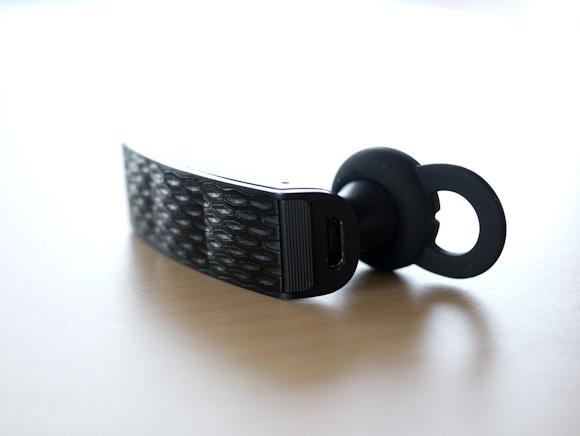
    A while back I needed a new bluetooth headset, so I decided to purchase the [Jawbone Era](http://www.amazon.com/exec/obidos/ASIN/B004K1EDG2/ref=nosim&tag=brooksreview-20) (affiliate link). In fact I ended up purchasing two of these headsets after my first one took a ride through the laundry.

    [](http://c276381.r81.cf1.rackcdn.com/era-1.jpg)
    While I like this headset quite a bit, there are four issues with it that I find quite annoying and that I only really became annoyed by recently.

    ### 1. Comfort

    Jawbone gives you a plethora of options for wearing the headset, including an over the ear loop. Here’s the problem though, with exception to the over the ear loop, the headset becomes very uncomfortable after about 30 minutes of wear.

    If I wear a smaller ear piece it is comfortable, but the headset doesn’t stay in my ear. If I wear the correct size it stays in my ear, but my ear ends up aching 30 minutes later.

    The over the ear band is simply not an option because:

    – It conflicts with my sunglasses. Yes I live in Seattle, but clouds can be quite bright.
    – It is more difficult to put on — meaning I need to keep the headset on my ear while in my car or fumble about every time I want to make or receive a phone call. This is not something I ever want to do.

    The SoundID headset that this Jawbone replaced was perfectly comfortable, so I know it is possible to have a headset that fits my ear comfortable — it’s just not the Era.

    ### 2. Bluetooth Connectivity

    I keep my iPhone 4S in the car door pocket, which is low and left of my body. There is actually a special little felt lined area for it there — this is the best place to keep my phone. I wear my bluetooth headset on my right ear, as these types of things tend not to stay in my left ear.

    The distance from my ear to the iPhone is about three feet.

    At that distance the audio gets a bit crackly. However if I move the phone three feet away on my right side, perfect audio. Even at 6 feet.

    I have found that the Jawbone doesn’t like to have to maneuver around your body and instead it just sounds like crap. This is really annoying for me, but people on the other end of the call rarely get the crackling sounds — so it’s not a total waste.

    I think, though, we should be past this bit of annoyance by now.

    ### 3. Motion Sensing Buttons

    The Era has this feature that you can turn on (when you mess about with it on your computer) that can set the headset to answer a call if you shake it twice. It sounded neat in the beginning, but it has turned out to be the worst feature I have ever seen.

    Here’s the common scenario:

    – My phone rings.
    – I grab the Era from the center console where it was sitting.
    – I lift it to my ear, and secure it in place.
    – I press the answer button.
    – I hear the other person.
    – Then the phone hangs up on the call.

    What actually happened is that somewhere along the line I shook the Era twice and it initiated the call answering. What the hell? Then when I pressed the button on the Era to answer the call — well — I actually was ending the call.

    Lame.

    You can turn this non-sense off, but you need your computer to do it. This is the single worst feature, but not the worst problem with the Era.

    ### 4. The Worst Button in the World

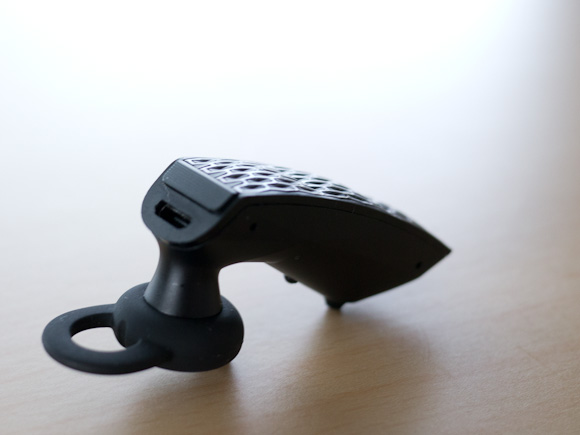
    The absolute worst part of the Era is the call/end button on the back of the device. It feels like complete crap. The stroke of the button is so shallow that you can hardly tell if you pressed it and forget about a firm and even “click” because most of the time you won’t even notice one.

    Therefore: I never know if I have actually pressed the button or not.

    [](http://c276381.r81.cf1.rackcdn.com/era-2.jpg)

    Just really horrible design and lack of care and attention to the one part of the device that all users are going to be interacting with. I find this button inexcusable.

    ### Wrap-Up

    I didn’t really state any of the good on this headset, so let me state it now: the noise canceling is phenomenal and the audio quality is very good (provided your phone is one the same side of your body as the headset). The battery life is OK (about 3-4 days on one charge left on in my car 24/7 and used about 30 minutes a day).

    Even with all the bad, and the very little good, this is the best bluetooth headset I have tried — which says more about the industry as a whole.

    For a device that many states require a driver to use, if they want to talk on the phone while driving, it is pretty amazing how crappy most of the bluetooth headset offerings are.

  • The B&B Podcast – Episode 46: BlackBerry Withdrawal

    >Shawn and Ben talk about cellphone fanboy rankings in Kansas City, iPad 3 rumors, and Ben’s ideas about the model that Kickstarter is using (Shawn brings some rationality into that discussion).

    Thanks to our excellent sponsors: [Doxie Go](http://www.getdoxie.com/a/bbpodcast_feb12.php) and [Jumpchart](https://www.jumpchart.com/).

  • It’s About Trust and Apple Broke It

    [Craig Grannell responding to the idea/ragae that Apple should have prevented Path from uploading a users address book](http://reverttosaved.com/2012/02/10/blame-apple-part-3463-it-shouldnt-allow-devs-to-be-naughty/):
    >But more to the point, why should Apple become a watchdog for the less-than-moral behaviour of some developers? Just because you can do something, that doesn’t mean you should.

    What I think we all have to keep in mind here is the concept of trust and more specifically who is asking for our trust. Apple isn’t saying that we should trust developers, quite the contrary, because of the review process Apple is saying that we actually *shouldn’t* trust developers.

    What Apple is telling iOS (and now with the Mac App Store, OS X) users is that they can and *should* trust Apple. And therefore they can trust everything in the App Stores because those apps have been vetted by Apple.

    And we are supposed to trust Apple.

    There is no doubt in my mind that developers should go out of their way to gain user trust and there are some developers that are absolutely trustworthy. While there are certainly developers that can be trusted, and developers that can not be trusted, it doesn’t matter at the end of the day.

    If you live and play in the Apple world, you need only trust Apple. This is what Apple tells us — it’s a ‘feature’ of the Apple ecosystem.

    The fact is, that in this instance, Apple broke that trust.

  • ‘Your Phone Loses Value Pretty Fast (Unless It’s an iPhone)’

    Priceonomics:
    >Not all cell phones are created equal. You can buy an iPhone 4S today and sell it a few months later on the secondary market for almost what you paid for it. However, if you buy the latest big fancy Android phone, a few months later it has lost hundreds of dollars in value.

    I wonder if this has much of anything to do with popularity/design, because you have to think the slow rate at which Apple releases iPhones, compared to the rate at which new Android phones comes out, plays a huge role in this.

    Priceonomics also noted this underlying assumption that they make:

    >At Priceonomics, we firmly believe that resale value is the best objective indicator of product quality.

    I couldn’t disagree with that statement more. There are far more factors controlling the resale value of cellphones. Things like:

    – Gazelle, or any other company wanting to buy back the phone. Why would you sell your iPhone for less than what Gazelle is offering — this pumps up the price.
    – Apple refurbished units set the price for mint condition used phones.
    – Carrier subsidies: because maybe I am willing to pay $25 more than what I could buy the phone new for, just so I didn’t have to be locked into a contract.

    All this plays a large role in determining price — much larger, I think, than product quality.

    [via Macworld]
  • ‘Attempt to Criminalize Tweets That Solicit Law-Breaking Fizzles in Oregon Legislature’

    Harry Esteve on the proposed law: ((Meanwhile Washington is [inches](http://www.reuters.com/article/2012/02/09/us-gay-marriage-washington-idUSTRE81727F20120209) away from legalized gay marriage.))
    >It was dubbed the “flash mob” bill when it got a hearing Monday at the Oregon Legislature — a proposal to make it a felony to summon people by Twitter or email to commit a crime at a designated place.

    and:

    >Sen. Doug Whitsett, R-Klamath Falls, said he asked for the bill because he heard from retailers about being victims of flash mobs that steal stuff.

    and then:

    >”If someone wants to bring a whole bunch of people to the Capitol to demonstrate, no problem,” he said. “But if they’re solicited to come to the Capitol at 9 p.m. to firebomb the place, that’s a problem.”

    The man does have a point, I mean, firebombs are **not** cool. ((As if we needed another reason not to live in Oregon, Sen. Whitsett wants to make sure we point and laugh.))

  • Windows on Arm

    Or WOA, as Steven Sinofsky highlights in his post about porting Windows 8 to the ARM architecture. Sinofsky also answers one of the bigger questions about WOA, will it run “full” Windows:
    >WOA supports the Windows desktop experience including File Explorer, Internet Explorer 10 for the desktop, and most other intrinsic Windows desktop features—which have been significantly architected for both touch and minimized power/resource consumption.

    To be honest I am not sure what the hell that statement means. What I think it means is that, yes, you will get full Windows — but that full Windows will have been optimized for tablets running ARM chips.

    I think.

  • ‘US Government Dumps BlackBerry in Favor of iPhone, iPad for NOAA’

    Since the iPhone came out lawyers and government officials have always said (to me): “I can’t use the iPhone because person/agency/department X doesn’t (or doesn’t allow it).”

    I never understood this. Corporate offices have clung to their BlackBerry devices so it is nice to see these organizations make the move.

  • ‘iOS Address Book Access Should Prompt the User for Permission’

    Marco Arment:
    >But Apple can, and should, assure users that no app can read their contact data without their knowledge and explicit permission.

    Yep.