This week: I dive deeper into USB-C hubs destroying my iPad Pro battery life, a news app recommendation, Zoom (sigh), and then turn on the pay wall for the new gear I bought, productivity, thoughts on lasting impacts, and a note on walking. Enjoy…
## Power Drain from USB-C Hubs is Unreal
Last week I complained about the state of USB-C hubs, and specifically the power drain I was seeing on my iPad Pro. None of you responded with a better hub suggestion, so I tried [Apple’s Digital AV multiport thing](https://www.amazon.com/exec/obidos/ASIN/B07WF96FY5/ref=nosim&tag=brooksreview-20) and it was just as bad. Here is the power drain chart from the Apple dongle attached to the USB-C Alt keyboard:
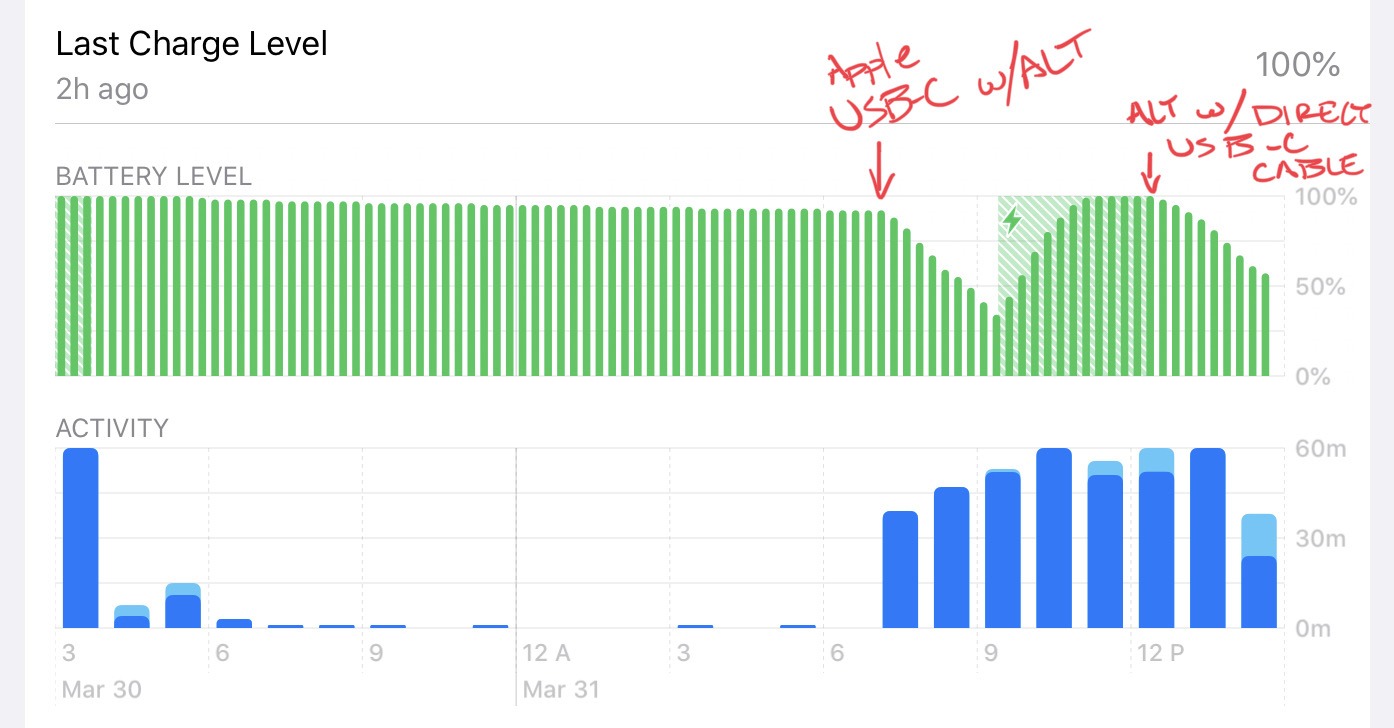
This is quite something, showing the same keyboard with two different connection methods on the same day. The first arrow is when I plugged in the ALT via a USB-C to USB-A cable to the Apple dongle. The power drain was rapid and in line with what I have seen from *all* USB-C hubs. which means it makes the iPad Pro almost unusable because of how fast the power drains unless you keep the device constantly charging.
The second arrow is when I switched the same keyboard to a USB-C to USB-C cable and plugged it directly in (after charging back up the device), no dongle or anything. The power drain is still there (this keyboard has many LEDs) but the decline is not that rapid and generally what I expect to see.
That’s just one day, and maybe I was doing something else on my iPad, right? Here’s the next day, no dongles at all:
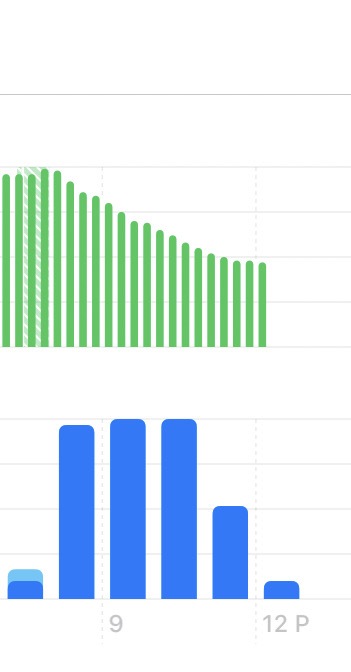
The curve is roughly the same, which to me says that while this keyboard is power hungry, the USB-C hubs makes the problem drastically worse. So I tested a few more times with different setups. I tested the Vortex Pok3r and Vortex Core, both directly connected to the USB-C port with a cable.
Here is the aggregate off all this:
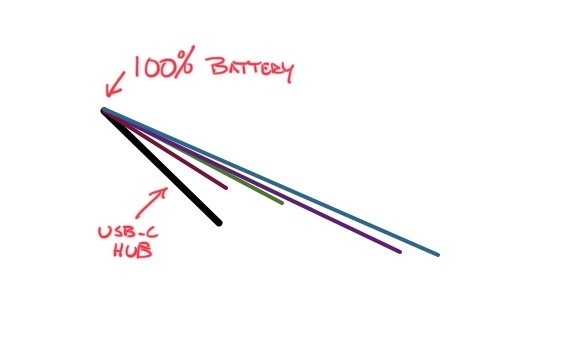
The big black bar at the bottom is the drain from using Apple’s USB-C hub with only my keyboard connected — it is terrible. Next the Greenish line is the ALT on a fresh day, the maroonish is the bar of the ALT from the same day as the black bar, the purpleish is the Pok3r, and the slate/blue is the Core. No doubt the diminutive Core which has but one LED makes it so I can almost last an entire day, even with video calls, and have no need to charge. The Pok3r comes close, I did turn off the LEDs half way through, but that didn’t seem to phase the power drain too much.
What’s clear to me is that the power drain between the keyboards is very different — and enough so that you might think about it a little harder if you truly want to get the most battery out of your device — but at a desk it’s hardly much of a concern. (My tip: when on a call, plug in the iPad for the call, that way you don’t let anyone hear your typing, and you stay focused, and the battery charges back up. I use a 60w charger, you would be amazed how much power you get from that charge.)
My big takeaway though is that you should simply not use a USB-C hub with your iPad Pro, unless you are also charging the iPad Pro, because the power drain is absolutely absurd. I am very used to my work iPad being around 30% at the end of the day, but with a USB-C hub plugged in and only powering a keyboard, I will be at 20% by lunch time. With direct connection I can make it through a work day on one charge. The ALT will most tank the entire battery, often to single digit percentages left, whereas the Core will leave me with about 23% left.
## Finimize
A while back I learned about the Finimize newsletter and signed up for that, and then they posted something interesting which caused me to subscribe. I’m a huge fan. I have long paid for Economist’s Espresso app on iPhone, but I think Finimize is better and will replace that. They do great ‘insight’ pieces as well as distilling down the financial portion of the markets into two major points each day. Only downside it the iPhone only app. They also really only cover financial related news.
It’s just right. [I recommend it](https://apps.apple.com/us/app/finimize-finance-simplified/id1335577505).
## Zoom Bye
Holy shit, what a week for Zoom. Last week I cracked a joke that even with everything going on with Zoom, that I would still prefer it over Microsoft Teams. I apologize, as I had no clue how much worse it was going to get for Zoom. Here’s a smattering of why you should get away from Zoom as fast as you can:
– [It’s not actually encrypted.](https://theintercept.com/2020/03/31/zoom-meeting-encryption/)(More about [security woes here](https://citizenlab.ca/2020/04/move-fast-roll-your-own-crypto-a-quick-look-at-the-confidentiality-of-zoom-meetings/).)
– [Zoom is Leaking Peoples’ Email Addresses and Photos to Strangers – VICE](https://www.vice.com/en_us/article/k7e95m/zoom-leaking-email-addresses-photos)
– [Axios is calling it their ‘tarnished moment of glory’](https://www.axios.com/zooms-tarnished-moment-of-glory-f1e2a46e-9ce2-4926-a0a0-ebb4b9e0d2fa.html)
– [Even the FBI commented on Zoom](https://abcnews.go.com/US/fbi-warns-video-conference-hijacking-amid-coronavirus-pandemic/story?id=69901757)
– [All your Zoom records are easy to find](https://www.washingtonpost.com/technology/2020/04/03/thousands-zoom-video-calls-left-exposed-open-web/)
– [Here’s a big list with some things I probably missed](https://tidbits.com/2020/04/03/every-zoom-security-and-privacy-flaw-so-far-and-what-you-can-do-to-protect-yourself/) (too long for me)
What a [nightmare](https://www.schneier.com/blog/archives/2020/04/security_and_pr_1.html), get away from it and fast. (One good thing, if you are stuck using this for work: they are reacting quickly so far to patch these bad decisions, so stay updated.) I will say that the CEO seems to be saying he is committed to fixing this, and that is actually great. But here’s the thing: why should we trust him? On what grounds has he earned any trust? We should not trust him, this is a get rid of Zoom and wait for security researchers to let us know it is all clear.
Signal, and FaceTime are both secure. FaceTime does fantastic group calls. Microsoft Teams is basically free if you have Office 365 at your, erm, office — so if you need convince your boss, now is great time to pitch cost savings.
You must be a member to read the rest of this article. (Already a member? Log In.)