Author: Ben Brooks

  • Arguing for ‘Business Class’ News

    Oliver Reichenstein:
    >Reading news online feels like flying Economy. Loud distracting banners, cheap stock picture material, sloppy typography, a lot of useless comment noise, machine generated reading tips, no human service, and a claustrophobic information design make the reading experience a torture.

    If you are at all interested in shaping news on the web then this is a must read. To answer the question at the end, I’d pay $49 per year for the NYT laid out as described — actually it would be great with just his mock up.

  • MacBook Air SSD Upgrades

    The pricing here is crazy considering the minimal speed gain you get. Sure the drives can be larger, but those prices need to, and should, come down.

  • Checking Off My ‘Bugs Me’ List

    Knocking off some chores on my ‘Bugs Me’ project in OmniFocus last night meant that I spent a lot of time playing in Keyboard Maestro.

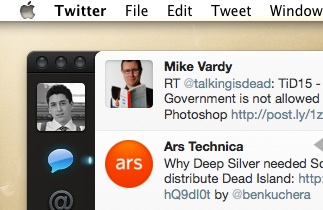
    First up is Twitter.app and how I like it to stay near the upper left corner of my screen. Sometimes I move it, whether by accident or for some odd reason. I like the window to sit just below the menu bar and just off the left edge so that I can use the app without bugging the Dock and so that it doesn’t feel smashed against the side, like so:

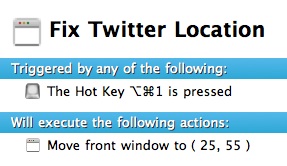
    The thing is I want to be able to have Twitter snap back to that position at my command, but not automatically in case there is a reason I don’t have it in that corner. Here’s the Keyboard Maestro commands to do just that:

    Please note that this macro is inside a group that only works on the Twitter app so that I don’t get weird things occurring in other apps that use this same shortcut.

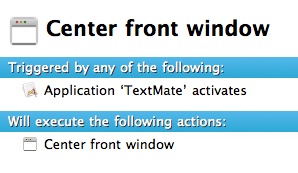
    Next up is TextMate. When I write I like TextMate to be centered on the screen and I like nothing else to be shown behind it — basically I hide all my windows and start writing. This is a pain though when I am bouncing back and forth to Safari to grab links, or text. So I created this little magic in Keyboard Maestro:

    What we are doing here is centering the TextMate window on the screen — just how I like it. I keep this Macro in a group that only works in TextMate, for no real reason other than I made it a while back.

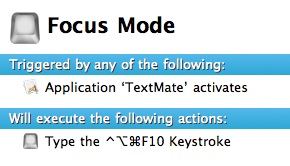
    This little bit doesn’t look like much, but that keyboard shortcut invokes Isolator [LU] so that the rest of the screen is almost completely out of my way.

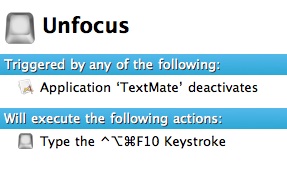
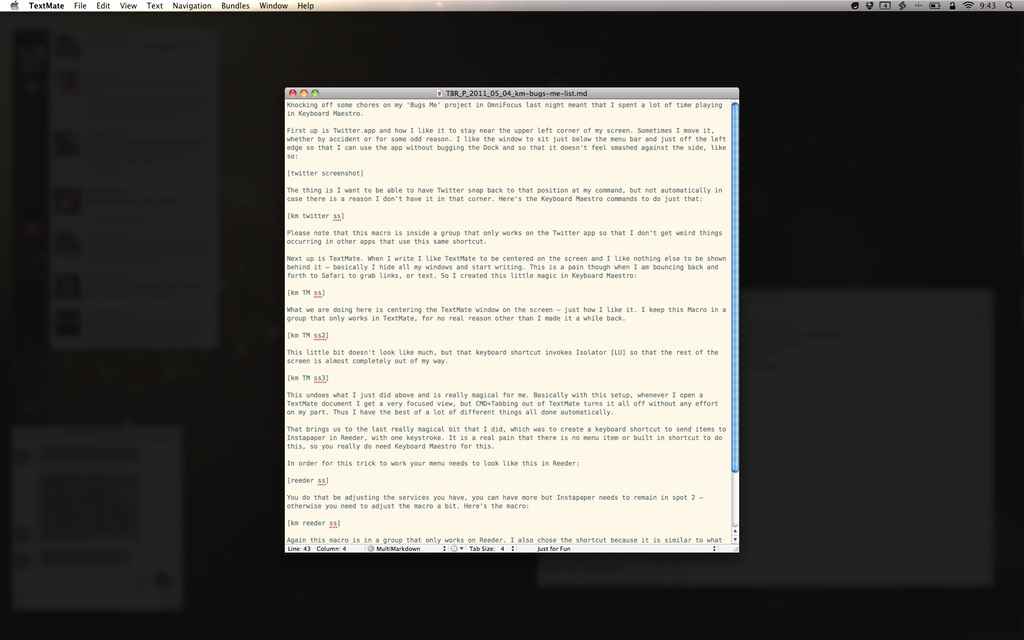
    This undoes what I just did above and is really magical for me. Basically with this setup, whenever I open a TextMate document I get a very focused view, but CMD+Tabbing out of TextMate turns it all off without any effort on my part. Thus I have the best of a lot of different things all done automatically.

    The end result looks like this:

    That brings us to the last really magical bit that I did, which was to create a keyboard shortcut to send items to Instapaper in Reeder, with one keystroke. It is a real pain that there is no menu item or built in shortcut to do this, so you really do need Keyboard Maestro for this.

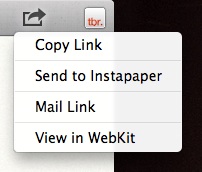
    In order for this trick to work your menu needs to look like this in Reeder:

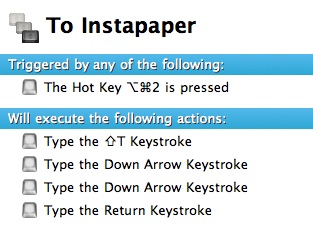
    You do that be adjusting the services you have, you can have more but Instapaper needs to remain in spot 2 — otherwise you need to adjust the macro a bit. Here’s the macro:

    Again this macro is in a group that only works on Reeder. I also chose the shortcut because it is similar to what I use in Safari to send to Instapaper — making it easier to remember.

    Just for Fun

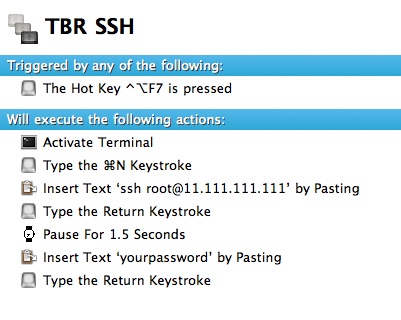
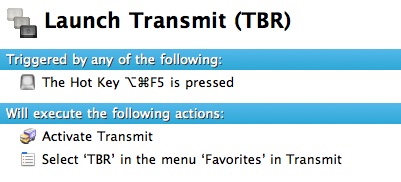
    A couple of others that I setup to help out with server stuff:


    (Thanks to David Findlay for that.)

  • Streaming Videos to Your Tablet While You Fly

    A nice touch by American Airlines allowing its customers to buy and stream movies to their devices over WiFi. Now, what’s the pricing on that?

  • What would you buy first?

    Here’s an interesting thought experiment: if you had to start over, buying all of your apps from scratch, in what order would you buy them (the assumption being you couldn’t afford to re-buy them all at once, but over time you could afford them all). I have been thinking about this for a while now and I started with a list of all the apps I normally use that I would need to purchase. From there I started arranging them in order of what I would buy first.

    Here’s where I stand:

    – [Dropbox](http://db.tt/nQKF6kW) ((Yes this is technically free, but if you want it to be a success you need to start paying.))
    – [1Password](http://agilewebsolutions.com/onepassword)
    – [LaunchBar](http://www.obdev.at/products/launchbar/index.html)
    – [Keyboard Maestro](http://www.keyboardmaestro.com/main/)
    – [TextExpander](http://smilesoftware.com/TextExpander/)
    – [Lightroom](http://www.adobe.com/products/photoshoplightroom/)
    – [Transmit](http://www.panic.com/transmit/)
    – [Acorn](http://flyingmeat.com/acorn/)
    – [TextMate](http://macromates.com/)
    – [OmniFocus](http://www.omnigroup.com/products/omnifocus/)
    – [Parallels Desktop](http://www.parallels.com/products/desktop/) ((This is higher on the list than I want it to be, but my job necessitates it.))
    – [Numbers](http://www.apple.com/iwork/numbers/)
    – [Pages](http://www.apple.com/iwork/pages/)
    – [Yojimbo](http://www.barebones.com/products/yojimbo/)
    – [Reeder](http://madeatgloria.com/brewery/silvio/reeder) ((Assuming this will be priced above free.))
    – [SuperDuper!](http://www.shirt-pocket.com/SuperDuper/SuperDuperDescription.html)
    – [Tower](http://www.git-tower.com/)
    – [xScope](http://iconfactory.com/software/xscope)
    – [InDesign](http://www.adobe.com/products/indesign.html)
    – [Photoshop](http://www.adobe.com/products/photoshop.html)

    That’s my order — I’m curious to see how you would order your own list, if you have a blog and create a post like this please share it with me.

    I’ll try to add links below as I get them.

    ### Reader’s Lists: ###

    – [Jordan Patterson](http://www.thecheapgeek.org/what-software-would-you-buy-first)
    – [Recenseo](http://recenseo.tumblr.com/post/5189832441/what-would-you-buy-first)
    – [Scott Jack](http://scojj.posterous.com/what-would-you-buy-first)
    – [Brian O’lyaryz](http://www.allisinfinite.com/post/5190137968/a-reply-to-ben-brooks)
    – [Kennon Bickhart](http://kennonb.tumblr.com/post/5190760480/what-would-you-buy-first)
    – [Shadow Huard](http://smarterbits.tumblr.com/post/5189881667/re-what-would-you-buy-first)
    – [Michael Kalina](http://3th.be/2011/05/04/in-dieser-reihenfolge/) (Written in German)
    – [Craig Grannell](http://reverttosaved.com/2011/05/04/what-would-you-buy-first-or-my-favourite-mac-apps/)
    – [David Silva](http://davidsilvaonline.com/notepad/what-app-would-you-buy-first/)
    – [Josef Szotten](http://josef.co.vu/post/5192554542/what-would-you-buy-first)
    – [Michael Rockwell](http://mickerlodeon.com/2011/05/what-would-you-buy-first/)
    – [Michael Anderson](http://appleink.wordpress.com/2011/05/04/buy-first/)
    – [Hugh Sissling](http://www.woooster.co.uk/?p=495)
    – [Nik Fletcher](http://nikf.org/post/5194684867/what-would-you-buy-first)
    – [Robert Falck](http://streakmachine.com/post/5194632024/what-would-i-buy-first)
    – [Michael Doan](http://michaeldoan.com/2011/05/clean-start/)
    – [Brandon Bohling](http://brandonbohling.com/2011/05/04/buy-first/)
    – [Jon Snyder](http://ministrymac.tumblr.com/post/5196892338/what-would-you-buy-first)
    – [Steven Teskey](http://therealsteventeskey.com/2011/05/04/What_Would_I_Buy_First.html)
    – [Adrian Boioglu](http://www.boio.ro/experiment-ce-aplicatii-ai-cumpara-din-nou/) (In Romanian — awesome.)
    – [Thomas Brand](http://www.eggfreckles.net/tech/buying-my-app-list/)
    – [Giovanni Lanzani](http://blog.lanzani.nl/2011/what-would-you-buy-first/)
    – [John Kmiecik](http://jkbc.co/post/5230564717/paid-applications-or-the-lack-thereof)
    – [Gabriel Ponzanelli](http://gabrielponzanelli.net/2011/05/what-software-would-you-buy-first/)
    – [Robert Lo Bue](http://robertlobue.com/2011/05/09/what-would-you-buy-first/)
    – [Steve Lyb](http://astroaficionado.net/2011/05/09/clean-broke-apps/)
    – [Jon Siddle](http://randombrainactivity.com/what-would-you-buy-first)
    – [Nic Lake](http://niclake.com/2011/05/what-would-you-buy-first/)
    – [Carlos Eduardo de Paula](http://carlosedp.com/posts/what-would-you-buy-first.html)

    Let me know if I missed you.

  • TomTom Oh Boy

    Jim Travers:

    >In the video, TomTom CEO Harold Goodijn stresses that the tracking of its devices is voluntary and that customers can choose not to allow it.
    and:
    >TomTom says the company has provided this data to police departments and other authorities to help them identify congested areas for safety reasons and to help determine where road capacity needs to be increased. Mr. Goodijn says TomTom had been unaware Dutch police were using the data to choose locations for speed traps and that the company would prevent that type of usage in the future.

    Correct me if I am wrong, but here’s how the above basically reads: “I mean, look, these people asked for the location data and so we gave it to them. It’s not like we *knew* what they were going to do with that data. Look, if users really cared — then why’d they leave the tracking feature turned on? Here’s what I am going to do, I am going to go down and tell cops that they can’t use our data in that way. No, I will still sell them the data, but I will amend the ToS for the usage.”

    Yeah — you get the picture.

  • Keeping it Straight

    Patrick Rhone has a new book out called *Keeping it Straight*. I had the privilege of getting an advance copy of the book to read and read I did. I maybe read two books in the last year — this was one of them. I don’t know what you will get out of the book, but for me I got a tangible benefit: a trunk full of items that went to Goodwill.

    Again that’s not what the book is about, but it did cause me to start cleaning my desk (again). From there I started cleaning everything and eventually I was starring at bags of garbage and piles of items to donate. It felt great. I can’t wait to read the book again and see what happens.

    Randy Murray says:

    >Patrick offers the ‘Why’ to GTD’s ‘How.

    I can see that.

  • Quote of the Day: Dave Caolo

    “You needn’t sever an ear, retreat to a secluded cabin or stagger through French cafes to realize your creative potential. You must, however, work very hard, expect failure, employ a powerful filter and occasionally abandon your work entirely.”

    Dave’s issue of the Read & Trust newsletter (no. 5) is simply fantastically written — I found myself nodding along through the entire thing. Great work, you now *need* to subscribe to just check out this one from [Dave](http://52tiger.net/).

  • Fontcase 2.0

    Bohemian Coding was kind enough to let me check out [Fontcase 2.0](http://www.bohemiancoding.com/fontcase) before it was released and all I can say about it is: “Wow”. Before Fontcase it was pretty common for me to open an InDesign document, paste in text and play with the fonts and sizes. Font Book has never been a very good app for selecting fonts, Fontcase though is fantastic for choosing fonts.

    By far the best new feature is the Typesetter, once activated will display a webpage and allow you to click on a body of text and see what it would look like with another font. This will save me a ton of time when designing sites and more importantly: this will keep me at bay when wanting to tweak this sites font. Here’s Typesetter in action on TBR:

    [](https://f3a98a5aca88d28ed629-2f664c0697d743fb9a738111ab4002bd.ssl.cf1.rackcdn.com/tbr-typesetter.png)

    The last feature that I want to mention is the glyphs feature — it is a real pain to grab html codes for glyphs, or even to view them — Fontcase makes that process dead simple. Are these things that you could do in other apps? Certainly, but not with the ease and beauty that Fontcase gives you.

    At the very least it is worth checking out the free trial — I really love the app.

  • It Was a Very Good Year

    On April 30th, 2010 [I wrote](https://brooksreview.net/2010/04/hps-very-smart-acquisition/):

    >Hey thanks HP for acquiring Palm — I almost forgot you were still around.

    That’s the sentence that started this blog. Not a post about Apple, not a review — an analysis of HP’s acquisition of Palm. I haven’t actually read that since I posted it, but I did just now. Reading that post I remember why I wrote it and what I was trying to say when I read the last line:

    >So in short, HP forget about Windows (phone) Mobile, spend money on Palm’s marketing. But most importantly forget about Apple and do your own thing, because you can’t beat Apple at its own game, so beat them at yours.

    Boy, I could say that again today and still would be relevant — yet we are a year removed from when I originally wrote that. In fact that entire article is still relevant to HP/Palm — that’s not me tooting my own horn, that’s me shocked at the ineptitude of HP.

    The next month, just weeks after launching the site, I switched hosts because I was fed up with downtime at Bluehost. I moved to the Media Temple (gs) and was so overly happy with the move. Near the end of that month I wrote about Google and Apple, and [stated](https://brooksreview.net/2010/05/google-vs-apple-gaining-perspective/):

    >Before the iPhone it was more common for someone to not have a data plan on their phone then it was for them to have one — let alone an unlimited data plan.

    Funny now that a year later we are without the ability to buy unlimited data plans — because of the sheer overwhelming demand for mobile bandwidth and the greed of the carriers.

    In May 2010 The Brooks Review had less than 150 total readers for the entire month. ((Which was far more people than I actually shared the blog URL with.)) I had no idea what I was doing, or where this was all going — but I was having a hell of a good time sharing my thoughts with a small audience.

    July 2010 saw my first “big” post, it got a couple of points on Hacker News and occasionally people still come across it. I liked it at the time — though now I very much regret writing it in a list way, lame.

    [Email Mistakes That Irritate Smart People](https://brooksreview.net/2010/07/email-mistakes-that-irratate-smart-people/):

    >It is really awesome that you figured out how to embed your company logo in your email signature, but I know who you are and what your company logo looks like. I still hate it. Don’t waste bandwidth sending me email attachments of your logo.

    Yeah, that *sounds* like me.

    Thanks mainly to that single post I had what I thought was a huge month, at 766 unique views for the month — I was a very happy guy. ((Still am, though most would argue that.))

    Unbeknownst to me this was the first turning point of everything, from here it would be nothing but up, up, up.

    For October the only post that really generated discussion was [this one](https://brooksreview.net/2010/10/mba-fits/), where I refuted some of John Gruber’s claims about the new MacBook Air’s. To which, after seeing that I was buying one as my primary machine, he [responded](http://daringfireball.net/linked/2010/10/26/brooks-air): “And he’s putting his money where his mouth is.”

    Luckily I didn’t have to eat those words. It also happened that buying my MacBook Air was one of the best purchases I have ever made.

    The next month I wrote what still may be the longest post on The Brooks Review, my [MacBook Air review](https://brooksreview.net/2010/11/mba-review/). I remember slaving for days over this post to be as accurate and interesting as I could be. It was one of the toughest things I did all year and one of the most satisfying.

    I am going to skip over the rest of the year — there is just too much to process at this point, suffice to say: thank you for reading and emailing and correcting my grammar.

    Things I learned this past year:

    – I don’t know how to use a comma.
    – My readers know how to spell and use commas.
    – Positive, interesting, email outweighs the bad 6 to 1.

    It… was a massive good year.

  • eBook Pricing

    Nik Fletcher:
    >The item you’re selling has to be priced relative to any physical predecessor. No, really: when you’re supplying a digital copy in place of a book with substantial printing costs, we’re going to question why we need to pay a premium when there’s lower costs associated with the production of said item. The idea that a user should pay a premium for the ‘convenience’ or ‘privilege’ of a digital copy is laughable, and will simply disenchant users who feel penalised by this premium.

    This is one of those posts that I was nodding along in agreement with the entire time I read it.

  • White iPhone 4, Not Fat

    Mike Gikas:
    >But when we compared a white iPhone 4 with a black iPhone 4 in our Yonkers, NY, lab using high-quality calipers, we found they were both the same thickness (0.37 inches). T

    I can only imagine how pissed *Consumer Reports* was that they couldn’t put another red mark on the iPhone 4 by claiming inconsistent sizing — must have been seriously depressing for them.

    I’m just glad someone (finally) took the time to measure the thicknesses before proclaiming that two devices are not the same size.

  • “Blue da ba dee da ba di”

    >I have a blue house with a blue window
    >Blue is the color I thought that I’d wear
    >Blue are the streets and all the trees are too
    >I have a girlfriend and she is so blue
    >Blue are the people here that walk around
    >Blue like my corvette its standing outside
    >Blue are the words I say and what I think
    >Blue are the feelings that live inside me.

    — Eiffel 65

    There seems to be a building consensus that if your app uses blue in the icon, or main interface elements, that I will — at some point — mention how much I dislike that and to be fair, that’s probably accurate. What isn’t accurate is the idea that I somehow hate the color blue when, in fact, that couldn’t be further from the truth. Blue is, and will always be, one of my favorite colors (if that even means anything).

    When I comment on the color blue I am not so much commenting on the actual color itself — as I am commenting on the lack of originality using the color brings to apps. Exactly 50% of the icons in the my dock right now use the color blue (in one shade or another) as the main component of the icon. Blue, on it’s own is a great color, blue in everything is boring and meaningless.

    That’s my problem with blue — it’s like a good song that you have listened to one too many times.

    People can still design wonderful apps using blue, and these will still be apps I recommend — but for the love of creativity I think it’s time to try some other colors. ((There *are* other colors.))

  • SSDs Fail and Fail Often

    Jeff Atwood on SSDs:
    >Solid state hard drives are so freaking amazing performance wise, and the experience you will have with them is so transformative, that *I don’t even care if they fail every 12 months on average!*

    I haven’t seen one of mine fail yet, but even if mine failed I would still be and SSD fan — the performance is just too good not to be using.

  • Quick Takes on Five Apps #11

    This is the eleventh [installment](https://brooksreview.net/tag/quick/) of the Quick Takes series, where I look at five (or so) apps and tell you my thoughts on them.

    ### A Bunch of Weather Apps (skip if you are tired of this): ###

    #### [Pocket Weather World](http://www.shiftyjelly.com/products/pocket-weather-world) (iPhone and iPad)####

    This app was kindly provided to me from the developer. I don’t care for the visual styling of the iPad app. I do however like the ‘high visibility’ theme on the iPhone app — but it just doesn’t meet my needs in a weather app. If the forecast data was easier to scan for trends this might be the winning weather app on my iPhone. I do however like that all the data is on one screen — no tabs.

    #### [Weather Watch](http://www.shiftyjelly.com/products/weather-watch) (iPhone) ####

    The same developers of the above app provided me with this app as well. This is a very nice app, but falls in the category of many other apps that show a large clock and smaller weather information. More of a display app, than an information app.

    #### [Wx](http://itunes.apple.com/us/app/wx-for-ipad/id376956323?mt=8) (iPad) ####

    This looks like a Sharper Image gadget circa 1997. That’s not to say that it is bad, just that the interface feels like a dated geek gadget. There is all the information you need, but I don’t think it makes very good use of the iPad screen space. That said if the visual styling was better I could find myself getting into the app. There are great graphs for seeing trends and nice little radar maps. Interestingly this app is not easy to set a new location for, you can’t just say: “give me the information for my current location”. This app wants to know which reporting station you want to use for temperatures, which to use for radar, and so on — it’s not for the quick and easy folk.

    All of that aside, once set up it is apparent that this app is for data geeks.

    #### [Umbrella](http://itunes.apple.com/app/umbrella-the-simplest-weather/id331519827?mt=8) (iPhone) ####

    Drop dead simple app that tells you if you need to carry an umbrella with you. In smaller print it also shows the temperature range and allows you to set the chance of precipitation as a badge on the icon. Not very useful in Seattle ((Because 90% of the time in Seattle it is a good idea to have a rain jacket on hand. Let’s also be honest and admit that only tourists carry umbrellas in Seattle — it’s just not a practical item to have with you when it is raining 10 months out of the year.)) , but a nice little app.

    **End of Weather Stuff**

    ### [Tower](http://www.git-tower.com/) (Mac) ###

    I recently setup GitHub and in doing so quickly found out that I didn’t know what I was doing with it. I wanted a GUI, Transmit, like interface and Tower does exactly that. I haven’t dived into it too far, just yet — but I will say that the generous 30-day trial makes for an easy recommendation to at least try it out. I have personally found it a great way to interface with GitHub and perhaps the only reason I am using GitHub is because of how easy Tower makes it for me.

    ### [Analytics HD](http://itunes.apple.com/us/app/analytics-hd/id364894285?mt=8) (iPad) ###

    This is a handy little iPad app for checking in on your Google Analytics (since Google insists on Flash content). I can’t say that this is a great app, and quite honestly $6.99 is a stretch for this app. Then again there isn’t much an iPad app can do to make Google Analytics look as pretty as something like [Mint](http://www.haveamint.com/). I also find the data refresh rates to be slow, but that is a Google problem as all apps I have tried pull the data very slowly.

    The best feature is the ‘Today’ and ‘Yesterday’ options, allowing you to be able to quickly see the data for those days. If I am completely honest I think that GA on the web actually looks better than in this app, but you can’t see that on the iPad so there is a need for me to have this app.

    ### [Terra](http://itunes.apple.com/us/app/terra-web-browser-tabs-full/id394704159?mt=8) (iPad) ###

    It doesn’t do much to better the built in iPad browser. That said it gives you a much more Safari on Mac feeling than the native browser gives you. The two compelling features in this free app are:

    1. The ability to open files in apps.
    2. Access to downloaded files via iTunes.

    Those are nice features, but I had to force myself to use them because honestly I just rarely need these features on the iPad. It is nice to have, but not the end of the world not to have. Hey, it’s free though.I also found the tabs too small to comfortably hit without thinking about it. I find the lack of a bookmarks bar a huge oversight and the fullscreen mode more of a ‘bullet point’ feature and the usability improvement.

    ### [Photosmith](http://itunes.apple.com/us/app/photosmith/id427757668?mt=8) (iPad) ###

    This app promises to be your Lightroom companion for the iPad. The idea for the app is that you off-load your images from your camera to the iPad, then Photosmith will allow you to tag and rate the photos. You can also organize the photos and share them on a the standard “social” sites. The entire thing syncs with Lightroom with the help of a custom free plugin.

    This is a pretty neat tool, but in it’s current state it is hardly worth $17.99. Tagging, rating, organizing is not as valuable to me as basic color adjustments and cropping. I was pumped to try this app out and was hoping it would make for a nice tool to have on my iPad — I think that if I was on a trip without my Mac, then yes this app would be worth it. However, if I am going to be gone long enough to want to organize photos, why wouldn’t I have my MacBook Air with me?

    *If you liked this installment be sure to check out the other [installments](https://brooksreview.net/tag/quick/).*
  • BlackBerry 7 OS

    So sad:
    >The new BlackBerry Bold 9900 and 9930 smartphones are expected to be available from carriers around the world beginning this summer.

    In other news RIM also announced that BlackBerry 10 OS will be shipping sometime in the future.

  • Apple Doomsday Meme

    Jean-Louis Gassée:
    >The notion that the iOS platform will lose to Android “the way Mac OS lost to Windows” ignores history and disregards facts such as the growth of the iPhone and iPad.

    An insightful post and well worth the read.

  • Grandview

    Grandview is a fullscreen writing app like you have never seen before. Yes, you can customize colors and fonts — but you only get to see one word at a time as you type. That is one word, fullscreen, while you type. The experience is a bit trippy at first — after a few times through you start to see just why the developer wrote this app.

    It’s not something that will make you focus better, or write better — it is a very unique app that is loads of fun to use. I have been testing the app for quite sometime now and have to say that I really do enjoy it — not for every writing moment — there are times though when it feels like the right tool for the job.

    The app is available in the [app store](http://itunes.apple.com/us/app/grandview/id432436025?mt=12) for $4.99 (my copy was provided free), or you can hit the main link and see a video of the app in action and give a 7 day trial copy a go. I really recommend you give the trial a go, it’s pretty fun.

  • Fixing in Post

    Justin Williams has a nice take on why Apple won’t be losing its lead in tablets anytime soon. The bottom line is that too many companies are shipping incomplete products with the promise of updates that will fix all the problems to come later — except that those updates are not shipping.

    It reminds me of photographers that snap a picture, look at it and realize it isn’t very good — then go on to state: “Umm, I’ll fix it in Photoshop later.” Except that “fixing” a photo in Photoshop takes just about as much talent as creating a great photograph to begin with would — often it takes even more talent in my book.

  • Quote of the Day: President Obama

    “We will be relentless in defense of our citizens and our friends and allies.  We will be true to the values that make us who we are. And on nights like this one, we can say to those families who have lost loved ones to al Qaeda’s terror:  Justice has been done.”