Category: Articles

  • The TBR Daily Summary Email

    Since I launched the [members](https://brooksreview.net/members/) only paywall I have been plagued with RSS feed issues for members. There are a handful of people that simply cannot seem to get a reliable RSS feed, no matter what I do. And this really bugs me. So I wanted an alternative way to have new posts delivered.

    Given my recent obsession with email newsletters, the downfall of Twitter, the lack of good ADN WordPress plugins, and my general need to spend the money I make on the site to actually make the site better, I had JR code a daily summary email.

    If you have an account with the site, regardless of whether you are still a paying member, you can [go into your profile](https://brooksreview.net/wp-admin/profile.php) and check a box to get the daily email. It comes at 5pm pacific time, with links, titles, and excerpts of what was posted. It’s not formatted with HTML, it’s bare bones and quick.

    I hope you like it.

    (It is, of course, opt-in not opt-out. So be sure to go to your profile to activate it.)

  • Organizing an iPhone 5 Homescreen

    Ages ago (last year) I wrote a post about my methodology for organizing my iPhone and iPad homescreens. I still use that methodology for my iPad, but with the extra row of apps on the iPhone 5 I had to rethink my organization system.

    At first I simply added another row of apps to the bottom, like I suspect so many of you did, but after a week it was clear to me that this was the wrong way to go about utilizing an extra row of apps. I was stuck, not having a methodology bugged me because there had to be a good way to organize with this extra row — then during a 3am wake up call from my daughter it hit me.

    My flashlight app.

    With the added screen real estate I had finally added it to my homescreen, but it was in a random spot and in the dark I couldn’t find it without looking at the screen. Then I thought, if I had it in the top corner I could find it without looking — because it’s as far as my thumb can reach along the edge of the phone.

    That was the aha. So I have rethought my overly nerdy way of organizing my homescreen. Let’s take a look.

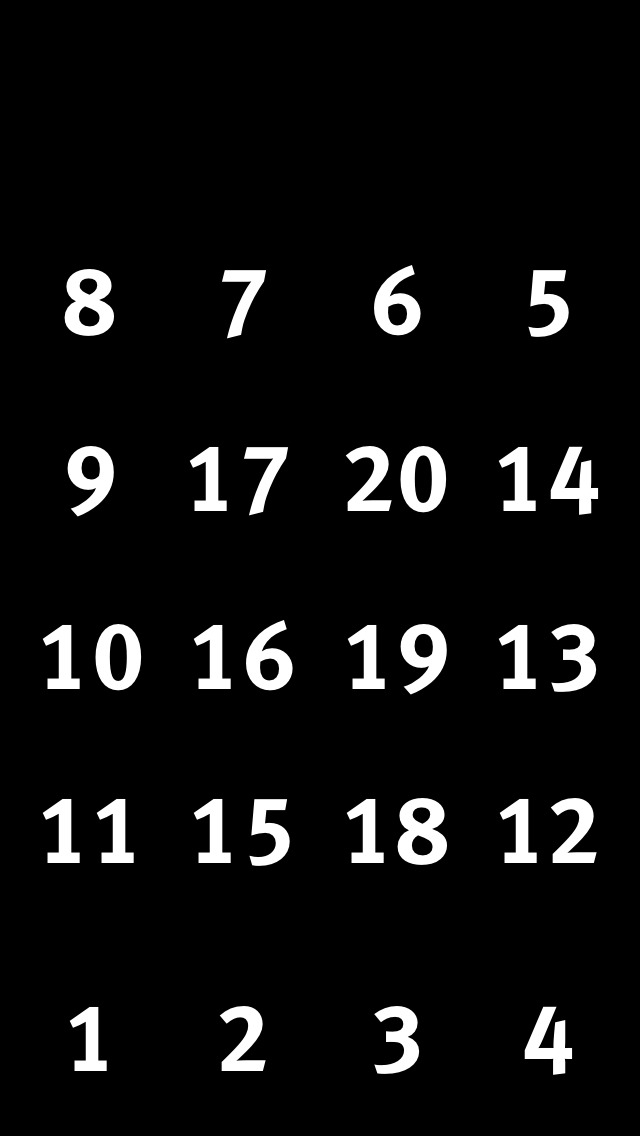
    I had actually modified my original method, and the modified version can be represented as such:

    Modified homescreen layout for iPhone 4S sized screens.

    The numbers roughly correlate with the priority of the apps in those spots.

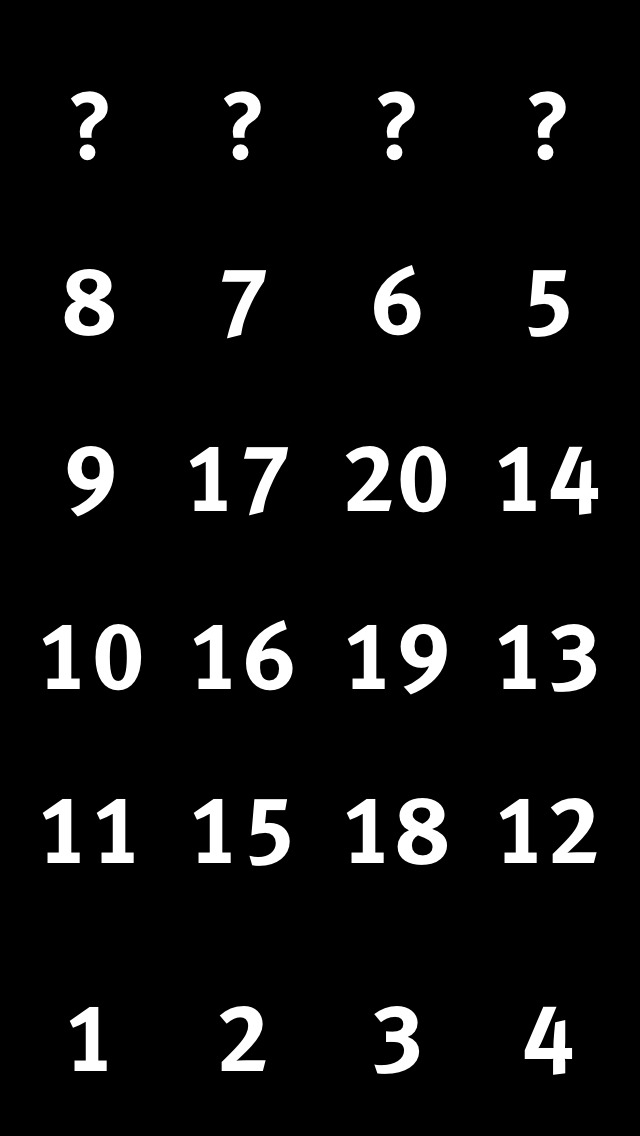
    So for the iPhone 5 I finally realize that I need to treat the extra row, not as a row that slid into the bottom, but that attached to the top, like so:

    Now what apps go at the top?

    From there all I had to decide was what should go at the top. As I said, top right is my flashlight app for the simple reason that I can find that spot on my iPhone every time without looking. This, however, is not something universal for people, it just so happens that with the grip I keep on the phone, my tendency to hold it with my right hand, and the size of my hand, the top left corner is an easy tap for me without looking. Great spot for a flashlight app in other words.

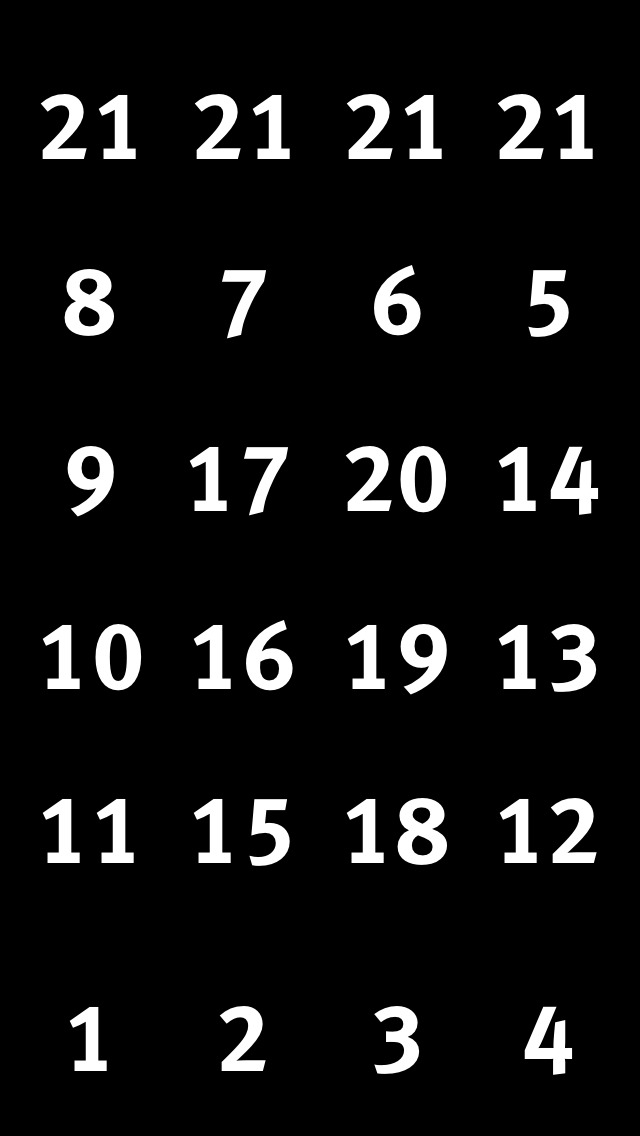
    Here’s my revised iPhone 5 homescreen layout methodology:

    iPhone 5 homescreen layout.

    I admit that this is a bit of a cop-out. I’ve numbered the top row all the same, but this is simply because the top row is not easy to access and therefore any app in that spot should be one that fits two criteria:

    1. Is useful to have on the homescreen, but not mission critical. (Flashlight app)
    2. Isn’t accessed all the time, but when needed is an app that you would get annoyed digging for. (Settings)

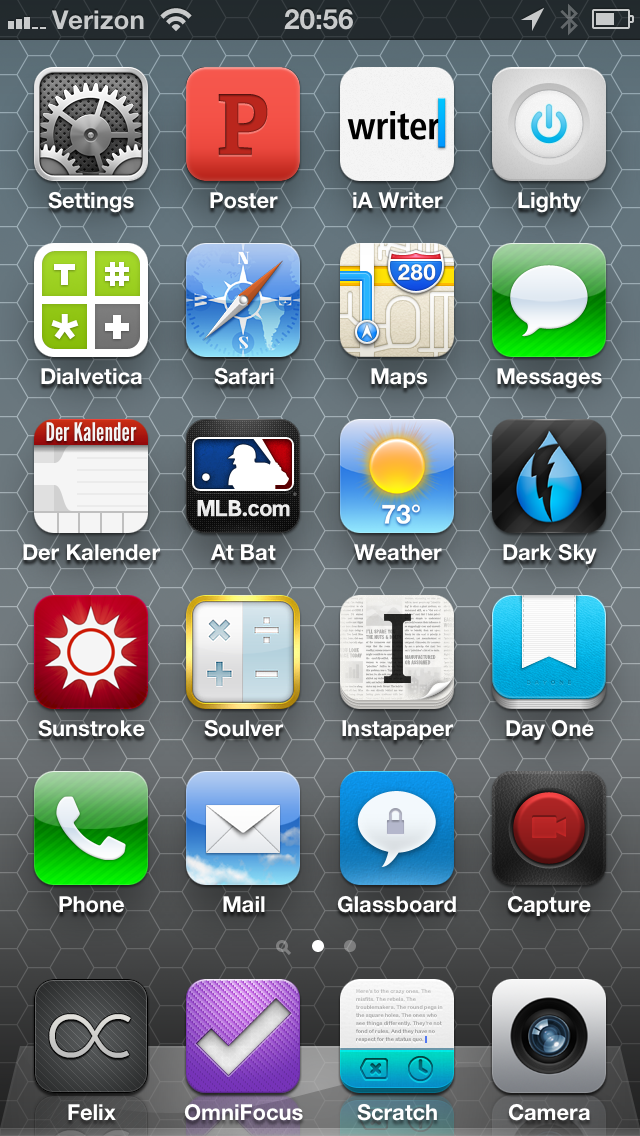
    I’ve obviously thought about this layout a bit, and tailored it for my thumb range: that is the apps I tap the most, I want in a zone that is easy for my thumb(s) to get at. It’s that simple, here’s what my homescreen looks like:

    My homescreen as of October 17, 2012.

    I only want to note a few things:

    1. I love having settings in the top row, like really love it.
    2. Der Kalendar likely isn’t permanent. I’ve become annoyed with calendar apps (again) and am cycling through a bunch right now.
    3. Wouldn’t it be great if you could tell iOS to allow an app to span multiple icon cell areas? I’d love for Scratch to be the size of both the OmniFocus and Scratch icon spots for really quick and easy taps.

    Overall, I am pleased with my new arrangement methodology now that I have better accounted for thumb reachability and decided that the extra row of apps is added to the top, not the bottom of the screen.

  • The Future Is Hypocrisy

    [Google’s Jonathan Rosenberg pens a post in Google’s *Think Quarterly* titled](http://thinkwithgoogle.com/quarterly/open/the-future-is-open.html): “The Future is Open”. And what a gem it is. Let’s dissect it a bit, shall we? We shall.

    >Three years ago this December, I sent an email to my fellow Googlers, attempting to pin a clear definition on a term being batted around quite a bit: Open. I was concerned that within our walls it meant different things to different people, and that too many Googlers didn’t understand the company’s fundamental commitment to the merits of being open.

    Your concern is well founded and still not resolved. Further, it is not a term being batted around by the world, it’s a term being batted around by Google — let’s keep that in mind because as far as I can tell “open” is really only important to Google. I’ve yet to meet someone who bought an Android device because it was “open”, typically it is because the sales rep pushed it on them.

    >No longer can a company so thoroughly control its customers’ environment.

    Except in the case of Apple’s ecosystem. Where, if the customer buys into the entire ecosystem (OS X, iOS, iCloud), their technology environment is very well controlled. Except in the case of Google’s ecosystem. Where, if the customer buys into the entire ecosystem (Chrome OS, Chrome, Android, Google Syncing), their technology environment is very well controlled. Ditto, Microsoft.

    >They know the primary motivation of an open system is product excellence; if the company tried to impose some other agenda on it, the developer audience would detect it immediately and revolt. In committing a product to openness, the company surrenders the ability to do anything but make it better for the user.

    I’m not going to rip into this too far, but the entire paragraph is highly hypocritical. The first half of the first sentence is pure bullshit. This may be Google’s primary motivation, but it is simply *not* the primary motivation of *all* or even *most* “open” systems. I’d further argue that Google *is* imposing another agenda on it, [as seen by the delay in “opening” Google releases up](http://www.businessweek.com/technology/content/mar2011/tc20110324_269784.htm) and their tight control over device certifications.

    >Today, we’ve shot up to 51 percent, and odds are good your smartphone was made by Samsung, HTC, Motorola or another Android partner.

    Or Apple and Nokia. Maybe that slipped his mind, or maybe he really believes that by not mentioning the competitors no one will know there are competitors? Nah…

    **…**

    Actually, I’m going to stop here, because I think you get the point. This is nothing but PR fluff with Fox News fact checking.

  • Update Your RSS Feed

    Looks like Feedburner is pissy that I ditched it. You probably should check your RSS feed subscription if you aren’t a member.

    The correct feed is [here](https://brooksreview.net/feed).

  • Thoughts on Roaming

    I’ve never understood people not willing to pay to roam. Here I have a world class computer, that I rely on daily, but I’m not willing to spend a couple hundred bucks to keep it useful on a trip? Oh but souvenirs, sure.

    Ok, so I have never actually paid for roaming before. But because I was spending a short three days, two nights, in Canada — and I knew I wouldn’t have time to go get a local SIM card — I decided to go with roaming data. Now Canada calling and texting is relatively cheap with Verizon and is covered under most of their normal U.S. plans, but not data.

    When I called in to request international data, Verizon had to verify my identity and run a credit check before activating the $25/mo plan (keep in mind my normal plan is $100/mo and I *could* use international data with no plan at a massive rate with no credit check, but hey whatever). After that I verified that the [only plan](http://businessportals.verizonwireless.com/international/GlobalData/rates_coverage.html) I could get is $25/mo for 100mb or pay $2.05/mb. Yikes. I was also told that if I went over, I would just pay another $25 for another 100mb. Ok, $50 wouldn’t be bad for the reduced hassle. It’s [not as good as what AT&T offers](http://www.wireless.att.com/learn/international/roaming/affordable-world-packages.jsp?%20#data), but then again Verizon sold me an unlocked iPhone.

    There are two things I learned:

    1. I needed 200MB to be able to use my iPhone as I normally would.
    2. The Verizon iPhone 5 does *not* roam on LTE. I was expecting LTE, but instead just got 3G. I don’t even know what network I was using because the normal carrier spot just said “Roaming”. I am told Rogers has LTE in Vancouver, but I believe that is the network AT&T phones roam on — not Verizon.

    Either way I was glad to have the data, glad to not have to hassle with it at all, but I was disappointed in the slow speeds of the network. Next time I will be getting a SIM instead to get faster speeds and better rates.

  • The Email Newsletter Brigade

    Two years ago I would have laughed at the idea of writing a quick post to point out some email newsletters — after all, that’s not the way we get news now days. We have ADN, Twitter, RSS, Push notifications and on and on. Yet the email newsletters are the only ones that I never miss — they are great. Here are some that you should consider.

    ## NextDraft

    [You are subscribed to this right](http://nextdraft.com), better yet you have the iOS app right? It’s fantastic. Dave Pell does an amazing job accumulating enough links everyday to keep your Instapaper queue overflowing.

    ## The Brief

    What [Evening Edition is for news](http://evening-edition.com), [The Brief is for tech news](http://thebrief.io). Except you get the tech news first thing in the morning. This is a great way to get a handle on the day if you are going to be away from your RSS feed — at least it is for me. At a conference, away on vacation, but don’t want to miss out? Here is your solution.

    ## The Round Down

    [This is a weekend newsletter with a more global](http://therounddown.com) (read: non-US centric) take on things. I’ve only been reading for a little while, but I do enjoy it quite a bit.

    ## Now I Know

    [Dan Lewis’ newsletter is awesome](http://nowiknow.com). Short little stories that leave me with *at least* one thing I didn’t know before I read it. It’s like getting a Wikipedia summary from a random truly interesting page delivered to you everyday.

    There’s four great newsletters to fill your inbox.

  • Beating a Dead Horse that Keeps Coming Back to Life

    For the last few days I was in Vancouver BC (Canada for those that don’t know). It’s a city I have been to a few times and I generally really like the city and the fact that I can drive to it in less than half a day. Even though I have been there a few times, I still have no sense of bearing in the city — it’s one of the few cities that I have driven in, that I have yet to figure out. ((San Francisco is another.)) This meant that for three days I was at the mercy of my iPhone and the (dun, dun, DUUUNnn) iOS 6 Maps application. I used turn-by-turn navigation the entire time, never once double checking the spot the iPhone was taking me to, here’s the result:

    – Times lost: 0.
    – Times frustrated: 0.
    – Battery drain: far less than expected.
    – Speed: fast.
    – Times I questioned the GPS and was proven wrong: 1.5.

    The one thing that actually blew me away about the navigation was just how fast the maps application loaded a route on the sluggish 3G network I was roaming on. ([Here’s just how slow that network was](https://f3a98a5aca88d28ed629-2f664c0697d743fb9a738111ab4002bd.ssl.cf1.rackcdn.com/maps-3.PNG), and [how fast my iPhone is only an hour back into Washington state](https://f3a98a5aca88d28ed629-2f664c0697d743fb9a738111ab4002bd.ssl.cf1.rackcdn.com/maps-2.PNG). Additionally are there no LTE networks in Vancouver, or can USA iPhone’s not roam to them?)

    I wasn’t going to write any of this up, but an odd thing happened on my way home — something that absolutely made me fall in love with Apple’s mapping solution — I hit massive traffic long before I expected to and naturally I checked the traffic flow on the Maps.app and scrolled down to see this:

    Accident icon.

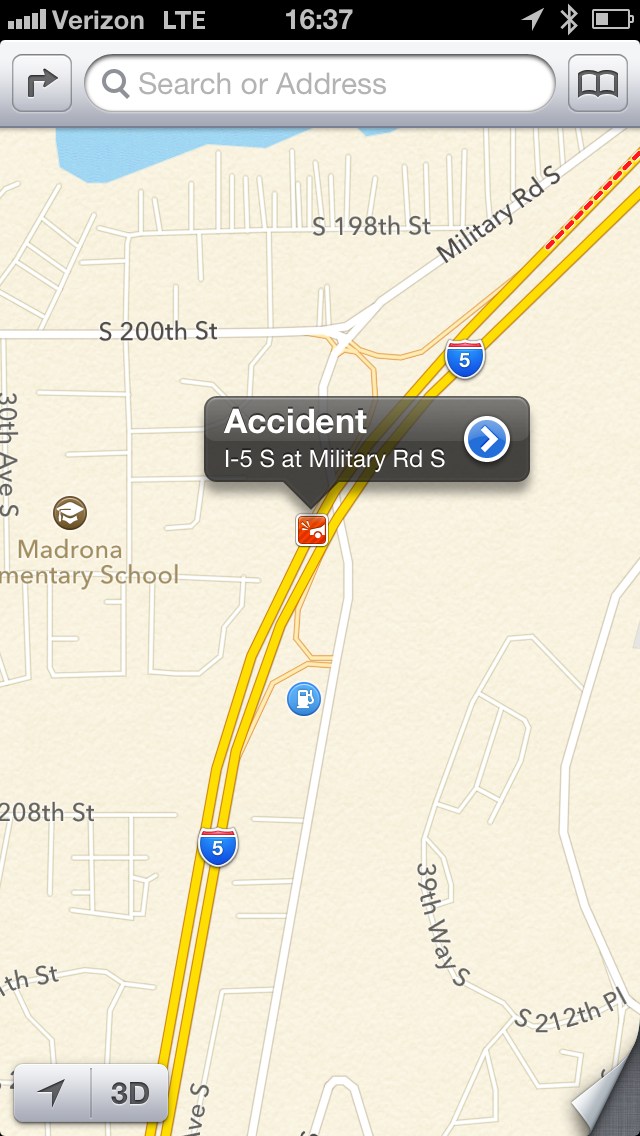
    So I tapped the icon, here’s what came up:

    Accident detail.

    Holy. Shit.

    That ladies and gentlemen is what I call useful information. Red, yellow, and green lines don’t tell you much other than what you likely already know. However knowing that there is an actual accident ahead, where it is, and the lane it is blocking is nothing short of awesome.

    For me this was the equivalent of using visual voicemail for the first time.

    #### The So You Don’t Email Me Section

    1. Yes I know Maps isn’t that great in *your* country.
    2. I don’t use public transit.
    3. I know you rely on street view, I don’t, nor do most other people.

    ## Bottom Lining It

    I never thought three days in Canada would make me fall in love with a maps application, but it did.

  • CDMA versus GSM Call Quality

    In the thoughts I wrote up about the iPhone 5, I had mentioned that the call quality seemed worse to me on Verizon. [I said](https://brooksreview.net/2012/09/iphone-5-2/):

    >Call audio quality seems worse when you are in an area with low reception, worse than with the previous iPhone. What I suspect is that this is a difference between AT&T and Verizon and not a difference in the iPhone itself, but I cannot be sure.

    I received a long and detailed email from a reader, who wished not to be named or the email shared, that pointed me in the direction of looking at CDMA versus GSM technologies. The hint that I was given was the CDMA doesn’t limit the users a cell tower can receive, instead CDMA drops the bandwidth to each person to accommodate the traffic, whereas GSM limits the users and fixes the bandwidth each user can have. That made a ton of sense, so I did some digging to see what in the world is actually happening. I started with LTE and found this note on the [LTE Wikipedia page](https://en.wikipedia.org/wiki/LTE_(telecommunication)) under voice calling:

    >While the industry has seemingly standardized on VoLTE for the future, the demand for voice calls today has led LTE carriers to introduce CSFB as a stopgap measure. When placing or receiving a voice call, LTE handsets will fall back to old 2G or 3G networks for the duration of the call.

    So from everything I could gather, in a lot of cases, Verizon calls are dumping back to the CDMA networks. Ok, so what can we unearth about CDMA. [Again, Wikipedia](https://en.wikipedia.org/wiki/Cdma#Advantages_of_asynchronous_CDMA_over_other_techniques):

    >There is no strict limit to the number of users that can be supported in an asynchronous CDMA system, only a practical limit governed by the desired bit error probability, since the SIR (Signal to Interference Ratio) varies inversely with the number of users. In a bursty traffic environment like mobile telephony, the advantage afforded by asynchronous CDMA is that the performance (bit error rate) is allowed to fluctuate randomly, with an average value determined by the number of users times the percentage of utilization. […]
    >In other words, asynchronous CDMA is ideally suited to a mobile network where large numbers of transmitters each generate a relatively small amount of traffic at irregular intervals. CDM (synchronous CDMA), TDMA, and FDMA systems cannot recover the underutilized resources inherent to bursty traffic due to the fixed number of orthogonal codes, time slots or frequency channels that can be assigned to individual transmitters.

    This is why at sporting events your AT&T service goes tits up while Verizon users can still actually use their devices — albeit damned slowly. Basically, the anonymous emailer was correct, CDMA is one big shared pipe with a finite amount of resources and no cap on the users.

    Now, I tried to verify the claim the GSM does not act this way, but couldn’t find any kind of resource. I did however [come across this page, titled](http://www.nordicgroup.us/ssub/voicequal.htm): “Voice Quality CDMA versus GSM”. The page seems to confirm that CDMA quality will degrade with the more simultaneous users on it, but that overall call quality is in parity between the two networks. ((Full LTE voice calling should be way better sounding.))

    So what I have learned is: “call quality” is a dodgy bugger. All things being equal the two standards should have relatively equal “call quality”. However, if CDMA gets congested, the call quality will drop. Whereas if GSM gets congested, you just won’t be able to make a call — roughly speaking.

    There’s obvious advantages to both. If you know more, please share.

  • The Gray

    I’ve been analyzing the response I get to opinions that I post on this site, and what’s interesting to me is that most opinions are polarized towards emphatic disagreement, or slow-clap-inducing agreement. I wondered why that was, so I started paying attention to my own writing a bit to see what correlation I could find. It’s probably obvious to most, but it wasn’t to me until a month ago: I state almost everything in a black or white manner. I either love the product, or think it’s a piece of shit.

    So with statements, reviews, and sentiments expressed in such a way, the readership naturally becomes polarized towards my thoughts. This makes for very interesting interactions on social networks and my email inbox, but I digress.

    Armed with this knowledge I started to think about why I lacked in one key area: the middle. In my writing there seems to be only black and white, so where’s *the gray*?

    The immediate fear that leaped into my head was that I am *Dan Lyons-ing* myself. That is, intentionally being a jackass to serve up more page views and controversy.

    So I’ve been trying to get to the bottom of my feelings on this, diving deep into thinking about why I write about things in such a black and white manner. I think I have it sorted now.

    The other night I was washing a sink full of baby bottles and other baby related items and I reached for a paper towel. I grabbed the paper towel, pulled out a sheet, and did the old one-handed jerking motion to try and free the paper towel from the roll. As always happens, the paper towel holder tipped a bit, the towel tore, and the paper towel stand wobbled about until it found a new spot on the counter.

    The thought that jumped into my head: I hate [this](http://www.target.com/p/euro-paper-towel-holder/-/A-13856426) fucking paper towel stand.

    Then it occurred to me. Here is something that I say I hate with a vengeance, yet my wife and I have had this paper towel stand for close to 4 years now. It’s not fancy, it’s rather cheap, we could replace it at anytime — yet we haven’t. Instead it just annoys me everyday. On the surface it certainly does its job well: the paper towels are held up off the counter enough to be free from sopping up any water, the rolls spin on it, and it looks nice enough. In fact the only thing this stand really sucks at is allowing me to tear a sheet from it one-handed. So in fact this paper towel stand sits in the middle as an average thing in my life if you take everything into account, however, I hate it. I wouldn’t recommend it to my enemy. And yet, truly the paper towel stand *is* in the gray.

    That’s when it dawned on me — when I finally figured out why I write in the black and white, the extremes — it’s not me being disingenuous about my feelings, it’s about discerning the most important part and analyzing that part. So while the paper towel stand truly is *average*, it also sucks at one primary function that effects me the most: allowing me to tear a single paper towel from it with one hand. For me, that’s *the* factor that matters most and *the* factor on which I will judge this item, only taking into consideration other factors if I am ambivalent on the things ability to perform *the* factor.

    So the paper towel holder, is shit — even though if you listed out the “specs” for it, it would look fairly average.

    Likewise, I recently traded in my BMW to get a Dodge Journey to fit our family better. It is, by all accounts, an average car. If you asked me if I would recommend it, I’d say no. Flat out, no. It’s not a *good* car. However, it is a very good car for my family — just not for me.

    I judge a car on how it drives, the Journey drives like shit compared to the BMWs I am used to owning. How a car drives is *the* most important thing to me in a car, however in life *the* most important thing to me is my family — so I bought the car that best worked for our family, but I still think it sucks. ((For the record it actually is a nice family car, but I get zero joy from driving it.))

    ## The Future

    I’ve thought long and hard about how and if I should change my writing based on this insight. I don’t think I will, because that wouldn’t be me being honest and to me that is *the* factor for my writing here on this site.

    What I do think needs to change, the thing that I’ve failed to be clear about, is which factor of any given *thing* is most important to me and therefore the factor that *I* will be weighting my judgement on something. I hope to be more clear about this than I have been in the past.

    If you’ll excuse me, I need a new paper towel holder.

    **Update:** Don’t read this as me changing the way I write. I just want to be more clear going forward.
  • Crossposting

    [I missed this feature with my initial look at Netbot](https://alpha.app.net/netbot/post/639827):

    >To crosspost to Twitter from Netbot for iPhone, just tap on the Navbar in the Post window. On Netbot for iPad, tap on your Avatar.

    I get why a lot of people will be happy about this, but to me this is the fundamental flaw facing App.net. Most people simply do not have the bandwidth to keep up with Twitter and App.net (I don’t), so why would you use both services? Crossposting is something I hate and I really think is bad for the overall health of both Twitter and App.net.

    To me, cross posting is like that person that calls you, leaves a voicemail, and then texts you the same thing they just left your a voicemail about. That is to say: annoying.

    **Update:** Also, [this is the best thing ever](http://cl.ly/image/0W1o2Q0C2T2L) (courtesy of [Panzer](https://alpha.app.net/panzer/post/641778)). And [here’s another](http://cl.ly/JuC1) from [Dan Frakes](https://alpha.app.net/danfrakes/post/641881). I love that because of the passive-aggressive nature of the dig to Twitter — well played Tapbots.

  • ‘Netbot: Tweetbot Reborn for App.net’

    I was rather outspoken about Tweetbot when it came out, I’m sweeping that under the rug as history, call me names if you want.

    [Federico Viticci has written up a nice review of Netbot](http://www.macstories.net/reviews/netbot-tweetbot-reborn-for-app-net/) — which is essentially a working version of Tweetbot for App.net. I wasn’t on the beta (for obvious reasons), but I did download it to check it out.

    It’s exactly what it is billed to be, but it’s not for me. That’s not to say Netbot is bad, but [here’s what Stephen Hackett said](https://alpha.app.net/ismh/post/632916):

    >Netbot is nice, but this is weird. Think I might prefer different app experiences for different services.

    [Robb Lewis has a similar feeling](https://alpha.app.net/rmlewisuk/post/633544):

    >Huh. I keep forgetting which app I’m in.

    That’s a problem — I think — because the two services are hardly the same. Say what you will about the value of either, but it is hard to deny that they are identical — yet Netbot and Tweetbot are pretty much identical.

    I don’t much care what app you use, but I will say that I find Netbot to be more of a “hedging our bets” move — not that this is a bad move — than a true let’s see what we can do *differently* for a new service. I had actually hoped that Tapbots would come out with a client that was radically different from Tweetbot, so part of this may be my disappointment there.

    Anyway, I did my natural thing and goaded out some responses between my favorite client, Felix, and the blogger’s wet dream, Netbot. [You can read all the responses to it here](https://alpha.app.net/benbrooks/post/633816), to get an idea of the sentiment surrounding the two (spoiler: I am in the minority). ((Keep in mind, I naturally bring out the anger in people, don’t hold them to nasty remarks.))

    Here’s my theory: those that embrace Netbot are those that *want* App.net to replace/duplicate/be Twitter ([perhaps the same people that do these things](https://brooksreview.net/2012/10/whining/)). That’s not a bad thing, it’s just a *thing*.

  • Woz

    [Slashdot held an open Q&A with Apple Co-Founder Steve Wozniak](http://apple.slashdot.org/story/12/10/01/1527257/ask-steve-wozniak-anything#comments), it’s a rather long thread to read through, and like a lot of these open Q&A’s it is terribly unorganized and presented like someone would present something to people that they hate, anyways, here’s my choice quote from Woz:

    >If you remember, we ported iTunes to Windows. We now addressed 100% of the world’s market with this integrated system (iPod/iTunes) and it began the era of Apple that we are now in. So why don’t we port iTunes to Android? Did something get closed up? I love Apple products and iTunes and wish it were on my Android products too.

    There’s two fascinating things in this quote. I want to break them down a bit more.

    ## Android iTunes

    I like the idea that Apple is shooting themselves in the foot a bit with iTunes — at least at first glance. Apple undoubtedly ported iTunes to Windows — not to gain a Windows foot hold — but to expand the iPod market. What good is an iPod to a Windows user if you can’t sync it with Windows? Limiting the iPod to just the Mac market, also limits the growth potential to *just* the Mac market.

    However, *not* porting iTunes to Android does nothing to limit Apple. Instead it effectively locks in iTunes customers to Apple devices. That’s just as savvy a business move as porting iTunes to Windows was. Apple needed iTunes on Windows to grow the iPod and later the iOS market. Apple doesn’t need iTunes on Android and in fact likely sees doing so as opening up the door to competition.

    ## We

    It is very interesting to me that Woz chose the wording of “we”. There’s no doubt that Woz had a large part in Apple, but I very seriously doubt he currently has a hand in Apple affairs. I could be way off, but that’s the sense that I get. So using “we” sounds very odd to me.

    This is especially odd given the next post he makes, writing:

    >I wish that instead of all these lawsuits Apple was sitting down and cross-licensing with the other players. They have come up some very good features without complicating the UI

    Now that Woz is talking about something he loathes, he switches from “we” to “they”. I won’t harp too much on this, I just thought it was very telling about how Woz still associates and doesn’t associate with Apple.

    This doesn’t really matter, but I always find it interesting how Woz seems to waffle between embracing what Apple does and condemning what Apple does.

  • Whiny Things On App.net That Drive Me Nuts

    1. You reposted something from Twitter, but didn’t bother removing the `@` mention to the user that doesn’t have an account, or worse, doesn’t have the same account name, on App.net.
    2. You reposted something from Twitter and used a `t.co` link in doing so. Those suck *even* on Twitter, why would you bring that crap to App.net?
    3. You never post on App.net, but when you do you simply ask: “Is this thing still on?” You are *so* clever.
    4. You openly complain on App.net about not knowing what to post where.
    5. You’ve set up a tool to repost things you posted on Twitter, but then don’t bother to check the replies people make to your comments on App.net.

  • Pricing App.net

    I’ve seen more than a few people talk about how today’s price reduction (from $50/year to $36/year or $5/month) to App.net’s service being a good thing, but simply not good *enough*. The argument is typical: those who wouldn’t pay $50, *still* won’t pay $36, and that argument is actually correct.

    [Marco Arment sums the argument up nicely](http://www.marco.org/2012/10/01/app-net-price-drop):

    > This is a nice move, but I don’t think it’s enough of a price drop to meaningfully change the adoption rate. Most people who balked at $50 will also balk at $36.

    I ask something different: so what?

    I’m one of the earlier users of App.net, I also don’t use *any* other services like App.net ((I occasionally respond to people on Twitter, but I have to be pretty bored to do so.)) and so I think it’s fair to say that I am one of the more dedicated users of App.net. With that said I haven’t talked with @Dalton or @Berg about what their plans are for the future, but I suspect that they aren’t after the two things that many assume they *are* after:

    – Fast adoption.
    – Replacing Twitter.

    The simple fact is that neither are possible with a paid product. It wouldn’t matter if App.net charged $1 a year, adoption would still be slow. There’s no further proof needed than a perusal through the iOS App Store and looking at comments that $0.99 apps get — many people thinking these apps are “a ripoff” — yet we are only talking about a dollar.

    I’ve long thought $50/year is too high for App.net and $36/year sounds a lot better, however in the end it doesn’t really matter. The network, the user base, that is already present on App.net replaces the value I received from Twitter two-fold at this point and have largely proven that they don’t much care if they pay $50 or $36.

    The conversations are slower on App.net, as are the updates, but that makes me engage *more* with the service, not less. Yes, Gruber doesn’t post on App.net that much — but there are plenty of others that do post. If you signed up for App.net and are sitting around waiting for it to be able to “replace” Twitter for you, then you simply signed up for the wrong service — stay on Twitter.

    However if you signed up for App.net because you are fed up with Twitter — for whatever reason — then App.net can likely replace it for you.

  • Assorted iPhone 5 Thoughts

    There’s not much reason to write an iPhone 5 review, as [John Gruber truly said it best](http://daringfireball.net/2012/09/iphone_5):

    >I own things that cost and remain worth more (e.g. my car). But I own nothing this nice.

    There is however a few things that I have noted in my week plus of using the device that I thought worth sharing.

    The first time I heard rumors of a larger screened iPhone I was immediately against it. Even when seeing it announced from Apple, I thought it was a bad idea.

    My concern: how could I comfortably use a bigger screen? Turns out that, aside from the first day, I can’t remember having an issue with the larger screen size after only a week of use. How quickly we adapt and this coming from a guy who used his iPhone more than his Mac over that first week.

    The way I see it there are two disadvantages to the larger screen size and a multitude of advantages.

    ### Disadvantages

    No matter which hand you hold your iPhone 5 with you are going to have to strain to reach the farthest corner of the screen. Note that the strain is not uncomfortable, but it is there. You can see it in the muscles in your hand, but after a day you don’t notice that you are doing it.

    There seem to be two solutions for this: get used to it, or learn to shimmy the phone around in your hand. For me it took about a day to get used to, but I imagine smaller handed folks will have much trouble with this on a more on-going basis. This is the true disadvantage of the larger screen size: it sucks for smaller handed people. There’s no getting around that.

    The second major disadvantage is that developers can “just” stretch their apps. For some apps, like App.net clients, this makes sense. However for a great many other apps this doesn’t make any sense. Take [Apple’s weather app for instance](https://brooksreview.net/2012/09/apple-weather/), it would have been easiest to stretch the UI, but instead they rethought how the app should work for the larger screen. I have two longterm concerns about this:

    1. iPhone 4S and older users will be punished with crappier UIs while developers focus on creating UIs for the larger iPhone 5 screen. Thus leading to inconsistent apps within a daily consistent (to date) app platform.
    2. Developers that already have an existing app will take the easy way out and instead of rethinking their interfaces for the larger screen they will just go for the “stretch”. So far I have only seen a handful of developers do such a rethink for the larger screen, and that worries me. Again, many apps (think content centric apps like reading apps) don’t need such a change, but there are plenty of apps that I had hoped would get a rethink that didn’t, or haven’t yet. This is a major longterm concern I have. I really think the larger screen is best taken advantage with by creating new layouts for it, not by stretching an existing layout — again that’s not universal.

    ### Advantages

    There are a ton of advantages to the larger screen, but only one I think worth pointing out. Apps with an extra row of keys added to the top of the keyboard (like Scratch or Writer) now have ample room remaining to type in the text fields. I think, I hope, this drives more content creation apps to add special keys atop the Keyboard for faster access because now keys can be added without eating up too much of the typing area. This could be a big win longterm — especially if Apple extends the built in keyboard by a row in the future.

    ## Oddities

    – Occasionally when I am typing and I switch to the numeric keyboard there’s some staticky-fuzz-stuff that happens on the keyboard, like a display glitch. It’s very odd and never stays for long, but concerns me. If I could consistently replicate it I would take my iPhone to the Apple Store. **Update:** [A lot of users are writing to tell me they see this too](http://m.cnet.com/news/iphone-5-users-complain-of-static-lines-on-keyboard/57519607).
    – I [mentioned the chipping issue](https://brooksreview.net/2012/09/nicked-black/) already, but oddly enough it stopped after the first day. I have two ideas as to why: bad paint adhesion in certain spots, or the paint just wasn’t fully cured when I got it. Either way I have about four or five small nicks and they don’t bug me much now since they don’t seem to be continuing.
    – Twice now I have noticed that the automatic time setting feature goes haywire and jumps around, the only fix is to restart the phone. I think a network settings restore may fix this, but I don’t want to lose those settings just yet.
    – Call audio quality seems worse when you are in an area with low reception, worse than with the previous iPhone. What I suspect is that this is a difference between AT&T and Verizon and not a difference in the iPhone itself, but I cannot be sure.

    ## Why It’s Worth the Upgrade

    Two reasons:

    1. We lowly iPhone users finally get LTE, and boy is it fantastic. As I noticed with my iPad, LTE is true broadband speeds in most areas and is something that you immediately notice. It is my favorite feature of the new phone.
    2. The camera is really good. Not just better in low-light, but all around better. [I talked about why I think this is important to Apple](https://brooksreview.net/2012/09/cameras-mics-brand/), but I left out another obvious reason: the iPhone is probably the most used camera among most iPhone engineers. And it shows with the work they put into each version. The larger shutter button, low-light ability, and the new hardware make for an excellent pocket camera. I’ve been leaving the GX1 at home more now that I have this upgraded iPhone camera than ever before. It won’t replace something like the GX1 for me, but it’s really good.

    ## Wrap

    Everything about this iPhone is better than every iPhone before it — it’s something that is said every year, but the leap from a 4S to a 5 feels much larger than any previous leap. It’s like going from an original iPhone to an iPhone 4.

  • The Apple Weather App

    When I first installed iOS 6 as a beta, one thing that immediately struck me was Apple’s own weather app. I’ve long hated the app as it always didn’t do quite enough and at the same time looked cheesy. Then Apple added the local weather portion, that grabs your current location and shows you the weather data for where you are right now — that made the app a little better. So too came the hourly forecasts, and better still the app became.

    But I’ve always been searching for something even better — something that looked great and worked great.

    So when I popped open Weather in iOS 6 I was surprised to find a really good looking app. It’s still the cards, but the graphics, the sheen, the polish all looked very nice for a change. Nothing else change, but it now looked like a sheet of glass instead of a plastic bubble.

    Still, the app wasn’t quite perfect and so I kept my folder of 5-6 weather apps on my iPhone.

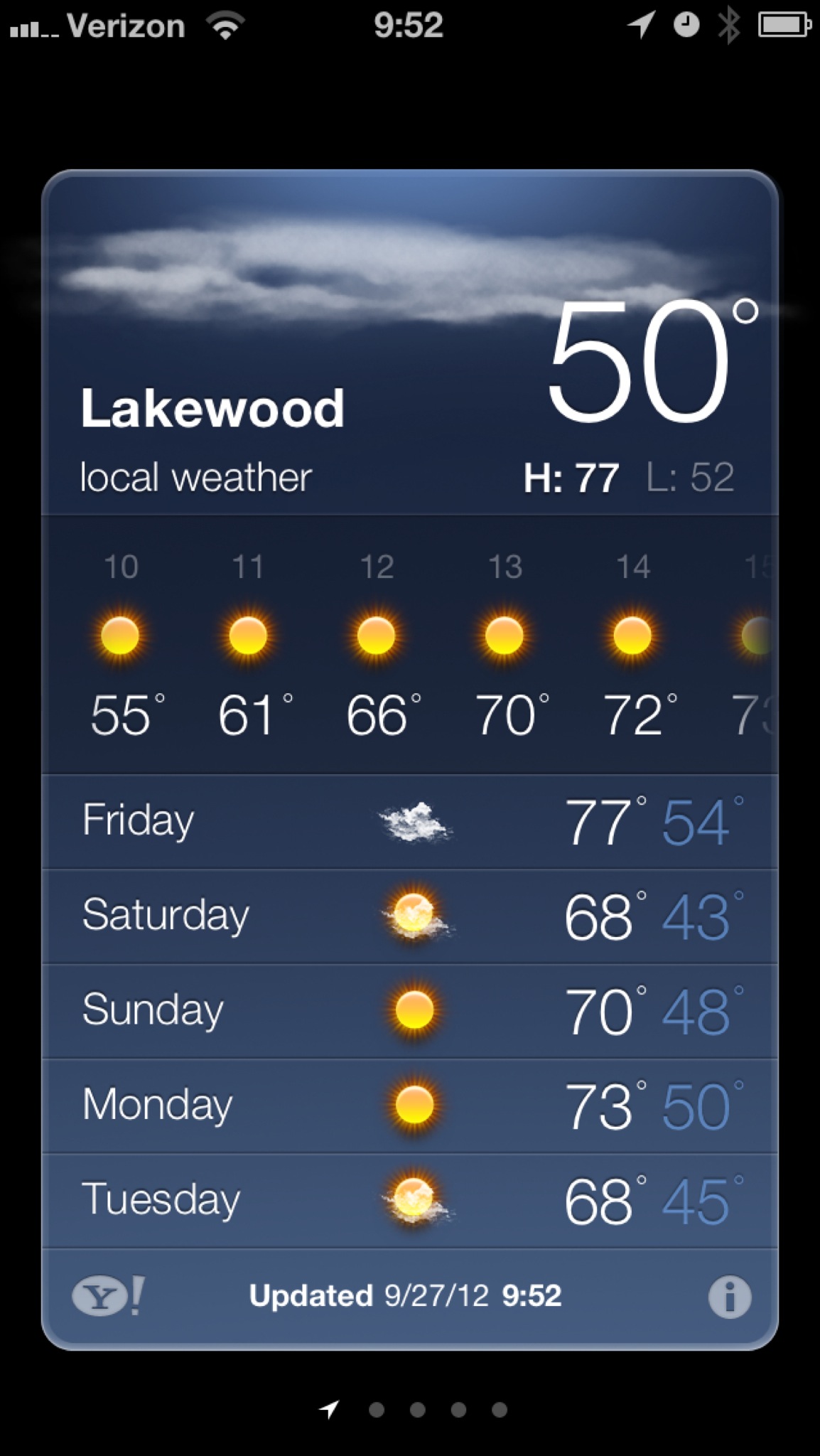
    Then I opened the Weather app on my iPhone 5 and everything changed. For the taller screen Apple made the app look like this:

    Apple’s Weather app on the iPhone 5.

    The change is subtle, making the hourly forecast a horizontally scrolling list, available right away without having to tap anything. This is simply fantastic.

    I feel like I must be losing “it” because the Apple Weather app is now on my home screen right next to Dark Sky and I’ve deleted all the other weather apps I have been hanging on to. Apple’s made something really great here and no one seems to be talking about it.

    The Weather app gives me everything that I need at a glance, without extra taps needed, without extra swipes need, all wrapped in a lovely looking package.

    As I said, it’s on my homescreen now.

    VoiceOver

    Something new I’ve started doing is testing whether apps support VoiceOver, and I am going to shame those that don’t. Apple’s Weather app supports it really well, of course — no worries here.

    Try It

    I doubt I would be using the built-in Weather app if I still was on my 4S, but on the iPhone 5 I strongly recommend that you give Apple’s offering another go — its gotten very good.

  • Note on RSS Feeds

    After today I will be turning off Feedburner and sticking with just the built in RSS feed system. Most of you that use Google Reader should roll over to the new feed (in theory) without having to do a thing. However if you don’t use Google Reader you will need to replace the Feedburner URL (if you are using it) with https://brooksreview.net/feed

    Let me know if you bump into any issues — member feeds are *not* affected.

  • Why Your OS Name Matters

    Apple has, to my knowledge, never exclusively used a non-numeric name for their operating systems since OS X. Yes, they refer to 10.8 as “Mountain Lion”, but they also fall back on the “10.8” monicker when needed. I’m reminded of just how important this fact is by the [exploit found on Android devices](http://thenextweb.com/google/2012/09/26/heres-check-android-device-vulnerable-remotely-wiped-hackers/) and it occurs to me that it would be very hard for Google to say either of these two statements:

    1. Devices running 4.X and newer are secure.
    2. Devices running Ice Cream Sandwich and newer are secure.

    It’s difficult because Google has decided that the non-numeric name is a *better* way to sell the OS to consumers. So statement #1 doesn’t work because no Android user is likely to know what version number they are running, or what version number corresponds with each name. Which is why #2 won’t work either, because even I don’t know the order of the names (yes they are alphabetic, but it took me writing that sentence to remember that detail and do you think general users will know this).

    So if the same thing occurred on iOS, Apple could say: only affects devices running iOS 5.1 and older. Likewise on Mac OS X, Apple can say: only affects Macs running 10.7.4 and older. As users we know how to count, thus we know how to tell what we have. With Android it’s a much harder sell to tell a general consumer which OSes are exploited and thus [you get sites like this](http://dylanreeve.com/phone.php).

    There’s much larger issues at bay with Android, like fragmentation and slow updates, but the naming issue will always come into play when a security breach occurs — like right now.

  • Soulver is Amazing

    [I’ve mentioned Soulver more than a few times on this site](http://duckduckgo.com/?q=soulver+site%3Abrooksreview.net) and I am going to go ahead and mention it again, because it is an amazing tool.

    For the past month I have been working on representing someone purchasing a very large property (both physically and financially). In that process there are a lot of calculations that you run, revise, and rerun. Typically these are done in Excel, typically by accountant types, and I am certainly not prone to using Excel or being an accountant.

    Either way at some point you run calculations at lunch meetings, site meetings, or during various other times when you are not in front of Excel, so what happens to those numbers? For most people those calculations are simply lost, or stuck in a piece of paper your file away never to see again.

    Not for me, because I use [Soulver](http://www.acqualia.com/soulver/) on all of my devices and I use it religiously for even the smallest things.

    So here’s a scenario that recently happened to me:

    – I ran a bunch of impromptu calculations on Soulver on my iPad. I thought it was a simple set, but then it got more involved and immediately became apparent to me that these are calculations I would like to reference in the future. I saved the calculations to iCloud Dropbox in Soulver and went about the rest of my day.
    – A week plus later, I needed to revise three numbers in that calculation and because Soulver was running calculations based upon solutions from calculations in the file — I really only needed to change three numbers. So I changed them, received the new solution, and went about my morning. Oh and I did at on my iPhone, without a hiccup.
    – Then my client called and wanted to see my “math” (common in this industry, as people like to see if they would have used other numbers where I input best guesses). I called up the data set on my Mac, added in annotations for everything to explain what each number was, exported the PDF and sent it on its way.

    I do that all the time, it saves me tons of time of wrestling Excel (hell even opening Excel is a chore), and I never lose some “numbers we ran” for different deals.

    That’s just one reason to use [Soulver](http://www.acqualia.com/soulver/), honestly it’s half calculator half spreadsheet and is often better at both than either tool is at just one.

  • About Switching to Verizon

    A lot of people have written in [wondering how my move to Verizon went](https://brooksreview.net/2012/09/vz-att/): It was the easiest thing in the world. ((That’s probably an exaggeration.))

    To follow up:

    – I haven’t noticed the lack of simultaneous data, as I figured I would rarely notice it.
    – I have yet to not have LTE coverage in the areas I have roamed around in.
    – The family plan thing was a piece of cake.

    Here’s how I made the switch: I ordered the phone on Apple’s website, told the Apple website I wanted to port my AT&T number to a Verizon phone. The Verizon phone showed up, I set it up and within a minute my AT&T iPhone was not active and my number was on Verizon. I was the primary account holder on the AT&T family plan, no problems with that, as AT&T just moved another line to the primary spot.

    The only word of warning I would give, something I didn’t think about, is that you lose your voicemails. I had to setup the Verizon voicemail, so it was a little unnerving to lose my other ones — but not a big deal. (You also have to re-record your voicemail greeting — I mean what a *pain*.)

    That’s it, fast and painless.