Category: Articles

  • What is the Everyman’s PC?

    When the MacBook Air “relaunched” in 2010, I immediately thought that it was the absolute best computer that any general computer user could buy. It was priced right, fast enough, light enough, had great battery life — and so on — it blew everything else out of the water.

    More importantly it came with an SSD standard. For most users that SSD will be the single greatest speed boost they have ever seen when upgrading from one computer to another.

    It seemed to me that the 2010 MacBook Air (and it’s subsequent upgrades) was the computer that 95% of all computer users should buy — not just Mac users.

    I haven’t thought much about this until the never-ending debate over whether an iPad is a PC overtook my RSS reader (again) this past week. I have nothing further to comment on that debate other than to say that iPads can, and are, certainly being used in place of PCs. ((Personally I think it is foolish to think of the iPad as anything but a PC. The more interesting debate to me is whether iPhones and Android phones are PCs.))

    If I, and many others, believe that the iPad is actually a PC — then does my theory that the MacBook Air is the best PC that people can buy still hold true today?

    That is: is the iPad a better PC for most people than a MacBook Air?

    That was interesting enough to me that I started to write this post, but then something else occurred to me. If the iPad is better for most people than a MacBook Air, then is an iPhone better for most people than an iPad and thus a MacBook Air?

    It’s a topic that [Shawn and I discussed on the last episode of our podcast](http://thebbpodcast.com/2012/02/episode-45-a-slightly-better-pedigree-of-americanos/), but one that I think warrants further thought.

    It’s easy ((Because people are already doing it.)) to see why one would argue that the iPad could be better suited for most people than a MacBook Air, but a cellphone? That seems like a stretch, right?

    ### More with Less?

    I am not arguing that everyone goes out a buys iPhones and ditches all other computers. That’s short sighted.

    I do however think that the iPhone can do *more* than an iPad while being far more convenient. Thus if you think buying an iPad instead of a PC is a good idea, then perhaps buying an iPhone instead of either would be an even *better* idea.

    I don’t have a strong argument that the iPhone is a better computer than a MacBook Air — because it’s not. But I do think that it is by far my (a many other peoples) most *used* computer.

    So my question now becomes: if I use my iPhone more than my iPad, and more than my MacBook Air — is my iPhone the best computer I have?

    I think the answer is a resounding: yes.

    Not only that, but I think that any one of my iPhones (certainly the 4S) is *the* best computer I have ever owned. Yet, while that is most certainly a true statement, I wouldn’t dare ditch my iPad or MacBook Air.

    ### Niche Computer Era

    The simple fact is that we now have two types of computing devices: general purpose and niche. All of these devices are “personal computers” it just so happens that not all of them a general purpose personal computers. ((I guess I did end up weighing in on the debate.))

    My MacBook Air and everything with a “Mac” label are general purpose computers. However things like my iPhone, iPad, and the Nest are all niche computers.

    There’s certainly nothing wrong with choosing a niche computer over a general purpose computer — just so long as you can do what you need and want to do with the computer. If all I need a computer for is to control the temperature in my house, then the Nest makes far more sense than a Mac Pro.

    So to get back to my original question: If the iPad is better for most people than a MacBook Air, then is an iPhone better for most people than an iPad and thus a MacBook Air?

    The iPhone is probably not better for most, but certainly better for some. ((Where the term “some” doesn’t necessarily amount to a small percentage of people. I believe this group is rapidly growing.)) I would even argue that as time progress the amount of people that the iPhone is a better computer for is actually increasing, not decreasing.

    For me the iPhone has done far more to reduce my need of a MacBook Air type computer than the iPad has ever done. ((And I love my iPad.))

  • Looking at the Wrong Specs

    *Editors note: This post was updated to remove all mention of the Tim Moynihan post that I had originally linked to and quoted.*

    [Canon released a new camera](http://www.usa.canon.com/cusa/consumer/products/cameras/digital_cameras/powershot_sx260_hs) that:

    >The fact that the PowerShot SX260 HS digital camera is an ultra-slim camera with a powerful 20x Optical Zoom […]

    I don’t give a damn about this camera, but I think it offers an interesting glimpse at the market. That is: consumers are looking at the wrong specs. Traditionally in this segment it was all about megapixels, but now it seems to be all about: optical zoom and Wi-Fi (this particular camera does not have Wi-Fi but it was a trend at CES). Both are horrible features to care about, let alone to base a decision on.

    Wi-Fi is just a way to get pictures off your camera and onto the computer without all that “hassle” of taking a memory card out. It’s a non-feature-feature — a throw-in.

    Optical zoom *is* important, but not when stated as 20x. Because a multiplier specification like `20x` is not something you can compare from camera to camera. If the focal length starts at 10mm on one and 40mm on another then 20x that initial focal length on the first and 20x on the second means two entirely different things.

    In fact, if you are worried about zooming in that much with a point and shoot, perhaps you should look at other offerings.

    The two features that matter most on a point-and-shoot to almost all consumers are:

    1. How wide angle is the lens. This matters because you are going to take far more pictures close up to things than you will far away. Wouldn’t it be nice to fit that entire building in the frame without having to walk a block away? Or fit the line of five friends in frame while still being able to stand in the same room? My most used camera lens on my dSLR? A 17-40 wide angle lens on a full frame camera — that’s a useful lens. My least used: 80-200mm lens.
    2. ISO, or noise is the second most important factor. Most of our pictures aren’t well lit, so you really need to look at how well the camera handles noise in dimly lit photos. If you can get a camera that performs with low noise at high ISO speeds, then you are going to be far happier with your photos and that trip to download them on the computer won’t matter as much.

    Those two items are going to be far more helpful than a 20x optical zoom ever will be — remember that the next time you buy any camera.

  • Reviewing PDFPen for iPad

    [PDFPen for iPad](http://www.smilesoftware.com/PDFpen/iOS/index.html) was released just before I hopped on a plane to head down to Macworld|iWorld in San Francisco. [I read a quick review of it](http://www.macstories.net/reviews/smiles-pdfpen-for-ipad-is-a-powerful-1-0-version/) and then purchased the app, closed down my iPad, and jumped on a plane.

    While airborne I got an email from my real estate agent saying that he needed some paperwork signed for the home my wife and I are purchasing. I used iMessage to tell my wife to sign the paperwork on her Mac and then send me the file. At this point I could have pulled out my MacBook Air and paid another Wi-Fi fee to connect it, but I had PDFPen on my iPad — why not give it a go?

    I did and it worked fantastically well.

    You might be thinking that there are hundreds of apps on the App Store that can do this same thing, and there likely are, but PDFPen has some really great things that made me love it.

    A few of those things are:

    – iCloud Sync
    – Stored Signatures
    – Email a “Printed” PDF

    ### iCloud

    If you have PDFPen on your Mac, then PDFPen for the iPad will sync the files between the two applications over iCloud. Unless you are a heavy PDF user this likely doesn’t seem to be all that life-changing of a feature, but it still is pretty great.

    The iCloud support in iOS and Mac applications has become a fantastic Dropbox like utility, but unlike Dropbox it is something that is built-in at the system level.

    You don’t have to think about it and that is key.

    So when I sent out 4-5 signed PDFs from PDFPen on my iPad and a few days later was sitting at my MacBook Air with a need to resend a couple of those documents — I didn’t need to go find my iPad. All I had to do was grab those PDFs in PDFPen and resend them. They were just there.

    It’s these really small moments that add up to a product that just fits in your life. More developers need to add iCloud syncing — it really is great — and I am glad PDFPen has it.

    ### Stored Signatures

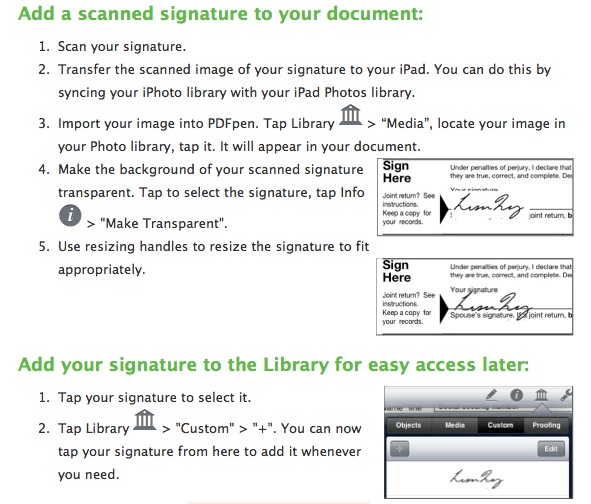
    I didn’t know this when I was signing all those PDFs, but there is a fantastic feature of PDFPen that allows you to store your own signatures and other scribbles so that they can be added to any document with one tap. Here’s how you do that (from a Smile newsletter):

    I love that feature and have already added not just my signature, but my initials as well. It’s a nice little touch and I can imagine there being some really great uses for this (including storing company logos).

    ### Emailing a “Printed” PDF

    One of the most annoying problems that I run into on a weekly basis is filling out a PDF, sending it to a Windows user only to get an email back saying that the document isn’t filled out. I don’t know why this is a problem on Windows, but the layered approach that Preview seems to take on the Mac is not compatible in a universal manner.

    The solution has always been to fill out the PDF and then print the file to a PDF — thus flattening the document. The fine folks at Smile must have had this problem too because when sending out the PDF in PDFPen you can choose to send it as a flattened file (printed PDF) if you want.

    This *is* fantastic.

    ### Two Criticisms

    There are two things about this app that I don’t care for:

    1. The icon. I have never been a fan of the styling that Smile uses for its icons and PDFPen is no exception. I know that I pick on icons a lot, but a good icon is a good icon. A bad icon is one that I never want on my home screen — so if my home screen is your goal, you better make your icon good.
    2. Highlighting PDFs is a bit awkward. I could see this being pretty good with a Cosmonaut, but with my finger I felt like I never learned how to highlight before. If some sort of tracking could be built-in so that you can make relatively straight lines then we would really have something here. Until then, if your primary use case is highlighting, you might want to look elsewhere. ((Also, why are you highlighting so many PDFs?))

    ### One Step Closer ###

    Like I said before, I am not a PDF guru. However I am a real estate professional and PDFs are a norm in my business. There’s nothing missing from PDFPen for my needs, which takes me just one step closer to not needing my Mac at all.

    In fact, I didn’t even need my MacBook Air at Macworld until I recorded a podcast — a large part of not needing the Air was because of PDFPen for iPad.

  • Smart Alec Review: Part III

    In part one I talked about my day-to-day usage of the Tom Bihn Smart Alec and how it felt to switch from a messenger bag to a backpack. In part II I talked about using the Smart Alec as my only bag for a short weekend away. In the third and final installment I am going to talk about using the bag at Macworld and toting it around San Francisco and airports.

    First, some more follow-up:

    • In the last installment I reported that I had some trouble getting the second strap on my shoulder. The tip provided from Tom Bihn was to loosen the strap that I put on last as I take the bag off. ((They have told me that they are working on a video to demonstrate what they mean.)) This is a cumbersome tip, but it does work. When in San Francisco I didn’t run into this issue given that I wasn’t wearing layers of clothing. So this may not be an issue for people that aren’t constantly layering clothes.
    • The zippers on the bag continue to get easier and easier to close one handed — this is great news.

    I’ll keep this pretty short because I don’t have much to say, but did want to talk about two things: expandability and the airport.

    Conference Mode

    While at Macworld|iWorld I found the Smart Alec to be outstanding. It kept my hands free the entire time and at times carried quite the load of gear. The bag went from carrying just an iPad and battery chargers to carrying the goodies purchased at the Apple Company Store and a couple of jackets that Shawn and I carried with us.

    I still preferred to not carry the bag around if possible (I would feel this way about any bag), but it never once became uncomfortable to carry with me. The only hinderance I ran into was when on the expo floor due to how crowded it was in spots.

    Last I will note that while moving around SF with the pack on there were more than a few times when the back of the Smart Alec became very warm — it felt like my MacBook Air had woken up and was overheating in the bag. This is likely due to how tightly the pack sits against your back and the dense material, adding that extra layer to your body. It was never uncomfortable, but it was warm enough that I noticed when I took the backpack off.

    TSA, Flying, and Airports

    Had I not been carrying an additional shoulder strap type carry-on, the Smart Alec would have made for the best TSA line bag I have ever had. It was fast and easy to pull out my MacBook Air and to stuff away the various items in my pockets — all in secured areas of the bag. And I mean fast.

    However trying to add another shoulder strap in lock step with a backpack is cumbersome at best and downright painful most of the time. I hate wheeled luggage because you can’t carry as much in them and you are at risk for them not fitting in overhead bins, but that would be a better option than carrying my Patagonia MLC with me on this trip.

    The absolute best part of the bag is how the pockets open, because it’s very easy to stand the bag up on the ground and pull out my iPad from the main compartment. I don’t have to futz about with balancing the bag and trying to get my iPad out as I have had to with most shoulder bags. Set the backpack down, unzip, and pull the iPad out — all while the bag is standing upright on its own.

    I can do that one handed.

    Bottom Line

    This is the best bag I have ever owned. It excels when you need it to go from medium to huge. But it doesn’t do small and compact well.

    It is, however, lightweight.

    The best feature of this bag, and I imagine of most backpacks, is just how freeing it is to have both hands free and not having to worry about balance. I don’t feel a desire to go back to a single strap bag of any kind.

    The tradeoff is size.

    A small backpack looks stupid, so you have to put up with a larger sized bag, but you don’t really feel the extra weight of the bag. Having a backpack always makes it look like you are carrying more than people with fancy minimalist shoulder bags, but it doesn’t necessarily mean you actually are carrying more.

  • You Don’t Say?

    [Cameron Kaine, for *Seeking Alpha*, posted yesterday](http://seekingalpha.com/article/325282-amazon-determined-to-continue-its-assault-on-apple):

    >With many investors (including yours truly) ready to proclaim retail and technology giant Amazon (AMZN) as the No. 1 contender to Apple (AAPL), this makes its upcoming earnings announcement on Tuesday all the more interesting.

    and:

    >It was an instant success and was termed the “iPad killer” – much to the dismay of Apple investors.

    [Today, Stu Woo and John Letzing for the *Wall Street Journal* reports](http://online.wsj.com/article/SB10001424052970204740904577195371567545142.html):

    >The Seattle-based e-commerce giant on Tuesday reported fourth-quarter revenue of $17.43 billion, up 35% from a year earlier. But profit plunged 57% to $177 million as the company continued to spend on warehouses, technology and its Kindle electronic devices. Amazon’s operating expenses rose 38% in the quarter from a year earlier, exceeding its 35% revenue increase.

    Sounds like Amazon is really challenging Apple’s top spot…

  • Use Launch Center to Go Directly to Adding a New Task in OmniFocus

    Just as the title says, you can enter a URL scheme in App Cubby’s [Launch Center](http://appcubby.com/launch-center/) which takes you directly into OmniFocus’ Quick Entry screen.

    It’s dead simple [given this forum post](http://forums.omnigroup.com/showthread.php?t=23210&highlight=iPhone+quick+entry).

    ### Steps

    1. In Launch Center tap `Add New Launch…`
    2. Tap `Launch Website/App`
    3. Enter a title of your choosing.
    4. For the URL field type: `omnifocus:///add`
    5. Tap done.

    Works like a charm. This has moved Launch Center to my home screen.

  • Do you have the paperback or the hardcover?

    Earlier today [I posted a link](https://brooksreview.net/2012/01/ibook-and-iad-pluralization-marco-org/) to [Marco Arment’s “iBook and iAd pluralization”](http://www.marco.org/2012/01/28/ibook-iad-pluralization) post. In my link post I said:

    >With this method (as I read it) this statement would not be correct: “I own the Steve Jobs iBook.” Instead it seems the correct statement would be: “I own the Steve Jobs book, from the iBookstore.” That’s far more clumsy in my mind.

    >You could, technically, leave out the “from the iBookstore” bit, but in doing so you would have no way of indicating that you purchased a digital version instead of a dead tree version.

    Apparently that was odd(?) to many (judging from email and Tweets), but [Tim Ricchuiti sums up the counterpoint in his blog](http://theelaborated.net/blog/2012/1/29/sign-of-the-times.html):

    >But why would anyone care to go to the trouble of specifying what version they bought? No one says “I bought the new Snow Patrol album from the iTunes Music Store.” And no one who heard “I bought the new Snow Patrol album” would assume you did so from Tower Records.

    In other words here’s the arguments that I have been hearing as to why defining a book as an ebook, iBook, or physical book is irrelevant:

    1. Things are changing so much that it is assumed all books are digital — or so Apple wants that to be the assumption.
    2. People never say: “I bought the paperback”, or “I bought the hardcover.”
    3. A book is a book — there’s no difference what kind you bought, just that you bought (and presumable read) the book.

    ### 1 ###

    I think this argument is clearly what Apple wants, but also is very clearly *not* where we are currently at in the book market. Not enough people buy books in digital form to make the assumption that all books are digital — yet.

    ### 2 ###

    It is true that people don’t usually clarify which version of the dead-tree book they purchased. But it is equally true that a paperback is a different book than the hardcover and thus the distinction is sometimes made. Perhaps the content isn’t different, but saying “there’s a great quote on page 51” will yield very different results depending on the version you buy.

    That’s why the differentiation is important. An iBook versus paper or Kindle book *is* a very different thing than the others. They will visually look different and that’s why it isn’t fair to lump the different types of book all into one category.

    These types of books are simply different.

    ### 3 ###

    I agree that reading the book is the most important part in owning a book. But as I said above there are very real differences between the books.

    Perhaps the most important of which is that digital books can be (and are) updated.

    The *Steve Jobs* biography was my example because I own the following versions:

    – Hardcover
    – Kindle
    – iBookstore book

    I can tell you from first hand experience that the reading experience is very different on each of the different mediums and that’s why the distinction matters to me. I don’t care which version you bought because it changes what you read, but I do care because it may not be the same as the book I read (sometimes in the minor content differences, but always in experience and layout).

  • The Google Privacy Changes

    [This article](http://www.washingtonpost.com/business/technology/google-tracks-consumers-across-products-users-cant-opt-out/2012/01/24/gIQArgJHOQ_story.html), or versions like it, have been getting emailed and sent to me all day long. There’s three important things that you need to know from this article:

    1. Google is changing its privacy policy.
    2. The change allows Google to share your information with itself so that it can integrate it’s own products.
    3. Those changes happen March 1st and you can’t opt-out.

    These changes aren’t bad, they are actually good, and Google is going about them the right way. Google didn’t just plop the changes on everyone, they are changing the necessary documents first and giving people a heads up.

    >Google said it would notify its hundreds of millions of users of the change through an e-mail and a message on its Web sites. It will apply to all of its services except for Google Wallet, the Chrome browser and Google Books.

    Google isn’t trying to sell off your data to other people.

    So the scary thing about this is: more targeted ads with the data being pulled from all the a google properties.

    > If someone watches an NBA clip online and lives in Washington, the firm could advertise Washington Wizards tickets in that person’s Gmail account.

    That is scary, but a smart user already knows that Google has that information and all this change does is formally allows them to better tailor the ads to you. This is a fact of life with Google products. If you can’t accept that then you really shouldn’t be using Google products to begin with.

    The part I think is worth focusing on (that others aren’t) is that this is not an “evil” move by Google. At least I don’t think it is in the same way that the Search+ changes are.

    There is certainly a monetary reason for Google to do this,but more than that: this change will substantially improve Google’s services from the perspective of the user.

    >Consumers could also benefit, the company said. When someone is searching for the word “jaguar,” Google would have a better idea of whether the person was interested in the animal or the car. Or the firm might suggest e-mailing contacts in New York when it learns you are planning a trip there.

    This move has the potential to not only help Google’s bottom line, but to help Google’s users. When’s the last time Google did that?

    These services should have never been sandboxed to begin with, but they are. Google wants to change that. There’s good and bad with it, but I for one ((Not a Google lover.)) think there is far more good than bad here.

  • Let’s Ditch Google for DuckDuckGo

    I am done with Google. I think they have lost their way.

    I don’t remember when, or where, I found out about DuckDuckGo, but a quick search of this site has me [promoting it first](https://brooksreview.net/2011/02/chrome-10/) in February of 2011. It’s my go to search engine right now and I am trying to not use Google for anything. Here’s how I am making DuckDuckGo a default across my computing.

    ### LaunchBar

    First things first you need to add it to LaunchBar so that you can get fast access. [Here’s the guide to do just that](http://www.obdev.at/resources/launchbar/help/SearchTemplates.html).

    As an added bonus I set up another search template for searching my website with DuckDuckGo, here’s how that looks:

    Done.

    ### Safari

    While Chrome [makes it easy](http://help.duckduckgo.com/customer/portal/articles/216440-chrome) to change default search engines, Safari takes a bit more work. ((If you want it to replace Google in that nice little search area next to the address field — which I do want.)) DuckDuckGo [has a guide](http://help.duckduckgo.com/customer/portal/articles/216447-safari) for doing this and I have used the Glims method — it works fantastically well and looks stock.

    Don’t turn on all that fancy crap that drops down search results, just install DuckDuckGo and turn everything else off. That will give you the most “stock” look.

    ### Your Website

    Lastly I had to change the search at the footer of this site. I was porting it through Google previously and now have changed it to go through DuckDuckGo.

    There’s a [handy tool on the DuckDuckGo site](http://duckduckgo.com/search_box.html) that allows you to customize an iFrame (not the best, but better than using Google) and while it is much bigger than what I had — I like what it stands for: true search.

    Here’s the key to adding DuckDuckGo: you can customize a few key areas to make it match your site better: the colors and whether DuckDuckGo can show ads. Check out all those param tweaks [here](http://duckduckgo.com/params.html).

    ### Done

    If you have done everything correctly you shouldn’t need Google search anymore. If we want Google to stop jacking around our search results then we have to hit them where it hurts: search. That starts with people leaving Google search.

    That’s what I am doing.

    DuckDuckGo often has better quality results from what I have seen, but you will notice that the results aren’t as instantaneous as Google’s — they take a second.

    Give it a go, I bet you like it.

    *(As an added bonus, take a look at their [privacy policy](http://duckduckgo.com/privacy.html).)*

  • Ultrabook Rules

    Casey Johnston for Ars on [all the new ultrabooks that were announced](http://arstechnica.com/gadgets/news/2012/01/ultra-in-name-only-the-failures-of-intels-ultrabook-rules.ars):
    >But the new Ultrabooks, meant to be PC competitors to the MacBook Air, seemed suspiciously fat. And heavy. And lacking in solid-state drives.

    That too me is anything but an ultrabook. Johnston goes on to state the rules (made by Intel) for calling your PC an ultrabook:

    >Intel’s official requirements for Ultrabooks are as follows: each model must have a configuration that falls below a $1,000 price point, notebooks with screens smaller than 14 inches must be thinner than 18 millimeters (14-inch-plus screen notebooks can be as thick as 21 millimeters), they must wake from hibernation in no more than 7 seconds, and they must have a minimum 5 hours of battery life, as measured by MobileMark 2007.

    For comparison the MacBook Air’s 13″ model is 17mm at its thickest and weighs just 2.96lbs with a 7 hour battery life. It’s clear to me that Intel wants “ultrabook” to be defined as “a MacBook Air”, but what’s also clear (to everyone) is that PC manufacturers will do what ever they need to be able use a trendy new name.

    In other words: PC manufacturers don’t have their heart in the ultrabook game.

    They don’t care to make a MacBook Air.

    They just want to sell more computers.

    And the easiest route to sell more computers is to go with the minimally accepted specifications to make a product fit into a “hot” new product category — which right now is tablets and ultrabooks.

    And *they* wonder why their sales are tanking.

    I actually wonder when the last time a computer manufacturer, not named Apple, gave a damn about making a computer that made lives easier. Think about it: they don’t make the software, just the hardware — and yet that’s the part that seems like utter crap.

    To put it another way: if Apple hadn’t made version 2 of the MacBook Air a wild success, would any other PC manufacturer care to try and make a competing product — one that Intel is begging them to make?

    I doubt it. And that’s the problem.

  • If I Were CEO

    If I were CEO of RIM, here’s what I would do:

    1. Call a meeting of all top executives.
    2. Pull my iPhone 4S out and rest it gently on the table in front of me.
    3. Wait for dramatic effect.
    4. Fire anyone not patient enough to wait for me to speak first.
    5. Tell everyone left in the room that they have 3 months to bring me a working prototype that makes me want to use it over my iPhone. (While gesturing towards my iPhone already placed on the table.)
    6. Fire anyone that asks “How?”
    7. With everyone gone, hire a new executive team.

    That’s where RIM should start and this isn’t a joke. Why bother with anything else if you can’t make people want to use your product? Beats me.

  • The Apps that Stuck in 2011 — iPad Edition

    When I wrote the [iPhone edition](https://brooksreview.net/2012/01/apps-stuck-iphone/) of this post I had planned on writing an iPad version as well. Except when I started to dive into what the iPad version would list and talk about, I quickly realized that it’s not nearly as interesting to me — so I canned the post.

    Since then I’ve gotten a bunch of requests for the iPad version, so I decided it was worth the time to look at the post once again. What I realized upon second consideration is that I have fundamentally changed the way that I use my iPad over the course of last year.

    I believe I change my usage for the better.

    Initially I used my iPad in a similar way as I used my iPhone: a tool to fill small bursts of time and to supplement my Mac. In other words my iPad was a part of my arsenal, but a part that could be eliminated with minimal pain.

    At some point around September (the best that I can tell) my iPad shifted from being equivalent to my iPhone to becoming more equivalent to my Mac.

    The practical difference between the two is that when I used to sit at my iPad it was for any length of time — now when I sit down at my iPad it is almost always going to be for an extended period of time. In that regard it is a lot like my MacBook Air.

    That means that time filler apps (e.g. small games, Twitter) they have been back-burnered, whereas more time intensive apps ( e.g. [Instapaper](http://www.instapaper.com/), [iA Writer](http://www.iawriter.com/), [Reeder](http://reederapp.com/)) are now the most used.

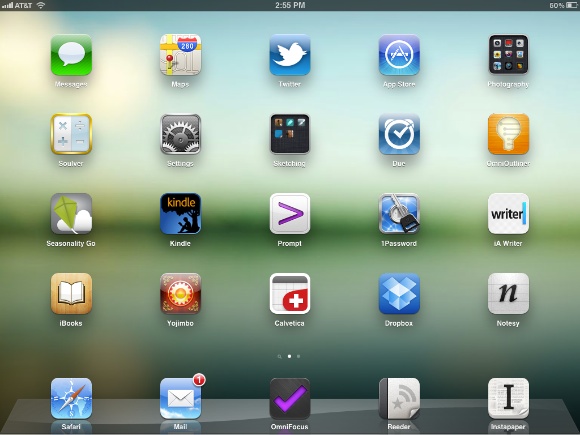
    Here’s my iPad home screen at the start of my writing this post:

    [](http://c276381.r81.cf1.rackcdn.com/iPad-hs-original-lg.jpg)
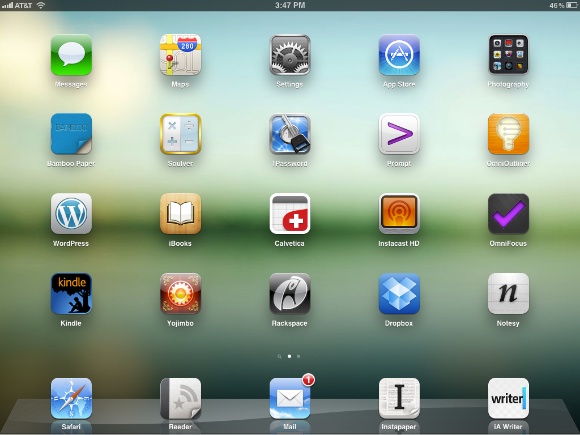
    I took some time and went through all the apps to determine the ones that I actually use and rearranged the layout based on that. Here’s what my home screen looks like now:

    [](http://c276381.r81.cf1.rackcdn.com/iPad-hs-new.jpg)
    Most of these apps I am not in everyday, but they are still my most used. The change here is that I look at my iPad as an essential part of my workflow, instead of just an aid to that workflow.

    There’s only three apps that were actually “challenged” in 2011 on my iPad: [Calvetica](http://mysterioustrousers.com/calvetica), [Notesy](http://notesy-app.com/), and iA Writer.

    ### Calvetica

    For the iPhone I strongly recommend Agenda, but on the iPad I much prefer Calvetica. I find that there are only two instances that I ever use the calendar on my iPad for: scheduling a meeting while in a meeting, and looking up “am I busy on day X” inquiries if I am already using my iPad.

    For those two things Calvetica’s split view works a lot better for me. Seeing the monthly calendar and weekly agenda is just nice. Contrasting that to [Agenda](http://getappsavvy.com/agenda/) on the iPad: I get a more chaotic feeling about my schedule with Agenda on the iPad.

    This is a highly personal preference and honestly I use the calendar so infrequent on the iPad, that it probably doesn’t even need to be on my home screen.

    ### Notesy

    [Elements](http://www.secondgearsoftware.com/elements/) kept bumping heads with Notesy all year long and Notesy has mainly stuck because it is the app I prefer on my iPhone. That makes my life a bit easier and is all there really is to that decision.

    ### iA Writer

    A dozen, maybe more? That’s how many apps I “tested” that sought to replace Writer, or create a better writing environment than it. There’s a lot of good options, from Elements to [Daedalus](http://www.the-soulmen.com/daedalus/) touch and [Writing Kit](http://getwritingkit.com/). There’s a lot to like about all of them, but in the end the seamless integration with Writer on my Mac is unfathomably good.

    iA Writer is as simple as it gets and at the end of the day that is exactly the tool that I prefer. The fact that Writer exactly mimics its desktop counterpart only enhances my ability to transition from my Mac to iPad in a seamless manner. Perfect.

    ### The Rest

    Here’s a quick rundown of the other apps you see, for those interested:

    – Messages: I actually like using iMessage on the iPad — it feels more conversational.
    – Maps: I use the crap out of this on my iPad. Best Google Map experience you can get.
    – Settings: WiFi, Airplane mode, 3G, VPN.
    – App Store: This is the only “time killer” on my home screen.
    – Photography folder: Just apps for cropping and editing photos for TBR posts (not used often, but I like to play around in them).
    – [Bamboo Paper](http://itunes.apple.com/us/app/bamboo-paper-notebook/id443131313?mt=8): I try to use this app anytime I feel the need to reach for paper.
    – [Soulver](http://www.acqualia.com/soulver/): Best calculator, hands down.
    – [1Password](https://agilebits.com/onepassword): Because I don’t remember any passwords, but more importantly I often forget usernames.
    – [Prompt](http://itunes.apple.com/us/app/prompt/id421507115?mt=8): Quick way to restart Apache.
    – [OmniOutliner](http://www.omnigroup.com/products/omnioutliner-ipad/): I was big on outlining when this came out for the iPad, but it gets used less now. I do use it for meeting notes and ideas. Specifically if I have a post idea and want to write down a bunch of points about the idea, but don’t have time to write out complete thoughts, this is the app I use.
    – WordPress: This is how I post most articles to TBR when blogging on the iPad. More often though: this is how I fix typos.
    – iBooks & Kindle: I try to read the occasional book — still hope to finish that Steve Jobs biography someday.
    – Instacast HD: I like listening to podcasts at lunch and around the house. For the most part I do that listening on the iPad, always in Instacast.
    – [OmniFocus](http://www.omnigroup.com/products/omnifocus-ipad/): My brain.
    – [Yojimbo](http://www.barebones.com/products/mobile/yojimbo/): Every post on TBR, every show note for B&B, and a ton of other quotes and links live here. It’s my memory.
    – Rackspace: Uploading photos to be used in a TBR post. Works fantastically well.
    – Dropbox: I drop leases in here for reference when I meet with tenants (day job).
    – Reeder: My preferred app and device to read RSS feeds with.
    – Mail: Necessary evil.
    – Safari: Ditto.
    – Instapaper: If I could only have one iPad app, this would be my choice.

    ### The Change

    I have changed the way I not only use my iPad, but the way that I view my iPad. Right now my iPad is only slightly less capable than my MacBook Air. Most of this *is* actually limited by a lack of good apps in certainly niche categories that I need — not by speed and power of the device.

    I am honestly not trying to be sensational when I say that. Nor am I saying I want to only work on my iPad, or that anybody else should, I am simply saying that with each passing month the iPad becomes exponentially more capable because of the app ecosystem that has developed for it.

  • Apple Aiming at Kindle Singles

    Here’s a [quick FAQ](http://www.apple.com/itunes/content-providers/book-faq.html) (has been around a while) from Apple detailing how you get a book on Apple’s iBookstore. You can compare and contrast it with Amazon’s for the Kindle Singles [here](http://www.amazon.com/gp/feature.html/ref=amb_link_354802082_5?ie=UTF8&docId=1000700491&pf_rd_m=ATVPDKIKX0DER&pf_rd_s=browse&pf_rd_r=1CRR091ZCKXT26JN88GT&pf_rd_t=101&pf_rd_p=1326127342&pf_rd_i=2486013011).

    Even more information about publishing from Apple’s iBooks Author tool can be found in the help for the software. There’s a very interesting, distinctly different, feel between these two FAQs.

    I am talking about Kindle Singles because I think Apple is really bringing the fight to Amazon, the fight for independent publishers. [We already know that Amazon wants these writers](http://pandodaily.com/2012/01/17/confessions-of-a-publisher-were-in-amazons-sights-and-theyre-going-to-kill-us/), but Apple seems to be making it a bit more competitive for this niche.

    This is a line from Amazon’s Kindle Singles FAQ:

    >We are currently not accepting how-to manuals, public domain works, reference books, travel guides, or children’s books.

    Do you notice a common thread amongst those types of books?

    Imagery.

    How-to manuals, travel guides, and children’s books — these three types of books *need* to have great images in them to make the books infinitely more useable and entertaining. Beyond the imagery the design and layout of these books can often make or break them — something that you would be hard pressed to control when the book is read on a keyboard-less Amazon Kindle.

    Black and white e-ink screens, well, don’t do so well with this type of media — the iPad though? Yeah, now you see why this is a shot across Amazon’s bow.

    Amazon also limits the word count and price of Kindle Singles — I have yet to see mention of Apple doing that. Both services review books before publishing them, though it’s fair to say Apple will be just — if not more — stringent that Amazon.

    This should be interesting.

  • The Apps that Stuck in 2011 — iPhone Edition

    I tested a ton of apps in 2011 — too many to count. Because of that process it meant that new apps were constantly challenging the old guard on my iPhone, here’s the apps that I ended the year with (well the ones worth mentioning).

    ### Calendar

    The second most popular email I get is: what calendar app do you use on your iPhone… I tested a lot of calendar apps during the year and every time I came back to [Agenda](http://getappsavvy.com/agenda/). It’s certainly not perfect, but it works really well for my needs.

    I love the continuous scroll view that allows me to consume a lot of information very quickly. For that reason alone it has been fantastically hard for me to even bother giving another calendar more than a couple of days on the home screen.

    A big point of friction on the iPhone was entering calendar data — this made a lot of other apps challenge Agenda. However with the release of Siri it has become easy enough to tell my phone a new appointment and then look at my schedule in Agenda.

    Without Siri I maybe using something like [Calvetica](http://mysterioustrousers.com/calvetica).

    ### Weather

    Ah yes: weather apps. [I was a big fan of My-Cast](https://brooksreview.net/2011/04/weather/) and it still is a very good app. Truthfully though once I got my hands on the iOS 5 beta I switched back to the stock weather app and I am still using it.

    While I don’t like the overall look of it, it excels in simplicity and telling me exactly what I need to know. I have been mostly happy with the app and frankly Siri handles a lot of my weather queries these days.

    Many have asked if I have looked a new weather app X and for the most part I have. I still haven’t found one that is more practical than the built-in app that Apple now offers.

    ### Check-In

    Big changes here in the social space as [Gowalla](http://gowalla.com/), my long favored location check-in app, is dead and gone from my iPhone. I have replaced it with [Foursquare](https://foursquare.com/) and though I don’t much care for the app itself — it actually fills the need perfectly. ((I use it as a breadcrumb for myself, so that when I ask myself “have I been there?” I have a way to check.))

    I do miss the original Gowalla though…

    ### Notes

    This was perhaps the most challenged app on my iPhone home screen, but [Notesy](http://notesy-app.com/) is still there. I am not joking when I say this app was challenged — it felt like every other day another note-taking Dropbox app made its way to my iPhone, but time and time again Notesy came right back into its home on my first screen.

    I am not sure if it is my affinity for the app icon, or my love of the Solarized themes in the app that does it, but for an app that hasn’t been significantly updated in a while — it sure holds its own.

    ### The Less Interesting Ones

    Of all the changes for apps on my iPhone, perhaps the most notable to me was moving [Instapaper](http://www.instapaper.com) back onto my home screen. I hadn’t been using it much on my iPhone, so it was moved off in favor of giving my a space to add an app I wanted to heavily test.

    However in the last 4 months of 2011 I found myself using Instapaper so much that it made no sense to not have it on my home screen. I don’t use Instapaper on my iPhone in the same way that I do on my iPad, but I do use it to fill tiny voids in my day with non-game content.

    So back Instapaper came.

    There has been one app that went unchallenged in 2011: [OmniFocus](http://www.omnigroup.com/products/omnifocus/). Not even a single new task management app piqued my interest enough to think about trying it in lieu of OmniFocus. I find that interesting given how competitive the space has historically been, but not surprising given how good OmniFocus really is. Reminders from Apple came the closest, but even then it was just a supplement to OmniFocus — that is until OmniFocus baked in the Siri support.

    Lastly, [Capture](http://skyballoonstudio.com/capture) stuck on my home screen even though it is one of the least used apps on my iPhone. It’s one of those apps that when you need it, you need it. For that reason alone I have found it worth keeping on the home screen.

    Personally I find it very interesting that most of the apps that are on my home screen have been on there for a very long time. It’s interesting not only because of how many apps I tested, but because of how competitive the app market is.

    Further I noticed that I could move too different kinds of apps because of the addition of Siri to my iPhone. The Apple weather app is the prime example — it’s not good enough without Siri, but with Siri it is more than sufficient.

    When/if Siri is opened up to third party developers things should get very interesting in the iOS app space, let’s hope that happens soon.

  • The Picture Says It All

    There’s still a lot of back and forth going on with this iPhone mute switch argument, but reader Ian Ferrel ([@ianferrel](https://twitter.com/#!/ianferrel)) emailed in to say:

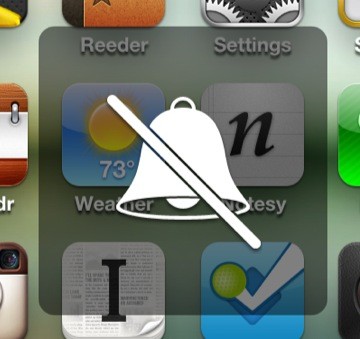
    >It’s worth noting that the image shown when you flip the switch is a bell with a line through it, not a speaker symbol with a line through it. This is a clue that the switch is not setting the volume to zero, it’s turning off the ringer.

    That’s a fantastic point and here’s what he is talking about:

    [](http://c276381.r81.cf1.rackcdn.com/ringer-mute.jpg)
    I don’t think most iPhone users are going to notice the difference between the ringer symbol and the speaker symbol, but Apple took the time to make them different because, they do in fact, have different meanings.

    **Update:** I’m not saying this exonerates Apple. I am saying that Apple sees a clear differentiation between the mute switch and the volume rocker — and uses symbols differently to convey this to users. It should also be noted that Apple labels the speaker icon as “ringer” when you adjust it with the volume rocker and this leads to more confusion.

  • Headphones

    I’ve always cared about the headphones that I use, but if I am honest the depth of that care extended mostly to price and design alone. I wanted something priced higher than grocery store checkout line level, but far less than an audiophile would pay — mostly I just wanted my headphones to look cool.

    There was also another thing: I liked the Apple headphones back then. I liked them for the same reason everyone else did back in the day: they told the world you had an iPod. So I really didn’t need portable headphones.

    Christmas of 2004 (maybe 2003) my Dad gave me a set of Bose QuietComfort 2 headphones — big, noise canceling, and the Bose name. I loved those headphones, in fact I still love those headphones.

    Up and until yesterday I still used those 6+ year old headphones for almost everything — including travel. ((They are great for blocking out crying babies on the plane.))

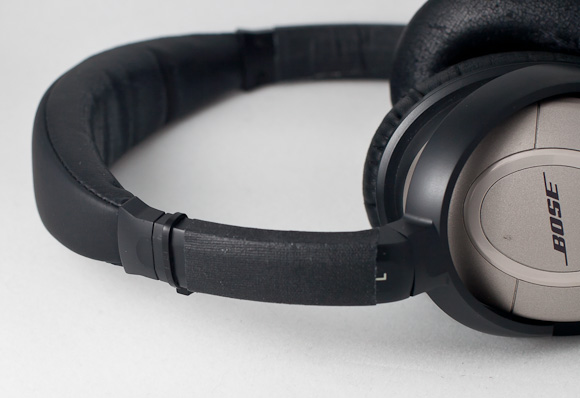
    But I knew I needed a new set of headphones, I mostly knew this because here is what those old Bose headphones look like today:

    [](http://c276381.r81.cf1.rackcdn.com/headphones-1.jpg)
    Yes, that’s a zip tie holding them together along with a piece of tape. The zip tie was added to them somewhere over the U.S. in a cramped cabin of an airplane. ((For the life of me I can’t remember why I had a zip tie with me.)) The tape was added later to secure other plastic bits that were cracking.

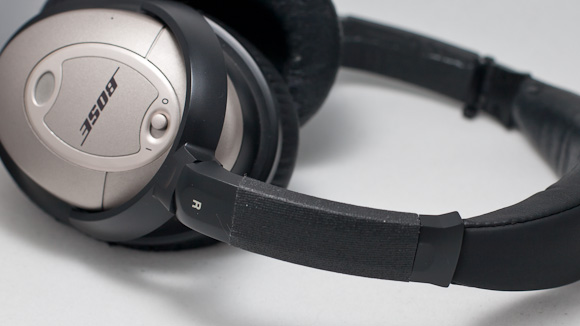
    [](http://c276381.r81.cf1.rackcdn.com/headphones-2.jpg)
    The right side held up much better, not requiring tape until sometime in 2009.

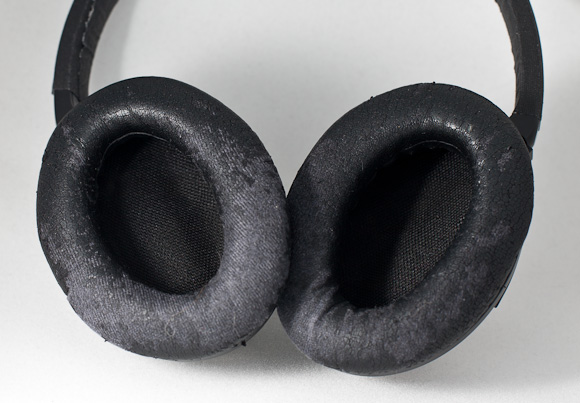
    [](http://c276381.r81.cf1.rackcdn.com/headphones-3.jpg)
    You guessed it, this is the reason I needed new headphones. Sometime last year the ear pads started to disintegrate and leave little black flecks all over my ears and face. They still work fine and fit nice — they just kinda gross me out now.

    But that’s a long life for a set of mid-range headphones.

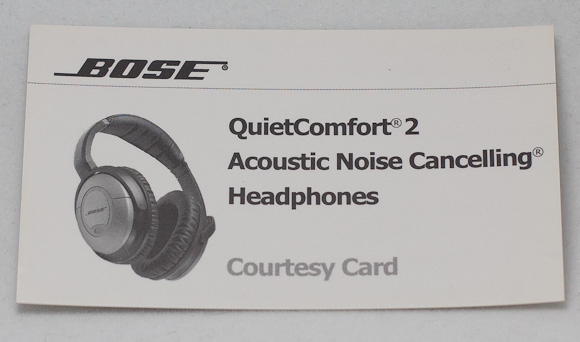
    Perhaps my favorite part of the old Bose was the stack of courtesy cards that it came with — and that store in the case — for handing out to other people:

    [](http://c276381.r81.cf1.rackcdn.com/headphones-4.jpg)
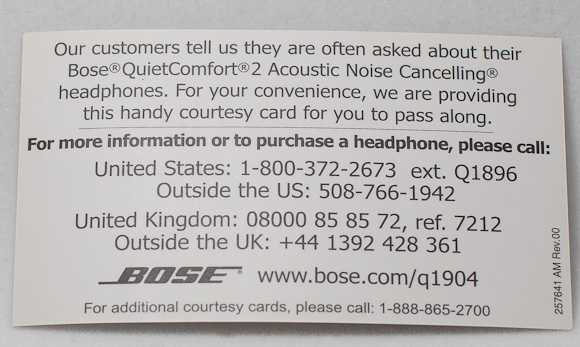
    [](http://c276381.r81.cf1.rackcdn.com/headphones-5.jpg)
    How perfectly arrogant.

    This isn’t a review of any new headphone — it’s a goodbye to a great set of headphones.

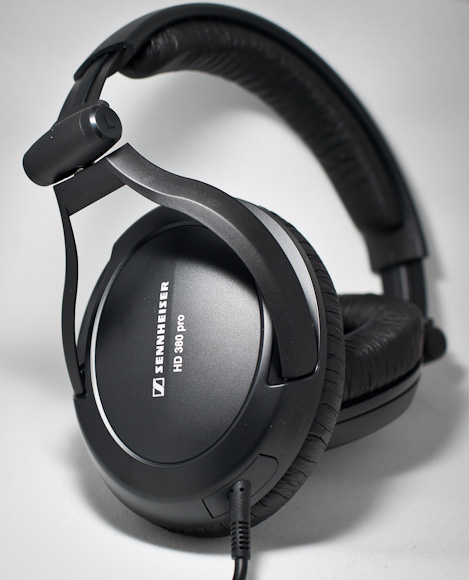
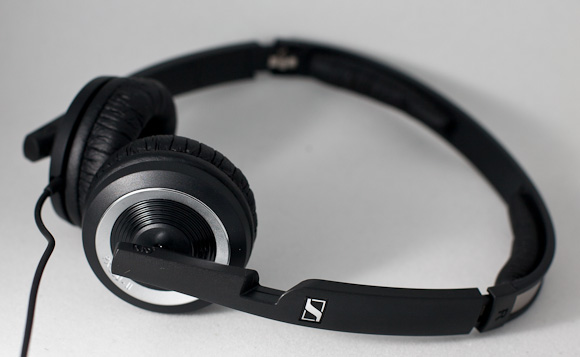
    But, to save some emails, here is what will be replacing the Bose: two separate pairs of Sennheisers.

    [](http://c276381.r81.cf1.rackcdn.com/headphones-6.jpg)
    Those are for my home.

    [](http://c276381.r81.cf1.rackcdn.com/headphones-7.jpg)
    Those are for my office.

    I hope they last a while…

  • Responding to the Dynamic Duo

    [Either Taylor Sternberg, or Peter James Zielinski writing](http://robotasaur.us/2012/01/ben-brooks-doesnt-know-about-onlive/) ((The post gives no indication which one is writing.)) (I prefer to think one writes one word and passes it to the other for the next — that’d be fun) responds to my post saying that Mossberg has lost it:

    >I think what Ben Brooks is trying to say here is that using Windows 7 on an iPad is dumb.

    No. Actually I was trying to say [exactly what I said](https://brooksreview.net/2012/01/office-mossberg/):

    >Also: it sounds horrible.

    Never mind what I actually said though, back to the dynamic duo:

    >But Ben, did you read the entire article?

    I did. In fact I take it upon my self to read every article I link to, in full, unless I state that I gave up on it.

    Again the duo states:

    >Walt agrees with you, bro.

    No, actually he doesn’t. [Mossberg mentions](http://allthingsd.com/20120111/working-in-word-excel-powerpoint-on-an-ipad/), as they quoted, that there are:

    >[…]some caveats, limitations and rough edges.

    I stated that “it sounds horrible” and that “Mossberg might be losing it”. I don’t think Mossberg agrees with either of those two things I said, but I will wait and see if he responds to confirm that.

    The reason I doubt Mossberg agrees is because stating that there are some problems, as Mossberg did, is far different that calling something horrible — which is what I called it.

    The duo, agian:

    >But I think the thing that makes me frustrated about Ben’s post (out of context) is that the power isn’t just that it’s a VNC clone (simplifying it to an extreme), but that OnLive’s first mission is to rethink internet streaming video.

    Ok, explain…

    >Their first product is OnLive for gaming. They want to expand their streaming product to a VNC-like system.

    So it’s like VNC, just as I said — and just as you said — but it also allows for streaming games? That’s sounds really horrible.

    >Even if the product itself (OnLive Desktop) is flawed from a usability standpoint, having a company focus on faster 1:1 streaming and computing is good for the internet industry. It creates competition in a space where streaming technology is very important today.

    That may all be true, but it doesn’t change the fact that the product Mossberg described sounds horrible. The same product that you say should be given a pass even if it “is flawed from a usability standpoint”.

    It doesn’t matter if the streaming is precisely 1:1 — clicking toolbars in Office on the iPad with your finger is truly a terrible thing, something I know from first hand experience. OnLive may be trying something new — and that’s noble and all — but in the end it’s still a terrible sounding product.

    Lastly the duo suggests:

    >*Read the entire article.*

    I did. And I responded to what is contained in the article without further trying to figure out things not mentioned. Your post back to me makes many assumptions about what I think — all of which are, simply, wrong.

  • Quick Thought: Dedicated Instapaper Device

    Here’s a thought I had after reading about the discount applied towards Nooks if you buy a subscription to select periodicals: What if instead of buying an e-reader that is book-centric, you get an e-reader that is Instapaper-centric (with the ability to side load eBooks)?

    That is a device dedicated to Instapaper from the ground up so the primary focus is still reading, but not reading books.

    It would be my guess that people churn through Instapaper articles much faster than they do through a book and therefore a dedicated (of sorts) Instapaper device could prove more beneficial to consumers than a dedicated book reading device.

    I agree that Instapaper is fantastic on the iPad and excellent on the iPhone/iPod touch, but wouldn’t a Kindle like device that downloaded only your Instapaper articles, as you saved them, be a fantastic device?

    I think so.

    You can certainly send articles to your Kindle from Instapaper, but that’s not something that the general consumer is likely to do. Essentially I want a Kindle type hardware device that is actually a curation of the articles I want to read from the web.

    The Instapaper device becomes my new newspaper, my hub, and books are relegated to the back burner — where their true priority is in my life.

    Just a thought, but I think it could be neat.

  • Tech Headlines

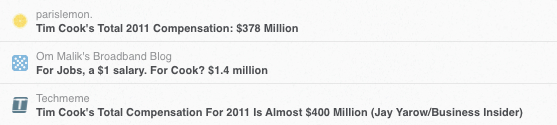
    File this under: why it’s important to read the story, not the headline:

    Depending on which headline you read Cook made between $1.4 million and “almost” $400 million.

  • The Copycat Business Plan

    Any reader of [Daring Fireball](http://daringfireball.net/) knows that one of the more interesting/annoying/unbelievable/sad things going in tech is the copycat business strategy. The strategy where company B sees company X doing thing Y, therefore company B decides that they too can find success in doing thing Y.

    This certainly isn’t a new strategy, but I think the way that Samsung (and Acer now too) have been implementing this is pretty interesting. For the most part Samsung has resided to copying design facets of Apple’s products. [Whereby “facets” I really mean Samsung as gone down the rabbit hole of just copying the actual hardware designs of Apple devices.](http://inspiredbyapple.tumblr.com/)

    That by itself is just a sad fact, not very interesting. I believe that the hardware design of Apple products is only 30% of what makes those products “good” and therefore copying just the hardware design doesn’t actually help as much as Samsung might think.

    With the recent Samsung announcement of an [Airplay clone](http://b.akumar.me/2012/01/07/samsung-to-announce-swipeit-an-apple-airplay-competitor-at-ces-2012/) and Acer’s of the [AcerCloud](http://www.loopinsight.com/2012/01/09/acer-commits-most-blatant-ripoff-of-apple-yet/) I think things are about to get much more, well, dirty — because now these companies (Samsung especially) are getting closer to a full copycat strategy — something we can easily see with Coke and Pepsi.

    ### Pepsi v. Coke

    If Wikipedia is to be believed, then [Coca-Cola was introduced in 1886](http://en.wikipedia.org/wiki/Coca-Cola), [followed by Pepsi in 1898](http://en.wikipedia.org/wiki/Pepsi). So Coke was first and then Pepsi came along to rip it off.

    (For the sake of this please try to shake off your personal preference for either drink for a moment — that’s not at play right now.)

    What’s interesting about the Pepsi versus Coke struggle is that they both are so very similar, that in the U.S. it is mostly a wash between the two. Now I don’t have any evidence to support this, but here is what I was taught in my business classes in college: In the U.S. one decade Coke will be ahead, the next Pepsi.

    I don’t fully believe that statement, and in fact searching the web seems to turn up evidence that Coke is number one followed by Diet Coke in the U.S., even so Pepsi and Coke are very close to one another and for the sake of this argument it’s not entirely important. Both are successful companies.

    What’s really important is how the two are competing. Pepsi and Coke clearly taste different to those that care, but the amount of people that actually prefer one to the other — probably don’t really prefer it because of the taste. That’s why the “[Pepsi Challenge](http://en.wikipedia.org/wiki/Pepsi_Challenge)” is so interesting. Pepsi usually wins in a side by side taste test, but is clearly not the more popular drink. ((See criticisms on the Wiki page, because there are some important ones.))

    I am going to go ahead and say that most Americans don’t have a strong enough opinion to matter towards the taste of one over the other. A persons personal preference then isn’t something that most people will change their mind over if in a restaurant and they are told they can’t get the brand they prefer.

    Cola seems to largely to just be cola to most Americans.

    In fact the real competition for the two cola’s is done with marketing and nostalgia. A persons preference is usually from either good commercials that are swaying those on the fence from one to the other, or nostalgia of Coke/Pepsi “being the drink I grew up with” that keeps the non-fence-riders firmly in one camp or the other. That’s where most preference comes from — certainly where mine comes from.

    Another important factor is that both colas are priced the same, eliminating price as a decision factor. ((Excluding periodic sales.)) Something that is also the case in the cellphone market.

    This is relevant here because I don’t think a Samsung phone that looks like an iPhone 3G S will largely be accepted by most users as a sufficient equivalent to the iPhone in the same way that Coke and Pepsi are “sufficient” equivalents for cola to most people.

    So unlike the Pepsi and Coke battle, Samsung is just selling a can that looks like the Apple can, but that tastes more like [RC Cola](http://en.wikipedia.org/wiki/RC_Cola). That’s not a winning strategy and it is not fully embracing the copycat business strategy that has worked so well for Pepsi.

    However, with the recent introduction of cloud services by Samsung they are taking a huge step towards improving the “taste” of their offering. Essentially Samsung is beginning to fully embrace the copycat business strategy — to the point where they may actually make it successful.

    If a consumer can buy a Samsung phone that looks like an iPhone and has the same bullet points as an iPhone (as far as extra services like iCloud go) — then it really just comes down to which phone *seems* like the better choice.

    And when a consumer has to pick based on what *seems* best, well that’s when you start getting into the Coke v. Pepsi conundrum.

    That’s interesting.

    Samsung used to only copy the hardware design and that was a half-assed solution. Because Samsung can’t copy iOS that well with Android they have started to copy some of the things that Apple gives its users for free: iCloud. That’s why the entry into cloud services by Samsung and Acer is so interesting, it’s how these two companies are completing their copycat strategy — a strategy that has been proven to be pretty effective for Pepsi.