It is funny to me that I feel like I have been talking about this keyboard from Drop.com for a while now, but I never officially wrote a review of it. The entire time I have been thinking I had reviewed this already, and yet I hadn’t. Allow me to rectify that oversight now.
Category: Articles
-
Lochby Tool Roll and Pocket Notebook
At the end of 2019, Bond Travel Gear rebranded to Lochby. I had previously tried a bunch of their gear, and was interested to see where they went with the rebrand. Ostensibly the rebrand was a nod to two things: that the focus was moving from travel to everyday carry items, and the materials to more heritage away from full out Cordura.
I am a big fan of the new look of the gear, and asked them to send over the new stuff for me to check out, they did. Today I want to look at two items I have previously reviewed: the Tool Roll and the Pocket Journal.
-
Better Zipper Pulls
One aspect that can make or break a bag is the zipper pulls: those little metal, plastic, or rope tabs we yank on to open our bags. There are a myriad of options out there for these, and my favorite are the GORUCK style pulls. They are paracord shells with heatshrink tubing and a knot at the end. No metal, or any other stuff. GORUCK calls them “silent zipper pulls” which is to say they don’t jingle around when you move the bag about.
-
Member Journal — 3/16/20
Special Coronavirus edition, first part is free for all to read, as it is full of tips for working and managing teams from home. Free free *free*. And then we dive into a few other things like Apple News+ value, nothing is as secure as you hope, my purse, and a sale pick up.
## That WFH Thing
Many people are finding themselves (or will be finding themselves) in a work from home situation in the coming weeks (or more, who knows) and my company is even doing a limited amount. Being someone who has run a team of distributed workers, and as someone who is not currently setup for working at home — well let’s just say all the advice I have been seeing is a crock of shit. I’ve got three sets of advice, for you as an employee, as a manager, and tech things. Hopefully it all helps you out.
For you, the employee:
1. It’s not easy to work from home, even if you have been doing it for years, or simply dreaming of doing it. What is easy is underestimating this, do not underestimate the ease of working from home.
2. Say no to TV. Even if it is just to follow the news, or for background noise. If you wouldn’t have done it at your office, don’t do it at your home.
3. No family, package delivery errands, or pet care while you are home and working. It might seem easy to take your dog for extra walks, or play with the kids. This is a bad idea, I don’t care what the justification. It also is going to be a pain for most people in the current situation to follow this advice as many parents find their kids home while they work. I get it, but do your best.
4. Take breaks. Not like a lot of breaks, but you take a ton at the office, and you should do so at home too. If someone pings you while you are taking a break, just wait to respond. Don’t waste everyone’s time (including yours) trying to convince people you are constantly working. That is counterproductive.
5. Don’t kill your day with small things that add up. Yes, you can move over the laundry in a few minutes, but you never stop there. Likewise, you don’t prep dinner while working at the office, so don’t do so here too. If you couldn’t do it from the office before, pretend you can’t do it now. You get extra time in your day, by virtue of the fact you don’t have to commute. Not by taking random breaks throughout the day.
6. Headphones are a must when kids are in the house. AirPods will offer better quality audio calls than most alternate options.
7. Clean up the space you are going to work in, and keep it tidy. You need room to work.
8. No bed should be in sight. I know this isn’t possible for everyone, but try to make it as possible as you can. Get away from the area in which you sleep. I mentioned this on twitter and a few people chimed in to say it wasn’t economically feasible for most, and I agree. In short, this crisis notwithstanding, remote work should be reserved for only those with the space to have a dedicated office. I know that’s not the popular opinion, and rather elitist, but I will expand on this later. In short, for now, try to stay out of your bedroom if at all possible. Even the kitchen is better. Those with a studio apartment, Godspeed.
9. No couch or bed working. Under no circumstances should you lounge on the couch or your bed to do work. That’s a scenario where you will get less done. Don’t do it. I don’t care. Sit on the floor if you have to.
10. I am mixed about saying this because people will strongly disagree, but… Who gives a fuck what you wear, I don’t. People on your calls don’t. I hate the advice that you need to get fully dressed and all that. Brush your teeth, and wear what you want. But you should definitely brush your teeth, otherwise gross. If you need to dress like you are going into an office just to get work done, then you have some other problem that you should address. That said, you should be presentable for video calls, but like that could just be a nice t-shirt.
11. Step away to eat. Don’t eat at the desk out of guilt that you get to work from home. You take a real lunch break at the office, do so here and don’t apologize. Step away.
12. Over communicate. If you are stepping away for lunch set a status, let your team know and so on. Keep people informed of your availability. What drives managers crazy about working from home setups is that they often have no clue when you will be back at your desk. So make sure there is a way for people to know that, without them having to reach out to ask you. Status messages are key here.For managers:
1. Drop notes to check in on your team, not so you know they are working, but so they have a chance to vent.
2. Force video chat: audio only is for savages. Video is substantially better, so use it — always have your video on, and ask others to turn theirs on too. But warn them before you initiate a video chat.
3. Monitor for misunderstandings in chat and get a call for those not ‘hearing’ each other. When you see that two people are going back and forth and not getting it, step in and get them on a call.
4. Make sure people do sign off when work hours are over. Often people will feel the need to show up earlier and leave later, set an example by signing off in a group chat to everyone. And make sure others sign off too. E.g. “Ok, I am off for the day, everyone have a nice evening.” That little message will give everyone else permission to leave as well.
5. Make sure people leave to eat at lunch. The best way to do this is to post something like “I’m taking lunch, back online in 30m” or something like that. Again, lead by example, but unlike in the office you need to explicitly state things.
6. All team remote or no team remote. Those are best options. A mix of people in the office and people remote when you are not already setup for working like that is a recipe for disaster. Try to avoid this.Tech things:
1. Standing desk more better, but not necessary to buy right now. If you work from home full time, that’s when you invest. Same with a ‘good’ chair, but like standing desk removes the need for a good chair. Win win. Think of it like this: you can buy the top chair and top desk people recommend for like $1000+ or you can buy a [great standing desk](https://www.standdesk.co/black-adjustable-height-desk/) and [sign up](https://brooksreview.net/join/) for a year membership to this site for like $550 and have an extra $450. You are welcome.
2. Lots of power to charge. Get your chargers and such setup right away in the spot you are going to work in and leave them there. Don’t wait until you need the power. Route the cables nicely too, Velcro cable tie things are dirt cheap on Amazon.
3. Good light is a must. 2700k or 3000k bulbs are ideal, make sure your home office has more light than you think you need and turn them on. Working in the dark is horrible for so many reasons. Also consider having a light behind your display to help your eyes.
4. Monitor/laptop/iPad stands: get your device to a comfortable height and angle. These are worth buying and don’t cost much on Amazon. Cheaper than toilet paper right now it seems.
5. Loud and proud keyboards can be used! Blue switch lovers can rejoice, smart people can keep using their clear switches.
6. Prioritize your work devices on the WiFi network to beat back kids sucking your bandwidth on the network. Look at your router for QoS settings and prioritize the devices you use to work and drop the priority of your kids devices. Each router is different so search around to find out what each setting means, also not all routers have this feature.
7. WiFi calling for smooth calls. In you cellphones turn on WiFi calling as that will often been a crisper and more consistent call quality when you are in your home. Especially if your are moving about.
8. Pick one device for calls and one for everything else. When I do calls I use a secondary device, not my primary work device, for the call. This means I can keep using the primary device while letting the call be full screen on another device. For me that’s using a Mac for calls and an iPad for real work. For you, I don’t know.
9. Eat chips or otherwise finger grease prone snacks with chopsticks to keep your keyboard clean. And pour them in a bowl for easy grabbing. No reason to get your fingers and keyboards gross when there is a proper tool for the job already. And every reason to eat nacho cheese Doritos when you work from home. You be you.Look, work from home isn’t science and you don’t need to go out and buy more stuff. But it does require you to focus and commit. So if you get to your desk and you can’t bring yourself to work, maybe give yourself the option of working, or of doing the worst chore in your home.
Best of luck.

*All I need to be productive.*## Apple News+ is Killing It
You must be a member to read the rest of this article.
-
Member Journal — 3/9/2020
This week: notebook thinking, iBackpack, Slack, hankies, malware apps, and location tracking.
You must be a member to read the rest of this article.
-
Member Journal — 3/2/20
This week: my kickstand argument; I pick on John Gruber’s lack of iPad understanding; show you how unlimited time off is really an open office concept for HR policies; and preview some goods I am testing out.
You must be a member to read the rest of this article.
-
The Best Things for Everyday Life
Starting around 2011, or roughly 9 years ago, I embarked on a journey with this site to find the best things. Things which would make my life easier in all the roles I play. To that end, those things are spread out all over the place on the site, in various articles and reviews, while members have access to them in ‘The Best‘ page. So I broke down three categories which I feel, I have a very good handle on, and want to offer you some items for each of those categories.
These items are not only that which I consider to be the best, but things which I think genuinely make your life better/easier for having. Here we go…
-
Member Journal — 2/24/20
This week: I go deep on this idea of contextual menus for iPad multi-tasking and describe why it is beyond stupid; let’s go to mechanical keyboard school, to help you out in your office or my office; the stress of different navigation apps; and a life pro tip your lawyer will love.
You must be a member to read the rest of this article.
-
Member Journal — 2/17/20
This week: my thoughts on remote work and offices; chicken nuggets; bedding scams; flashlights; and how do airplanes work.
You must be a member to read the rest of this article.
-
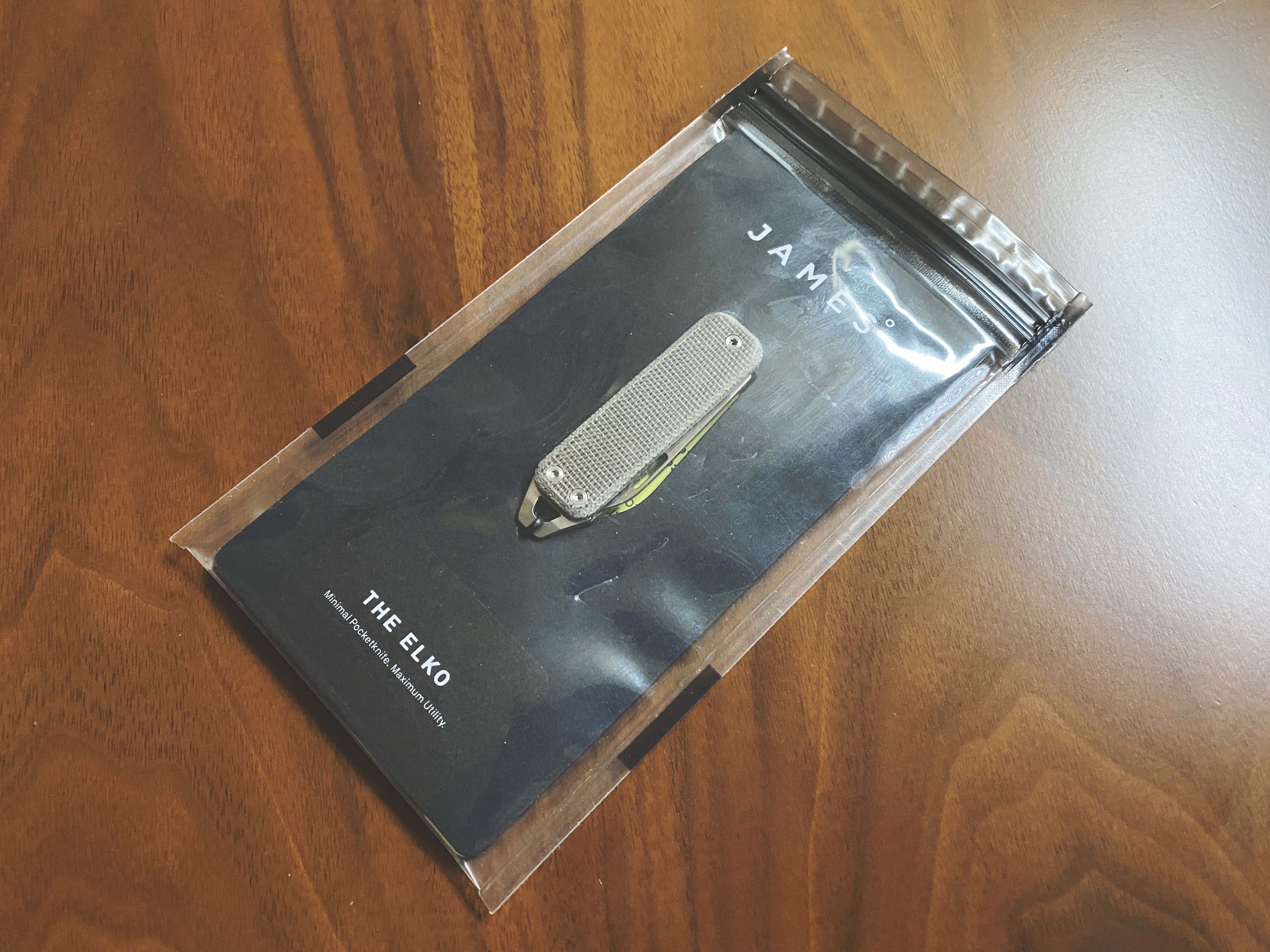
The James Brand: Elko
I love carrying Benchmade’s Proper series of knives, and I think they are among the best knives you can daily carry, but there are times when you want something smaller. Something lighter, just to have, just in case. But you don’t want that something to be crap.
-
Member Journal — 2/10/20
This week: my advice for managing when pissed; paying for gas got better; watch statements; kudos to News+; notification hell; my new pocket organizer; site design updates, and how I split the work between Mac and iPad; and lastly a note on Apple Watch face design.
You must be a member to read the rest of this article.
-
Member Journal — 2/3/2020
Yesterday, [I posted a response](https://brooksreview.net/2020/02/ipad-turns-10-people-lose-their-damn-mind/) to many of the complaints I have seen about the iPad. Today, I write about the things I see missing from the iPad and touch on how I am using it full time these days. Including what exactly I think we need on the software front. Read on…
You must be a member to read the rest of this article.
-
iPad Turns 10 — People Lose Their Damn Mind
I was going to post this as my member post for the week, but then I had an entirely different take for that. Instead, as most of you know, the iPad hit its ten year mark last week. Good for it, best computer ever made by a laughable margin. It seems though that many people are still split, and not of that same mindset. The word “disappointment” seems to be the best summarization of these elite tech bloggers.
Let’s get to it.
-
Member Journal — 1/27/2020
This week: what I carry in my briefcase and brief reasons why; phones and looking at them always; living on Swiss time with watches; 5G and remote work; VPNs.
You must be a member to read the rest of this article.
-
Tudor Black Bay GMT
I know when this started — it started with my grandfather passing away. Shortly after his passing my grandmother handed me his watch, and told me she wanted me to have it. A Rolex Datejust, not particularly old having a 2007 model year, but it was the only watch I had ever seen my grandfather wear (something my dad confirmed). From the day my grandfather got that watch, and onward, it was always on his wrist. And for the next year and a half I basically never took it off either.
But that watch is not the style I would pick, and truth be told at the time I really didn’t know what my style was or is. So I started trying to find a watch, because that Rolex was what caused me to ditch the Apple Watch and never look back. I started with a classic Steinhart and have been on a rampage ever since then.
-
Member Journal — 1/20/2020
This week: paper and pen, keyboards stress me out, someone thinks Apple is evil, my toilet paper supply, overrated work perks, toilet seats, and then we dive into the topic of bags.
You must be a member to read the rest of this article.
-
Member Journal — 1/13/20
This week: why apps like Excel fail to understand iPadOS, the $20 million test, why OmniFocus uses Stockholm’s Syndrome to keep users, and Black PR — it’s a thing.
You must be a member to read the rest of this article.
-
Member Journal — 1/6/2020
New year, short post. I’ll be back to full length next week, but for this week: News+ subscription, miscellany to kick of the year, bag talk, and the finally tally on the poll.
You must be a member to read the rest of this article.
-
The Smartphone Isn’t Evil, Chill
I saw an article recently, which shared a ‘new tip’ for dealing with distraction in the digital age. The tip: keep your phone near the entrance/exit to your domicile — and if you need to use your phone walk to it and stay in that area while you use it. This, they say, is a great way to keep yourself from being distracted.
It’s also incredibly stupid. There seems to be this idea that tech itself is addicting and that many are handcuffed to tech by way of their phone. And so often the advice, like that advice above, is along the lines of eschewing tech during some part of your life. It’s bad advice, it’s avoiding the hard questions and finding a scapegoat.
-
Member Journal — 12/30/19
Short one this week: a poll, a pen thought, and Shortcut Automation fails me.
You must be a member to read the rest of this article.