Category: Articles

  • The Hospital ‘Go’ Bag For Dads (to be)

    I don’t recall what I took in my bag the first time to the hospital when we had Sloane, but I did try to pay a little more attention the second time around. There’s tons of advice for what mothers should pack, but what about the dad? The first thing you need to know is that labor, for the father, is boring — very boring.

    With that in mind, here’s what I actually used this time around, what I needed, and what I packed but didn’t touch. I am not posting this to tell you what to pack, just to offer: “oh yeah” type stuff.

    What I Used

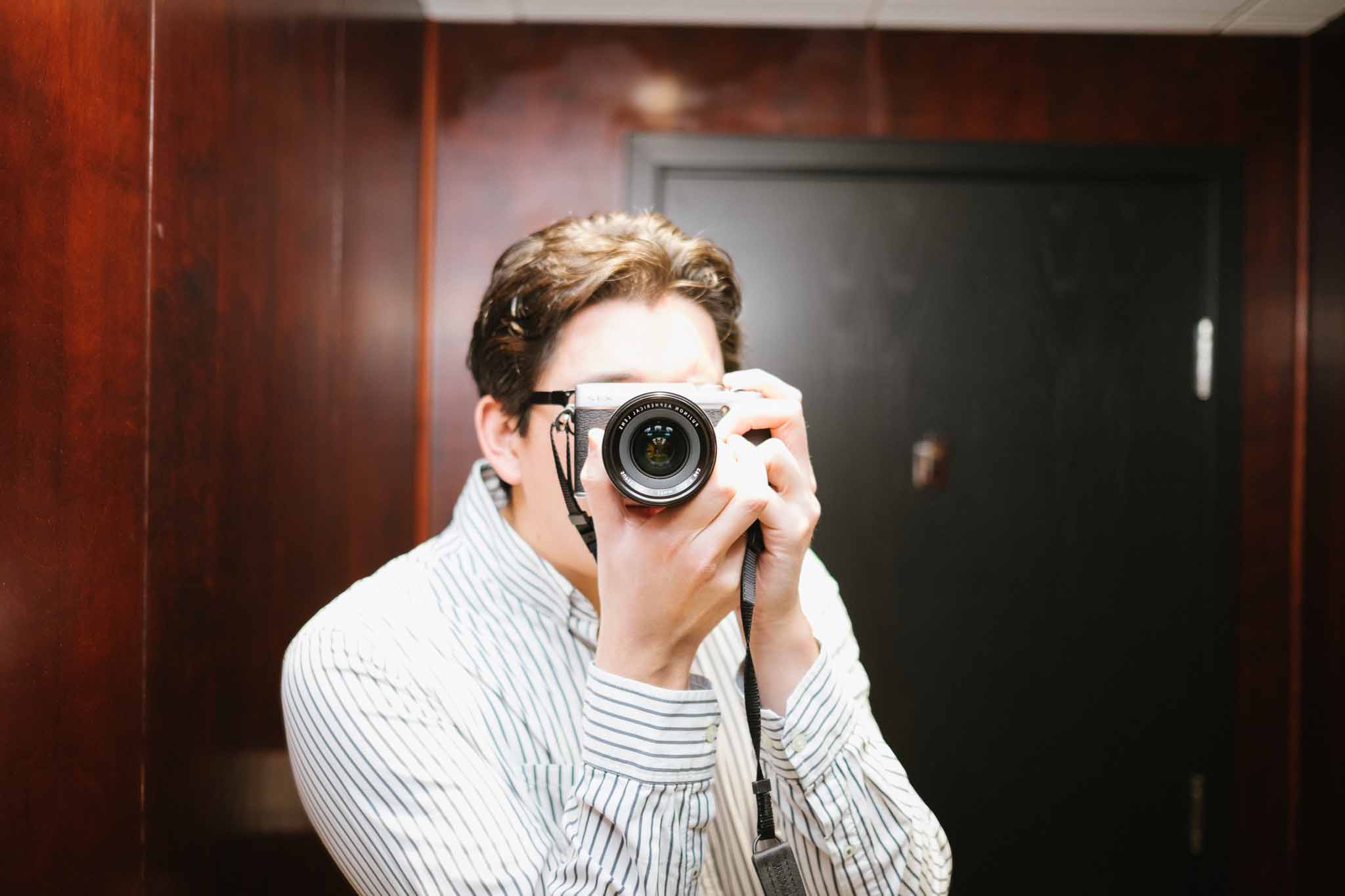
    • Camera: I packed the Fuji X-E2, and used the crap out of it.
    • 35 f/1.4 R Lens
    • 23 f/1.4 R Lens
    • Joby Gorillapod (I knew the hospital offered a great view of downtown, so I brought that for some long exposures.)
    • Pepsi: Yeah, you’ll want to pack some caffeine so you don’t have to go hunting for it.
    • iPad
    • iPhone
    • Chargers for the iOS devices.
    • Snacks: Granola bars, candy, anything that kept my hands clean and provided me with something to eat (i.e. no Doritos).
    • Tissues: Most hospitals will have them, but still, I have nasal issues.
    • Toothbrush & Toothpaste
    • Gum/Mints

    What I Needed, But Didn’t Have

    • Pen: I forgot one, and man is there a lot of things to fill out and sign.
    • More water: I only packed a liter, that wasn’t enough. It’s readily available, but the point is to bring it so that you can focus on the one in labor.
    • More tissues.
    • Slippers: my feet got really swollen and tired, but who wants to walk on hospital floors in their socks? Not me. Slippers would have been great. Really great.
    • CP Filter: for the long exposure. I meant to pack it, but forgot it.

    What I Packed, But Didn’t Use

    • Change of clothes. Had we been there longer I would have used them.
    • Battery-based chargers for my devices. Just didn’t need them.
    • 18-55 f/2.8-4 lens: too slow.
    • 27mm f/2.8: too slow
    • Full toiletries bag.
    • Cash: for some reason I remember needing it the last time, but I really didn’t need it at all this time.

    The first time I packed a backpack. This time I went with a small duffle bag: it was a bit too small. I’d advise packing something with extra room for the trip home (mine was stuffed to the brim from the get go).

  • Bad Weather Forecasting

    Snow forecasts in Washington state are pretty horrible. I actually am not sure they have ever accurately predicted snowfalls. Anyways, my favorite weather blogger, Cliff Mass posted a couple of articles on why forecasting is really hard sometimes. A bit weather-nerdy, but insightful.

    On the missed Washington snow forecasts:

    Weak disturbances that develop on fronts, or frontal waves, are relatively small scale, are often shallow, and are very difficult to forecast correctly even over land. But in this case, it is even harder because they are forming and evolving over the ocean where our ability to detect and describe small-scale structures are not as good. And the snow events this week have all been associated with such frontal waves and to forecast the snow correctly requires getting their position, size, and motion exactly correct…something current weather prediction technology is still not adequate to deal with.

    And on weather forecasting overall:

    There are at least three reasons:

    1. The description of the atmosphere, the starting point of the simulation called the initialization, is flawed.
    2. The physics of the model, how basic processes like radiation, clouds and precipitation are described, are flawed.
    3. The forecasting problem is not possible considering the inherent uncertainties of atmospheric flows and the tendency for errors to grow in time.

    Good reads.

  • On the Demise of Editorially

    While I was on leave Editorially announced that they were shutting down. As Pat mentioned, this is a service that was used heavily on this site, and was quickly becoming universal among the editor-freelancer workflows. It was and is the best of the lot of services like it.

    I was granted early access to the service, and loved the idea immediately, but I noted to the team at the time that it really should be a platform, not an app. In a longer post about the service I said:

    But most of all I want it to act more like a service — for example, the way Github does. Wouldn’t it be great if writing apps could integrate Editorially support like they do with Dropbox? You pull down the latest version and it is checked out until you are done editing — then it is pushed back up for others to edit and review changes. You could write in your favorite app, but have the full power of collaboration. In my mind that is where these tools need to be heading and I’d post with exclamation points upon this vision being realized.

    I think the web based nature is what killed Editorially, because I don’t know many writers who actually liked writing in Editorially. Almost everyone I knew wrote in their favorite app and copy and pasted in to Editorially — or just didn’t use Editorially because of that extra step.

    Editorially should have been a platform.

    We should have been able to open up Writer Pro, Byword, Ulysses, TextMate, whatever, and pulled down our documents, seen the changes, and edited the writing and sent it back to Editorially. The web view should have been there, but that should have been about as well used as Dropbox’s website is. In my opinion the focus of Editorially was too heavy on the app side, and not enough on the platform side.

    Users should have been finding out about the service because all the good writing apps were suddenly including support for it. It’s a real shame the service is shutting down, but here, at The Brooks Review, we have already received recommendations for six other like services and I still hold out hope I will get the platform like service I desire.

  • Things Parents Find Normal, Which Non-Parents Find Disgusting

    The three Ps:

    1. Being pooped on.
    2. Being peed on.
    3. Being puked on.

    Perfectly normal for parents, and after the first few times it stops bugging you.

  • On Evil

    I stirred up some controversy on App.net today, but among this was an incredibly salient point. Before I get to that, a little context.

    The conversation ((Or whatever you want to call it, I don’t care.)) was about Google and the topic of this conversation was “Evil”. You can now see why I was involved.

    Anna Tarkov chimed in to say:

    @duerig @benbrooks @jbouie I just want to chime in to say I agree. I think the way we use words is incredibly important. Language has meaning and we should be cautious. If Google is evil, if Microsoft is evil, etc, then “evil” ceases to mean anything.

    I knew this. I knew this. And yet I forgot it. We all seem to have forgotten it. Perhaps because Google famously says “Don’t be evil” is their motto we feel free to use evil when we disagree with that Google does. Even that motto doesn’t mean we should lower the debate, and devalue the meaning of ’evil’, by applying it to a technology company that has yet to, and may never actually do, something truly worth calling evil.

    Evil should be reserved for truly evil things, just as using the word “rape” should always be reserved for actual instances of rape. I’m glad to be reminded of this.

  • Confirm Your Email Subscription

    Guys, very sorry but a few hundred of you are getting legitimate email confirmations from me via aweber.com. This is because I need to send you a one time email pertaining to your account on this site.

    I am very sorry, and hoped to avoid this, but I cannot keep getting my email flagged as a spam sender so I needed to use a service.

  • Leica X2

    When Ben reviewed the Olympus OMD-EM5 he made a compelling case for buying previous generation cameras:

    A few months ago (maybe?) I told Shawn [Blanc]: “I am beginning to think the best/smartest/cheapest way to buy a new camera is to wait until it’s a year old.”

    As a slave to the full-price annual iPhone upgrade, the fact that one, two and three year old cameras are still perfectly usable and, in some cases, still the newest models offered by a manufacturer, makes me smile.

    I read some of the reviews of the OMD, thinking that a Micro 4/3 camera system and a couple of great lenses might be a perfect way for this amateur to step up into the ‘prosumer’ market. When we travel my Better Half wields a Canon 7D and a bunch of expensive ‘glass’, as she calls it. When I say, ‘she wields’, what I really mean is, ‘I carry the bag with all the lenses and accessories, while she takes the pictures’. Being relegated to the pack mule is no fun, so I decided it was time to get a camera of my own to use when we travel. She can carry her own glass.

    The last camera I bought was a Canon Digital IXUS75 (A.K.A PowerShot ELPH SD750). It packed a ridiculous 7.1 mega pixels and featured witchcraft-like ‘Face Detection’. I used it extensively on a trip I took to Australia in 2007. The pictures from that trip are predictably mediocre, exactly reflecting my ability as a photographer and the ‘consumer’ nature of the camera. Later that same year I bought the first iPhone.

    I haven’t even switched on the Canon since 2007 but I’ve taken thousands of photos with every model of iPhone released since.

    One of my big fears about the Micro 4/3 system was the interchangeable lenses. Having the option of changing the lens on a camera means that one thinks about changing the lens. Readers of this site can empathize: I imagined myself researching lenses, reading reviews of lenses, going to my local store and test driving lenses, and then inevitably buying lenses and attempting to use them.

    What if I just…took photos, instead of thinking about lenses.

    During my reading I stumbled on Steve Huff’s review of the Leica X2, in which he references its predecessor the Leica X1. Both cameras have 35mm-equivalent fixed lenses, very few ‘creature comforts’ (no video etc.) and apparently take wonderful photos.

    The more I thought about it the more I liked the idea of trying a Leica. One of my architectural heroes, Harry Seidler, carried a Leica 35mm film camera around with him at all times and was told by his photographer brother to, “only use Leica cameras and Kodachrome film, which is archival”. Seidler adhered to this advice and published the best architectural photographs he took over a 50 year span in an amazing book called, “The Grand Tour”, which is well worth a look if you love architecture, or photography.

    Leica enjoys something of a reputation for being either costly or expensive (and sometimes overpriced), depending on the opinion. If anybody reviewed the X2 (or any Leica) and claimed it to be excellent value, I couldn’t find it.

    Gavin Stoker, in his Leica X2 Review for Photographyblog.com:

    [The] gripe with Leicas largely appears to come down to the price tag, which sees them earmarked either as playthings of the rich or for successful pros only.

    Joshua Waller’s first impressions for ephotozine.com:

    From what we’ve seen so far, the X2 offers excellent image quality with low noise up to ISO3200, but without video and an optional electronic viewfinder it may only appeal to Leica fans, or those with a large wallet.

    Mike Lowe slams the X2 for its price in his review for pocket-lint.com:

    The Leica X2 is a bit like the Ferrari of the camera world. It looks gorgeous, has some enviable features, but it’s also extortionately expensive. […] This Leica is part statement piece, part camera. It’s lovable, but most will head straight for a “normal” compact and pocket the change.

    Price, among other things, is a sticking point in T3.com’s review of the X2:

    The Leica X2 is a bit of curio, to be honest. […] It comes across as slow, light on features, inflexible and expensive.

    My feet felt a little chilly at this point. The prevailing opinion appeared to be that the X2 is overpriced. What good could it possibly do a rank amateur photographer, looking to move past an iPhone, as their primary camera?

    A week later I sheepishly returned from my local camera store with a brand new X2, which raised some eyebrows at home: “You spent $2,000 on a compact? With a fixed lens? Are you mad?”

    Maybe I was mad. Compared to the simplicity of the iPhone I found full manual mode totally confusing. Those first days with the X2 were filled with uncertainty and hesitation as I constantly checked my focal distance on the display, double checked aperture and shutter speed and then wondered why I kept missing shots.

    Then I read an interesting post by photographer Alex Coghe about how he uses the Leica X2 for street photography. From here I delved into some traditional photography techniques for manual shooting, like the ‘sunny 16 rule’ and zone focusing.

    Zone focusing with the X2 is an incredibly satisfying way to take photographs. If you’re used to auto focus it will seem odd but it introduces a really interesting constraint: The focal range can be fixed at a known distance, which means no guessing about what the autofocus will lock on to and no way to alter your composition with a zoom lens. Simply fix your focal range (in feet or meters), estimate the distance to your subject, move your feet and concentrate on nailing the composition.

    After a few days of perseverance the uncertainty melted away and I found my ability to judge distance improved dramatically, allowing me to concentrate my attention on the subject and composition.

    I’ve now been shooting with the X2 for just over a month and have almost never used its auto focus, instead preferring zone focus with full manual ISO/shutter speed/aperture (occasionally I use Aperture priority, to prevent screwing up my zone focus when moving in and out of shadowy areas). I’ve taken almost a thousand shots with the X2. Most of them are truly horrible, unsalvageable messes but I’m putting it down to the learning curve. I have no intention of getting rid of this camera because the keepers are incredible.

    My biggest fear when buying the X2 was that it was going to be an over priced toy. Would I be a good enough photographer to to get anything out of it? I could have spent $1,000 less on a really decent M4/3 camera and a good prime lens. I could have bought a mid-range DSLR body. I could have bought a much less costly compact digital. But would I have used them? Would I have loved them?

    It is my genuine opinion that the X2 is worth every penny of its $2,000 price tag. Professional versus amateur be damned. This camera makes me want to take it along whenever I leave the house, so I do. This camera makes me want to learn more about the masters of photography, so I have. This camera makes me want to take photographs, and I am. In some ways, this camera is very much like the iPhone; a beautifully designed object that you want to have with you all the time that encourages you take photographs.

    If you take a lot of photos of fast moving subjects like children or dogs, or children playing with dogs, the X2 is probably unsuitable. If you need to take very wide angle photographs, or very close-up macro photographs, or use a tilt-shift lens to straighten out a tall building the X2 is probably unsuitable.

    If you’re looking for a portable, light-weight camera that reproduces color beautifully and removes a lot of the analysis paralysis inherent with interchangeable lens systems, the X2 is fantastic choice.

  • Baby Girl

    Adrienne Victoria Brooks is here.

    She’s here!

    7 lb 7.4 oz
    19.5 in

    Snowden strikes again.

  • Going In

    Going In

    Godspeed, my friend. We’re pullin’ for ya!

    Addendum: It just occurred to me — several hours after posting this and a while after posting the follow up — that those seeing this screenshot who don’t understand the context might be worried about Ben.1

    And you should. He and his lovely wife just had their second kid and that diaper bill is about to go through the roof.


    1. I’m a terrible blogger. 
  • Really Really Simple RSS Synchronization

    I’m working on an initialism for a new standard of RSS Synchronization. It’s really, really simple synchronization, so the working title is RRSRSSS.

    Before Google Reader shut down last year, before any of the alternatives had launched, I preemptively replaced it with Fever, hosted on a small Linode VPS.

    I never really used Fever to its full potential. The web interface can’t compete with Reeder and I could never really understand how the ‘hot’ list worked, or what one is supposed to do with ‘kindling’ and ‘sparks’. For me, Fever was a glorified RSS read-position synchronization service. I also wanted to add feeds to Fever from Reeder, but apparently that’s not possible due to the Fever API. I thought perhaps one of the new Google Reader replacement services would be worth a try.

    I tried to sign up for Feed Wrangler, but the service was unavailable, errors littered the screen every time I tried to ‘Join for $19/year.’

    My confidence in RSS synchronization services was at an all time low. Google Reader was gone, Fever was costly to run, had many more features than I needed and Feed Wrangler did not inspire confidence.

    It was time to put a little more “really” in Really Simple Syndication.

    I added a new manual account to Reeder on my iPhone and then added four (4) RSS feeds to that account. Then I refreshed the feeds, checked that I’d read all the current articles and exported that list via email to my iPad where I imported it to Reeder.

    I read my RSS feeds once per day. I estimate that on average there are ten things to read each day. I have since added two new feeds to my list, making a total of six (6), feeds. After adding a new subscription, I simply ‘share’ the accounts via email from Reeder on one device, then import them on the other.

    Because the volume of things to read is low I have no trouble remembering what I’ve read between devices. There’s no need to automatically synchronize anything.

    If you find yourself overwhelmed by your RSS subscriptions, or unread count, or if you’d like to spend less time pruning your RSS inbox and more time doing something productive, I urge you to try this experiment for a month: Export your current RSS subscriptions as a backup, then delete that account from your RSS readers (all of them). Add a new manually refreshed account to your RSS reader, then add up to five (5) feeds to that account. Think carefully about your choices. Select feeds that provide quality material.

    Try Really Really Simple RSS Syndication (RRSRSSS) today. Cut the junk. Remove the clickbait. Spend between thirty minutes and one hour, once per day, reading your RSS feeds, then spend the remainder of your time doing something useful, like finishing that novel you started writing in college, or finally learning to water ski.

  • Does syntax highlighting actually help?

    There are as many text editors as there are different flavors of ice cream, or at least it seems that way. No matter what type of writer, thinker, or creative you are, there’s a text editor slanted to your unique process and style. When a new text editor comes to market, it usually has a main feature that attempts to set it apart from the pack, be it easy entry in a distraction-free environment, Markdown formatting keys, or multiple ways to export your words to other platforms.

    Writer Pro attempts to compartmentalize the writing process into four different modes: Note, Write, Edit, and Read. This is what I think the main selling feature of Writer Pro is. It’s innovative, interesting, and helpful.

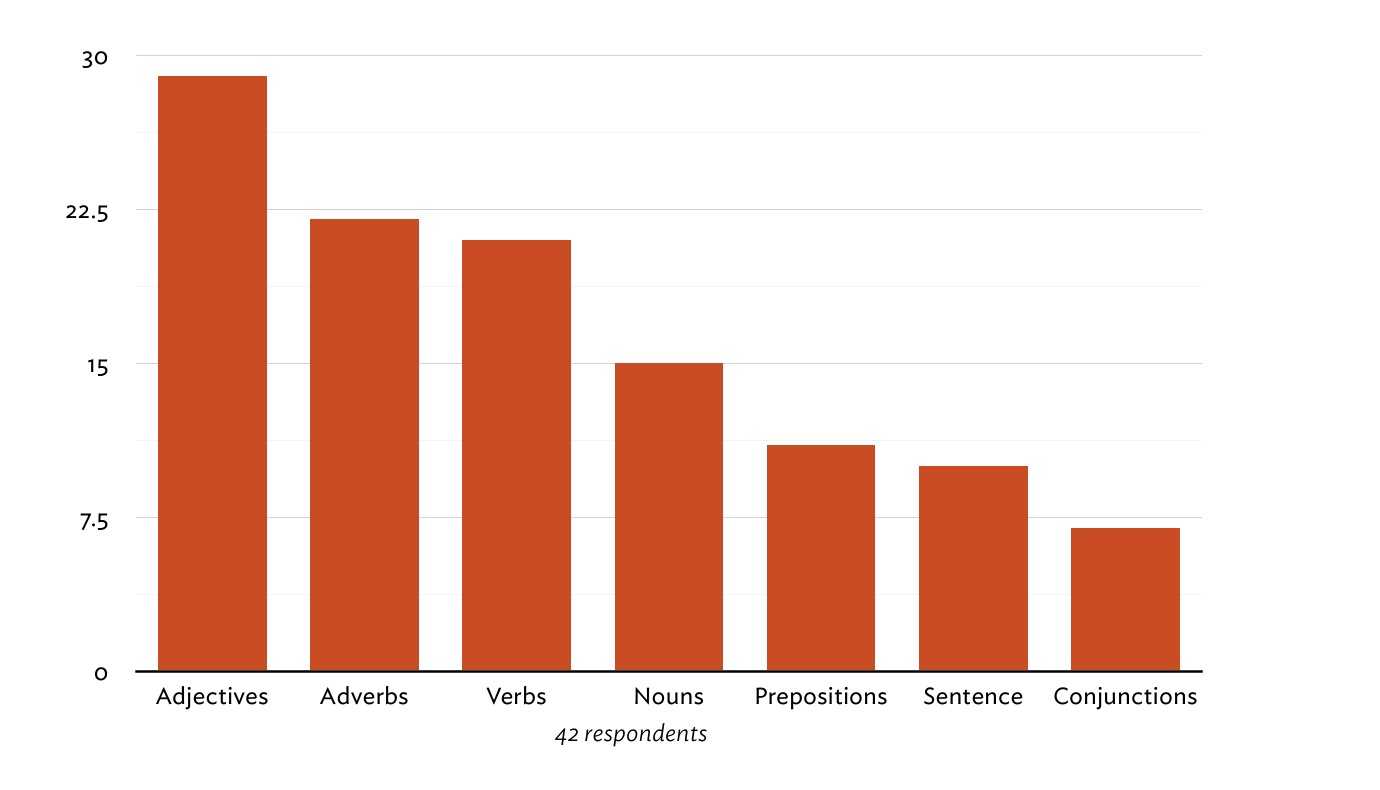
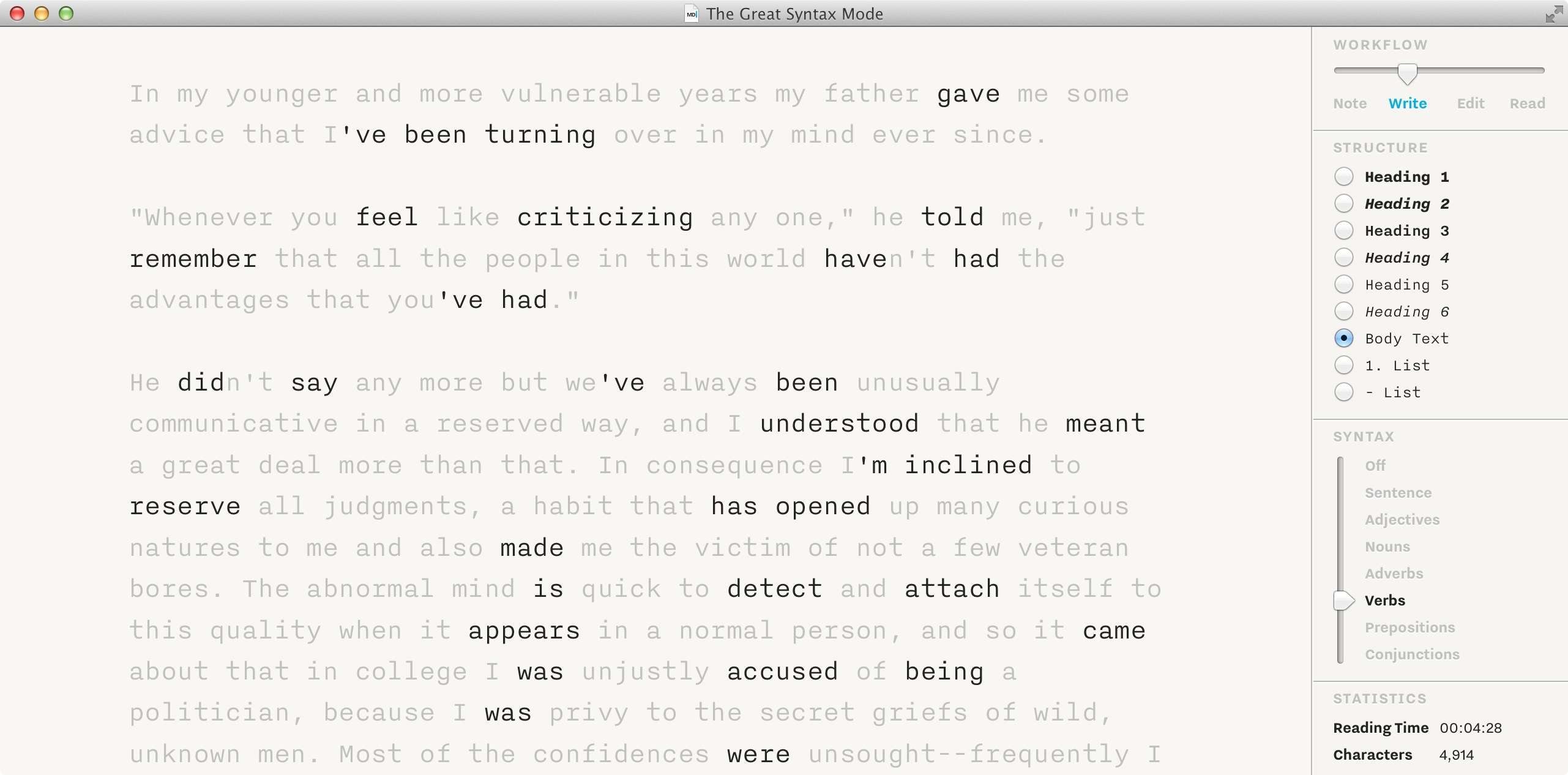
    iA positions Syntax Control as another selling feature of Writer Pro. Syntax Control allows you to highlight words based on parts of speech. There are options to isolate nouns, verbs, adjectives, adverbs, prepositions, conjunctions, and sentences. It’s an interesting feature that has drawn a lot of feedback for multiple reasons. Apart from the patents and licensing issues, what’s great about this feature? And, more importantly, does it improve your writing skills? Is it better than another text editor that doesn’t have this feature? That’s what we want to find out.

    This article focuses on the Syntax Control feature of Writer Pro, but there is a lot more to this app besides this feature. For more comprehensive reviews, we recommend these:

    Like I said, one of the prominent features of the app was the four writing modes. I’m a big fan of the writing modes and really enjoy using them. Syntax Control is another feature that is new to this app, and if you’re familiar with iA’s previous writing app, Writer, then you’ll recognize that this is something of a large iteration on Focus Mode, which allows you to focus on one sentence at a time.

    Before we dive into what I think, here’s what a few people said about how they use the Syntax Control feature on App.net.

    “It’s been helpful to show me how repetitive I can be.” – @noahread

    “Have been and it’s rough goings.” – @smarterbits

    “I love the Syntax Control feature. I never realized what a slave to adverbs I am! I believe the app has significantly improved my writing. (See, there I go again with the adverbs!!)” – @jimhull

    We also put together a quick poll to ask the readers what they think about the feature.

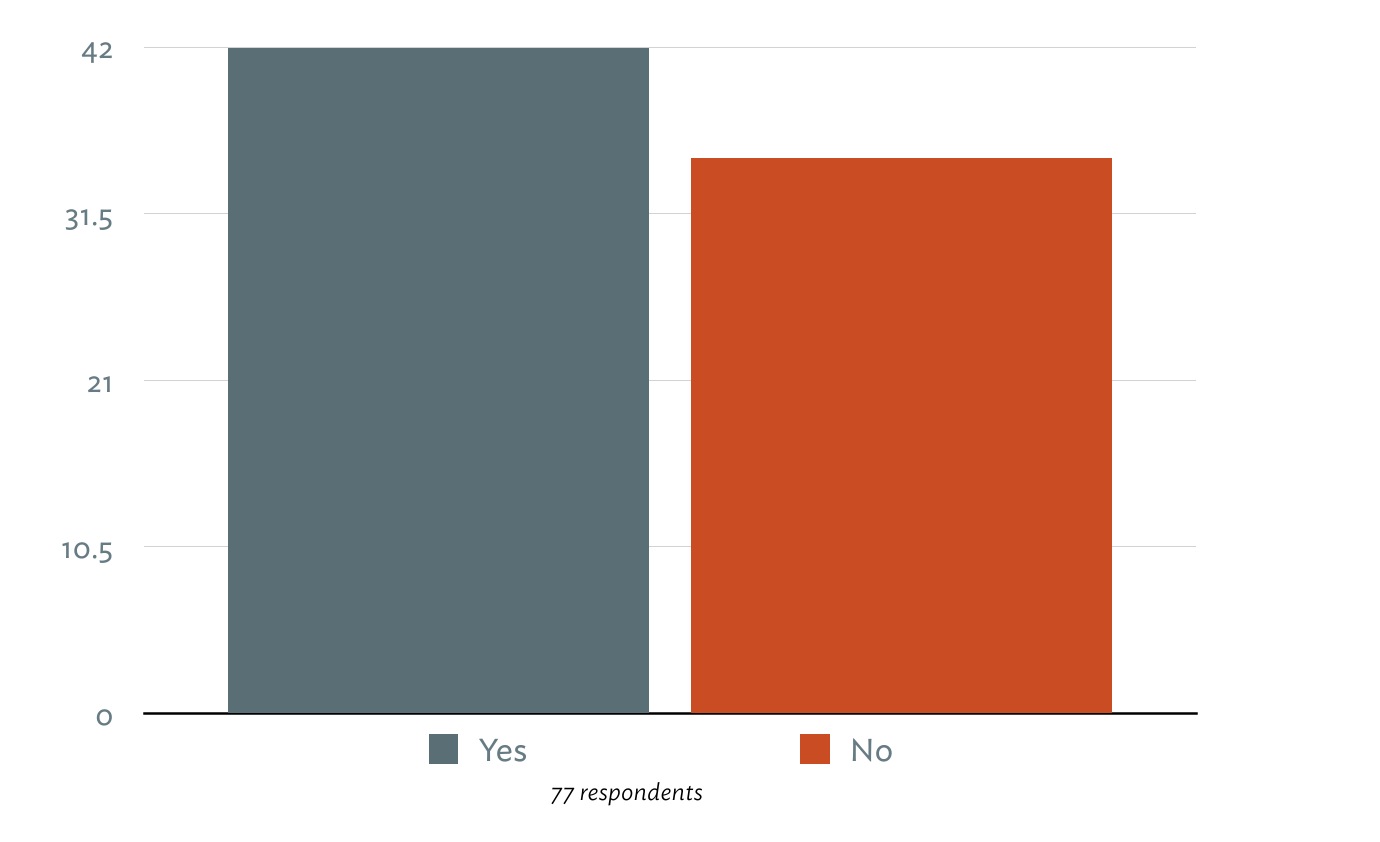
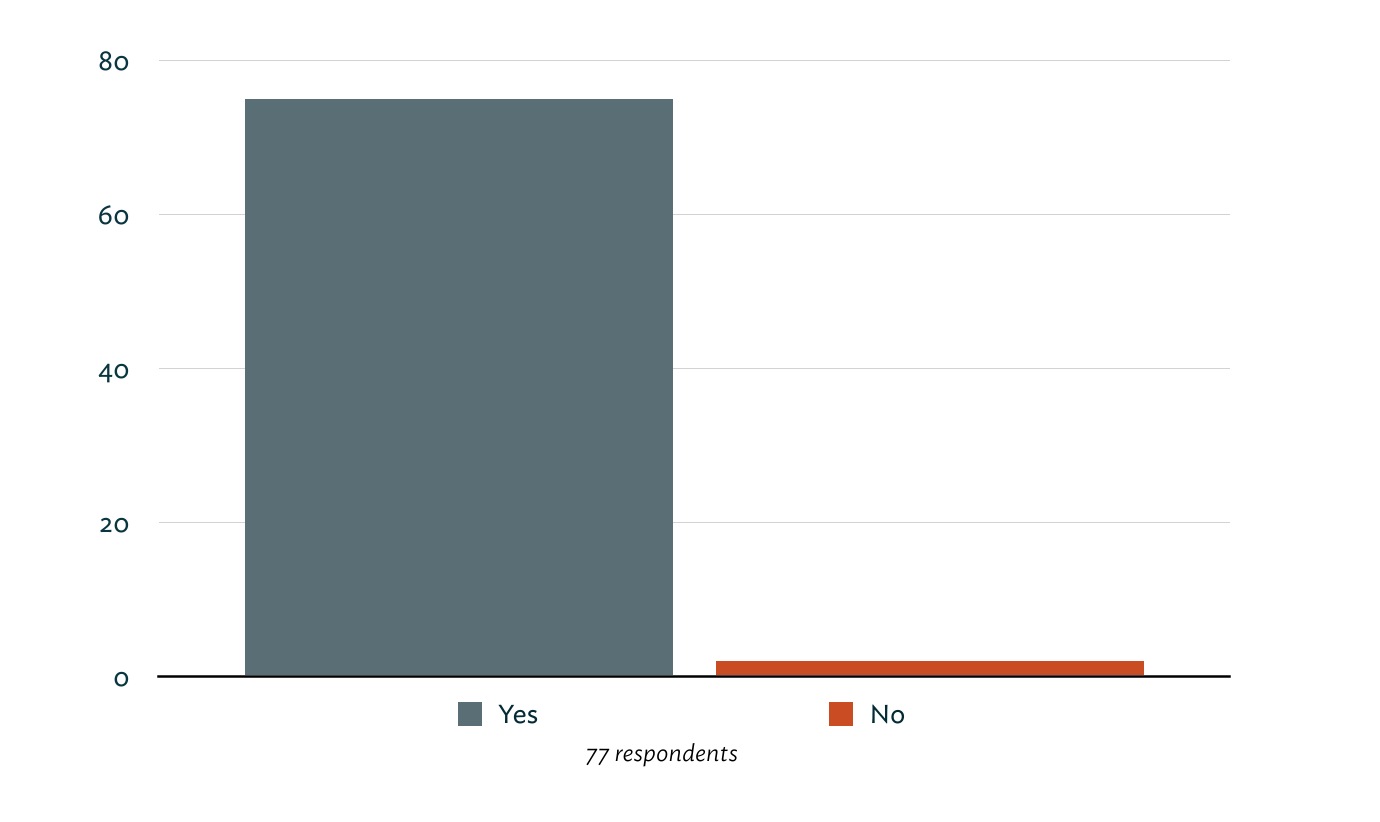
    #####Do you think the Syntax Control feature helps you improve your writing?
    helpful

    #####Which Syntax Control mode do you find most helpful when editing?
    speech parts

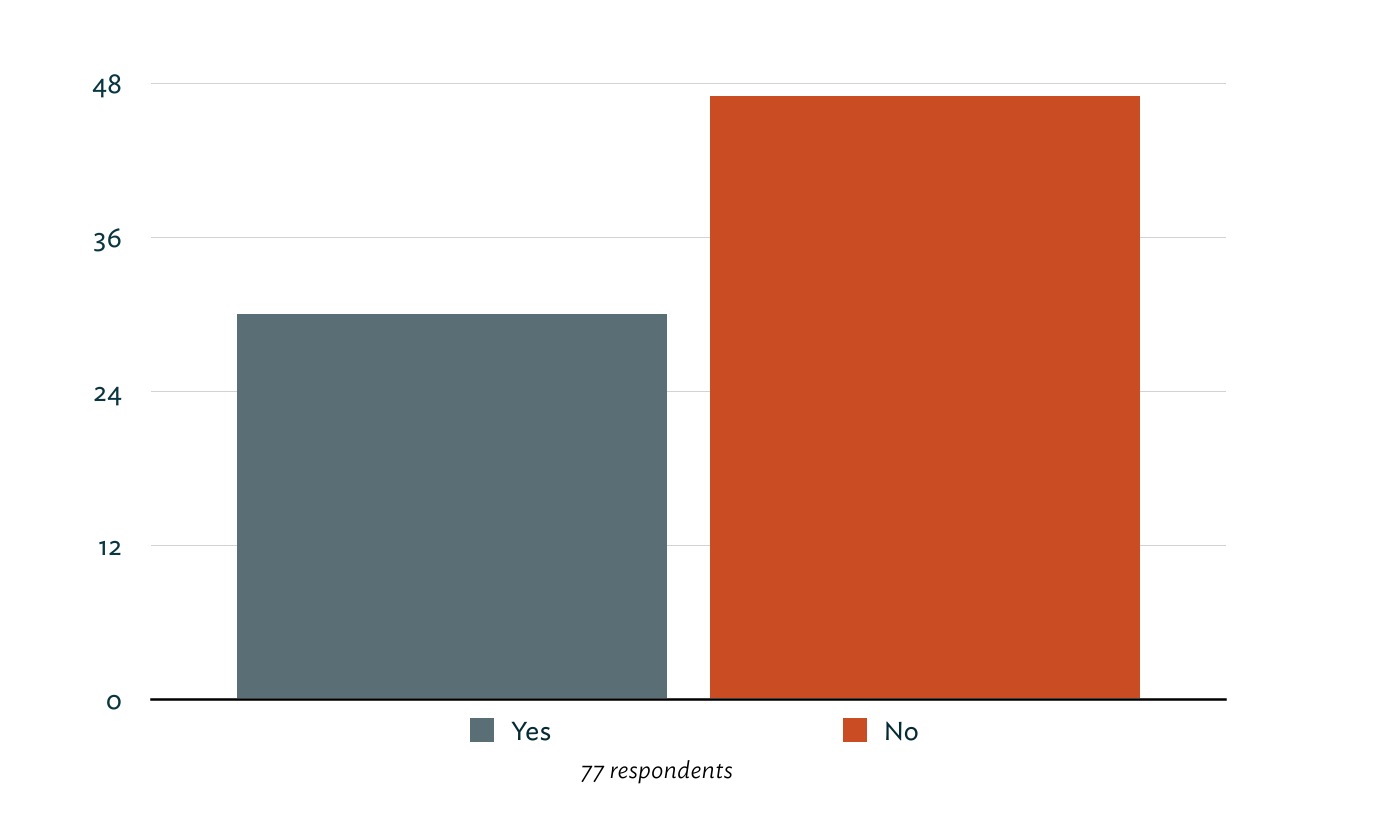
    #####Was Writer Pro worth the purchase price?
    worth it?

    #####Did you own the original iA Writer app?
    iA Writer

    Roughly 55% of respondents said they think the Syntax Control feature improves their writing. The most common version of their reasoning was, “It points out repetition and weak adjectives and adverbs.”

    “Syntax Mode is my first editor. It helps me find obvious errors in my copy, and allows me to single out unwanted repetitions keeping my text tight.” – Ashish

    “Just a neat way to show me patterns in my writing.” – Shawn Blanc

    “Is it a must-have, revolutionary feature? No, but short of having my own editor, it’s a convenient way to ferret out canned verbs.” – Jared Sinclair

    “I have the bad habit of using too many words in my sentences. Syntax control helps me analyse each part of a sentence and trim out what’s not required.” – Ian Betteridge

    While this is an excellent tool in certain situations, I agree with Jared in that it’s hardly a must-have feature in writing apps.

    So, is this tool useful? Yes, it can show you words that you repeat often. It can show you all of the adverbs, adjectives, nouns, verbs and sentences in your writing. What it can’t do is tell you whether or not your usage of these highlighted words is good or bad. Only you, your editor, and your audience can determine that.

    On the other hand, this is an extremely useful tool in the context of teaching and learning English. Remember the years in grade school and middle school (and high school?) you spent learning and practicing the parts of speech in written word. It’s not an overly simplified process. When I was in school, we had to diagram sentences as an exercise to learn the parts of speech and how they all work together. I hated diagramming sentences, but in a way it was peaceful. Every word had a place. I tended to look at is as a puzzle that needed to be solved.

    Syntax Mode

    I really can’t say if the practice of diagramming sentences made me a better writer, but I do know that it taught me the underlying structure of our language and how to use it correctly (and incorrectly). Looking back at my primary learning years, I can see how a feature that points out certain parts of speech would be invaluable. I can also see how this would be an incredibly helpful tool when learning English.

    Greg Pierce, developer behind Agile Tortoise and apps like Drafts and Phraseology, took a few minutes to answer some questions related to this topic. Greg’s app, Phraseology, has a similar functionality to Syntax Control that allows users to see the itemized usage of different parts of speech. He offered to share some of the feedback he’s received since launching the app two years ago.

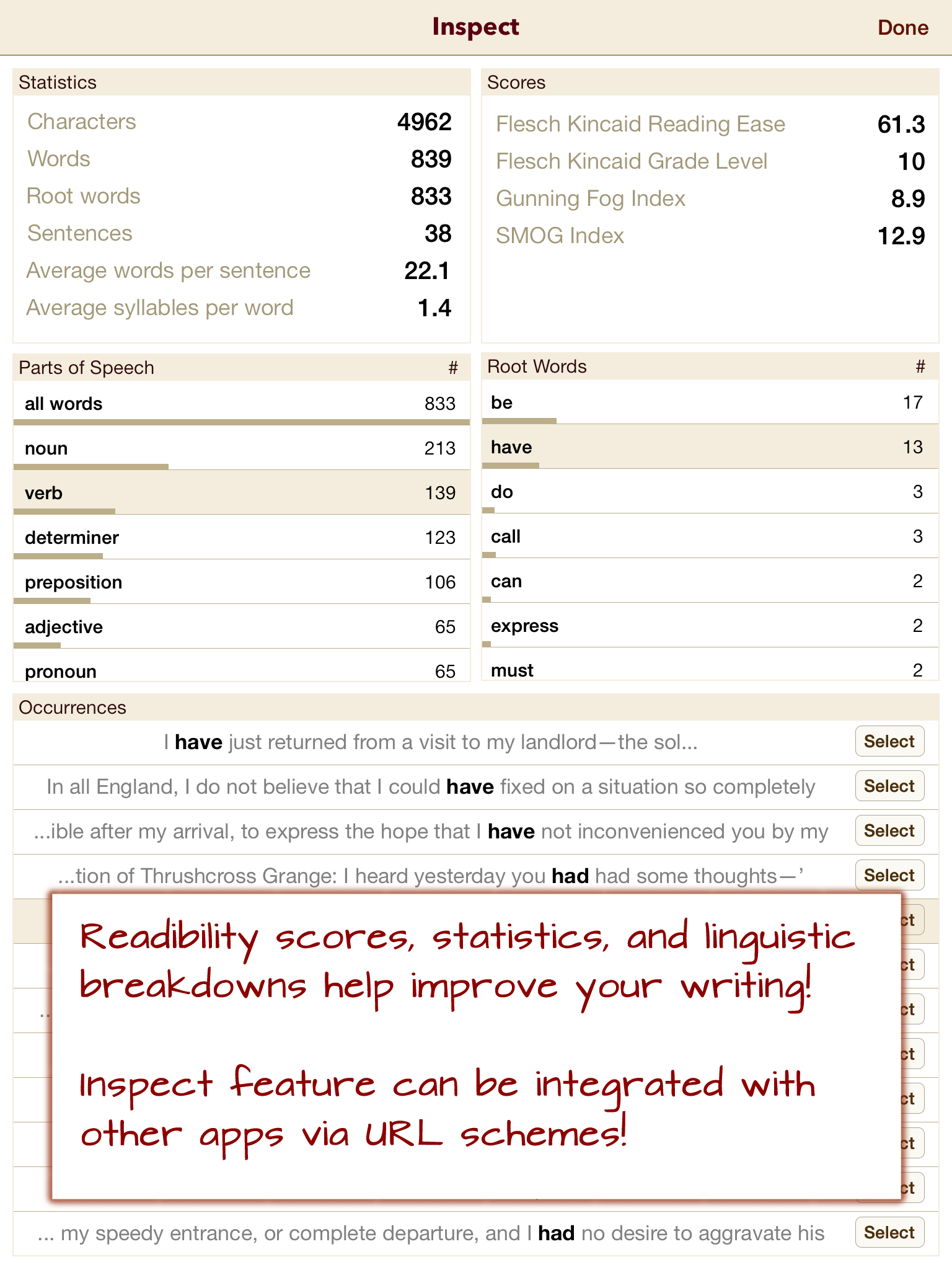
    The Inspect view has been what has drawn educators to Phraseology – it’s more helpful in repetition, because you get summaries by occurrence count, but provides other stats that are a larger draw. For example, I had a middle school teacher tell me how much her kids loved the “Grade Level” readability analysis because it gave them something concrete to get a feel for how well they were writing.

    If you’re not familiar with the app, the Inspect view mentioned above is a view that breaks down the parts of speech in the document and provides some useful statistics.

    Phraseology screenshot

    Phraseology takes a more analytic approach toward the syntax data. As Greg mentioned, this information can be invaluable to educators and students.

    Regarding more “mature” ((In the case of this article, let’s assume that “mature” writers are educated individuals with a desire to publish what they write in some form.)) writers, Greg echoed some of the same feedback we got from the polls. I asked Greg this question: “Can you think of any scenarios (or have you gotten feedback) where mature writers request or need speech parts analysis or highlighting?”

    No. Naturally, it would depend on the type of writer and how they go about writing. […] The one exception to that is writers who have (or editors who are particular about) certain ticks in writing – particularly excessive use of adverbs.

    Syntax Control is useful insofar as you can see the different parts of speech in your writing. It cannot tell you what’s wrong or what you could do better. It’s merely a looking-glass. In most writing scenarios, I don’t want to see individual word usage. If I want to really focus, I want to limit my view to one sentence or one paragraph at a time.

    Isolating certain words based on their syntax is an impressive feature, but there are other apps that take this a step or two further by offering more analysis. Phraseology can give you a grade level, which is a more human, or tangible, metric for your writing.

    A personal favorite of mine is 750words, a simple site that lets users write down their thoughts and achieve a daily goal of 750 words. This idea comes from a practice called Morning Pages. Basically, sit down and write 3 pages (roughly 750 words) before you start your day. It’s a way of clearing your mind and preparing for the day. I bring this site up because once you’ve finished writing, it offers up all kinds of data about your writing, such as typing speed, how often you were distracted, common emotional themes and concerns, mindset, and will even assign an MPAA rating to your writing (ie. PG, PG-13, R).

    Maybe this kind of data isn’t interesting to you, but it’s still a unique and impressive way of looking at words and presenting meaning. Yes, this approach does add a good amount of subjectivity to your words, but they’re taking this syntax analysis approach a step further and trying to give you something useful in the end.

    Another example of taking this syntax analysis to a more useful level is what Dr. Yejin Choi of Stony Brook University and her department are doing. Dr. Choi is the co-author of a paper titled Success with Style: Using Writing Style to Predict the Success of Novels.

    As the title of the paper implies, the Computer Science department at Stony Brook have created an algorithm that can predict whether or not a piece of fiction will succeed.

    “We examined the quantitative connection between writing style and successful literature. Based on novels across different genres, we investigated the predictive power of statistical stylometry in discriminating successful literary works, and identified the stylistic elements that are more prominent in successful writings.”

    Basically, they’re looking at the syntax of the literary work and comparing it to other literary works that have proven successful in the past. This algorithm is meant to help publishers select authors from the massive stacks of incoming novel pitches they receive daily. This type of work starts at the same place as Syntax Control: looking at the parts of speech. From there, they determine what qualifies as “good” writing, and go from there.

    This is fascinating work, and something I hope more developers try to achieve. Instead of having a syntax highlighter in your text editor, you could have access to a decent writing coach. Instead of “this is an adjective,” you could get feedback like, “This sentence is too passive.”

    A feature like Syntax Highlighting is going to appeal to some people and not matter to others. For example, of the dozens of responses we got from our survey, here’s a small handful that I think do a good job of representing the overall tone:

    “It’s a gimmick that represents a complete misunderstanding of what the actual pain points of writing are.” – Baldur in UK

    “It’s silly, gimmicky, and unnecessary. It has not improved or assisted my writing in any way. I no longer use Writer Pro for my writing.” – Andrew in California

    “You don’t have to be a professional writer to use it. I’m a student and this helps a lot for all the written work we have to do.” – Zeb in Switzerland

    Who might love the Syntax Control feature?

    The Syntax Control feature offers some great information for educators and students who are interested in improving and learning about parts of speech. It can also appeal to writers and editors who have certain “blind-spots” in their writing that they want to improve or catch.

    Why I don’t love the Syntax Control feature.

    On a personal level, I don’t see any benefit from using this functionality. I like Writer Pro because of the writing environment, not because it can show me my parts of speech. It’s an empty feature for me — but that’s me and my writing style.

    By writing style, I mean the way I compose and edit my words. I don’t think to myself when I’m writing, “Golly, I used way too many adverbs there.” I’m focused on the ideas when I’m writing. Features like this are distractions from the important thing.

    So what if you use “very” twice in the same article? Here’s the question you have to ask yourself. Who are you writing for? If you’re writing for a teacher or a boss, then follow the guidelines they’ve given you. If you’re writing for yourself, write however you please. If you want to improve your writing and have identified an unconscious pattern of using lots of insert speech part here in your writing, then this app could significantly help you in the editing stage of your writing.

    I don’t want to downplay the effort and time that went into creating this feature. It’s lightning fast and accurate. That’s amazing. Seriously. Just don’t think that it will make your words magically better. That’s all on you. This app might help you with that goal.

    Do you really want to improve your writing? Share it with a friend or colleague and ask for real feedback. When you give it to them, name one or two things that you don’t like about it. That gives them an open invitation to give you real critique, not the polite “this is awesome!” version.

    When Ben asked me to write this piece, I felt that my mind was completely made up. I didn’t see any value in the Syntax Control functionality. Honestly, I was surprised when the polls started coming in. 55% of you said the feature helps improve your writing. I didn’t understand. After reading through all the comments, I realized that this is a deeply subjective tool that only appeals to some writers and thinkers. For some people, this is a great feature that will get a lot of use. For other writers, it will never be touched. From reading all the feedback, my viewpoint was tempered a bit, but I still believe that this feature is mostly a gimmick that is marketed at magically making you a better writer. This simply isn’t true.

    Based on the feedback in the survey, my opinions will make some of you angry. That’s fine. I’m very happy that you have found an app that you enjoy and that adds value to your writing. Do us both a favor and go prove me wrong. When it comes to someone improving their writing skills, I’d love to be proven wrong and have my face rubbed in the mud. I’m just one guy, and ultimately we all have to figure this out for ourselves. There’s no universal answer. Find what works for you, then do it.

    My hunch is that you’ll know if this feature is right for you without even trying it. You’ll just know.

    As for the other features and the price, good luck with that. Not recommended. I recommend checking out Phraseology for this kind of syntax highlighting functionality. Excellent writing apps are plentiful in the App Store. I honestly prefer iA Writer over Writer Pro.

  • Help Keep the Reviews Coming, A Plan

    Here’s my proposal (and it’s a compromise, I know): if you have a new thing you want to buy, and you let me use it first, I’ll pay you 5-10% of the price of that item.

    ## Why

    Writing reviews is my favorite part of this site, and writing these reviews in general is something that I really enjoy doing day-to-day. However, buying items to review is also the most expensive part.

    I can, and do, sell items off after I review them, but that’s not an easy process and often the sale doesn’t get made. I end up having a lot of gear left over, or sold off far too cheaply just so I can move on to the “next thing”. I could stop but it’s my favorite part of the site.

    In one way then, this idea is a pre-sale of sorts. I buy something I otherwise wouldn’t because I know that item will get sold for a set price once I am done. In thanks for supporting this site, you get a _small_ discount on an item you want to buy. Reviews are going to start dwindling to smaller/cheaper items on this site unless I get more help financially, that’s the honest truth, and something that I just cannot get around unless I go back to ads — a non-starter.

    Any help you can give is wildly appreciated so here’s the idea.

    ## Idea

    – You contact me about an item you are going to buy — regardless of what I say about the item. If it is something I want to review, then we continue down this bullet point road.
    – We have a quick and easy contract saying that you will buy the item from me on X date and for Y price. This is assurance. And the contract will also stipulate as to damage, etc, from my usage of the item. (In other words, if I break it, I keep it.)
    – We discuss which options/colors/size of the item you want. *I* buy the item with my money (not yours) from an agreed retailer (Amazon, Apple, etc.).
    – I will use the item (taking good care) for 1–3 weeks (what ever the time period agreed to before hand, but typically at least 10 days is good for most items).
    – Upon publishing my review I will package up the item as good as new and ship it to you once you send along the agreed amount. (PayPal, Stripe, meet up in the Seattle area.)
    – Once you receive the item, and confirm it is in the expected condition, our transaction is done.
    – If the item isn’t acceptable, you send it back to me and get a full refund (less shipping on your side). Alternatively we can discuss a partial refund and you keeping the item.

    ### Another Way To Help

    The best way to help me out is to become a member. It may seem like a small amount of money, but it adds up. Other than that, feel free to get in touch if you think you can help in other ways.

  • The Fujifilm X-E2

    After using the Olympus OM-D E-M5 for a month I was pretty sure I had no need for my full-frame Canon gear any longer. That gear was outdated and to upgrade it (to a modern body) would be costly, and the benefit of doing so would be low because it would still be a bulky kit. At the beginning of January I decided to sell all my Canon gear and buy at least one more micro four-thirds lens — having that be my only camera system.

    Except that’s not _quite_ what happened.

    Instead I had several deals fall through while trying to sell my gear and I just wanted it gone so I could move on. I walked into my local camera shop to sell it, knowing I wouldn’t get top dollar, and walked out with a trade. The only doubt in my mind about this switch was that *perhaps* micro four-thirds wasn’t the system for me. Perhaps Fujifilm was a better choice for _me_, or even, overall.

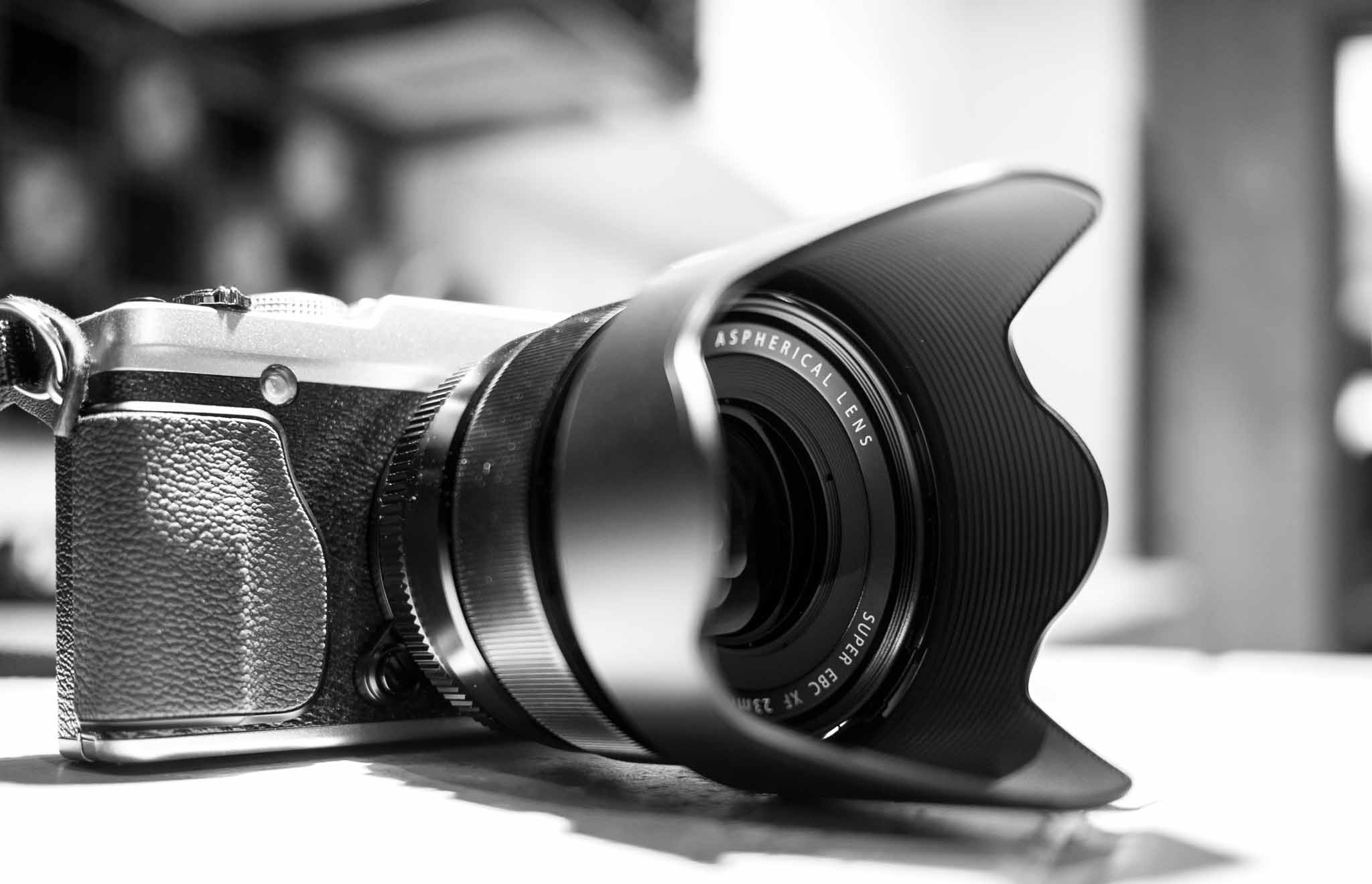
    So I walked out of the shop without my Canon gear, carrying a [Fujifilm X-E2](http://www.amazon.com/exec/obidos/ASIN/B00FPKDSGS/ref=nosim&tag=brooksreview-20) with Fujinon 23mm f/1.4 lens. ((I wanted the 35mm lens — alas they did not have one in stock and the 23mm is generally said to be a better quality, so I was fine with that (it’s also more expensive).)) I knew I could sell the Fujifilm gear right away, for a good price, but I had to know if I was missing out.

    On first use of the X-E2 it becomes apparent just how much bigger it is than the micro four-thirds stuff. Camerasize.com shows that (at least in part) that’s not a wholly true statement. While the X-E2 is larger than the E-M5, that doesn’t tell the entire story.

    Here are some comparisons of the X-E2 to other popular micro four-thirds cameras, from Camerasize.com:

    – [X-E2 v. E-M5](http://camerasize.com/compare/#289,493): The E-M5 is 6% narrower, 20% taller, and 13% thicker and also weighs 14% more.
    – [X-E2 v. E-M1](http://camerasize.com/compare/#482,493): E-M1 is 1% wider, 70% thicker, 25% taller, while also weighing 42% more. Wow.
    – [X-E2 v. GX7](http://camerasize.com/compare/#472,493): GX7 is 5% narrower and 6% shorter, but the GX7 47% thicker and 15% heavier.
    – [X-E2 v. E-P5](http://camerasize.com/compare/#459,493): E-P5 is 5% narrower, 8% shorter, the same thickness, and weighs 20% more.

    It’s astounding how well the X-E2 compares to other high end micro four-thirds cameras even though the camera looks like it is much bigger. Here are some pictures I took with the X-E2 and the 27mm pancake lens mounted, compared to the E-M5 with 20mm pancake lens:
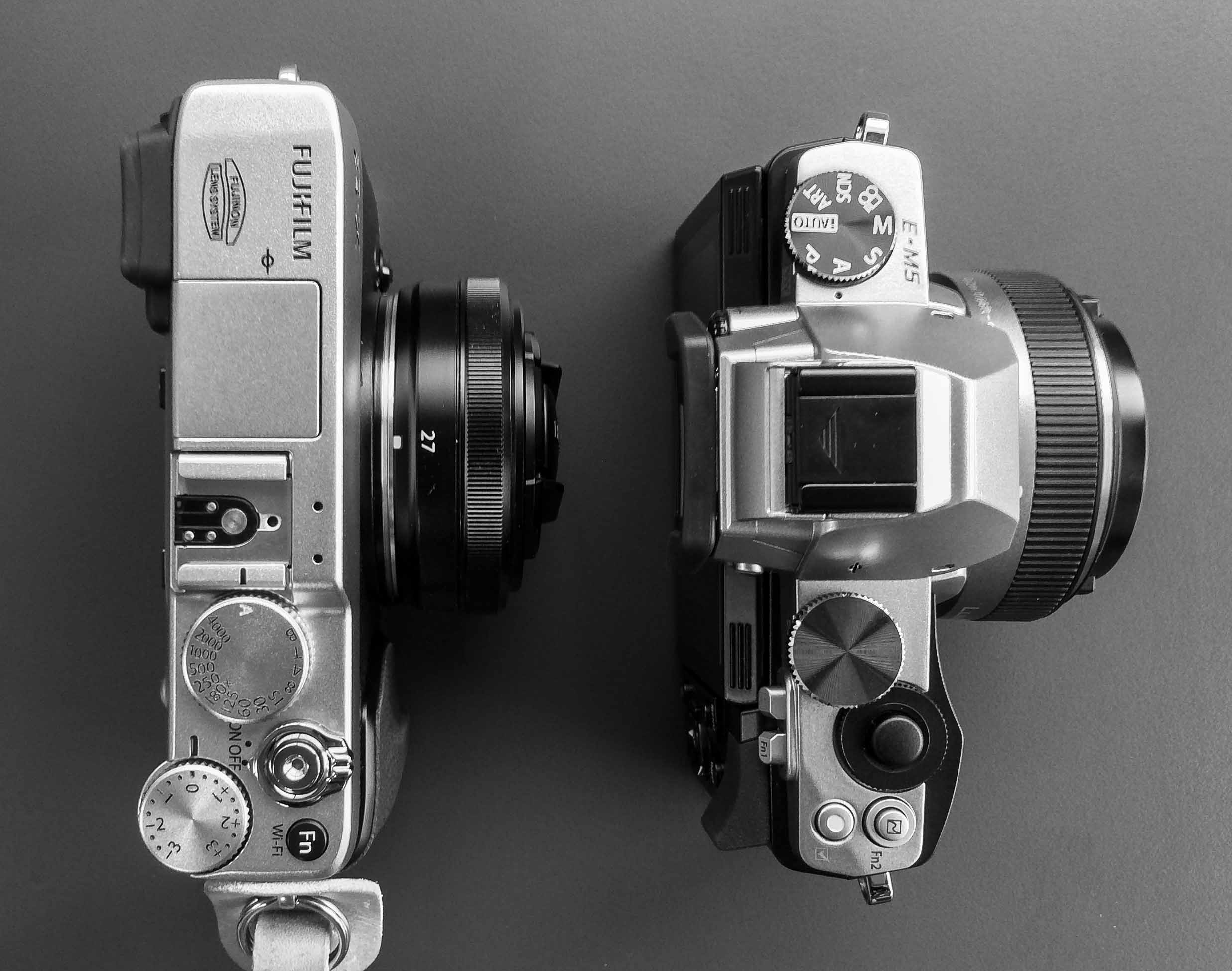
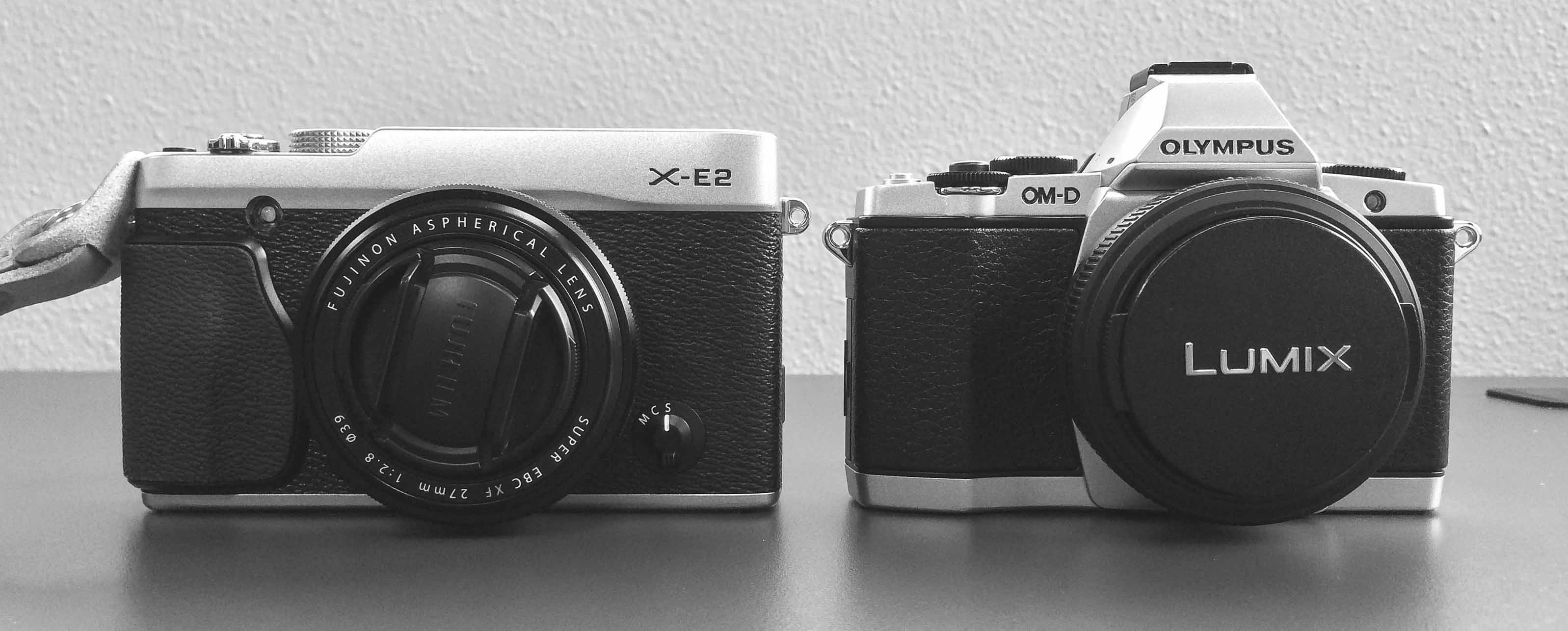
    The first thing to note about Fujifilm cameras is that in general the lenses are bigger, but the Fujifilm bodies are lighter than many other cameras. In other words, the body is only a bit bigger, but much lighter, however the lenses are bigger _and_ heavier.

    *As of this writing I own the 27mm f/2.8 pancake lens with the 23mm and have rented the 35mm f/1.4 and 18-55 f/2.8-4 OIS lenses.*

    ## The Sensor

    Unlike Sony, Fujifilm isn’t using full-frame sensors, but unlike micro four-thirds, Fujifilm isn’t using tiny 2x sensors. Fujifilm is using the well known APS-C sized sensor with a 1.5x crop factor (m43 is 2x crop, full frame is 0x crop). Fujifilm calls their latest line of sensors the X-Trans II, which lacks a low-pass filter but is still a 16 megapixel system like many micro four-thirds cameras.

    Theoretically the X-E2 should produce better images. In my testing the quality isn’t shockingly better, but the noise control is noticeably better.

    [Here’s what Fujifilm marketing says](http://fujifilm-x.com/development_story/en/processor/) about the removal of the low-pass filter:

    > To maximize the resolution capable by the lens, the function of reducing moire and false colors previously handled by the low pass filter were realized by pixel distribution and signal processing.
    > By using a structure without a low pass filter, high image quality surpassing those of single lens reflex cameras with 35mm full frame sensors was realized. This achievement was highly praised by many of our customers.

    Like I said, it’s not immediately noticeable to my eye. [Shutterbug has a good overview](http://www.shutterbug.com/content/low-pass-or-not-low-pass-optical-low-pass-filters-debate-has-been-ongoing-more-decade) on the issue of using low-pass filters, as does DPReview in their [X-Pro 1 review](http://www.dpreview.com/reviews/fujifilm-x-pro1/18).

    On the practical side I have found that you can shoot from ISO 200-6400 on the X-E2 and not worry about the noise level — and I am truly not trying to over state this fact. It’s astonishingly good at noise control.

    With the Fujifilm sensor there are three other benefits that you don’t get with other sensors:

    1. Shallower depth of field than micro four-thirds sensors. Not as much as full-frame sensors, but it’s more than enough to get you into all kinds of focusing trouble.
    2. Fujifilm color. This is what these cameras are known for — even without the JPEG film simulations — the color with the Fujifilm camera is distinct. I love it. People that shoot Fujifilm typically do so because they love the color rendering, but it’s not to everyone’s taste. In the reviews I have seen people either love it or hate it.
    3. A very low-noise sensor. [I read that it is hard to tell the noise difference](http://www.photographyblog.com/reviews/fujifilm_x_e2_review/) between ISO 200 and 6400, but didn’t believe it. While I still think that is an overly generous statement, I certainly understand the sentiment.

    For me, the allure of the Fujifilm sensor was both the colors (which I find stellar) and the size of the sensor — since it is something I am more comfortable with as my “only camera” than a micro four-thirds sensor.

    In fact, the generous sensor size is the main reason that — even when I was prepared to move fully to micro four-thirds — I still kept adding Fujifilm gear to my Amazon wish list.

    ## The Lenses
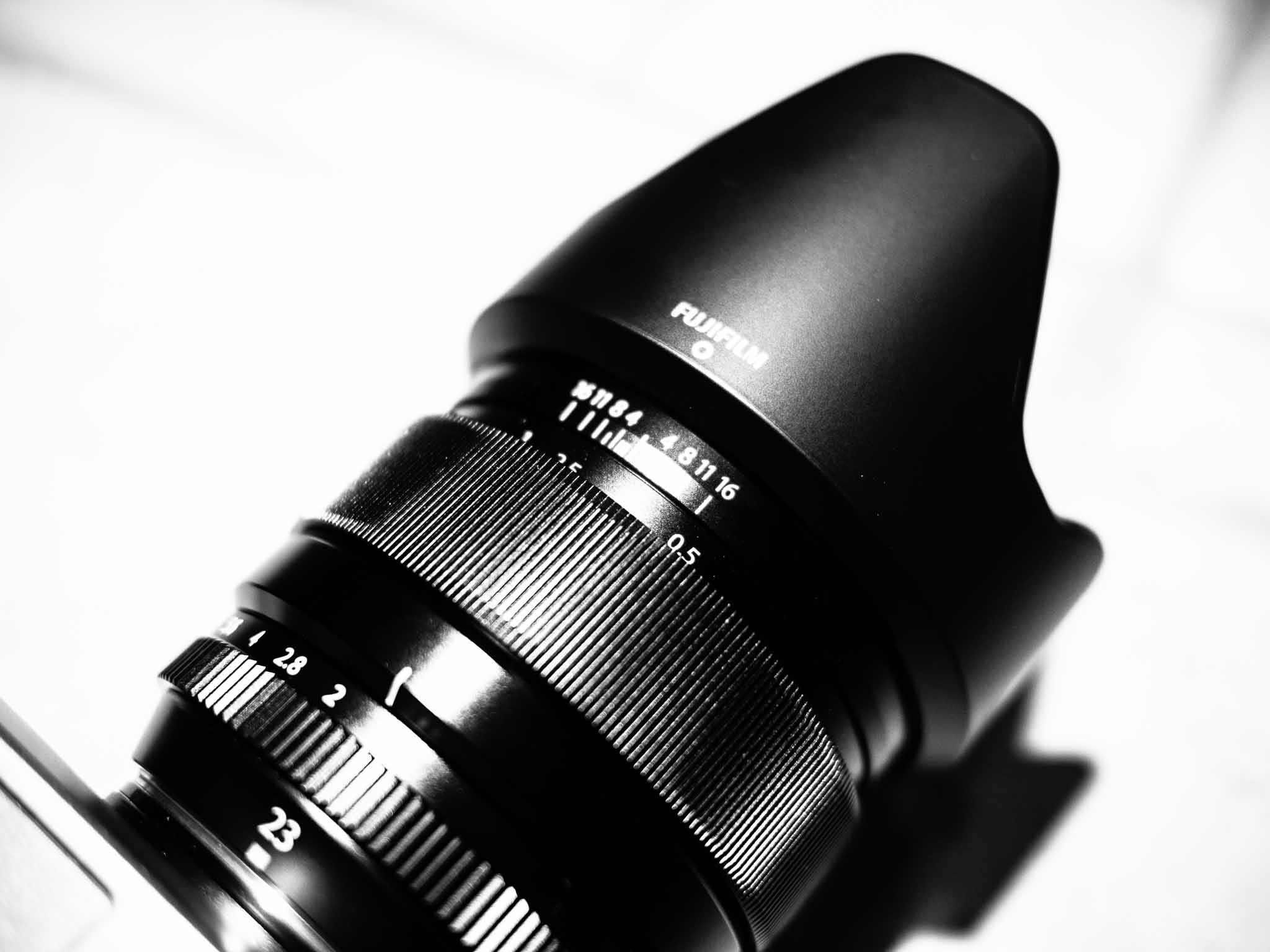
    What really sets the Fujifilm system apart is the Fujinon lenses, which in my opinion, are some of the best out there. The mount is proprietary to the Fujifilm system, so you won’t be able to select from a ton of great lenses unlike other systems, though adapters are available if you don’t care about autofocus.

    As of right now, here is the complete listing of Fujinon lenses:

    – [14mm](http://www.amazon.com/exec/obidos/ASIN/B0092MD6RQ/ref=nosim&tag=brooksreview-20)
    – [18mm](lhttp://www.amazon.com/exec/obidos/ASIN/B006UL00U8/ref=nosim&tag=brooksreview-20)
    – [23mm](http://www.amazon.com/exec/obidos/ASIN/B00EZ8BEXK/ref=nosim&tag=brooksreview-20)
    – [27mm](http://www.amazon.com/exec/obidos/ASIN/B00DCM0DUU/ref=nosim&tag=brooksreview-20)
    – [35mm](http://www.amazon.com/exec/obidos/ASIN/B006UL00R6/ref=nosim&tag=brooksreview-20)
    – [60mm macro](http://www.amazon.com/exec/obidos/ASIN/B006UL010W/ref=nosim&tag=brooksreview-20)
    – [18-55mm](http://www.amazon.com/exec/obidos/ASIN/B0092MD6S0/ref=nosim&tag=brooksreview-20)
    – [55-200mm](http://www.amazon.com/exec/obidos/ASIN/B00CNZTPGA/ref=nosim&tag=brooksreview-20)

    There have been [two](http://www.amazon.com/exec/obidos/ASIN/B00FPKDPF2/ref=nosim&tag=brooksreview-20) [more](http://www.amazon.com/exec/obidos/ASIN/B00HK8Z9AG/ref=nosim&tag=brooksreview-20) lenses announced and I left off a shitty 16-50mm. But it’s such a short list I was able to compile it from memory. I couldn’t even get through half the available micro four-thirds lenses from memory — nor Canon, nor Nikon. So, a much smaller lens selection, but overall the lenses seem to range from ‘good’ on up.

    What also set’s the Fujifilm system apart is that (with the exception of the 27mm) all the lenses have an aperture ring on them — which many of you may not be familiar with. I’ll get into that in the next section.

    I have been very impressed with the build and feel of the four lenses that I have handled. The resolution from each lens is fantastic in my opinion.

    ## The Film Simulation

    Stuff of legends. No, _really_. I have the VSCO Film Packs for Lightroom and those renditions of the Fujifilm films, like Velvia, pale in comparison to the JPEGs that come out of the X-E2. ((In comparison the VSCO packs look *over* processed compared to what the camera is rendering — that’s not a slight against VSCO as those film packs are excellent.))

    In fact before owning this camera I never saw the point in shooting RAW+JPEG. With this camera I am absolutely shooting RAW+JPEG just to get the great looking film simulations from the camera. Many, *many*, of the images that I love from this camera are only getting a slight crop on my Mac and then being shared — as opposed to being edited for color/feel and so forth — because the images are just JPEGs and I never touch the RAW files.

    The film simulations are so good that they have changed the way I have been shooting and processing my images. Great stuff. ((I should also mention that shooting JPEG allows the camera to make lens corrections and noise corrections, which is just one more really nice thing.))

    ## The Controls
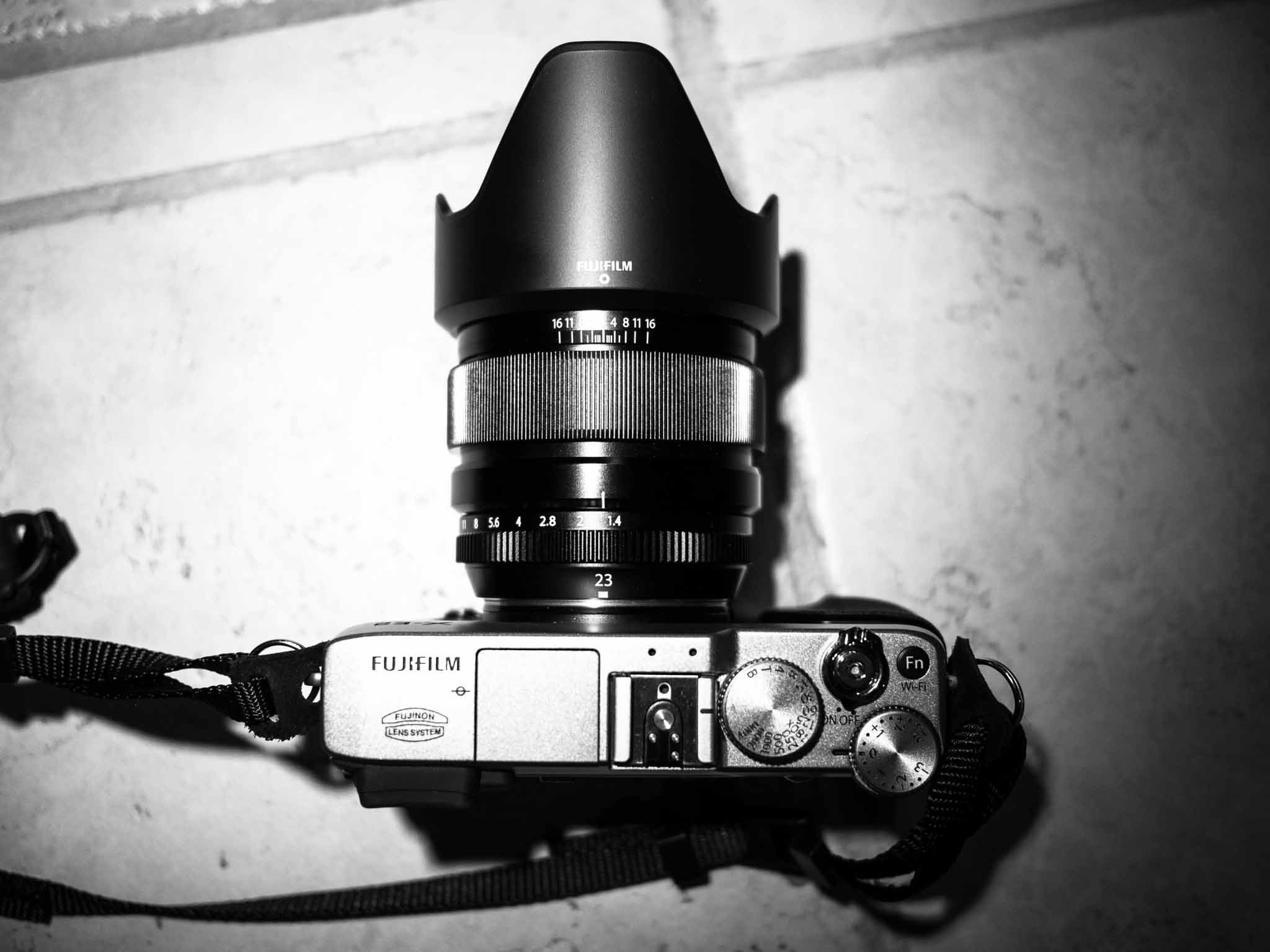
    When I first started using the Fujifilm system I didn’t love the controls — fast forward a week and I was convinced that the controls are *the* best attribute of the Fujifilm system. Menu controls aside because those suck (they do on every camera if you ask me).

    On most interchangeable lens cameras you typically get a dial to select the shooting mode: Program, Aperture Priority, Shutter Priority, Manual, Bulb. There’s a few more options on some cameras, but those are the basic ones.
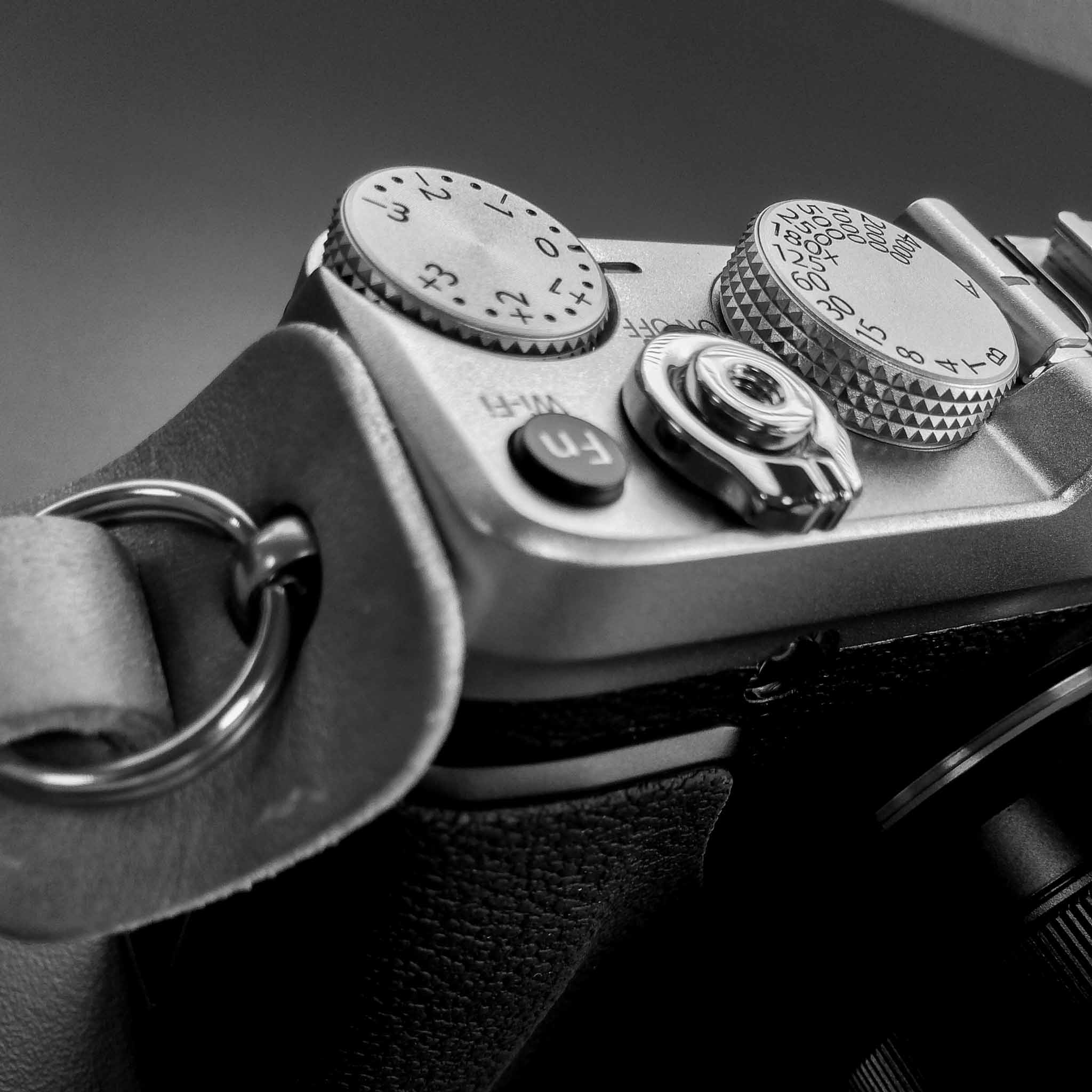
    On the X-E2 there is no such dial. Instead the largest dial is the shutter speed. That’s right, the shutter speed. On the lens is an Aperture ring and spins just like a focus ring, but instead it adjusts only the aperture (there’s still a focus ring).

    So: what the hell, the camera is only manual?

    No, not at all. The Fujifilm still has these modes: Program, Aperture Priority, Shutter Priority, Manual, Timer, Bulb. It just depends on the combined settings of those two dials. And that’s not nearly as complicated as it sounds — it’s the best part of the system actually.

    Set the shutter dial to A, and control just the aperture ring for Aperture Priority. Boom.

    I shoot in Aperture Priority mode 95% of the time and I find the X-E2 setup to be massively faster than any other camera’s controls — and again I am trying to downplay that a bit.

    These controls are what I love most about the X-E2. With my eye in the viewfinder I can keep one hand on the lens, and one on the body (as God intended) and still adjust every setting very quickly. My right thumb can jog the shutter speed and exposure compensation, while my left hand can adjust the focus modes, aperture, and focus. It sounds like a lot, but it only took a week for me to get lost with the random dials on the E-M5, while wishing every camera was setup like the X-E2.

    I can keep my eye in the viewfinder and easily fly through setting adjustments.

    *Side note about the 27mm f/2.8: For me this was a desirable lens to shrink down the size of the camera system, but it is the only lens that is pancake, and therefore it doesn’t have an aperture ring on it just the focus ring. To control the aperture you have to jog the dial on the back of the camera. This is a bummer for sure, but an acceptable tradeoff for such a tiny lens.*

    ## The Bad

    As with all things in life, there’s a few negative things the X-E2 has going for it. Some of you will find these to be a deal breaker, but I’d suggest you use the X-E2 before you make that proclamation as they are all are surprisingly minor if you ask me.

    #### The Image Stabilization

    There is none on the X-E2. Where the E-M5 and many other cameras are stabilizing the sensors — Fujifilm has gone the more traditional route of only stabilizing the lenses. There are, at current, only three stabilized lenses for Fuji x-mounts.

    I prefer stabilized sensors, over stabilized lenses, as it seems like a better method of stabilizing the image. However, the real question is how much of a problem is this for *you*? It’s a question only you can answer.

    If all your photography consists of shooting kids indoors — higher ISO ratings will be better for you (so you can get a higher shutter speed and freeze their motion), as image stabilization only helps steady the frame with slow shutter speeds (and fast ones too I suppose).

    So, really, image stabilization is better suited for still imagery in low light when you don’t have, or don’t want, a tripod. Image stabilization can, and will, help with moving objects to a degree, but if your shutter speed is slow there is no saving motion blur with image stabilizers.

    It’s likely that a higher ISO with better noise handling will outweigh good image stabilization. For me, the X-E2 handles noise better than many cameras — full frame or otherwise — but that doesn’t mean other cameras don’t do the same. You could get an E-M1 and have the best of both worlds for the most part.

    #### The Size

    As I showed at the top, it’s a big camera system. This isn’t a camera you can stuff in your pocket. You *can* but it won’t be comfortable. That said, it’s still considerably smaller than most dSLRs and competes well with the sizes of other mirrorless camera systems at this level.

    I find the size to be fine considering the image quality. More importantly I love the weight, or lack thereof. Lighter is better in my book when it comes to something you are carrying around and trying to hold steady.

    #### The Creature Comforts

    Ah, this is where the big difference between Fujifilm cameras and Olympus/Panasonic/Sony seems to be. The latter three brands all like to pack in what I call creature comforts — and with the exception of WiFi, Fujifilm isn’t cramming many creature comfort features in. ((Though the recently announced X-T1 may change that.))

    I think this is where a lot of people get tripped up. The X-E2 and most Fujifilm X cameras, are geared towards photography only — not video, not sharing, not anything else. There’s no touch screen, no manual video controls, no tilting screens — and that seems to be “the point” in a sense. These are purpose built devices, which Fujifilm purists see as polar opposite to cameras from other brands trying to be everything to everyone.

    Many will hold this against the system, but I see it as a company focusing on the most important aspect of a camera: the image. That said, a tilting screen would be fantastic — I couldn’t care less about a touch screen.

    #### The SD Card Slot

    It’s shit. The SD Card slot is combined with the battery compartment, so you access it on the bottom of the camera. Screw on a tripod, or quick-release plate for a tripod, and you can forget about getting to the SD card.

    This was horribly thought out.

    ### The Over Hyped Autofocus Issues

    One of the biggest complaints about the X-E2, and Fujifilm cameras in general, has been the poor autofocus system. With the X-E2 and subsequent firmware updates these issues are mostly gone. In my average shooting scenario I noticed no difference between the X-E2 with 23mm f/1.4 and the E-M5 with 12mm f/2 lens on each.

    In lowlight the autofocus can hunt at times, but it still out performs my E-M5 when the 20mm f/1.7 is on the E-M5. Though the E-M5 does do better with the 12mm f/2 in low light than the X-E2 does.

    Tracking is weak on the Fujifilm system but this isn’t a camera you buy to track fast moving stuff. If that’s what you want, you need to be looking at more expensive gear.

    Overall, there seems to be an awful lot of smoke billowing out of a very small, and now smoldering, fire of “bad autofocus” complaints. ((Fujifilm claims that the X-E2 has one of the fastest autofocus systems out there. I don’t believe that.))

    ## The Sum
    It used to be that when you dove into photography you bought a low end dSLR, something you would find packaged together at Costco. It would be an APS-C sized sensor with an 18-55 lens that would be something like f/3.5-5.6 — it’s a basic and not stellar kit. The jump used to be Camera Phone/Compact Camera (i.e. Point-n-Shoot) to a low-end dSLR. When you wanted to upgrade, then you had to jump to the full-frame bad boys that would cripple your wallet and lenses that would make you weep just thinking about their prices.

    Then the mirrorless stuff started coming out, and smaller cameras started to get a *a lot* better. Cameras like the Canon G9, S100, the Sony RX100, the Sony NEX lineup — and yes, micro four-thirds systems started to muddy the water. Things got pretty confusing.

    The truth is: any camera can yield an amazing image in the right hands. But another truth is that you can get better images with better gear (to a point).

    If you are stepping up your photographic pursuit, I would recommend the micro four-thirds systems. It has all the creature comforts, is cheaper to get into, and is everywhere. It won’t cripple your wallet and you can get a camera body that fits your current needs well that can still be upgraded, keeping the lenses for later if your needs change. I’d say the micro four-thirds stuff is well positioned where the old entry-level dSLR gear was (and that’s not to put down the system at all, just price wise it is positioned there).

    So where does that leave Fujifilm?

    To me, Fujifilm is something you buy for the style of it. The color rendering, the feel, the controls. It’s not a system that is quantitatively better if you ask me, but it is a system that just makes you feel like you have the chance to create something special every time you press the shutter release because the cameras and lenses themselves feel very special to use.

    I’m all in on Fujifilm and I consider this matter settled.

    ***

    Do try to remember this, from [Henrik Ersgård](http://www.stevehuffphoto.com/2014/01/27/my-thoughts-about-photography-gear-by-henrik-ersgard/):

    > Maybe there are many of you out there who has gone nearly as insane as I have about cameras/lenses/sensors so that you nearly forgot about that it should be fun to photograph. Smile when you pick up your camera instead of gently picking [it] up with rubber-gloves so that it won’t be any scratches on it. If there are scratches, then I may not be able to sell it later when I get a new one!!!… That really sounds terrible. It really does.

    I love gear, but I need to stop, now.

    ***

    Buy it here and I make *billions*: [Fujifilm X-E2](http://www.amazon.com/exec/obidos/ASIN/B00FPKDSGS/ref=nosim&tag=brooksreview-20)



  • Micro Four-Thirds Gear for Sale

    I am selling all of this gear only because I have decided to move to the Fujifilm X system. I love most of this gear and wouldn’t sell it if I could keep both sets.

    #### Olympus OM-D EM-5 SOLD

    In perfect condition and comes with original box and everything that was in that box (strap never used). I am also including an extra battery. I love this camera, in a perfect world I’d keep it, but I have financial constraints. See [my review here](https://brooksreview.net/2014/01/omd-em5/).

    Price: $615 (non-members add actual shipping from 98499)

    #### Panasonic GX1 SOLD

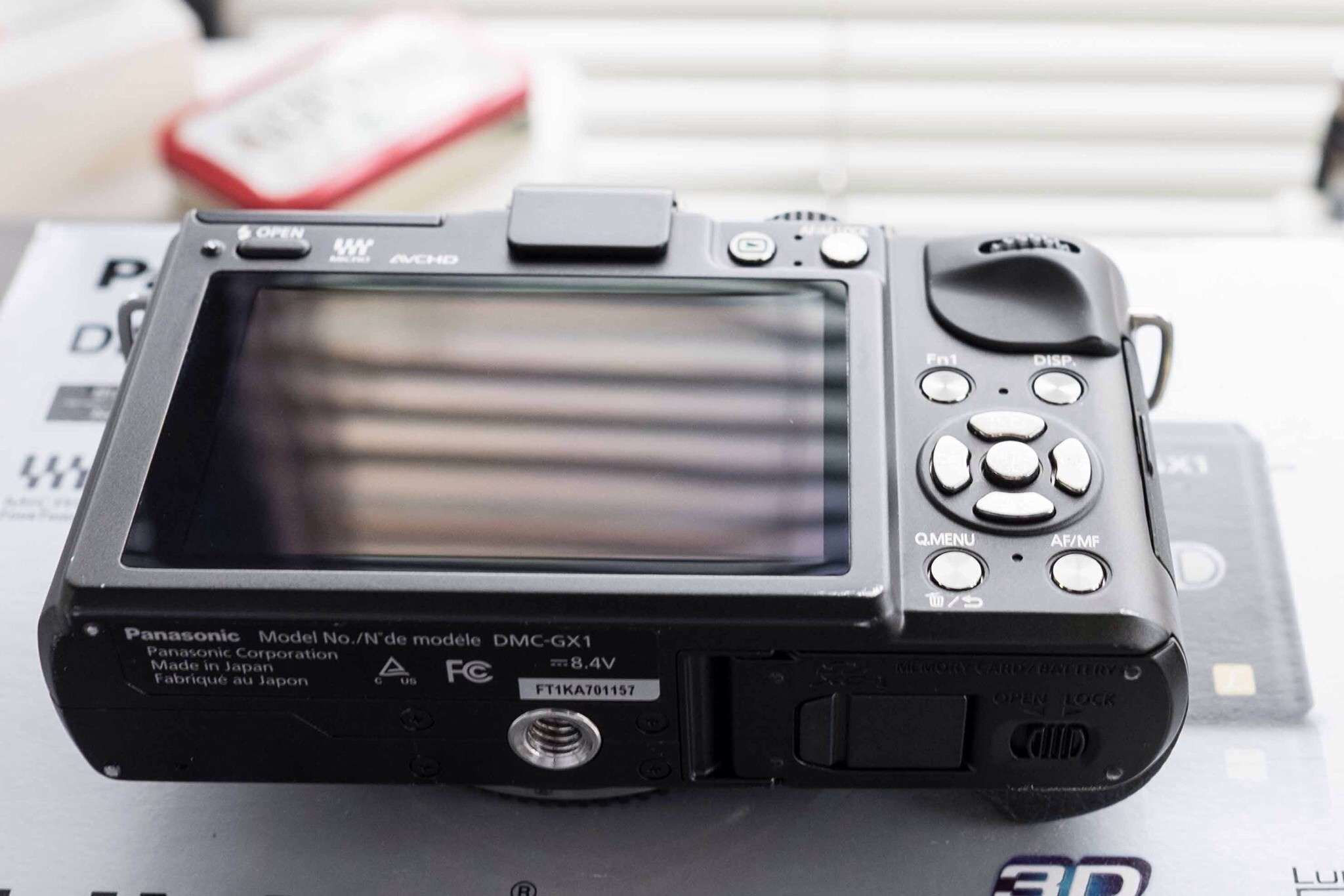
    She shows a bit of wear on the metal corners, but works like a champ. If you want to get into something better than your iPhone this is a good cheap place to start.

    Price: $ 175 (non-members add actual shipping from 98499)

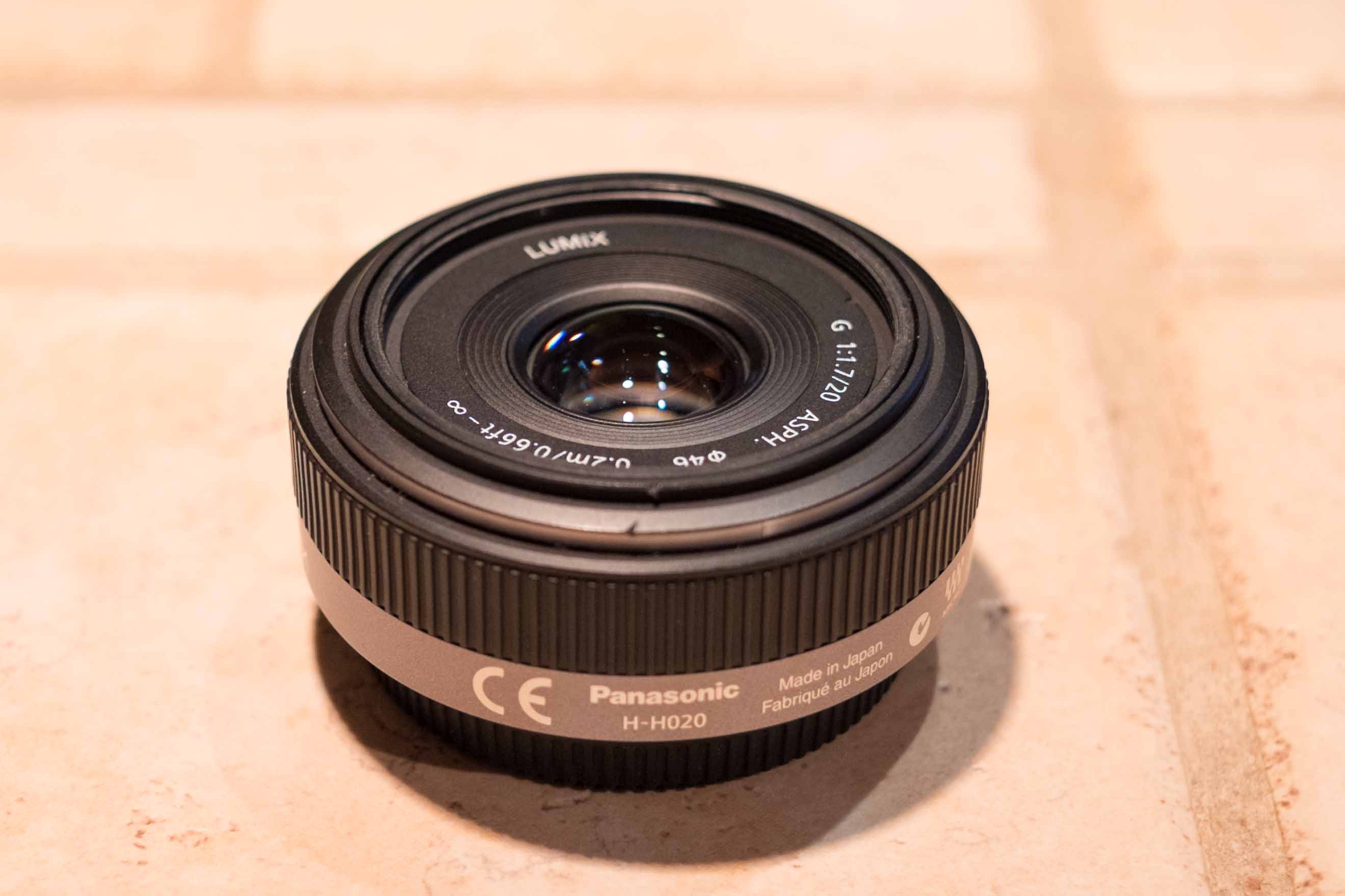
    #### Panasonic 20mm f/1.7 SOLD

    Works on both cameras listed above and well regarded for overall sharpness. It’s my favorite lens on the micro four-thirds system. Works perfectly, but has a dented blemish on the front (as shown in picture).

    Price: $275 (non-members add actual shipping from 98499)

    #### Panasonic 45-175mm f/3.5-5.6 SOLD

    This lens is in perfect condition. It has image stabilization in it, but I assume that only works if mated to a Panasonic body ( I’m told that’s not true). The zoom is electric which I thought was odd, but in practice works just fine. It’s not a lens that will knock your socks off, but man with the crop factor of micro four-thirds this is a 350mm zoom equivalent on full-frame — that’ll get you shots you didn’t think you could get.

    Price: $250 (non-members add actual shipping from 98499)

    #### DSPTCH Wrist & Neck Strap

    SOLD.
    Both in Olive color, sold only as a pair since I am missing one of the female side clips. Meaning you probably need to use them on one body only. Both in very good condition.

    Price: $45 (non-members add actual shipping from 98499)

    *Note: Shipping is done only M-F, please allow 24 hours processing time so that I may get my ass to the post office.*

    Feel free to make me an offer on any item if you think it isn’t priced well. I also have a couple of [bags for sale here](https://brooksreview.net/sale/).

  • Lightroom Workflow

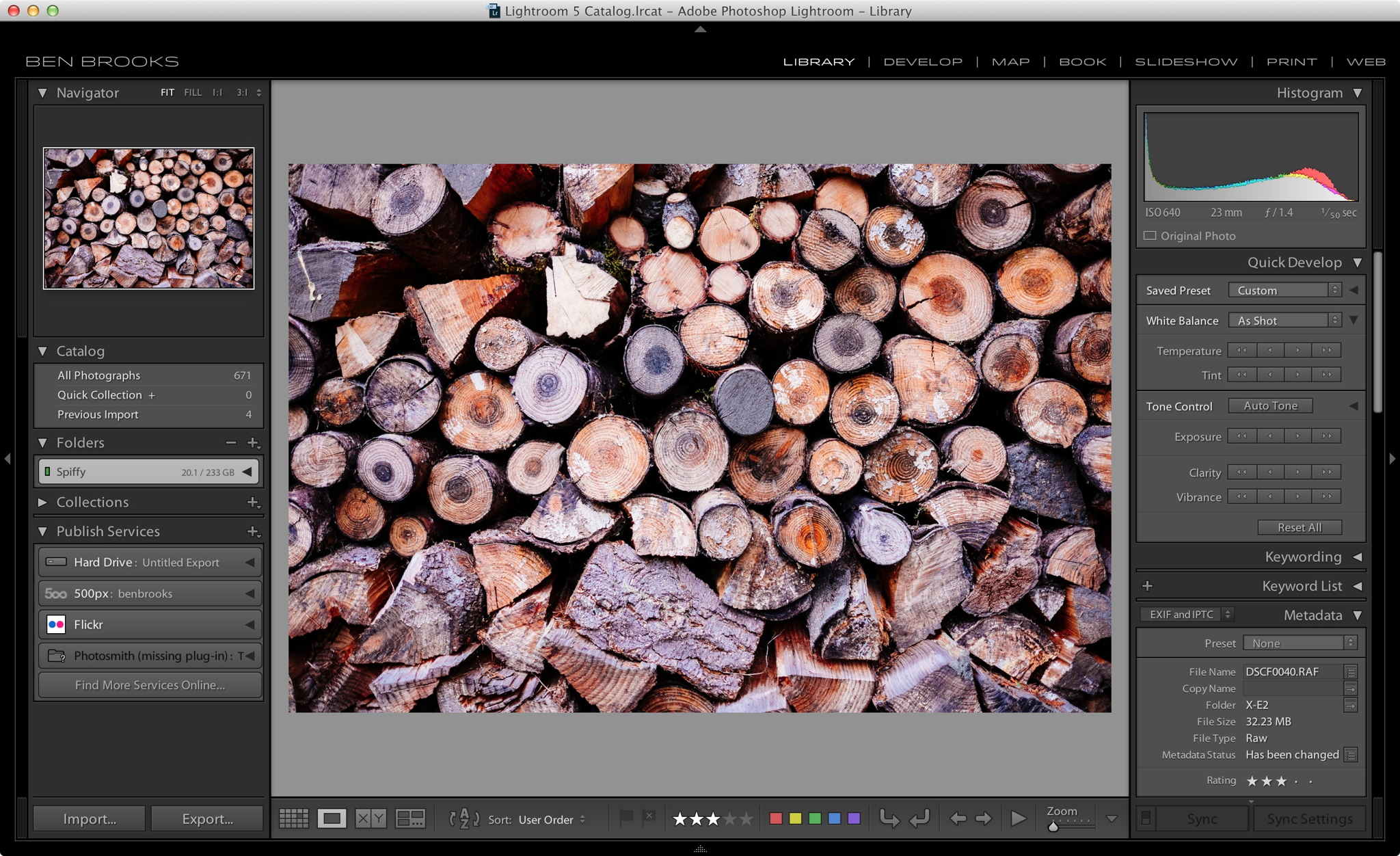
    When RAW image editing and workflow software started to hit the mainstream I checked out the three biggest name offerings: Photoshop Lightroom, Capture One, and Aperture. At the time I couldn’t stand Lightroom, so for three versions I stuck with Aperture. It was dog slow, and couldn’t do some of the really neat stuff Lightroom could. Aperture, though, had a logical workflow (and worked pretty well overall).

    And then I saw the noise reduction capabilities of Lightroom 4 and I tossed Aperture to the side ((Just as it seems Apple has done with the app.)) and moved over to Lightroom. Since then I have been trying to make the most of Lightroom.

    There’s no right and wrong way to do things, but maybe you will find a few helpful nuggets in how my Lightroom workflow goes.

    ## Settings

    First things first, you need to get your settings configured properly.

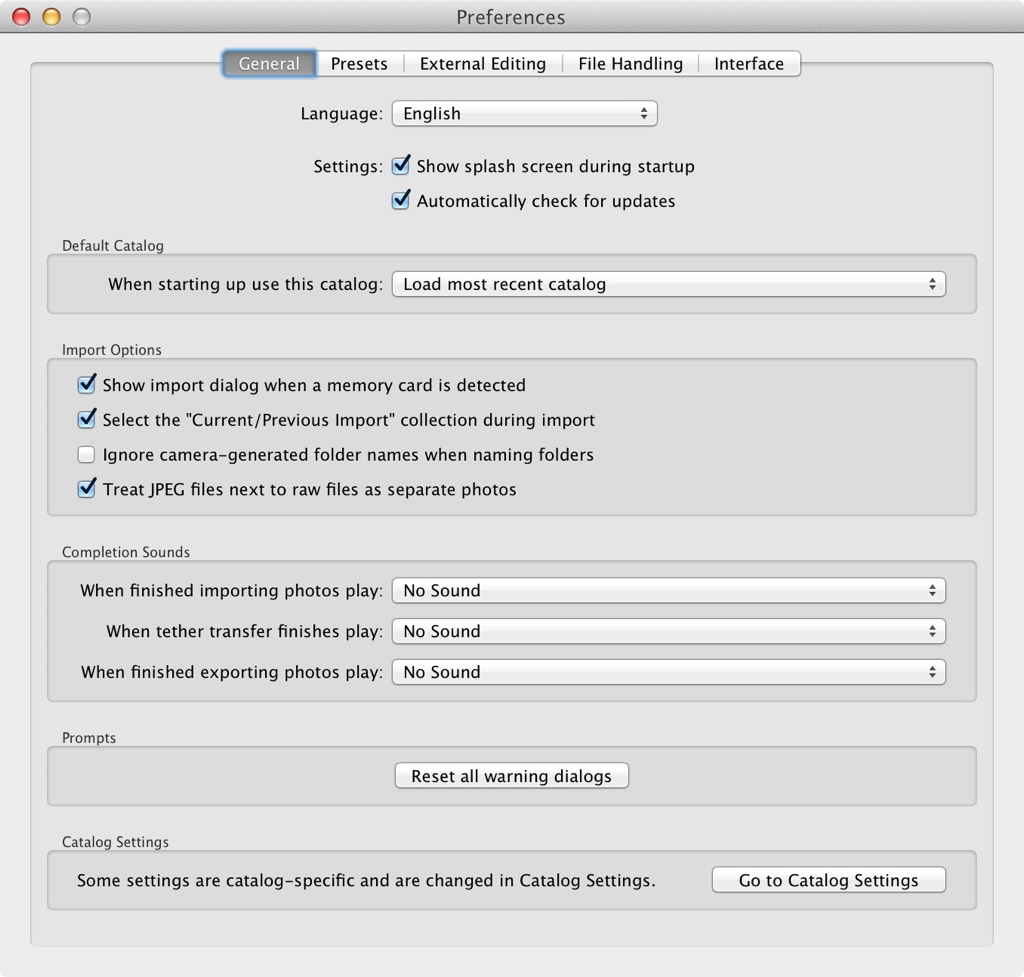
    #### General

    In the general tab I only really care about one setting: “Treat JPEG files next to RAW files as separate photos”. I turn that setting ‘on’ (it is off by default) as I have taken to shooting RAW+JPEG to make use of some of the nicer in-camera scene/profile settings out there. I use those JPEGs to share with people around me in the moment (e.g. my Wife), but still want the RAW file should it need tweaking once I get back to the computer. If you have that setting off, you will never get those jpegs imported into Lightroom.

    #### File Handling

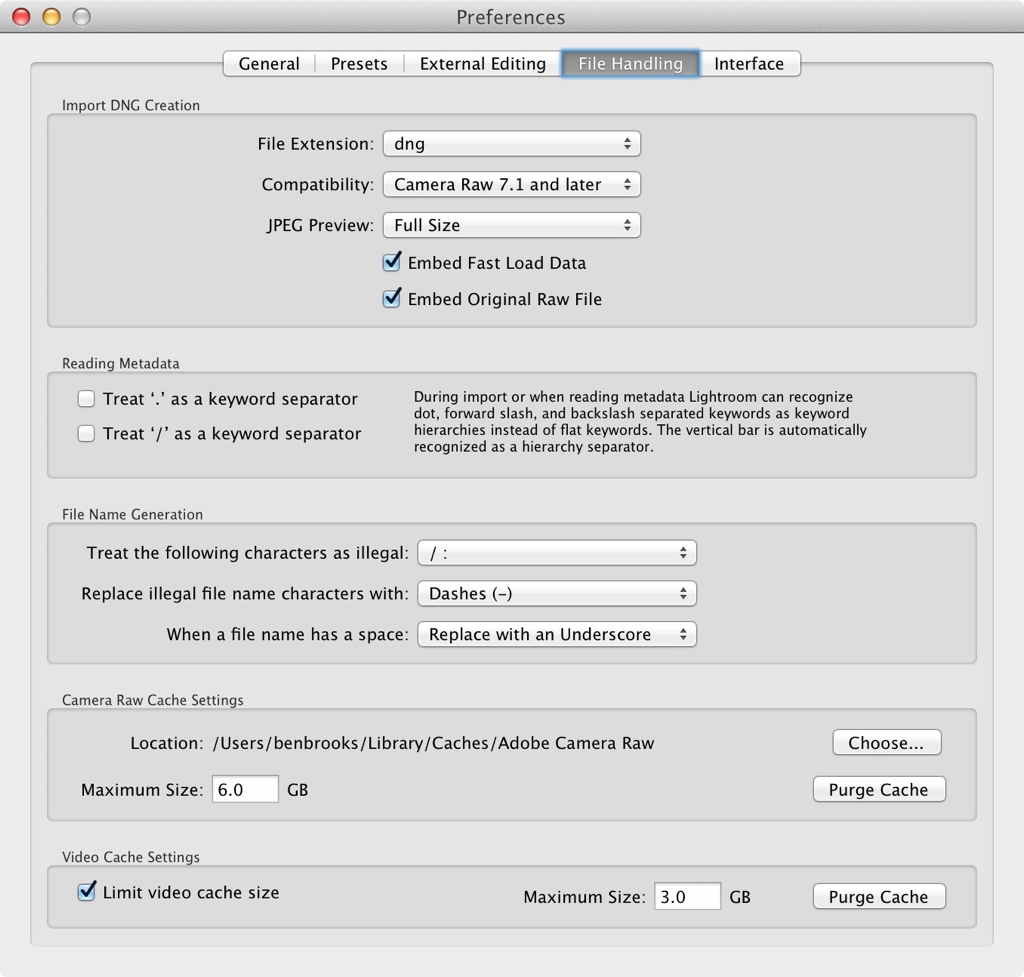
    In the file handling tab I change a few things to better fit my workflow and, specifically, my Mac. ((I am working with 16GB of RAM as a point of reference.)) I change the JPEG preview to ‘full-size’ and I embed the original RAW file out of paranoia that I may want that at some point should I decide to randomly convert to DNG. I also force spaces in file names to be replaced with an underscore for better web compatibility — unfortunately this effects your folder naming too. Lastly, I set the camera RAW image cache to 6GB and video cache to 3GB — both arbitrarily chosen, I would appreciate advice on this if you have it.

    #### Catalog Settings

    That’s all I do in the Lightroom Preferences, then I move to the Catalog Settings.

    Pro Tip: you can change how often you see that nagging backup dialog.

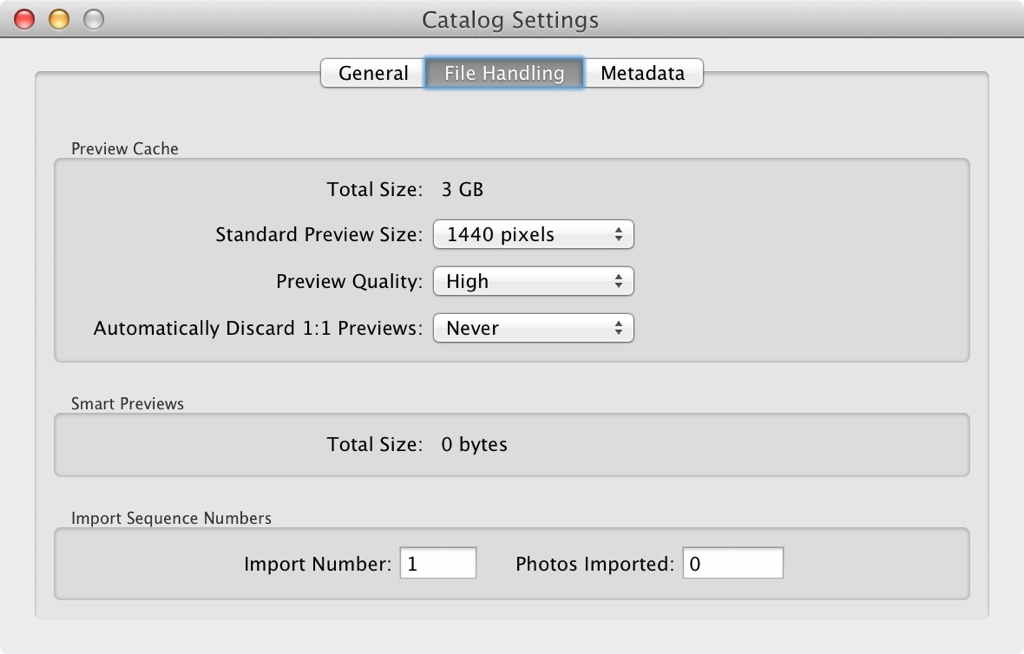
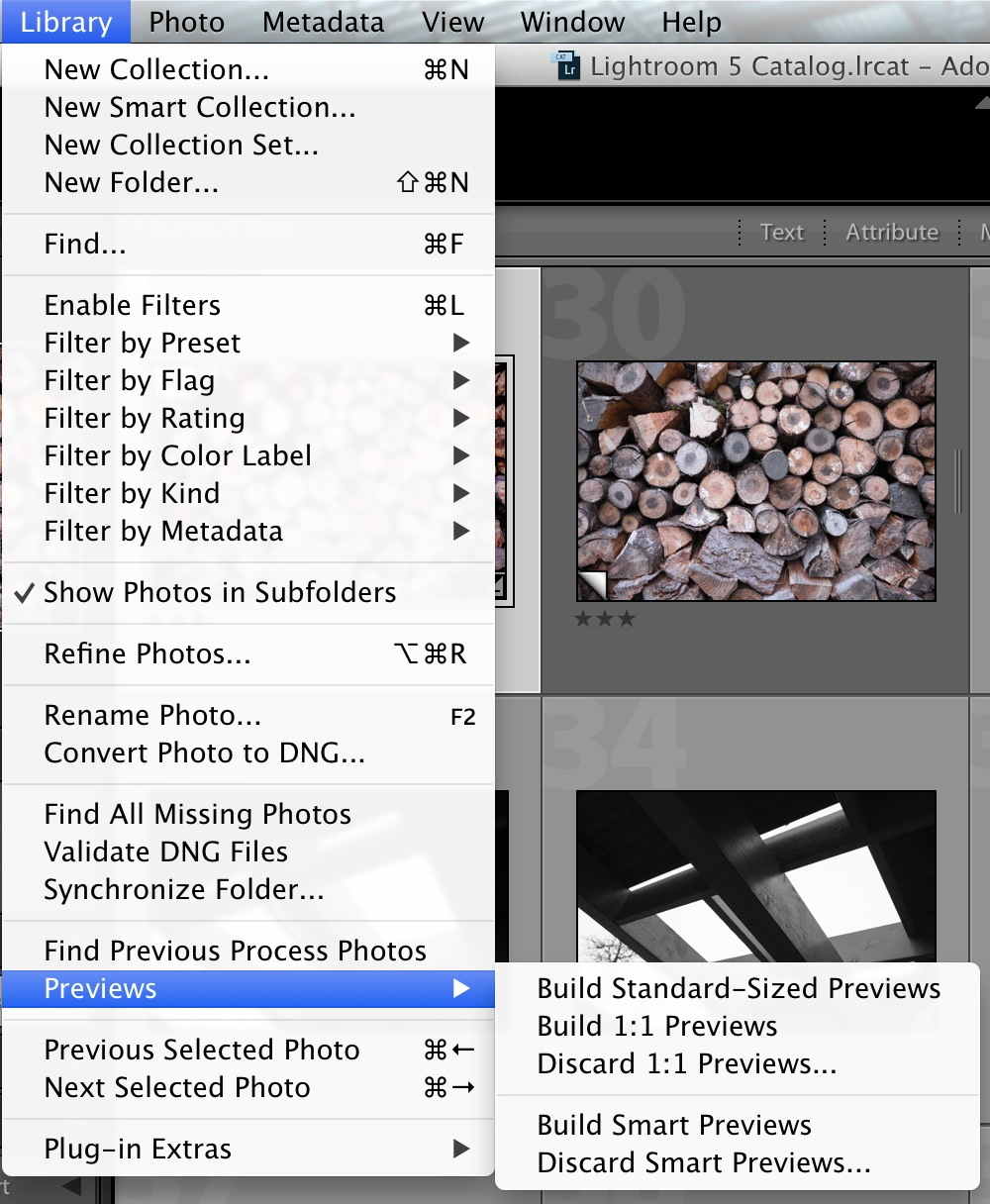
    More importantly you can swap over to ‘File Handling’ and change some preview settings. I have mine set to 1440 wide, High quality, and to never delete the 1:1 previews. That seems to work well for me.

    Lastly, you can go to the Identity plate setup and change the fonts for the tabbed sections as well as have your name displayed instead of the Lightroom text. This is not important but I like a nice font to look at.

    ## Import

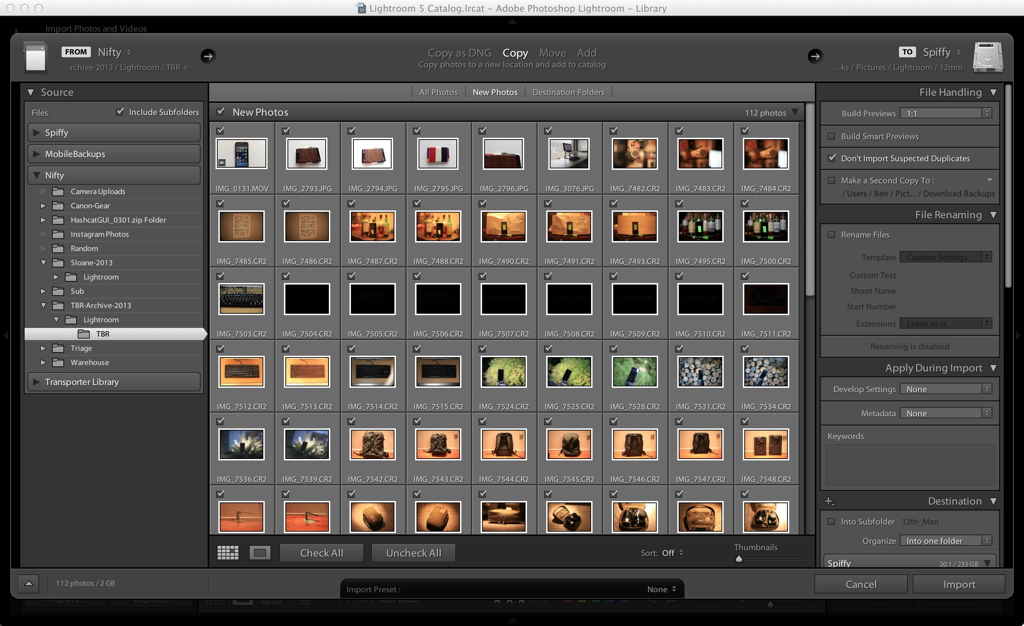
    Now that Lightroom is adjusted properly, the first part of my workflow is always an import to bring in new images. There’s a few important things to note on this screen. The first is located top center of the screen: “Copy as DNG, Copy, Move, Add”. Typically you should set this to Copy, and nothing else. The DNG option converts the file (remember when we embedded the original RAW file in the last section). Move, moves the file, and Add keeps the file(s) where they are but adds them into your Library. So, Copy is likely what you want.

    More importantly at the top left is Build Previews. If you use Lightroom you may notice there is a lag while moving between photos as the app renders the blurry preview to a sharp image. I set this option to 1:1, meaning after the images are imported Lightroom then builds a 1:1 preview for each image. The import takes longer, but you can then cycle through the images much more rapidly (which is important in the next part of my workflow).

    Note: If you edit any image, the 1:1 preview for that image will be gone.

    There’s not much else I do. I keep images grouped in folders in a way that likely only makes sense to me.

    ## Triage

    Now I have a bunch of photos in Lightroom, all with rendered previews. Before I edit a single photo I triage all of them so that I can take advantage of the speed 1:1 previews give me (remember: once you edit a photo, the preview needs to be rebuilt).

    I triage by viewing images in as large a view as I can (hit Tab, or switch to fullscreen), and then:

    – I set rejected images. These are any blurry, or out of focus images.
    – I set a rating of 1-4 stars for non-rejected images.
    – 1 star = keeping it for posterity
    – 2 stars = maybe something here, worth a quick edit.
    – 3 stars = likely a good shot.
    – 4 stars = _OH_ yeah, we’ve got something here.
    – 5 stars = I refuse to give 5 stars before editing an image.

    Next I remove all rejected images from the library so I can focus on the better images. I then set my view filter to anything above 1 star, helping me to ignore the shots I am just keeping to ‘keep’.

    From there I typically enter the Develop module to begin editing.

    ## Editing

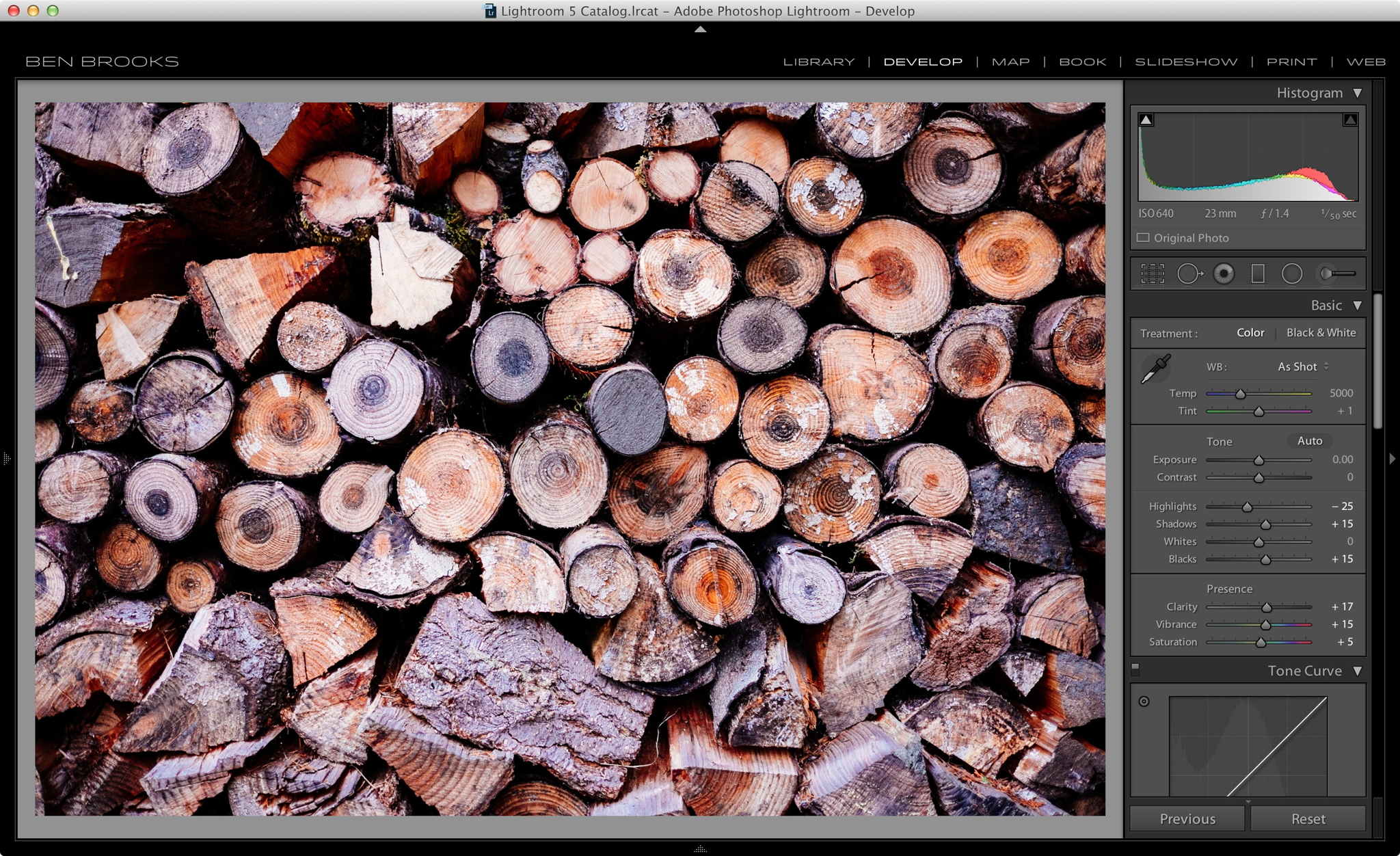
    If I took a grouping of images at the same location, and the white balance is off, I will fix it in one image and apply these settings to all the images I can. This way I don’t have to think about white balance as I try to edit the images.

    From there I typically just apply a preset to any 2 star image, using either Trey’s Lightroom presets, or VSCO filters. Occasionally, I will bump up the rating on a 2 star after I apply a preset — but not typically. Any image with greater than 2 stars gets a full treatment — I try to stay away from presets for these images.

    ## Sharing

    After editing I share the good images to Flickr, or 500px, using their Lightroom plugins, or I can export them for upload to my CDN for showing in a post here.

    I also have a workflow to send good photos to my iPad via the Lightroom Photosmith plugin. The advantage is that I can add them to my camera roll and thus Photo Stream, but it is a shitty workflow to be honest. You could do the same thing with iPhoto/Aperture on your Mac, but then you would have to import those photos to each app. I wish Apple would open up Photo Stream (though the rumored Lightroom iPad app may make this point moot).

    ## Before I Quit

    Before I’m done I go back and build new 1:1 previews for all the images I edited. This helps with speed the next time I move back into Lightroom and look at older images.

    ## End

    Hopefully this helped someone. If you have any tips, please get in touch to share them.

  • Bigger Sensors

    [David Pogue has written about cameras in a way that I find a tad inaccurate](http://www.yahoo.com/tech/sensor-innovations-from-sony-ushering-in-a-golden-age-74229401513.html). He says:

    > It’s very simple: Big sensor = better photos.
    > A big sensor can absorb more light. It makes possible sharp photos with better color in low light. Less digital “noise” (random speckles). And with the right settings, a big sensor also makes possible a large aperture, which gives you that delicious, professional-looking blurry background.

    Kind of — but it’s not always the case that a big sensor beats a small one. A shitty big sensor won’t beat a good small sensor. And a big sensor in the hands of a shitty photographer won’t make them any better.

    If all else is equal, then yeah when you pixel peep you will see the bigger sensor is, in general, usually better. But Pogue seems to be making the argument that you need a big sensor for a great image — when that’s not even close to true.

    Let me just leave you with this, three images shot the same day/same time, with three different cameras (all with different sensor sizes): ((If you must know: Fujifilm X-E2, Olympus OM-D E-M5, iPhone 5S.))

    Aside from the iPhone shot being pretty obvious (and annoyingly not at the same angle/framing) the other two are both pretty similar. Both are sharp, both have shallow depth of field, both have good colors and resolution. Pogue’s not wrong that a larger sensor is generally better, but to assume that you need a larger sensor to get a better image is a fallacy.

  • ‘Ad Blockers: A Solution or a Problem?’

    Mauricio Freitas, publisher of the New Zealand Geekzone website: ((I [looked at the site](http://www.geekzone.co.nz), not surprised people block ads there.))

    > The use of ad blocking software breaks that implicit contract. What’s more, he continues, the vast majority of visitors who use ad blockers aren’t interested in making even a small payment in exchange for an ad-free site.

    [Mike Zaneis as reported by Robert L. Mitchell](http://www.computerworld.com/s/article/print/9245190/Ad_blockers_A_solution_or_a_problem_?utm_medium=App.net&utm_source=PourOver)

    > “Do you see larger ads, or sponsored ads today that take over the entire page for three seconds? Absolutely. But they’re not the spammy, irrelevant messages that most of us think of from five years ago.” The problem for publishers, he says, is that most ad blockers don’t just block annoying or intrusive ads — they block everything.

    Sorry, anything that takes over a webpage for three seconds _is_ spammy, irrelevant, shit. Also, the point of ad blockers is that they block everything — except for those ad blockers that are paid by advertisers, or owned by advertisers, that is.

  • The NSA Director’s Lies

    [Daniel Stuckey a month back ](http://motherboard.vice.com/blog/the-nsa-director-asked-hackers-for-advice-but-left-a-lot-unanswered) reported on what NSA Director Keith Alexander showed on a slide at Black Hat 2013. Alexander showed what the NSA doesn’t collect:

    > And listed what the NSA is not involved in obtaining:
    > • Content of calls
    > • NO voice communications
    > • NO SMS/text messages
    > • Subscriber information
    > • NO names
    > • NO addresses
    > • NO credit card numbers
    > • Locational information

    *lol?*

  • GORUCK SK26 Second Opinion

    As you might recall Ben made a rather lofty claim, back in September 2013, that he would pick the GORUCK SK26 over, ‘any bag on the market’, even though he’d never used it. In Decmber Ben reviewed the SK26 for real and then decided he preferred the GR1 because he found the SK26, ‘rather boring’, to look at.

    We thought that was the end of Ben’s adventure with bags. We thought the issue was settled once and for all. We thought wrong. After publishing his review, Ben packed up the SK26 and sent it to me for a second opinion.

    I’m not a bag reviewer; this is the layman’s SK26 review.

    First Impression

    As I unboxed the SK26, my designer colleague, who was observing, exclaimed, "That’s really…plain." He sounded disappointed. We sat together and stared at the SK26. Underwhelmed.

    The SK26 is very plain: A slim-depth cuboid shape in all black fabric with rounded corners and two chunky vertical straps. A single fabric carry handle sits unobtrusively on top of the bag. On the front is a single horizontally-zippered "surface" pocket. The main compartment unzips around the bag from bottom corner to bottom corner, revealing the large internal space. An elasticated pocket sits flat against the back of the bag, presumably to hold a laptop in place. Against the back side of the front flap are two horizontally zippered pockets. The top pocket is a normal closed pocket, the lower pocket is covered in a mesh, making the contents visible at a glance.

    First test. I threw my trusty Black Wolf 25 and its contents into the SK26, slung it onto my back and walked forty minutes home from work. It was a hot day; 86ºF at 5:30pm. I was wearing a t-shirt and after just a couple of blocks I could feel my back getting sticky from the close contact of the bag, which sits flat against your back and doesn’t allow much chance for heat to escape.

    To unpack the Black Wolf backpack, I open the main compartment a little, hold the bag with one hand and fish things out. With the SK26 I was able to lie the bag flat, open the main compartment and unpack things easily. As Ben noted in his GR1 review, the ability to open the SK26 completely and unpack it easily is a huge usability improvement over top-loading bags.

    First Week

    Each weekday morning I throw a notebook and some pens, my iPad Air, a water canteen, a pair of shoes and a book or two into my backpack. Then I walk three miles, about thirty–five minutes, to work in a city office. The dress code is casual and the environment informal — I don’t meet with clients. In the evening I throw things back into the bag and walk home.

    The more I used the SK26 over the first week the more I appreciated its ruggedness and no-nonsense design. Unlike my normal backpack, which has no internal padding, I found the SK26 could be tossed around without fear of breaking either the bag or its contents. Presumably one would be more careful when carrying a laptop, but I was able to quickly throw the bag under a desk, or set it down on a concrete footpath without worrying if my iPad would be damaged. Not only did I feel confident that the bag’s contents were protected from knocks, but the bag itself, especially its straps, seemed totally unfazed by any maltreament.

    The only negative experience of the first week was my inability to open the main compartment one-handed while walking. Rummaging for headphones or a pen is a (bad) habit I’ve picked up over the years of using top-loading backpacks. With the SK26 I found this almost impossible; items actually spill out of the main compartment pretty easily if you’re not careful. In the end, I worked around this restriction by storing my headphones and frequently used items (pens etc.) in the front pocket. This restricts the number of readily accessible items due to the front pocket’s relatively small capacity.

    Functionally the SK26 seems complete and well-considered. Each element of the bag seems to have been included only when it genuinely improves the usability or durability of the bag. There are no extraneous elements. Nothing to distract the eye. No "features" for their own sake. No decoration. No ornamentation. The SK26 is ‘plain’ from one perspective, but it’s also true to itself.

    The down side of such ‘rational’ design is that the SK26 still hadn’t grown on me aesthetically after the first week. More troubling than simply seeming plain, the SK26 was beginning to seem unattractive to me. Something was subtly wrong. There was no pleasure to be taken from its appearance, which was causing mixed feelings. How could something be so perfectly functional? So rationally designed? So durable and suitable for its purpose, but fail utterly to evoke a sense of beauty?

    I resolved to consider these questions more carefully during a trip out of town. How would the SK26 perform as a carry-on travel bag?

    Travel Companion

    Over Christmas, we took a two-hour domestic flight to visit with family for five days. As a couple, we try to travel light and five days is comfortably within our ‘hand-luggage only’ duration, even with Christmas presents in tow.

    Between us, we packed a hand-luggage sized, wheeled, upright case. She carried a small handbag and I took the SK26.

    Into the SK26 I packed toiletries in a plastic baggy to satisfy airport security, two pairs of shoes, headphones, charging cables and accessories, a paperback, my iPad and Origami case, plus a Bluetooth keyboard and a few of the flatter presents.

    At airport security, the open-flat main compartment came into its own again. I simply dropped the SK26 flat on the metal bench, unzipped the main compartment, threw the toiletries and iPad into a plastic tray and scooted everything along the conveyor and into the X-Ray machine. The whole process took less than ten seconds and I wandered through the metal detector looking smug, which was probably why I was treated to a random explosives swab.

    Thanks to the previous week’s use, I was ready for the inevitable boarding scrum. I placed my paperback and reading glasses into the SK26’s front pocket allowing me to one-hand them out of the bag as we got to our seat.

    Inside the cabin, the SK26 performed admirably as we jostled for overhead compartment space along with dozens of people who had clearly flouted the carry-on allowances and were happily toting giant gifts, food, drinks and bags of all shapes and sizes. Thanks to the SK26’s slim profile, I was able to stash it between a giant gaudy purse and a box of Krispy Kremes (seriously), even when the stewardess had given up on available space.

    On arrival at our destination, I removed the SK26 from the overhead bin and saw that it had taken a beating in the preceding rush to grab things from the overhead bin. I took a moment to check the contents and was happy to find that only the bag’s outer fabric showed signs of contact with other objects. The iPad was doing just fine, nestled between the solid back panel and internal pocket. I wouldn’t advise putting fragile china or glassware into the SK26 and then throwing it into a festive airborne luggage fight, but I was pleased with the basic strength of the outer walls to offer some protection.

    Possible Comparison

    Comparing the SK26 to a small daypack is a little unfair, so instead I decided to compare it to another backpack I have experience with, the Samsonite Pro DLX. Samsonite no longer sell this pack, but in the current range the Pro DLX 3 looks almost identical. In 2006–2007 I travelled a lot for work. I lugged a 15" HP laptop (with a spinning hard disk and internal DVD-R/W drive) between London, UK and Zurich, Switzerland every week for six months. The Samsonite performed admirably, protecting my laptop, its enormous power adapter and all my business papers. Every week I jumped on and off flights, wandered round in airports and cities, rode public transport and turned up at meetings with ‘C’-level executives. The Samsonite handled most situations well. It wasn’t the prettiest backpack, but it was a good deal better suited to a business situation than most laptop backpacks of the same era and certainly easier on the eye than the SK26.

    While the Samsonite may have the edge when it comes to looks, the SK26 beats it hands down for durability and usability. The Samsonite didn’t feel cheap, but after a year of use the stitching on its straps were starting to come loose and the front-pocket’s zipper had given up entirely, resulting in the pocket being completely useless in a travel situation. The SK26 feels like it could handle serious daily use for years.

    Aesthetic

    Let’s talk about the look of this bag, as it seems to be a sticking point. At first I thought it plain, then I found it not attractive. Now I believe it to be aesthetically honest but not sublime. True to itself but not beautiful.

    Is this lack of beauty a problem for the SK26? How do competing bags that are less honest in their design succeed aesthetically in the minds of consumers?

    Before one starts wearing the SK26, it is reasonable to call it plain, it has no ornamentation to speak of, no color or pattern in its fabric. At this point one may dismiss the SK26 for its plainness, after all there are any number of lively looking competitors selling similar bags for similar costs but with much more eye-catching designs.

    Unlike the SK26, which eschews all ornamentation, the decoration on most other bags is purely aesthetic and while it may satisfy the eye for a while, eventually the brain will know if the bag is lacking in features or ability.

    But as soon as one wears the SK26 and looks at oneself in the mirror it becomes clear that the bag is worse than plain, it is not attractive. How could this be?

    I checked the press shots on the Goruck website to see if it only flatters people built like a U.S. Marine, but it seems to look unattractive on everybody. Check out the guy wearing a business suit, the SK26 looks entirely out of place in this context. It could be a combination of the bag’s height, rectangular shape and single flat color. The height (17") seems to diminish the height of the wearer, making them appear shorter, which is undesirable. I stand at 6’1" and still feel that the bag’s size makes us look proportionally mismatched.

    Because the SK26 does not taper in any direction (depth-wise, top to bottom, would be most obvious), it looks like a solid brick stuck to the back of the wearer.

    The GORUCK website provides a clue to the SK26’s aesthetic neglect. The GORUCK philosophy is one of designing bags ‘for Special Forces soldiers to use and abuse in war’. GORUCK founder Jason MacCarthy claims that his ‘Special Forces brothers trust [GORUCK gear] with their lives’, so naturally, ‘quality is a matter of life or death’ to him.

    The most frustrating aspect of GORUCK’s stance on rugged toughness above all is that they ‘aim to bridge the gap between military and civilian‘, and they don’t make cilivians look good. Perhaps if the bags also underwent trial by designers in a civilian challenge involving skinny jeans, plaid shirts and fixies they would turn out as beautiful as they are tough.

    Finally

    Using the SK26 day-to-day for the past month has been a pleasure. Functionally, it’s pretty much flawless and incredibly durable but then I walk past a shop window and remember that it’s aesthetically neglected.

    If you’re planning on crawling through muddy water, under barbed wire and then climbing over a wall while carrying your 17" MacBook Pro and wearing a business suit, then I can’t think of a better bag than the SK26. If you’re carrying a laptop to your job in the city, don’t use the SK26, as it will speak poorly of your taste.

  • The Three Billion Dollar Question

    Some recent comments on the Google acquisition of Nest:

    [Fred Vogelstein](http://www.newyorker.com/online/blogs/currency/2014/01/why-google-paid-three-billion-dollars-for-a-thermostat-company.html):

    > Buying Nest may be Page’s most important deal as C.E.O. of Google, a job he took on in 2011; it takes the company a long way toward realizing a vision of a Google that goes well beyond its roots as a simple search engine. Buying Motorola Mobility, in 2012, for more than twelve billion dollars, was a first step. Buying Nest not only thrusts Google into the business of selling general consumer electronics but it finally supplies the search company with the expertise to keep doing it.

    This ignores the fact that Motorola has seemingly yet to do anything different under Google’s ownership — not even making the Nexus devices for Google.

    [John Gruber](http://daringfireball.net/linked/2014/01/14/betteridge-google-hardware):

    > This Nest acquisition makes me think Google didn’t want these things to be jokes. That they want to make devices that tens of millions of people will buy and use in the way that they buy and use Apple devices.

    Keyword there: “buy”.

    [Ben Thompson](http://stratechery.com/2014/googles-new-business-model/):

    > In my estimation, this deal is not about getting more data to support Google’s advertising model; rather, this is Google’s first true attempt to diversify its business, in this case into consumer devices.

    The idea behind these three thoughts is similar: Google wants to take making *and* selling consumer devices seriously. I have to question whether that is possible.

    Google web services are the best of breed because it plays to the Google strength of data driven decisions. Handheld electronics requires more emotionally driven decisions. More “this *feels* wrong” and less “the data says this *is* wrong”. Motorola doesn’t bring that to the table, but Nest certainly does.

    In Nest Google has a different challenge: making money from selling goods, rather than from selling ads/users. I’ll go back to something I say over and over: you don’t buy Google products because *you are* Google’s products.

    With Nest and consumer electronics that’s not the case at all, and Google has yet to show that they even have a vague understanding of the notion of making money directly from sales of physical goods. Everything Google does is about driving their ad business by selling things at close to cost — just like Amazon.

    John Gruber, in [the same post as above](http://daringfireball.net/linked/2014/01/14/betteridge-google-hardware), restates a common notion:

    > Perhaps a better way to put that is that Google is getting better at what Apple is best at faster than Apple is getting better at what Google is best at.

    He’s specifically talking about design and web services. I think that’s not what each company is truly good at. Google is phenomenal at using data to drive ad sales — Apple sucks at that (look at iAds). Apple is truly good at selling products with industry leading margins — they do that by making you *need* their products, and Google is really bad at that so they give their stuff away free ((Or close to free.)) (because then “why not use it”).

    The nagging question I have in my head has nothing to do with Google’s ability to make compelling and good looking hardware. No, instead I wonder: can Google bring itself to making money off of hardware?

    They don’t have to make money from selling products, but if they aren’t directly making money then I have to wonder about two things:

    1. How long before someone at the company decides the R&D spending is too high and cuts it?
    2. How long before Page decides that since the products don’t make money, they really should “get” the data those products generate to help make money from ads?

    It seems to me that good intentions are only allowed to happen when you are making money from your “profit centers”, and that those good intentions (especially at Google) quickly die when you aren’t making that money.