This is the post I have been waiting for. Immensely helpful.
Top Posts
Leica Sofort 2June 13, 2024
Grand Seiko SBGX261February 23, 2023
Casio Duro MDV-106 Re-ReviewDecember 15, 2022
Recent Articles
-
Obama On Gun Violence
President Obama’s recent remarks on gun violence, via David Jackson at USAToday: His “biggest frustration” as president, Obama said, has been that “this society has not been willing to take some basic steps” to keep guns away from people who “can do just unbelievable damage.” The president again criticized Congress for blocking a proposal to…
President Obama’s recent remarks on gun violence, via David Jackson at USAToday:
His “biggest frustration” as president, Obama said, has been that “this society has not been willing to take some basic steps” to keep guns away from people who “can do just unbelievable damage.”
The president again criticized Congress for blocking a proposal to expand background checks for gun buyers and said too many lawmakers are “terrified” of the National Rifle Association and other gun rights groups.
While “our levels of gun violence are off the charts,” Obama said, the American people themselves have to demand new laws: “If public opinion does not demand change in Congress, it will not change.”It’d be one thing if that was a local Mayor, or Police Chief who is more or less helpless to change national laws, but that statement is from the President of the United States of America. The man that quite literally is in charge of the country, our safety, and our children’s safety. And his bullshit response amounts to little more than: “the public really needs to get mad at Congress for not making a change.”
Give me a fucking break.
-
App.net Versus Twitter: The Real Deal
This would have probably been far more timely a year ago, but oh well. The one thing that users of App.net (myself included) like to point to is that you have better, deeper, conversations on App.net then what you find on Twitter and therefore App.net is better. It’s as if theory gives far more meaning,…
This would have probably been far more timely a year ago, but oh well. The one thing that users of App.net (myself included) like to point to is that you have better, deeper, conversations on App.net then what you find on Twitter and therefore App.net is better. It’s as if theory gives far more meaning, or intellectualism to the service, and therefore (should) justify using it to anyone.
The idea is that because the service is smaller, used by people that are paying for it (mostly), and offers larger character limits — the conversations themselves are far deeper and done at a not-petty level (read: trolls).
So the real question is: is Twitter more shallow than App.net?
I don’t think so. I’ve used both extensively and App.net exclusively for the last year — so I have a good basis from where I speak. What I’ve come to realize, especially after coming back to Twitter, is that Twitter suffers from a popularity problem.
There’s too many great people and accounts to follow, and they turn out an amazingly high volume of, well, shit ((I don’t use shit to mean everything is bad stuff, just there’s a lot of shit being tweeted, some good, some inconsequential.)) everyday, hour, and minute. I’d guess that for everyone one post on App.net, I’d have 30 tweets waiting for me on Twitter, but it feels more like 50 to 1.
That’s astounding.
The real difference is that with Twitter you have a problem of overload, and on App.net it never gets that way. Even on busy days on App.net, I could go all day without checking App.net, spend 15 minutes at the end of the day, and be caught up. It just took me 15 minutes to get caught up on Twitter after not checking for three hours.
There’s no way I can decipher everything I see coming at me on Twitter, and because of that there is no way I can think about everything I see. On App.net you can read a post, think about it, and move on — without taking too much of your time. That will naturally lead you to formulating thoughts, thinking, and responding in a more considered manner.
It’s not that App.net is better for discussions because of the platform — it’s that it is better for discussions because fewer people use the service than use Twitter. Is that good or bad? That’s for you to decide, I missed the chaos of Twitter after a year away, but I do admit to needing to follow some old advice of mine:
We are not friends because we both pushed a button confirming so — we just are interested in what other people say. Think of Twitter more like RSS feed subscriptions and less like a network of friends and you won’t get so worked up over all this follower nonsense.
App.net as a platform kicks Twitter’s ass, but the people are simply not on App.net. You can live in the best city in the world, but if you feel alone in that city then what is the point of living there?
It’s not paid versus ‘free’, or 140 versus 256, that matters — what matters is what and how you use the service. You want more quality in discussions, slow down and read carefully and consider. Maybe unfollow a few hundred people on Twitter.
-
LaunchBar 6
Today LaunchBar 6 was launched (sorry) and it is a tool I have been relying on for years — switching to it after the death of Quicksilver. It’s a fantastic launcher, but it can and should be used for so much more. LaunchBar is now put in an interesting position with the expansion of the…
Today LaunchBar 6 was launched (sorry) and it is a tool I have been relying on for years — switching to it after the death of Quicksilver. It’s a fantastic launcher, but it can and should be used for so much more.
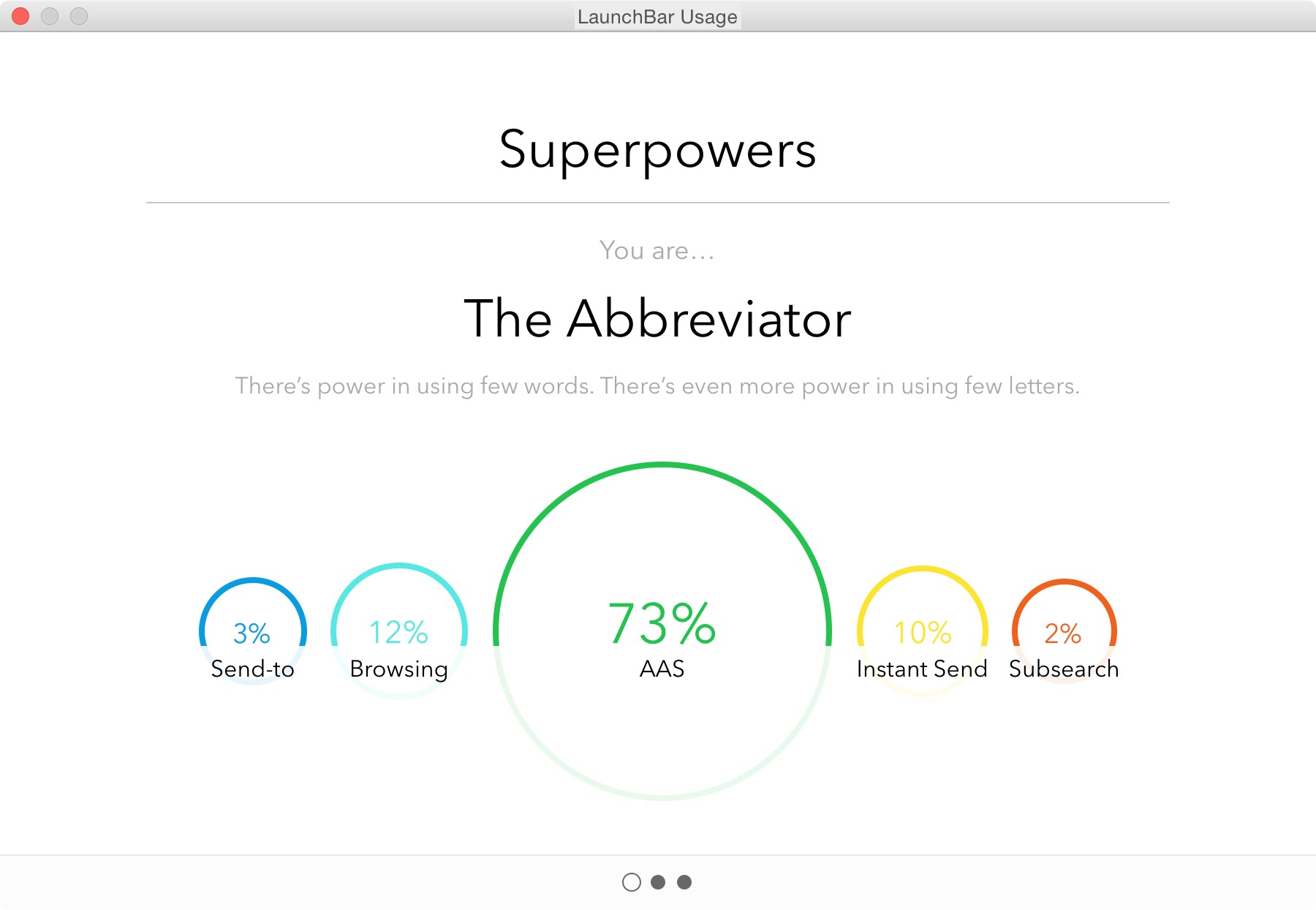
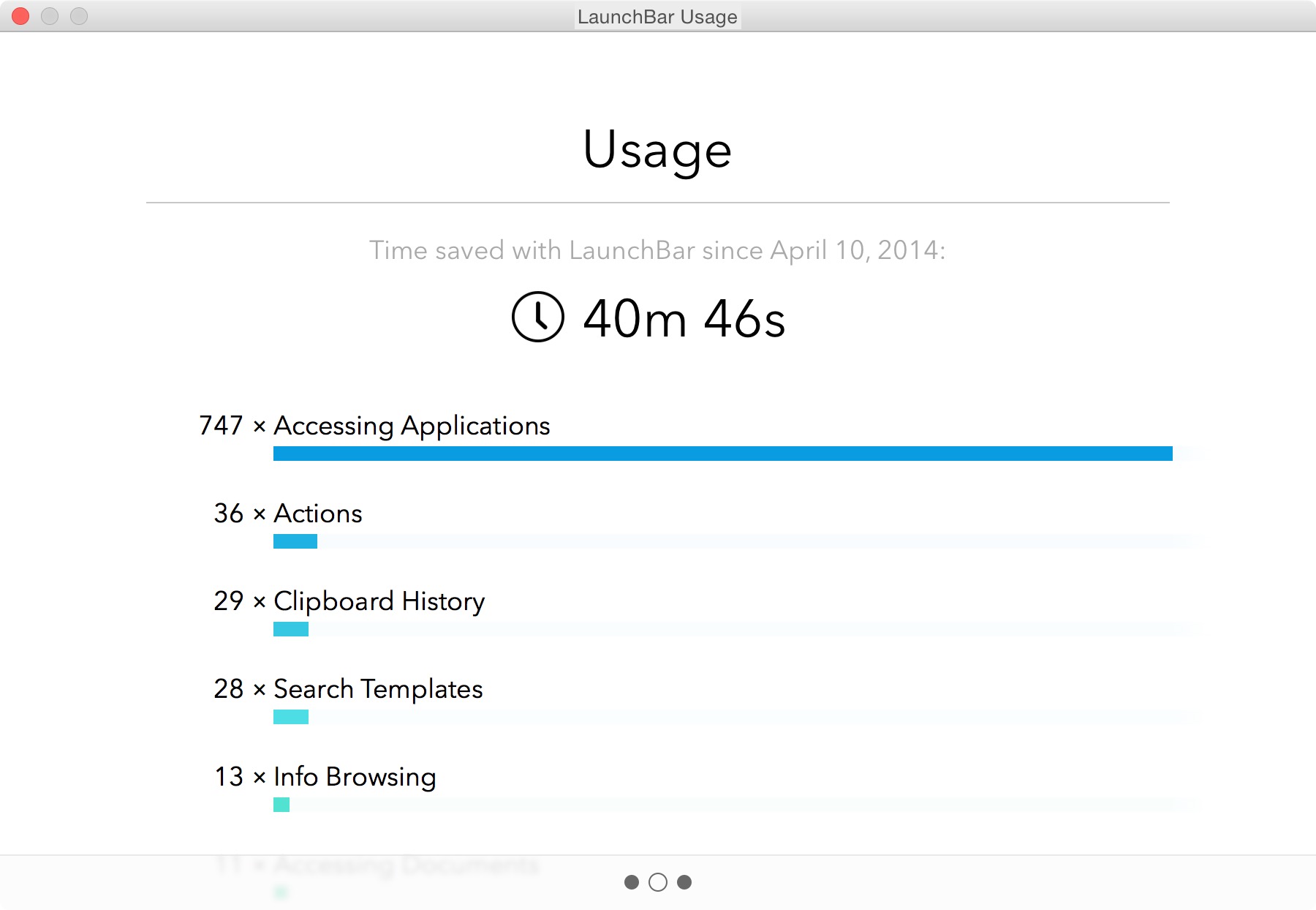
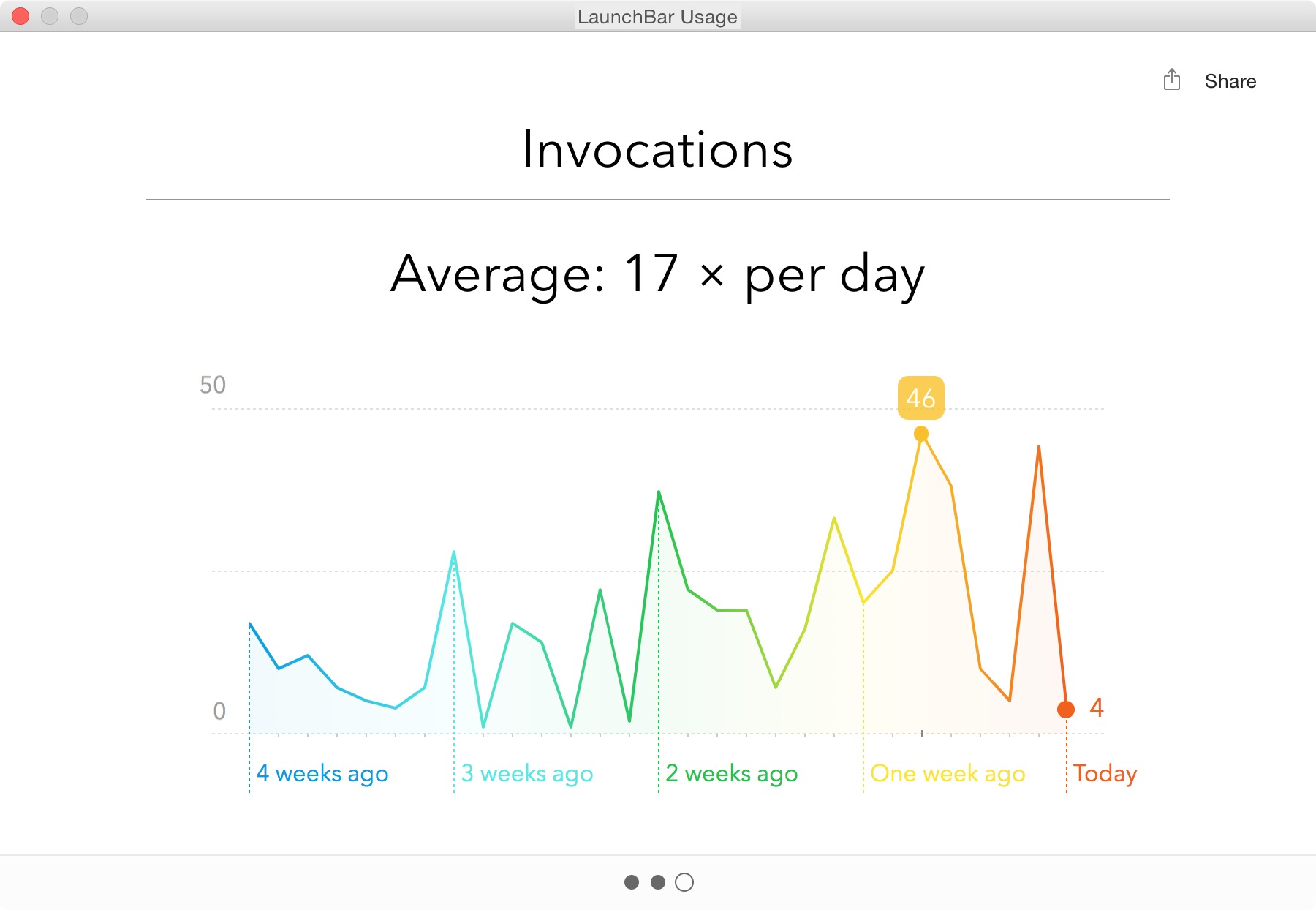
LaunchBar is now put in an interesting position with the expansion of the feature set of Spotlight in the coming OS X Yosemite — and though I’ve been testing this, Spotlight is hardly feature complete so a comparison at this point is pre-mature. Suffice to say, I doubt there is need for worry from the LaunchBar camp.
As you can see above, I use the piss out of LaunchBar — it’s one of the most used apps on my Mac. I mostly use LaunchBar for:
- Launching Apps
- Finding Contacts
- Searching this site
- Clipboard History
That may seem like an incredibly short list to most people, but the tool itself is invaluable.
I polled people on twitter and here are some of the responses I received about what people love about LaunchBar:
- Instant Send
- Clipboard History
Something like Instant Send is invaluable if you start thinking about it right. What I love to do is put images I am going to use in a post on my desktop. I then invoke LaunchBar, hit CMD+G, tab, and type
imo+return. I’ve just sent all those images to ImageOptim for compression. Boom. Never touched the mouse. So great.LaunchBar 6
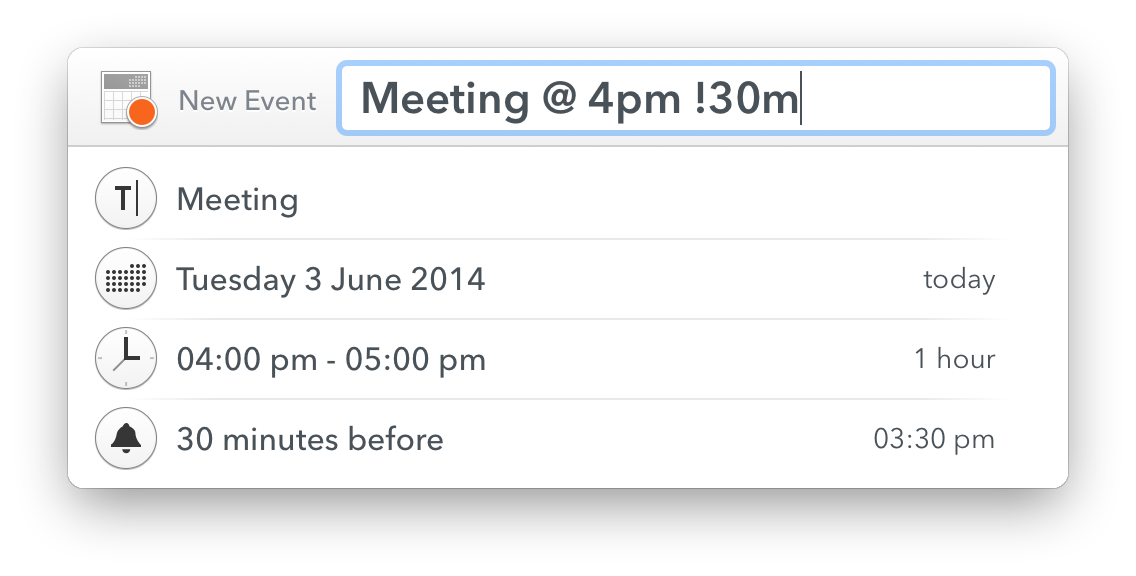
Now, we aren’t just talking about LaunchBar for no reason, because today we get a new version of LaunchBar. Among the biggest changes to the app is the new look. It looks stellar. With a larger focus on typography, and a bigger overall UI.
Overall I love the new UI, it brings a welcomed update to and old favorite of mine. But the UI isn’t the most important part of LaunchBar, the most important part is taking the time to learn how to do cool shit in LaunchBar.
To that end, I want to focus on some of the new additions in LaunchBar 6 — you can see many more examples of what LaunchBar can do here.
New to LaunchBar 6 is the ability to invoke Transmit Favorites. I’ve longed used Transmit to work on all of my web servers, and this is a great addition. The favorites are easily called up in LaunchBar, and invoking the action opens that favorite in transmit. I used to have a special Keyboard Maestro macro to open favorites in Transmit, but this is an even better way. Handy little addition.
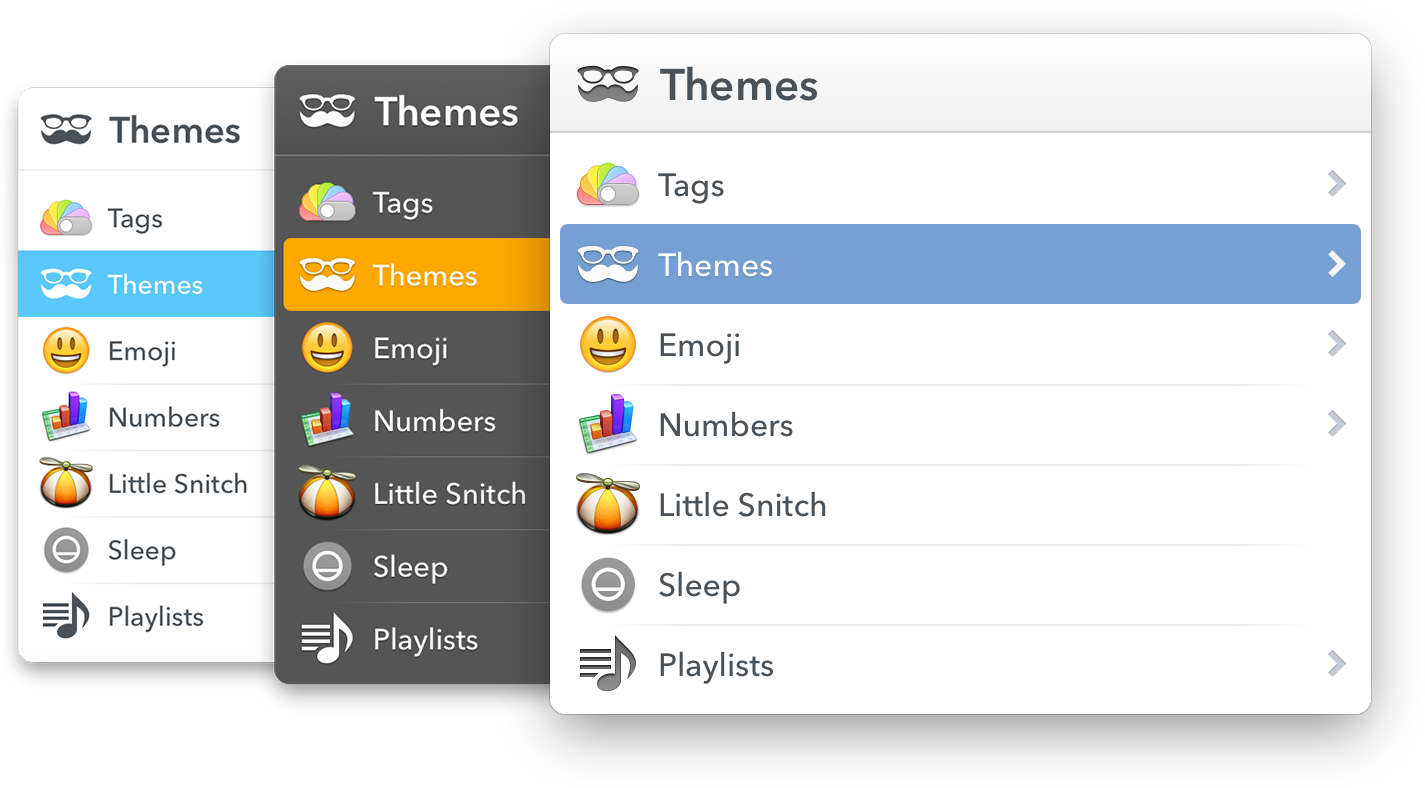
I mentioned earlier that you can select from a set of themes, well of course you can select from those within LaunchBar 6 itself. It makes for a very quick change of feel — something that will come in handy when you are working late into the night.
A few other great additions:
- Support for tags, both viewing and assigning tags to files.
- Now has Emojis, which is just fun.
- You can extend LaunchBar with custom actions written in a large range of scripting languages. This isn’t something I am likely to directly use, but I could see this becoming a very powerful way of launching scripts (like the ones Dr. Drang is keen to talk about).
- File data. I love being able to get all this info in a much better format than the
Get Infodialog affords.
Overall
LaunchBar isn’t just a good app, it truly is one of the great apps you can have on your computer. The way I use it, isn’t the way that other people use it — and that is kind of the point. There is so much that LaunchBar can do, and do easily, that you really have to get it and spend time playing with it to wrangle its true power for you.
LaunchBar 6 is out now, go buy it.
-
Gore on Snowden
Al Gore on Edward Snowden (via David Sirota): But what he revealed in the course of violating important laws included violations of the Constitution that were way more serious than the crimes he committed. In the course of violating important laws he also provided an important service because we did need to know how far…
Al Gore on Edward Snowden (via David Sirota):
But what he revealed in the course of violating important laws included violations of the Constitution that were way more serious than the crimes he committed. In the course of violating important laws he also provided an important service because we did need to know how far this has gone.
-
An Apple Device Is an Apple Device
Matt Drance: The “Continuity” suite of features says more to me than anything else announced last week, naturally blurring the line between Mac and iPhone and iPad while still accepting each product for what it is. Recent updates to OS X seemed intent on forcing iOS down the Mac’s throat. Last week, for what felt like…
Matt Drance:
The “Continuity” suite of features says more to me than anything else announced last week, naturally blurring the line between Mac and iPhone and iPad while still accepting each product for what it is. Recent updates to OS X seemed intent on forcing iOS down the Mac’s throat. Last week, for what felt like the first time ever, the two were on equal footing: an Apple device is an Apple device is an Apple device.
-
Quote of the Day: Bruce Schneier
“We’re starting to see a proliferation of smart devices that can be controlled from your phone. The security risk is, of course, that anyone can control them from their phones. “ — Bruce Schneier
“We’re starting to see a proliferation of smart devices that can be controlled from your phone. The security risk is, of course, that anyone can control them from their phones. “ -
Run, Don’t Walk
Liam Spradlin on a new feature he says is coming to Android, as this alleged text from the new feature called Google Nearby: When Nearby is turned on for your account, Google can periodically turn on the mic, Wi-Fi, Bluetooth, and similar features on all your current and future devices. Google+ and other Google services…
Liam Spradlin on a new feature he says is coming to Android, as this alleged text from the new feature called Google Nearby:
When Nearby is turned on for your account, Google can periodically turn on the mic, Wi-Fi, Bluetooth, and similar features on all your current and future devices. Google+ and other Google services need this access to help you connect, share, and more.
When you turn on Nearby, you’re also turning on Location History for your account and Location Reporting for this device. Google needs these services to periodically store your location data for use by Nearby, other Google services, and more.I’m really disappointed with Google here — there was a clear opportunity for them to also grant themselves remote access to the camera and they just completely miss it. Google is slipping.
-
Syndication and Theft
Matt Gemmell has a truly fantastic article about dealing with republication requests — something that is a must read for anyone who makes and sells things on the web (even if that is just a blog) because if you get a popular post two things will happen: You will get those annoying emails Matt references.…
Matt Gemmell has a truly fantastic article about dealing with republication requests — something that is a must read for anyone who makes and sells things on the web (even if that is just a blog) because if you get a popular post two things will happen:
- You will get those annoying emails Matt references.
- Someone will outright steal your content and post it on their site.
I’ve had both happen a lot. The best way to deal with number one is to have fun, the best way to deal with number two is to be forceful.
On the first I typically respond: Yes, the fee is $5,000 payable to me in advance. Let me know if you need me to fill out a W9. That ends the conversation right there, even if I put $5 as the price the conversation would be over. The thing is, people don’t see monetary value so they think you are greedy no matter what. And if they don’t think you are greedy, at least they know your price.
For the second, once I find out about it (usually because they have an ‘attribution’ link back to my site hidden somewhere) I send off a terse email. Usually saying: “Whether intentional or not, you’ve stolen my work. You need to remove it immediately, and if you do not remove it I will pursue full legal action, starting with a cease and desist from my attorney. This matter is urgent.”
That scares off most people, and (surprisingly) slimy sites like Business Insider will quickly comply, but work to secure rights to your post. Just be firm and tell them to fuck off. Here’s the thing, you need an attorney that you can call. Not on retainer, but you need to know one so you can toss out a Google-able name. And it takes a bit because attorney’s need to do “conflict” checks first. (You are looking for a copyright attorney, by the way.)
More Fun
Even more fun is the most common email I get: link share requests.
Here’s an actual email:
Hello,
My name is [redacted] and I represent a number of leading online companies that function in various fields: gaming, sports, international flower delivery and finance.
I had visited your site https://brooksreview.net recently and was impressed by its content. I believe that it could be suitable for a number of my clients.
I would like to offer that we purchase textual or banner advertisements from you to host your site.
If this would be of interest to you please contact me by return email, and we can begin discussing details.
Hope to hear from you soon.I get these about once a week, more when I am heavily linked to. Here’s how I respond, in almost every case:
For flower ads the price is $100,000 a month, all other ad types are a $150,000 a month.
I respond like this, because — honestly — if they paid me those rates I’d do it in a heartbeat. ((I used to, as people on Twitter way back know, respond with a “It’s $15million for a lifetime ad.” But times are tough, I get that.)) But the thing is, I set a price, now this person can either meet it or fuck off. Either way, I don’t care. Is it spam? Yeah, mostly, but who cares. Because sometimes you get this response:
These price are for banner, I assume?
I would like to know your prices for a sponsored post.That’s really the response from my above response and it’s awesome. Just for shits and giggles I responded:
Sponsored post is $25,000.
Because, after all, why not? (No response to that last one unfortunately.)
-
What Task Management Apps Are Missing
As I’ve been struggling to find the perfect task management app for me, I’ve come across some things that I don’t think many task management app designers think long and hard enough about. (Note: Begin ignores almost everything on this list by design, it’s meant to be overly simple. What I am referring to is…
As I’ve been struggling to find the perfect task management app for me, I’ve come across some things that I don’t think many task management app designers think long and hard enough about.
(Note: Begin ignores almost everything on this list by design, it’s meant to be overly simple. What I am referring to is the apps that are for “power users” — whatever that means.)
For me, then, the perfect task management app hits on all of these points in addition to what you would normally find in an app like OmniFocus.
Collaboration
I’ve said it before, but it bears repeating: if your app is not built for collaborating with a disparate group ((Not only ‘teams’ or companies, but groups of freelancers, or groups consisting of one or more people not at the same company.)) of users, then you are skating to where the puck was. ((I am beginning to hate that turn of phrase.))
At the most basic level I believe that collaboration in a task management app should be implemented to include the following:
- Assignment of tasks.
- Assignment of a project, with ability for tasks within that project to be assigned to others.
- Commenting on tasks.
- Partial, or progressive, completion indicators. This would be like sub-tasks, but would not need to be implemented from the creation of a task. Meaning, if someone assigns you to ‘create budget’, and you are waiting on items. Then you can link your waiting task to this budget task, and show when that waiting action was completed, thus showing the state of progress on the budget task itself. This idea also allows for marking the task as ‘drafted’, or ‘reviewing’ and thus moving a progress indicator along. Doing this partial progress report removes the need of a manager to bug you about where you are as they can see progress — and removes your need to type explanations as you can show progress through completing the supporting tasks. Hell, even allowing someone to arbitrarily mark a task as XX% complete would go along way towards making life easier.
- Sharing of files within a task/project. Even if that is just a linked Dropbox folder, it would be better than nothing. Not a day goes by where I don’t look at my tasks, then jump into a folder to open the file(s) I need to complete the task.
- Built-in ability to decline an assigned task. Most collaborative task management apps assume you will accept a task without complaint — give us the ability to say “hold the fuck up, whatchyou talkin about”.
- Ability to collaboratively assign time estimates. Going along with the last, if I assign a task I can tell the person I am trying to assign it to two things: how long as a manager I think the task should take, and what the time commitment is. That way the person being assigned not only knows my expectations, but knows the demand which is going to be put on them.
Just the basics here — we don’t need the most massive collaboration features, but we do need a better way of tracking work others are doing, and accepting work from other people.
Project management, or task management
Almost more important than collaboration is to define if your app is for project management, or for task management. Even still, a good app needs to do both well. Project management apps like Basecamp are all about collaborating, but you should also be able to use such an app on a personal basis. In other words I shouldn’t have to copy tasks between systems and check them off both places.
I shouldn’t need two apps: one for my manager to create schedules and assign tasks; and another for me to drill down the task and mini-projects into actionable tasks. This should be done within one app in order, not only for people to work better, but for managers to more easily manage their staff.
Send Reminders For Me
There should be a special class of tasks that is a reminder task, where you want to remind, or follow-up, with another person. You should be able to compose and send that email/text/notification within app, right there in the app. See the task, perform the action, task is marked complete and you get asked if you want to have it pop back up in X days.
Managers, or team leaders, spend an inordinate amount of time checking to see if things were/are done. We need a better way for everyone to manage this. I shouldn’t have to make a call, and you shouldn’t have to answer a call (or email) to let me know that you did go to the store and buy that thing.
Defer / Snooze
I’ve taken to calling the Defer date (formerly Start dates) in OmniFocus as one of the best, yet most under promoted, features of the app (but why doesn’t Forecast view show me every ‘deferred’ task instead of just those coming available today, this drives me nuts). David Sparks will fill you in on why they are so powerful, but it’s like a can of magic when you start using them.
The best way to think about these dates is to think of them as snooze buttons for your tasks. If you can’t, or don’t, want to do a task today then you shouldn’t see it just because you are looking at all tasks due this week. Moreover it shouldn’t be hard to push the defer date off (or the due date for that matter) on any task.
Even the mighty OmniFocus fails when it comes to quickly being able to change the dates on your tasks. ((AppleScripts can solve this, but that’s a hack.)) With Begin that was one key thing we focused on (albeit easier given the two-day-only nature of the app): making it just as easy to push a task off until tomorrow, as it is to complete the task.
Every task management app excels at quickly allowing you to complete a task, but I have to re-assign dates just as often as I have to complete tasks — yet for some reason little thought seems to be given to the workflow of putting off tasks. ((You can argue that this is “for productivity”, but I call bullshit. Sometimes stuff comes up and you need to put things off, it’s highly unproductive to make me jump through hoops to do that. And yes, I use Applescripts to speed this up, but I shouldn’t have to.)) There is immense power as a person, if a task is easy to shove off your plate. Having something on your todo list for today, when you know you won’t do it today, is more distracting.
In a nut shell: help people hide what they can’t act on, and quickly snooze what they can’t get to today.
Work modes
In an interview with the OmniGroup Shawn Blanc got this nugget about how Derek Reiff uses OmniFocus:
I separate my tasks at the very top level by using two folders: Work and Home. When I’m at the Omni Group office, I enable Focus on the Work folder and every view or perspective I switch to from that point on will only show Work actions and projects.
I think that pretty clearly shows the trouble people have with task management apps: they are personal apps that are used for both work and personal things. One thing I love about Flow is that I can have a Personal and a Work ‘workspace’ — and yes you can do that to a degree in OmniFocus, but these ‘spaces’ should be taken to the next level.
I’d propose a more time-sensitive set of views (not the only views, but perhaps on the level and display ability of what OmniFocus’s forecast view provides):
- Overview: Allow me to see a general overview of my day, week, month. I get to set the time/date range and can easily see what is starting, what is due, etc. This would be the planning mode. You can use it each day, or just at the beginning of the week. OmniFocus’ forecast view does some of this, but it’s only part of the way there.
- In the task: I’d like there to be a view for when I am working on the task. I wouldn’t use that with everything, but for larger tasks this would be great. It could show me the comments, how many times I snoozed the task, supporting documents, etc. In other words: a dashboard for getting that task done. Ideally this would also work with Projects too. This is your organizer for things you need for that task.
- Mid day: I’d like there to be another overview that I step into after lunch. Here I see just the tasks from a subset of projects that I want to see (added by drag and drop and keyboard shortcuts for speed, removed easily from a list somewhere else). I can check in and see what wasn’t done, and what must be done for the rest of today. It’s a view that shows you just the most important stuff — perhaps just flagged items, or some other means. The goal of this view is simply to make sure you plan time for the really important stuff (now that the day is half wasted at least).
- End of day: Here only the important tasks from the last view are shown if they were due and not completed and now I also see my personal tasks that I want to do this evening. This would also be time/location based so once it is past say 8p, or I am at home, I don’t see the work tasks anymore.
- Weekend: No work tasks, just my personal tasks. This view hides anything not personal so completely that I don’t even know I have work tasks and thus I can just focus on my honeydew list.
This all sounds complex, but it should be fairly automated using some AI to figure out where things go for you.
Integration
A task management app should integrate with other apps to show me activities, discussions, and emails that I may need to add into my task management system. (Flagging keywords which sound like I need to act on them.) I’d like to see a task management app that plays nice with tools like:
- Slack
- Basecamp
- Trello
- Asana
- IMAP
- CALDAV
I don’t always want to jump into those tools, but I might be ‘forced’ to use them at the office, so make that easy on me. Make it so that I don’t really have to use those tools — just your app.
Keep Me From Forgetting
Hit me in the face with important tasks. Really.
I should be able to assign things as “must do this today” and have the app remind me constantly so that there is no way to forget. ((Whereby constantly is user configurable — duh.)) This isn’t a feature you use everyday, but you use it when that really important thing needs to be done yesterday. This is great for something like “Today is your anniversary”, or “Taxes Due”.
For the things you are very likely to forget, but are imperative they get done.
Easier Creation
Calendar apps have gotten really great at natural language input, and I’d like the same in my task management apps. I should be able to tell a quick entry screen: “Work, Write proposal, start tomorrow, due in two weeks”. That entire string should parse correctly into my app.
Additionally, there should always be two entry modes: hit me with tasks as fast as you can; and the detail “quick” entry you see in apps like Flow and OmniFocus. Allowing me to brain dump if needed, while also being able to add a considered task when I want.
Further the app should be guessing at things like projects and contexts based on my previous usage of the app. So if I say Email as a start, the context is quickly assigned as ‘email’.
Auto Lists and Categories
Or another way to think about it: smart groups. A lot of times I will have tasks to email or call people, but instead of using ‘email’, or ‘phone’ as the context, I will simply do something like ‘office’ because I know I don’t want to make that call unless I am at my office. But I’d still like to be able to see all tasks which have a phone number attached, or ‘call’ in the title together.
There’s a lot of things you can do with such smart groupings that I am only scratching the surface with the above. This should be there already, but I’ve yet to see it anywhere.
It’s Hard
It is easy for me to type all these rather obvious things out, but building even a basic to-do app like Begin was really challenging. Just finding what would work isn’t easy — I get that — but at the same time there’s a lot of mature apps that seem to be focusing on the wrong parts of their apps. Making tasks more granular instead of helpful.
The above is simply meant to help some of these apps get back on path — because we, no, I need this app.
-
Fifteen Dollars
Recently the City of Seattle passed a $15/hour minimum wage. It’s not as brutal to businesses as many make it out to be (it raises from current level to $15 over a few years). What’s interesting isn’t so much the debate, national or local, or the dollar amount. But to me the most interesting part…
Recently the City of Seattle passed a $15/hour minimum wage. It’s not as brutal to businesses as many make it out to be (it raises from current level to $15 over a few years).
What’s interesting isn’t so much the debate, national or local, or the dollar amount. But to me the most interesting part is the perception of value. Washington state already has a ‘high’ minimum wage ((Comparatively.)) at around $10 (just under), now Seattle and SEATAC have $15 minimum wages (with the latter city having some exceptions). So if you are within a reasonable commuting distance to either, why would you take a lower wage when you could commute to a much higher wage.
It’s not about the dollar amount, it’s about the fact that it is so much higher. If you live in a state and you are making less than $8 an hour, and you look at Seattle’s $15 an hour minimum — well you get a different perspective on the value of that money you are making.
How this all plays out should be very interesting to watch.
-
Ios 8 Randomises the Mac Address
Redditor iOSecure: In iOS 8, Wi-Fi scanning behavior has changed to use random,locally administered MAC addresses. The MAC address used for Wi-Fi scans may not always be the devices real (universal) address. Once the iOS device is done scanning it will give the real MAC ID. Very cool feature to make it harder to “track”…
Redditor iOSecure:
In iOS 8, Wi-Fi scanning behavior has changed to use random,locally administered MAC addresses.
The MAC address used for Wi-Fi scans may not always be the devices real (universal) address.
Once the iOS device is done scanning it will give the real MAC ID.Very cool feature to make it harder to “track” iOS users.
-
Pixel Winch
I heard about this from some drama going on surrounding it, but man am I glad I heard about it. This is like xScope, in that it is for measuring things — but holy shit is it awesome. There’s a free beta right now, so give it a shot if you design at all on…
I heard about this from some drama going on surrounding it, but man am I glad I heard about it. This is like xScope, in that it is for measuring things — but holy shit is it awesome. There’s a free beta right now, so give it a shot if you design at all on the screen. Really stellar tool.
-
Unread for iPad
I’ve been beta testing the app, and it is wonderful. Most of what I said about Unread for the iPhone apply — well the good things. I don’t really like checking RSS on my iPhone anymore — it’s too good on the iPad. Here’s what Stephen Hackett had to say: Like most apps that exist…
I’ve been beta testing the app, and it is wonderful. Most of what I said about Unread for the iPhone apply — well the good things. I don’t really like checking RSS on my iPhone anymore — it’s too good on the iPad.
Here’s what Stephen Hackett had to say:
Like most apps that exist on both the iPhone and iPad, the new tablet version of the app is great to read with. Unread’s lack of Chrome makes the app just about indistinguishable from something like Instapaper or Pocket.
Agreed, which makes it a lovely way to read your articles.
Thanks to the larger screen, Unread works better for two core aspects: focus on text and comfort.
I think Mikhail Madnani hits the nail on the head for me:
Mr Reader is great for triaging and working on your list quickly if you subscribe to loads of feeds and Unread now provides the best reading experience.
I am a big fan of Mr Reader, and the change between the two is jarring — but I think a change well worth making. Go buy it, and be happy with your RSS zen.
-
Secret Wires
Juliette Garside: Vodafone, one of the world’s largest mobile phone groups, has revealed the existence of secret wires that allow government agencies to listen to all conversations on its networks, saying they are widely used in some of the 29 countries in which it operates in Europe and beyond. That’s not an NSA thing, thats…
Juliette Garside:
Vodafone, one of the world’s largest mobile phone groups, has revealed the existence of secret wires that allow government agencies to listen to all conversations on its networks, saying they are widely used in some of the 29 countries in which it operates in Europe and beyond.
That’s not an NSA thing, thats an, almost every other government thing
-
Update on A6000 Post
Some odd glitch on my end lead to the photos on the A6000 post not being viewable, apologies. Now fixed. (Thanks to all who let me know.)
Some odd glitch on my end lead to the photos on the A6000 post not being viewable, apologies. Now fixed. (Thanks to all who let me know.)
-
Maintaining Your Place
Thomas Brand: Instead of re-envisioning how an iOS application should look, Blixt has reinvented how an iOS application should behave. Users are no longer content navigating their apps the same way they browse their address books. Being pulled along a string of endless lists tied together by the Back button. Instead Blixt takes a new…
Thomas Brand:
Instead of re-envisioning how an iOS application should look, Blixt has reinvented how an iOS application should behave. Users are no longer content navigating their apps the same way they browse their address books. Being pulled along a string of endless lists tied together by the Back button. Instead Blixt takes a new approach. Giving users full screen content in stacks they can shuffle using just their fingertips.
Thinking about it, it is quite remarkable how you never get lost in Blixt. If you are an iOS developer you must download this app, because it just raised the bar.
-
Creating the Office with Walls
Olga Khazan: She has partnered with Steelcase, the office furniture maker, to create new types of office spaces that will allow introverts to both work and respite in peace. Some of the new modules will house desks, others will contain couches, and others still will have yoga mats. All will have walls. WOW, walls? What…
Olga Khazan:
She has partnered with Steelcase, the office furniture maker, to create new types of office spaces that will allow introverts to both work and respite in peace. Some of the new modules will house desks, others will contain couches, and others still will have yoga mats. All will have walls.
WOW, walls? What a new and novel concept — taking a desk and wrapping walls around it. Wow, I wonder what a floor of these ‘offices’ may look like.
-
Article Comments
Adam Felder: Respondents who saw comments evaluated the article as being of lower quality—an 8 percent difference. In other words, authors are judged not just by what they write, but by how people respond. The presence of comments did not make a statistically significant difference in a person’s likelihood to read more content by the…
Adam Felder:
Respondents who saw comments evaluated the article as being of lower quality—an 8 percent difference. In other words, authors are judged not just by what they write, but by how people respond. The presence of comments did not make a statistically significant difference in a person’s likelihood to read more content by the same author, nor did it make an appreciable difference in respondent self-reported mood.
The results seem contradictory. Having comments make the perception of the article quality to be less, but not your likelihood to read or enjoy the article? Huh?
-
The Device
Nate Barham: Think, “I am using my Mac,” or “I am using my iPhone.” Unlike Microsoft and Google, for whom the device is a layer of abstraction between the user and the primary product, which is the respective company’s services, Apple’s devices are zero layers of abstraction from their primary product: the device itself. Such…
Nate Barham:
Think, “I am using my Mac,” or “I am using my iPhone.” Unlike Microsoft and Google, for whom the device is a layer of abstraction between the user and the primary product, which is the respective company’s services, Apple’s devices are zero layers of abstraction from their primary product: the device itself.
Such a fantastic article about the Apple line of thought. “What ever makes users love our devices more.” That’s what it is all about, that’s why iCloud is now front and center and will likely get a lot of resources to be great.
