Top Posts

Leica Sofort 2June 13, 2024
Grand Seiko SBGX261February 23, 2023

Recent Articles

  • ‘How Silicon Valley’s most celebrated CEOs conspired to drive down 100,000 tech engineers’ wages’

    Mark Ames: > The secret wage-theft agreements between Apple, Google, Intel, Adobe, Intuit, and Pixar (now owned by Disney) are described in court papers obtained by PandoDaily as “an overarching conspiracy” in violation of the Sherman Antitrust Act and the Clayton Antitrust Act, and at times it reads like something lifted straight out of the…

    Mark Ames:

    > The secret wage-theft agreements between Apple, Google, Intel, Adobe, Intuit, and Pixar (now owned by Disney) are described in court papers obtained by PandoDaily as “an overarching conspiracy” in violation of the Sherman Antitrust Act and the Clayton Antitrust Act, and at times it reads like something lifted straight out of the robber baron era that produced those laws. Today’s inequality crisis is America’s worst on record since statistics were first recorded a hundred years ago — the only comparison would be to the era of the railroad tycoons in the late 19th century.

  • Lightroom Workflow

    When RAW image editing and workflow software started to hit the mainstream I checked out the three biggest name offerings: Photoshop Lightroom, Capture One, and Aperture. At the time I couldn’t stand Lightroom, so for three versions I stuck with Aperture. It was dog slow, and couldn’t do some of the really neat stuff Lightroom…
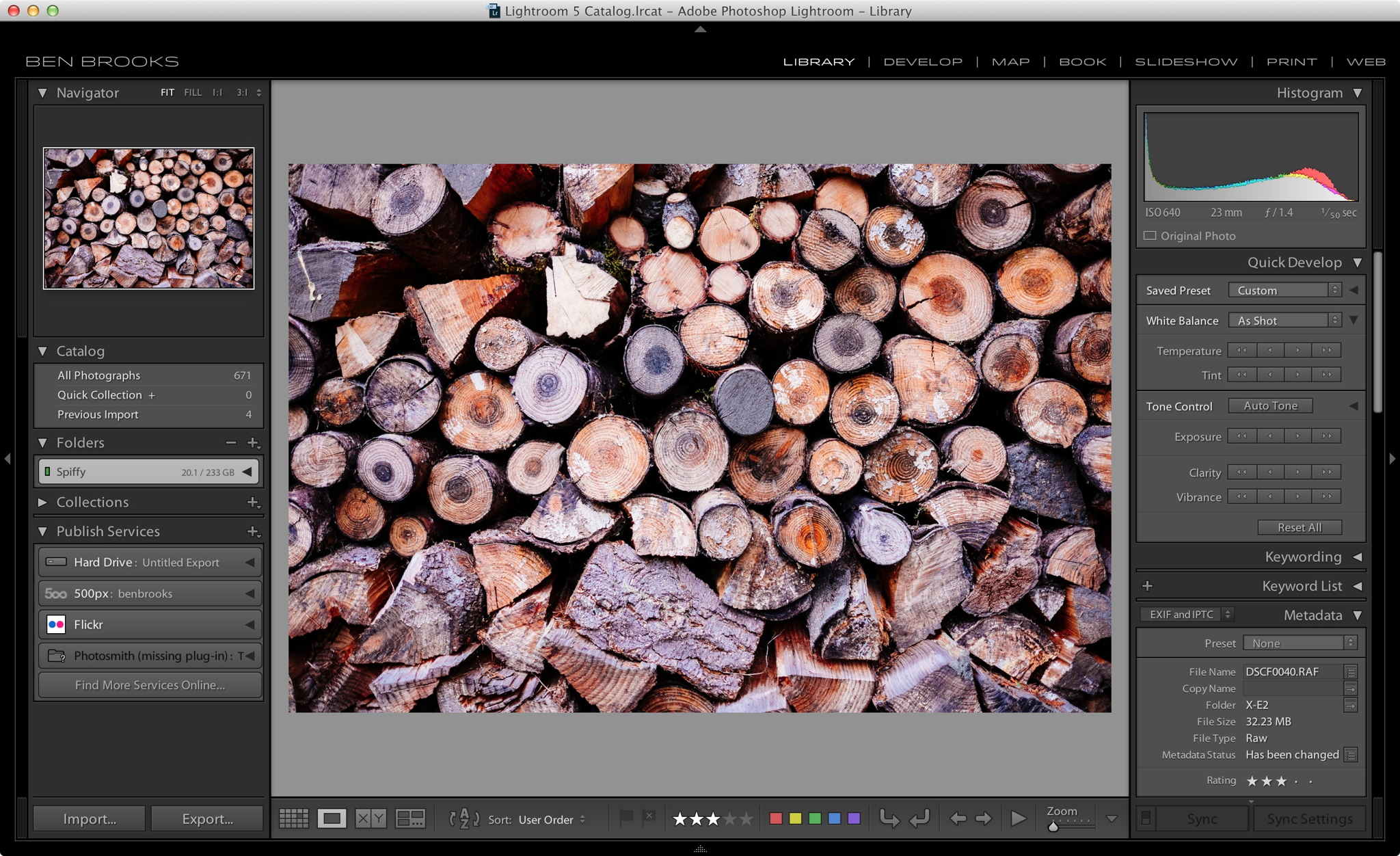
    When RAW image editing and workflow software started to hit the mainstream I checked out the three biggest name offerings: Photoshop Lightroom, Capture One, and Aperture. At the time I couldn’t stand Lightroom, so for three versions I stuck with Aperture. It was dog slow, and couldn’t do some of the really neat stuff Lightroom could. Aperture, though, had a logical workflow (and worked pretty well overall).

    And then I saw the noise reduction capabilities of Lightroom 4 and I tossed Aperture to the side ((Just as it seems Apple has done with the app.)) and moved over to Lightroom. Since then I have been trying to make the most of Lightroom.

    There’s no right and wrong way to do things, but maybe you will find a few helpful nuggets in how my Lightroom workflow goes.

    ## Settings

    First things first, you need to get your settings configured properly.

    #### General
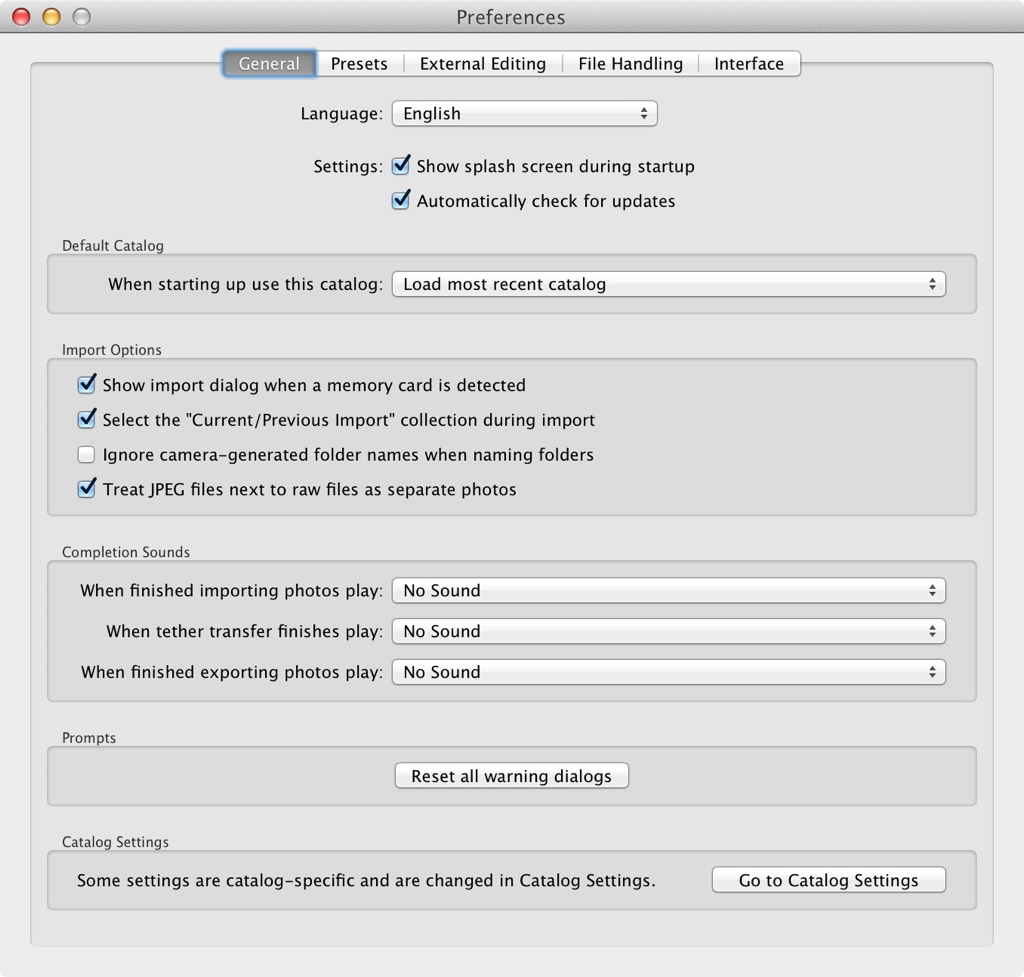
    In the general tab I only really care about one setting: “Treat JPEG files next to RAW files as separate photos”. I turn that setting ‘on’ (it is off by default) as I have taken to shooting RAW+JPEG to make use of some of the nicer in-camera scene/profile settings out there. I use those JPEGs to share with people around me in the moment (e.g. my Wife), but still want the RAW file should it need tweaking once I get back to the computer. If you have that setting off, you will never get those jpegs imported into Lightroom.

    #### File Handling
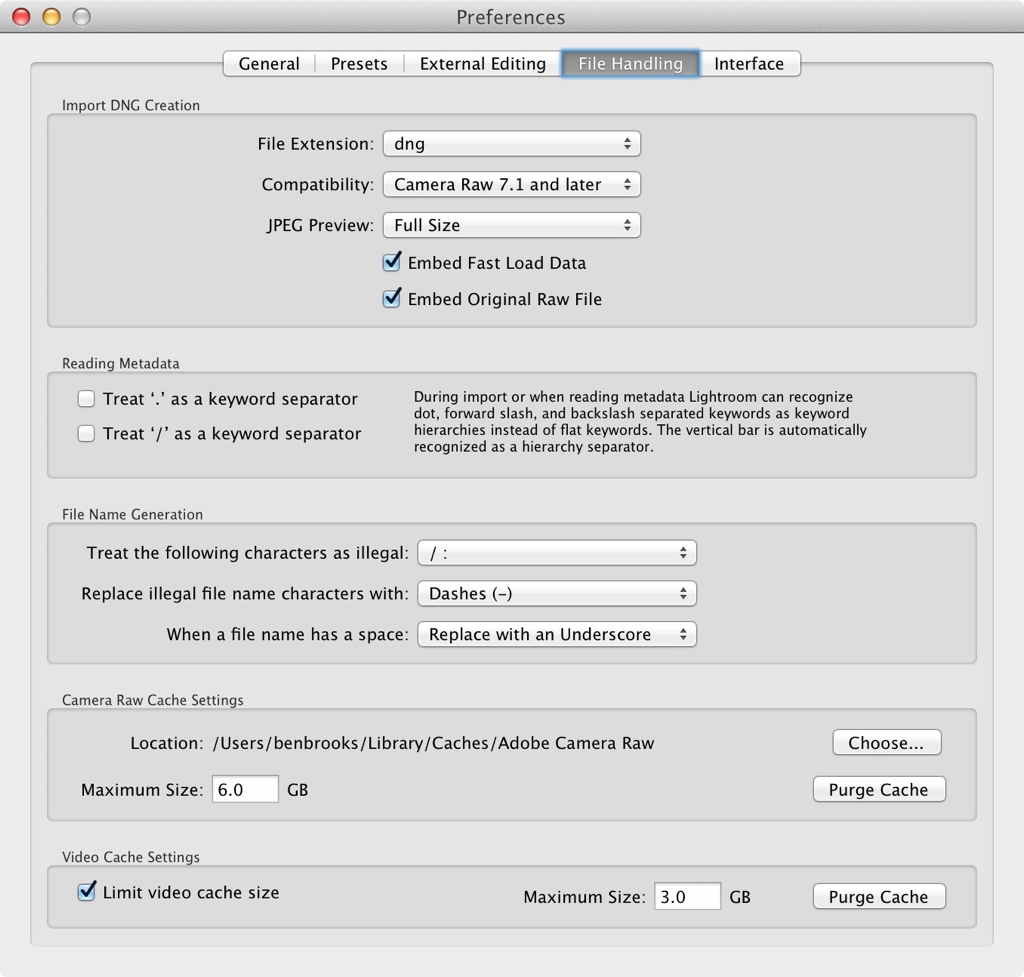
    In the file handling tab I change a few things to better fit my workflow and, specifically, my Mac. ((I am working with 16GB of RAM as a point of reference.)) I change the JPEG preview to ‘full-size’ and I embed the original RAW file out of paranoia that I may want that at some point should I decide to randomly convert to DNG. I also force spaces in file names to be replaced with an underscore for better web compatibility — unfortunately this effects your folder naming too. Lastly, I set the camera RAW image cache to 6GB and video cache to 3GB — both arbitrarily chosen, I would appreciate advice on this if you have it.

    #### Catalog Settings
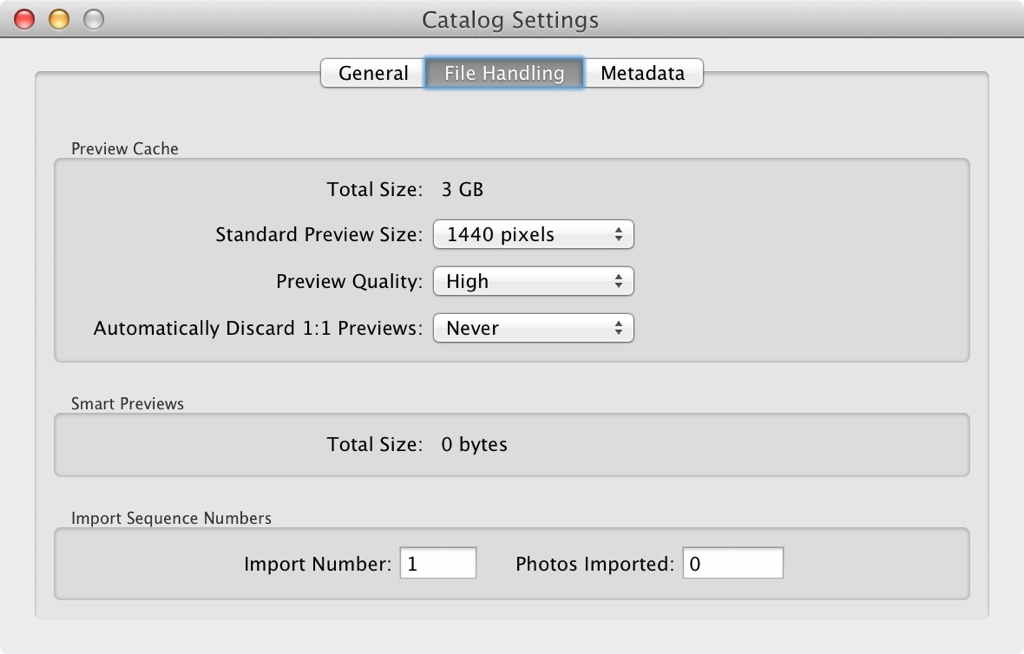
    That’s all I do in the Lightroom Preferences, then I move to the Catalog Settings.

    Pro Tip: you can change how often you see that nagging backup dialog.

    More importantly you can swap over to ‘File Handling’ and change some preview settings. I have mine set to 1440 wide, High quality, and to never delete the 1:1 previews. That seems to work well for me.

    Lastly, you can go to the Identity plate setup and change the fonts for the tabbed sections as well as have your name displayed instead of the Lightroom text. This is not important but I like a nice font to look at.

    ## Import
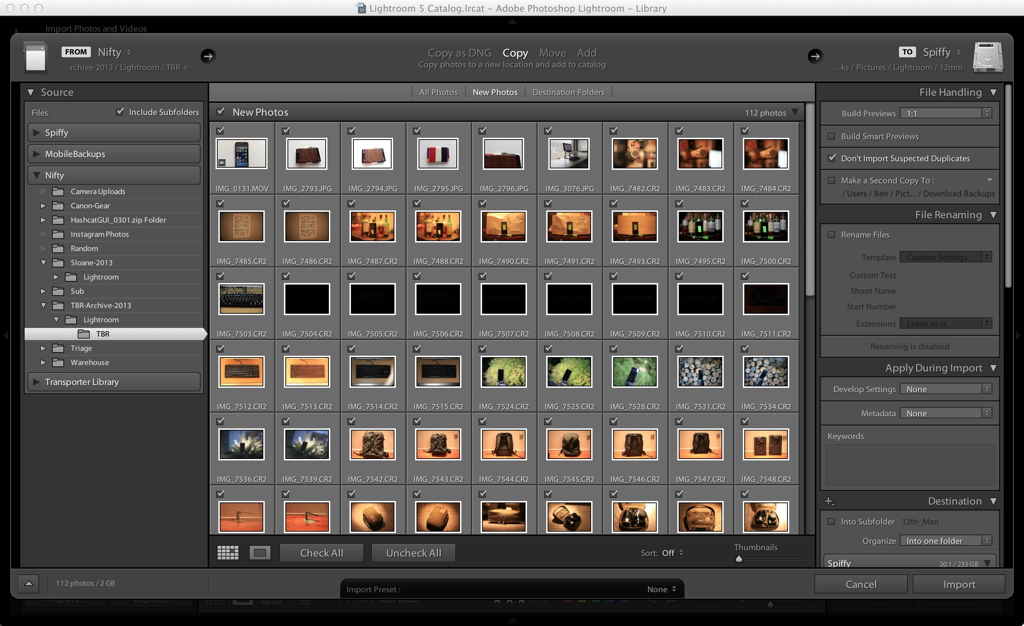
    Now that Lightroom is adjusted properly, the first part of my workflow is always an import to bring in new images. There’s a few important things to note on this screen. The first is located top center of the screen: “Copy as DNG, Copy, Move, Add”. Typically you should set this to Copy, and nothing else. The DNG option converts the file (remember when we embedded the original RAW file in the last section). Move, moves the file, and Add keeps the file(s) where they are but adds them into your Library. So, Copy is likely what you want.

    More importantly at the top left is Build Previews. If you use Lightroom you may notice there is a lag while moving between photos as the app renders the blurry preview to a sharp image. I set this option to 1:1, meaning after the images are imported Lightroom then builds a 1:1 preview for each image. The import takes longer, but you can then cycle through the images much more rapidly (which is important in the next part of my workflow).

    Note: If you edit any image, the 1:1 preview for that image will be gone.

    There’s not much else I do. I keep images grouped in folders in a way that likely only makes sense to me.

    ## Triage

    Now I have a bunch of photos in Lightroom, all with rendered previews. Before I edit a single photo I triage all of them so that I can take advantage of the speed 1:1 previews give me (remember: once you edit a photo, the preview needs to be rebuilt).

    I triage by viewing images in as large a view as I can (hit Tab, or switch to fullscreen), and then:

    – I set rejected images. These are any blurry, or out of focus images.
    – I set a rating of 1-4 stars for non-rejected images.
    – 1 star = keeping it for posterity
    – 2 stars = maybe something here, worth a quick edit.
    – 3 stars = likely a good shot.
    – 4 stars = _OH_ yeah, we’ve got something here.
    – 5 stars = I refuse to give 5 stars before editing an image.

    Next I remove all rejected images from the library so I can focus on the better images. I then set my view filter to anything above 1 star, helping me to ignore the shots I am just keeping to ‘keep’.

    From there I typically enter the Develop module to begin editing.

    ## Editing
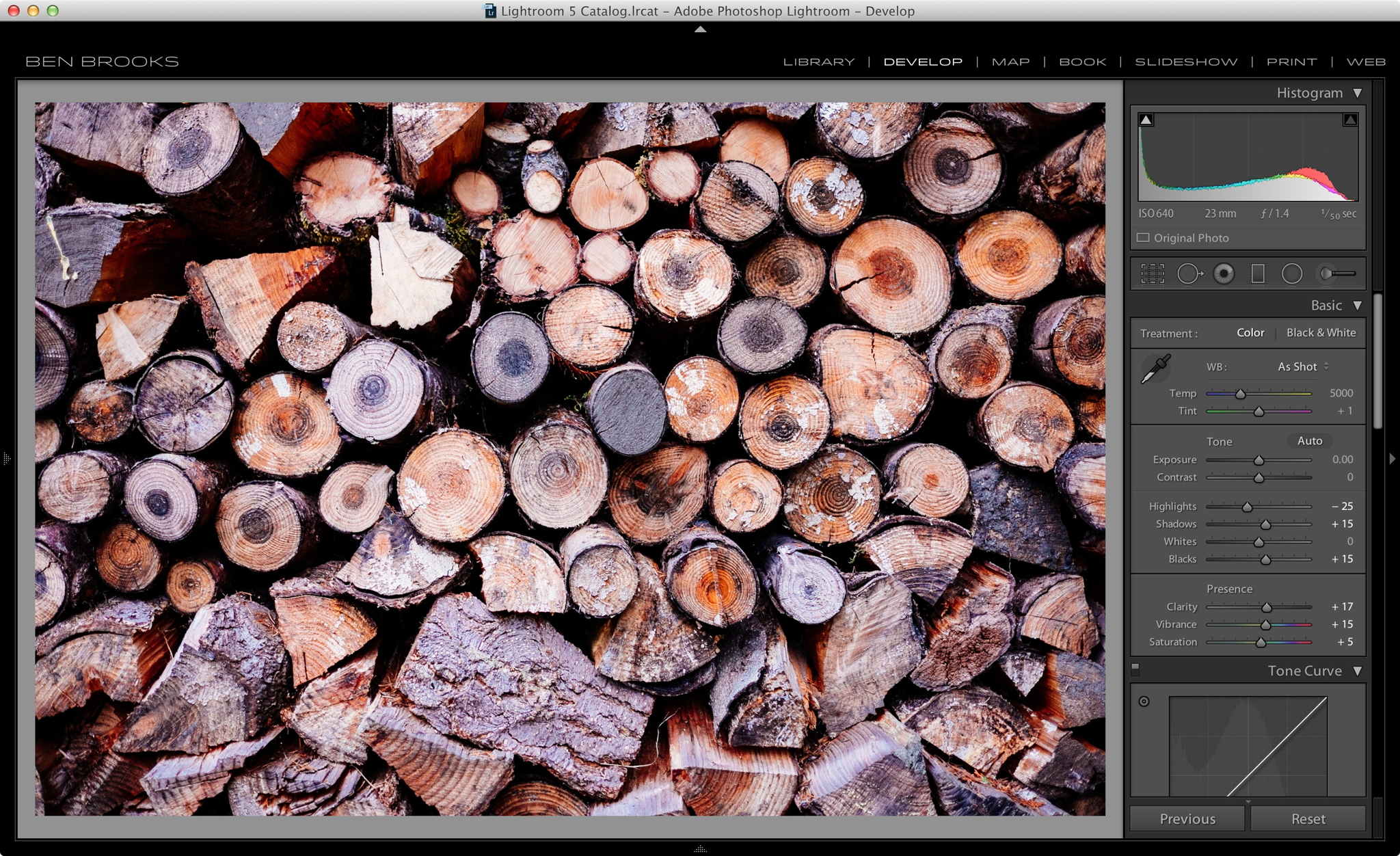
    If I took a grouping of images at the same location, and the white balance is off, I will fix it in one image and apply these settings to all the images I can. This way I don’t have to think about white balance as I try to edit the images.

    From there I typically just apply a preset to any 2 star image, using either Trey’s Lightroom presets, or VSCO filters. Occasionally, I will bump up the rating on a 2 star after I apply a preset — but not typically. Any image with greater than 2 stars gets a full treatment — I try to stay away from presets for these images.

    ## Sharing

    After editing I share the good images to Flickr, or 500px, using their Lightroom plugins, or I can export them for upload to my CDN for showing in a post here.

    I also have a workflow to send good photos to my iPad via the Lightroom Photosmith plugin. The advantage is that I can add them to my camera roll and thus Photo Stream, but it is a shitty workflow to be honest. You could do the same thing with iPhoto/Aperture on your Mac, but then you would have to import those photos to each app. I wish Apple would open up Photo Stream (though the rumored Lightroom iPad app may make this point moot).

    ## Before I Quit
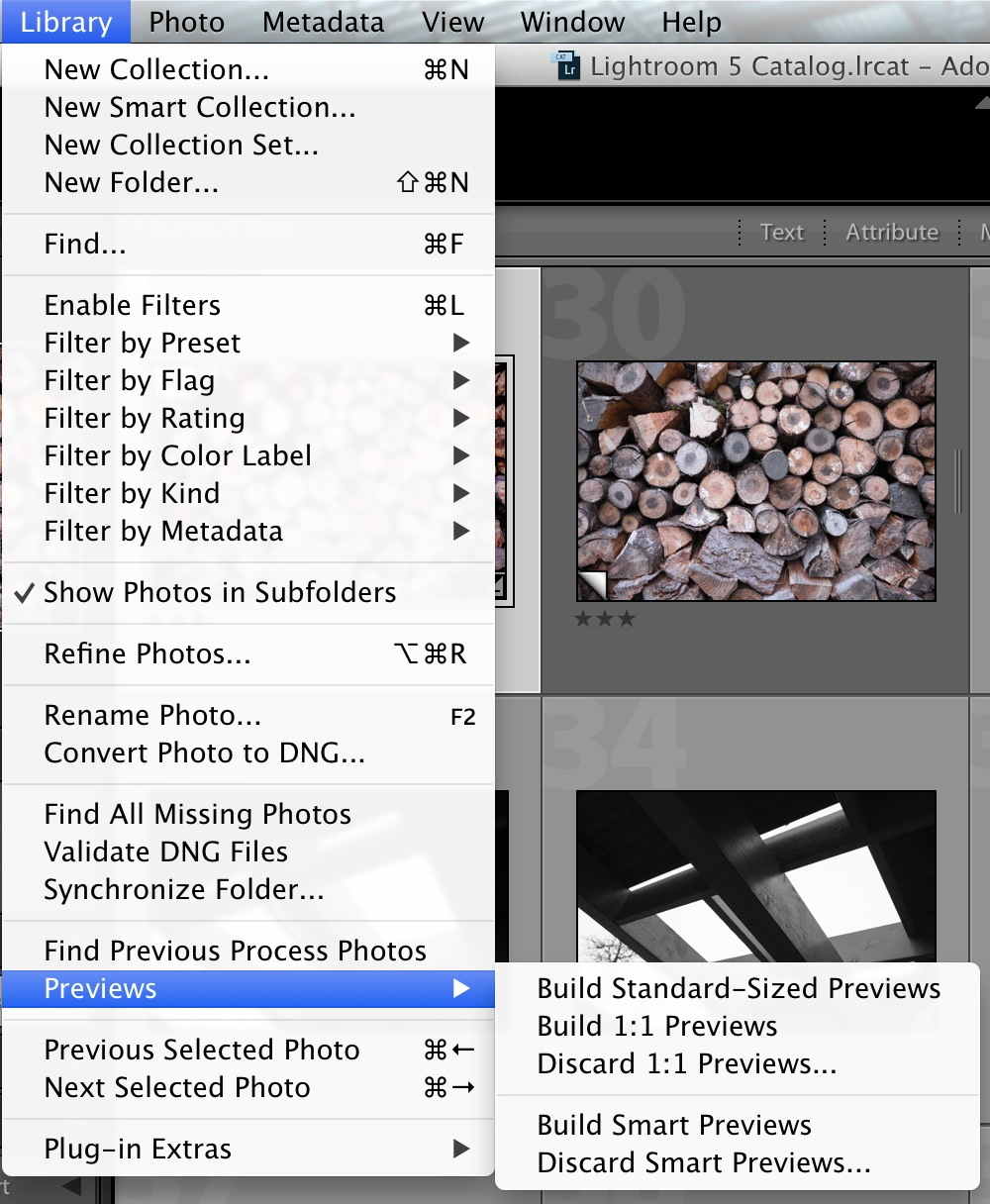
    Before I’m done I go back and build new 1:1 previews for all the images I edited. This helps with speed the next time I move back into Lightroom and look at older images.

    ## End

    Hopefully this helped someone. If you have any tips, please get in touch to share them.

  • Bigger Sensors

    [David Pogue has written about cameras in a way that I find a tad inaccurate](http://www.yahoo.com/tech/sensor-innovations-from-sony-ushering-in-a-golden-age-74229401513.html). He says: > It’s very simple: Big sensor = better photos. > A big sensor can absorb more light. It makes possible sharp photos with better color in low light. Less digital “noise” (random speckles). And with the right settings,…

    [David Pogue has written about cameras in a way that I find a tad inaccurate](http://www.yahoo.com/tech/sensor-innovations-from-sony-ushering-in-a-golden-age-74229401513.html). He says:

    > It’s very simple: Big sensor = better photos.
    > A big sensor can absorb more light. It makes possible sharp photos with better color in low light. Less digital “noise” (random speckles). And with the right settings, a big sensor also makes possible a large aperture, which gives you that delicious, professional-looking blurry background.

    Kind of — but it’s not always the case that a big sensor beats a small one. A shitty big sensor won’t beat a good small sensor. And a big sensor in the hands of a shitty photographer won’t make them any better.

    If all else is equal, then yeah when you pixel peep you will see the bigger sensor is, in general, usually better. But Pogue seems to be making the argument that you need a big sensor for a great image — when that’s not even close to true.

    Let me just leave you with this, three images shot the same day/same time, with three different cameras (all with different sensor sizes): ((If you must know: Fujifilm X-E2, Olympus OM-D E-M5, iPhone 5S.))

    Aside from the iPhone shot being pretty obvious (and annoyingly not at the same angle/framing) the other two are both pretty similar. Both are sharp, both have shallow depth of field, both have good colors and resolution. Pogue’s not wrong that a larger sensor is generally better, but to assume that you need a larger sensor to get a better image is a fallacy.

  • ‘Another Google Privacy Flaw – Calendar Unexpectedly Leaks Private Information (Disclosed)’

    Interesting discovery from Terence Eden (which Google now says is not a flaw). Basically if you add a appointment with an email address in the appointment title — the person with that email address *may*, or *may not* get an invite. Even if you specifically are trying to not invite them. Good lord — the…

    Interesting discovery from Terence Eden (which Google now says is not a flaw). Basically if you add a appointment with an email address in the appointment title — the person with that email address *may*, or *may not* get an invite. Even if you specifically are trying to not invite them.

    Good lord — the inconstancy of the “feature” alone is enough to drive you nuts.

  • Noiseware

    Great tool to remove noise if you edit images on iOS.

    Great tool to remove noise if you edit images on iOS.

  • ‘Retrofit’

    John Carey on retro themed cameras: It’s only natural for manufacturers to look back to the roots of the craft as a means to pull in photographers who crave more than what their mobile phone can offer them in regards to in camera creative control. That said, when you imagine a camera in your mind…

    John Carey on retro themed cameras:

    It’s only natural for manufacturers to look back to the roots of the craft as a means to pull in photographers who crave more than what their mobile phone can offer them in regards to in camera creative control. That said, when you imagine a camera in your mind with full exposure control you imagine a box with knobs that allows you to adjust these key values quickly. In this regard, these supposed retro themed cameras are not retro, they are obvious. No touch screen or series of buttons will give you the same quick uncompromising access to control that simple task specific knobs do.

    As Carey mentions, the Fuji X series is really leading the way in great camera body design. More on that later.

  • ‘The Mirrorless Post’

    David duChemin on his Leica M(240): > All of that means I am more present in the moment and that is more important to a photographer than anything. Whatever camera does that for you is the right camera. Little else matters. Good read if you are interested in the switch from dSLRs to mirrorless systems.

    David duChemin on his Leica M(240):

    > All of that means I am more present in the moment and that is more important to a photographer than anything. Whatever camera does that for you is the right camera. Little else matters.

    Good read if you are interested in the switch from dSLRs to mirrorless systems.

  • ‘Ad Blockers: A Solution or a Problem?’

    Mauricio Freitas, publisher of the New Zealand Geekzone website: ((I [looked at the site](http://www.geekzone.co.nz), not surprised people block ads there.)) > The use of ad blocking software breaks that implicit contract. What’s more, he continues, the vast majority of visitors who use ad blockers aren’t interested in making even a small payment in exchange for…

    Mauricio Freitas, publisher of the New Zealand Geekzone website: ((I [looked at the site](http://www.geekzone.co.nz), not surprised people block ads there.))

    > The use of ad blocking software breaks that implicit contract. What’s more, he continues, the vast majority of visitors who use ad blockers aren’t interested in making even a small payment in exchange for an ad-free site.

    [Mike Zaneis as reported by Robert L. Mitchell](http://www.computerworld.com/s/article/print/9245190/Ad_blockers_A_solution_or_a_problem_?utm_medium=App.net&utm_source=PourOver)

    > “Do you see larger ads, or sponsored ads today that take over the entire page for three seconds? Absolutely. But they’re not the spammy, irrelevant messages that most of us think of from five years ago.” The problem for publishers, he says, is that most ad blockers don’t just block annoying or intrusive ads — they block everything.

    Sorry, anything that takes over a webpage for three seconds _is_ spammy, irrelevant, shit. Also, the point of ad blockers is that they block everything — except for those ad blockers that are paid by advertisers, or owned by advertisers, that is.

  • CAPPTIVATE.co

    Fantastic resource.

    Fantastic resource.

  • ‘Feedly Found a New Way to Steal Page Views From Publishers’

    Nate Hoffelder: > Feedly announced their new URL shortening service this week, and it turns out that they are much more subtle scoundrels than I expected. The kind of crap Feedly has been pulling makes me want to start trying to block their services.

    Nate Hoffelder:

    > Feedly announced their new URL shortening service this week, and it turns out that they are much more subtle scoundrels than I expected.

    The kind of crap Feedly has been pulling makes me want to start trying to block their services.

  • Smug Nest CEO makes more promises about keeping Nest away from Google databases

    Casey Johnston: > Laurie Segall, the CNNMoney technology correspondent who interviewed Fadell, tried to clarify that Nest would not start feeding her ads about sweaters because it knows she is cold all the time. “Not that I know of, no,” said Fadell, smiling. > “Can you promise?” Segall asked. > Fadell laughed. “If we ever…

    Casey Johnston:

    > Laurie Segall, the CNNMoney technology correspondent who interviewed Fadell, tried to clarify that Nest would not start feeding her ads about sweaters because it knows she is cold all the time. “Not that I know of, no,” said Fadell, smiling.

    > “Can you promise?” Segall asked.

    > Fadell laughed. “If we ever change it, I’ll let you know.”

    What a smug response to the biggest concern his users have about the chosen company direction. Not only that, but it is telling that Fadell is the only one “reassuring” people, when it really needs to be Google making the assurances.

    Google should really be taking this more seriously, because *I* of all people seem to not be the most vocal worrier.

  • ‘Sunday’s sound bite doesn’t tell Richard Sherman’s story’

    Will Leitch, on THE BEST CORNER IN THE NFL: > The point is, Richard Sherman, that unlikely hero, that Stanford honors student, that beautiful lunatic, is going to be the center of the biggest event in sports for the next two weeks. The more you research him, the more you learn about him, the more…

    Will Leitch, on THE BEST CORNER IN THE NFL:
    > The point is, Richard Sherman, that unlikely hero, that Stanford honors student, that beautiful lunatic, is going to be the center of the biggest event in sports for the next two weeks. The more you research him, the more you learn about him, the more you understand where he his coming from … the more you get it. So many athletes claim they aren’t respected, that they’re misunderstood, that No One Believed In Them. Sherman has the benefit of being right about that. It drives him. All told, I can think of few better representatives of what football is about.

    See also: [Tommy Tomlinson](http://www.forbes.com/sites/tommytomlinson/2014/01/19/22-brief-thoughts-about-that-richard-sherman-interview/). Can’t wait to see the best corner in the NFL play again. ((And I don’t even like football.))

  • RAW Image Tests

    This is a really interesting comparison of the same RAW image being converted by different RAW image processors. I've shot in RAW for a really long time, but never given much consideration to how the image is processed differently with different tools. This is a really interesting comparison of the same photo processed with different…

    This is a really interesting comparison of the same RAW image being converted by different RAW image processors. I've shot in RAW for a really long time, but never given much consideration to how the image is processed differently with different tools. This is a really interesting comparison of the same photo processed with different tools.

    I've not tried Photoninja as it is not retina ready (yuck), but I did try Iridient and Capture One the other day. I have to say, I was impressed with the detail I got with Iridient, though the camera I was using was not officially supported by Lightroom yet.

  • Sunlit

    In Sunlit you create stories that combine photos, location check-ins, and text. For trips, events, or any memories. You can share them with friends and everything syncs automatically. Really great app and it's built off of the App.net backbone. I've been playing with it for a bit and I think this is going to be…

    In Sunlit you create stories that combine photos, location check-ins, and text. For trips, events, or any memories. You can share them with friends and everything syncs automatically.

    Really great app and it's built off of the App.net backbone. I've been playing with it for a bit and I think this is going to be a great way to share moments in your life with family and friends. Previously I was using a shared Photo Stream, but this has a web component which makes things much easier.

  • ‘Apple’s Nest’

    Daniel Jalkut: On that point, one reason I wouldn’t expect Apple to acquire a company like Nest is that the products are far too specific, far too niche. Apple doesn’t make very many specific things anymore. They make general tools and leave it to customers how they should best be used. In fact, over the…

    Daniel Jalkut:

    On that point, one reason I wouldn’t expect Apple to acquire a company like Nest is that the products are far too specific, far too niche. Apple doesn’t make very many specific things anymore. They make general tools and leave it to customers how they should best be used. In fact, over the past 10 to 15 years, Apple’s products are increasingly generalized, and more suitable to a wide range of uses (and customers) as the products become more refined.

  • ‘WTF, FTC’

    John Moltz: > And, if that’s not enough, the new chairwoman of the FTC who swooped in and demanded the consent decree was a partner at Quinn Emanuel, whose clients included Google and Samsung. In fact, it’s the same firm that leaked information to Samsung on contract agreements between Nokia and Apple.

    John Moltz:

    > And, if that’s not enough, the new chairwoman of the FTC who swooped in and demanded the consent decree was a partner at Quinn Emanuel, whose clients included Google and Samsung. In fact, it’s the same firm that leaked information to Samsung on contract agreements between Nokia and Apple.

  • ‘Everything you need to know about Obama’s NSA reforms, in plain English’

    Good synopsis from Brian Fung on the NSA reforms Obama is enacting. The [EFF has given Obama’s reform a score](https://www.eff.org/node/78469) of 3.5 out of a possible 12… so that’s actually probably every thing you need to know. [Obama’s full text remarks are here](http://motherboard.vice.com/blog/heres-the-full-text-of-president-obamas-nsa-speech) and the policy directive is [here](http://www.scribd.com/doc/200382836/Presidential-Policy-Directive-regarding-Signals-Intelligence-Activities).

    Good synopsis from Brian Fung on the NSA reforms Obama is enacting. The [EFF has given Obama’s reform a score](https://www.eff.org/node/78469) of 3.5 out of a possible 12… so that’s actually probably every thing you need to know.

    [Obama’s full text remarks are here](http://motherboard.vice.com/blog/heres-the-full-text-of-president-obamas-nsa-speech) and the policy directive is [here](http://www.scribd.com/doc/200382836/Presidential-Policy-Directive-regarding-Signals-Intelligence-Activities).

  • ‘The Net Neutrality Endgame’

    Matt Drance: > Put simply: the Internet we know and depend on will become something very different. The business relationship with your provider will change its focus from consumption (how many ones and zeros came over the wire) to behavior (what kind of ones and zeros). The latter is much more discriminatory and insidious.

    Matt Drance:

    > Put simply: the Internet we know and depend on will become something very different. The business relationship with your provider will change its focus from consumption (how many ones and zeros came over the wire) to behavior (what kind of ones and zeros). The latter is much more discriminatory and insidious.

  • The NSA Director’s Lies

    [Daniel Stuckey a month back ](http://motherboard.vice.com/blog/the-nsa-director-asked-hackers-for-advice-but-left-a-lot-unanswered) reported on what NSA Director Keith Alexander showed on a slide at Black Hat 2013. Alexander showed what the NSA doesn’t collect: > And listed what the NSA is not involved in obtaining: > • Content of calls > • NO voice communications > • NO SMS/text messages >…

    [Daniel Stuckey a month back ](http://motherboard.vice.com/blog/the-nsa-director-asked-hackers-for-advice-but-left-a-lot-unanswered) reported on what NSA Director Keith Alexander showed on a slide at Black Hat 2013. Alexander showed what the NSA doesn’t collect:

    > And listed what the NSA is not involved in obtaining:
    > • Content of calls
    > • NO voice communications
    > • NO SMS/text messages
    > • Subscriber information
    > • NO names
    > • NO addresses
    > • NO credit card numbers
    > • Locational information

    *lol?*