Top Posts

Leica Sofort 2June 13, 2024
Grand Seiko SBGX261February 23, 2023

Recent Articles

  • ‘California Bars Employers From Demanding Employees’ Social Media Log-in Info’

    Sarah Jacobsson Purewal: >It’s officially illegal for employers and universities in California to request social media log-in information—that is, user names and passwords for Facebook, Twitter, or e-mail—from employees and students. When I first heard about this being a common thing when trying to get a new job, I honestly thought it was a joke.…

    Sarah Jacobsson Purewal:
    >It’s officially illegal for employers and universities in California to request social media log-in information—that is, user names and passwords for Facebook, Twitter, or e-mail—from employees and students.

    When I first heard about this being a common thing when trying to get a new job, I honestly thought it was a joke. More of a, give it to us to show that you trust us, then we will forget the info — than a real, we want to snoop on you thing. I was wrong. I talked to many friends who fear self-employment in a way that I have never understood and many told me that not only is it a real thing, but something they’ve had to go through.

    I simply could not believe that: 1) people thought it was worth getting a job with such a stipulation, 2) that companies thought they had the right to do this, 3) that Congress didn’t step in to stop it.

    At least California didn’t have their heads up their asses about this one, now we need it to be federally protected, it’s just insane to me that people are OK with this.

    One last thing: if a company wants this info, trust me, it’s not a company you should work for.

    One more last thing: do you think Facebook looks at your Facebook profile and reads your private messages before they hire? I doubt it, but what about Google and Google+ — I get the feeling that [Uncle Creepy](https://en.wikipedia.org/wiki/Eric_Schmidt) looks at G+ private profiles all the time — just a feeling though.
  • “My Wife Did It”

    Chris Morran on a TSA agent stealing an iPad ABC intentionally left behind: >“I’m so embarrassed,” he explained to ABC. “My wife says she got the iPad and brought it home.” >When asked how his wife, who is not a TSA officer, could have “found” the iPad when it had been left at an airport…

    Chris Morran on a TSA agent stealing an iPad ABC intentionally left behind:
    >“I’m so embarrassed,” he explained to ABC. “My wife says she got the iPad and brought it home.”
    >When asked how his wife, who is not a TSA officer, could have “found” the iPad when it had been left at an airport security checkpoint, the man decided the interview was over and shut the door.

    Sounds like this would make for a great reality show, unfortunately it’s not over exaggerated bullshit that you normally see — it really *is* happening.

    I also like the iceberg analogy, because the TSA is the iceberg and those that travel in the United States are the Titantic. The only people that can stop it, the government, don’t seem to give a shit.

  • Software Driven

    John Gruber on the iPhone 5 camera: >Looking at the EXIF data, the big difference is that the photo shot with the built-in Camera app on the iPhone 5 had an ISO speed of 2500; the other three all maxed out at 800. It appears the iPhone 5 can go up to ISO 3200. I…

    John Gruber on the iPhone 5 camera:

    >Looking at the EXIF data, the big difference is that the photo shot with the built-in Camera app on the iPhone 5 had an ISO speed of 2500; the other three all maxed out at 800. It appears the iPhone 5 can go up to ISO 3200.

    I wonder if this is just a matter optimizing apps for the iPhone 5’s camera, or if this is Apple being a dick and blocking third-party apps from using the higher ISO speeds. It’d seem really short-sighted of Apple to block third-party apps from going above 800 ISO, but then again it is Apple — so who knows.

    Update: [Developers can use it](http://daringfireball.net/linked/2012/09/28/low-light-boost-mode).

  • Google’s Motorola Ad Faked an Address to Beat Apple Maps

    Honest question: why did they need to fake an address to “beat” Apple? Why not just show Street View versus Flyover? Seems like that is more honest and more telling of the feature dis-parity between the two. Another way would be to show one of the many “melting” bridges, or to advertise your market leading…

    Honest question: why did they need to fake an address to “beat” Apple? Why not just show Street View versus Flyover? Seems like that is more honest and more telling of the feature dis-parity between the two.

    Another way would be to show one of the many “melting” bridges, or to advertise your market leading position. There’s tons of ways Google Maps are better than Apple Maps — why invent something?

    What does it say about your company when you immediately decide to make up ways to “beat” a competitor instead of just realizing that you actually *do* beat a competitor? It’s like an abuser-abusee situation where Google now feels that Apple is so consistently better that surely they could never have a better product, yet in this case they do have the better product, Google just chose to think Apple did have the better product and made up shit. So odd.

  • The Apple Weather App

    For the larger iPhone 5 screen size, Apple didn’t just scale up their weather UI. They added to it.

    When I first installed iOS 6 as a beta, one thing that immediately struck me was Apple’s own weather app. I’ve long hated the app as it always didn’t do quite enough and at the same time looked cheesy. Then Apple added the local weather portion, that grabs your current location and shows you the weather data for where you are right now — that made the app a little better. So too came the hourly forecasts, and better still the app became.

    But I’ve always been searching for something even better — something that looked great and worked great.

    So when I popped open Weather in iOS 6 I was surprised to find a really good looking app. It’s still the cards, but the graphics, the sheen, the polish all looked very nice for a change. Nothing else change, but it now looked like a sheet of glass instead of a plastic bubble.

    Still, the app wasn’t quite perfect and so I kept my folder of 5-6 weather apps on my iPhone.

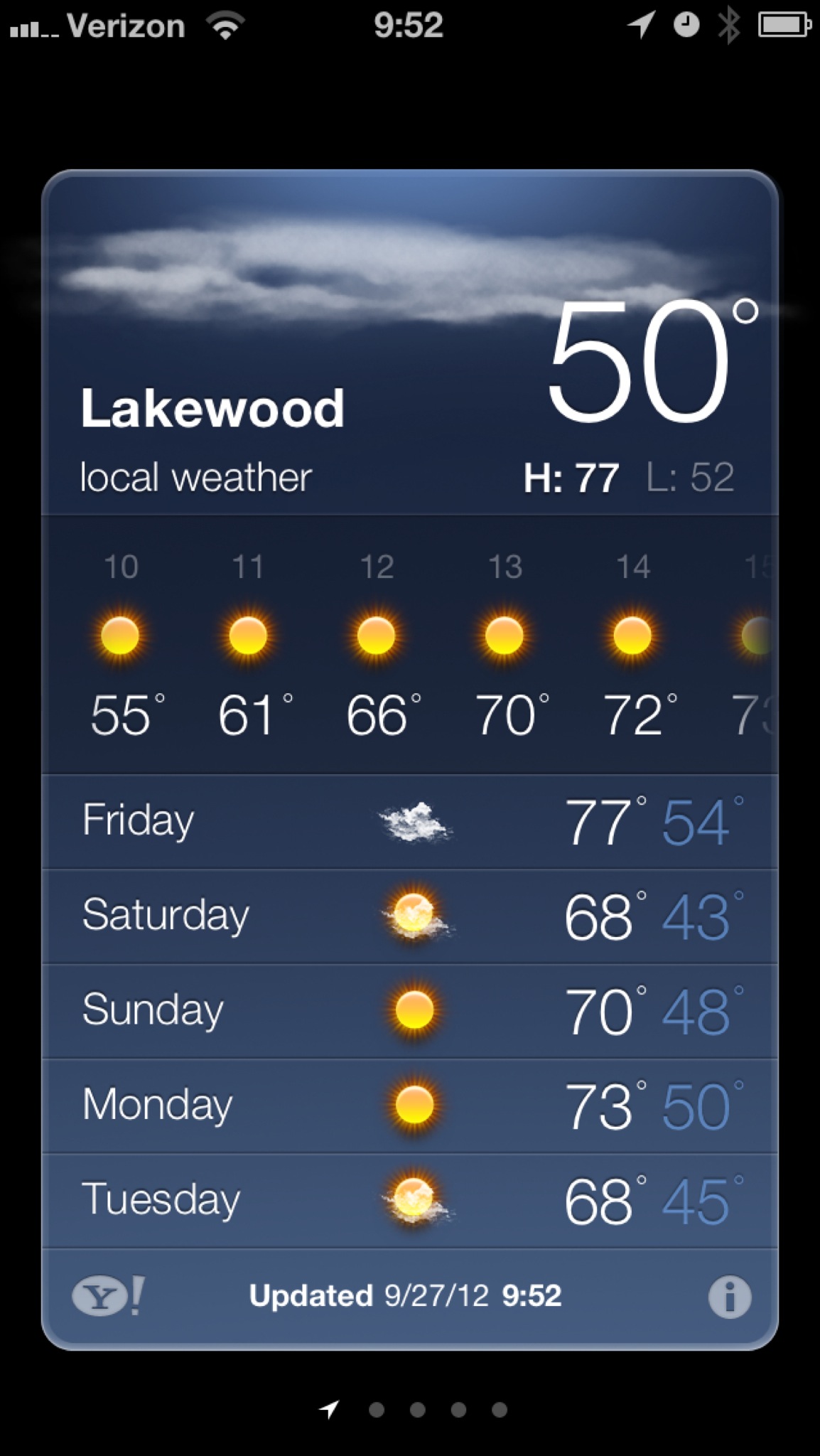
    Then I opened the Weather app on my iPhone 5 and everything changed. For the taller screen Apple made the app look like this:

    Apple’s Weather app on the iPhone 5.

    The change is subtle, making the hourly forecast a horizontally scrolling list, available right away without having to tap anything. This is simply fantastic.

    I feel like I must be losing “it” because the Apple Weather app is now on my home screen right next to Dark Sky and I’ve deleted all the other weather apps I have been hanging on to. Apple’s made something really great here and no one seems to be talking about it.

    The Weather app gives me everything that I need at a glance, without extra taps needed, without extra swipes need, all wrapped in a lovely looking package.

    As I said, it’s on my homescreen now.

    VoiceOver

    Something new I’ve started doing is testing whether apps support VoiceOver, and I am going to shame those that don’t. Apple’s Weather app supports it really well, of course — no worries here.

    Try It

    I doubt I would be using the built-in Weather app if I still was on my 4S, but on the iPhone 5 I strongly recommend that you give Apple’s offering another go — its gotten very good.

  • ‘Different People Have Different Hands’

    Lukas Mathis on the iPhone 5’s screen size: >There is no one perfect screen size that fits everybody’s hands. He has a screenshot of what looks to be the iPhone 5 commercial. The thing that strikes me most about that commercial is that Apple is clearly trying to convey to skeptics that you can easily…

    Lukas Mathis on the iPhone 5’s screen size:

    >There is no one perfect screen size that fits everybody’s hands.

    He has a screenshot of what looks to be the iPhone 5 commercial. The thing that strikes me most about that commercial is that Apple is clearly trying to convey to skeptics that you can easily reach all the edges of the screen with your thumb, but yet the most difficult corner to reach — the one where the camera icon is in the screenshot — is never attempted to be reached by the thumb in the ad. Why? Because to do so you have to stretch your hand and strain is shown in the hand — go ahead and try it — I can reach all four corners, but for the furthest corner I have to strain my hand just a tad to reach it.

    Is this a deal breaker? Not for me, but then again I have large hands — my wife would likely be seriously annoyed by this. And indeed the other night she told me something along the lines of: “Does Apple just not care about women? No woman could easily reach all the corners, this sucks.”

    I wish someone would take their iPhone 5 around and take pictures of people’s hands trying to reach that furtherest corner, just to see if this really is an issue or not.

  • Note on RSS Feeds

    After today I will be turning off Feedburner and sticking with just the built in RSS feed system. Most of you that use Google Reader should roll over to the new feed (in theory) without having to do a thing. However if you don’t use Google Reader you will need to replace the Feedburner URL…

    After today I will be turning off Feedburner and sticking with just the built in RSS feed system. Most of you that use Google Reader should roll over to the new feed (in theory) without having to do a thing. However if you don’t use Google Reader you will need to replace the Feedburner URL (if you are using it) with https://brooksreview.net/feed

    Let me know if you bump into any issues — member feeds are *not* affected.

  • The B&B Podcast #78: Listener Q&A

    A fun episode of Shawn and I taking questions from readers. Everything from bags to coffee roasting.

    A fun episode of Shawn and I taking questions from readers. Everything from bags to coffee roasting.

  • Why Your OS Name Matters

    Apple has, to my knowledge, never exclusively used a non-numeric name for their operating systems since OS X. Yes, they refer to 10.8 as “Mountain Lion”, but they also fall back on the “10.8” monicker when needed. I’m reminded of just how important this fact is by the [exploit found on Android devices](http://thenextweb.com/google/2012/09/26/heres-check-android-device-vulnerable-remotely-wiped-hackers/) and it…

    Apple has, to my knowledge, never exclusively used a non-numeric name for their operating systems since OS X. Yes, they refer to 10.8 as “Mountain Lion”, but they also fall back on the “10.8” monicker when needed. I’m reminded of just how important this fact is by the [exploit found on Android devices](http://thenextweb.com/google/2012/09/26/heres-check-android-device-vulnerable-remotely-wiped-hackers/) and it occurs to me that it would be very hard for Google to say either of these two statements:

    1. Devices running 4.X and newer are secure.
    2. Devices running Ice Cream Sandwich and newer are secure.

    It’s difficult because Google has decided that the non-numeric name is a *better* way to sell the OS to consumers. So statement #1 doesn’t work because no Android user is likely to know what version number they are running, or what version number corresponds with each name. Which is why #2 won’t work either, because even I don’t know the order of the names (yes they are alphabetic, but it took me writing that sentence to remember that detail and do you think general users will know this).

    So if the same thing occurred on iOS, Apple could say: only affects devices running iOS 5.1 and older. Likewise on Mac OS X, Apple can say: only affects Macs running 10.7.4 and older. As users we know how to count, thus we know how to tell what we have. With Android it’s a much harder sell to tell a general consumer which OSes are exploited and thus [you get sites like this](http://dylanreeve.com/phone.php).

    There’s much larger issues at bay with Android, like fragmentation and slow updates, but the naming issue will always come into play when a security breach occurs — like right now.

  • Felix for App.net

    This is my full-time App.net client — and I don’t mean on my iPhone, I mean on any platform. I have been testing Felix for quite a while now and I really like it. First: I love the icon. Second: It’s not quite as sexy as Tweetie, but where trade-offs are made I really don’t…

    This is my full-time App.net client — and I don’t mean on my iPhone, I mean on any platform. I have been testing Felix for quite a while now and I really like it.

    First: I love the icon.

    Second: It’s not quite as sexy as Tweetie, but where trade-offs are made I really don’t mind at all.

    Third: I actually like that the actions are visible and you don’t need to swipe to reply — it makes the app a lot faster (and the app is fast).

    What a great App.net client, go get it.

  • Soulver is Amazing

    [I’ve mentioned Soulver more than a few times on this site](http://duckduckgo.com/?q=soulver+site%3Abrooksreview.net) and I am going to go ahead and mention it again, because it is an amazing tool. For the past month I have been working on representing someone purchasing a very large property (both physically and financially). In that process there are a lot…

    [I’ve mentioned Soulver more than a few times on this site](http://duckduckgo.com/?q=soulver+site%3Abrooksreview.net) and I am going to go ahead and mention it again, because it is an amazing tool.

    For the past month I have been working on representing someone purchasing a very large property (both physically and financially). In that process there are a lot of calculations that you run, revise, and rerun. Typically these are done in Excel, typically by accountant types, and I am certainly not prone to using Excel or being an accountant.

    Either way at some point you run calculations at lunch meetings, site meetings, or during various other times when you are not in front of Excel, so what happens to those numbers? For most people those calculations are simply lost, or stuck in a piece of paper your file away never to see again.

    Not for me, because I use [Soulver](http://www.acqualia.com/soulver/) on all of my devices and I use it religiously for even the smallest things.

    So here’s a scenario that recently happened to me:

    – I ran a bunch of impromptu calculations on Soulver on my iPad. I thought it was a simple set, but then it got more involved and immediately became apparent to me that these are calculations I would like to reference in the future. I saved the calculations to iCloud Dropbox in Soulver and went about the rest of my day.
    – A week plus later, I needed to revise three numbers in that calculation and because Soulver was running calculations based upon solutions from calculations in the file — I really only needed to change three numbers. So I changed them, received the new solution, and went about my morning. Oh and I did at on my iPhone, without a hiccup.
    – Then my client called and wanted to see my “math” (common in this industry, as people like to see if they would have used other numbers where I input best guesses). I called up the data set on my Mac, added in annotations for everything to explain what each number was, exported the PDF and sent it on its way.

    I do that all the time, it saves me tons of time of wrestling Excel (hell even opening Excel is a chore), and I never lose some “numbers we ran” for different deals.

    That’s just one reason to use [Soulver](http://www.acqualia.com/soulver/), honestly it’s half calculator half spreadsheet and is often better at both than either tool is at just one.