Top Posts

Leica Sofort 2June 13, 2024
Grand Seiko SBGX261February 23, 2023

Recent Articles

  • Canon EOS M Hands-on Preview from Digital Photography Review

    Interesting looking camera that shoves the guts of an entry level dSLR into a smaller camera of the size class that the micro 4/3s play in. When I saw the news of this my first reaction was “crap”, because having just bought the Panasonic GX1 I thought I really should have waited for this. I…

    Interesting looking camera that shoves the guts of an entry level dSLR into a smaller camera of the size class that the micro 4/3s play in. When I saw the news of this my first reaction was “crap”, because having just bought the Panasonic GX1 I thought I really should have waited for this. I am a huge Canon fan, and given that you can buy an adapter to mount the Canon EF lenses on this, it looked like a great deal.

    The more I read about it though, the less I like it. First the controls are made to be set and fiddled with on the touchscreen, with the ability to do so in a very cumbersome manner via the few hardware buttons the camera has. The GX1 has touchscreen controls as well and I hate them. What I hate about them is two fold:

    1. I have to look at the screen to use the button. Whereas with physical buttons I can memorize the location and change settings without having to look at the camera. That may not be a big deal for many, but I change settings on my cameras all the time, so I expect this would be very annoying for me.
    2. On the GX1 you can set a focus point for the camera to lock to by tapping an area on the screen, but while this is a really nice feature, it’s incredibly frustrating when I accidentally hit the screen with my hand and guess what: I get an mis-focused image of a priceless face my daughter was making.

    I am not saying the EOS M will have these problems, but they are the two things that concern me most about the camera. However if reviews start coming in that this camera is substantially better than the GX1… well anyone want a GX1?
  • Cue

    The past week or two, there has a been a lot of chatter about archiving your Tweets into text files. [Dr. Drang just reminded me of this when I saw this follow-up post from him](http://www.leancrew.com/all-this/2012/07/archiving-tweets-without-ifttt/). I’ve used ThinkUp and implemented one of the IFTTT methods, but I have found Cue (formerly Greplin) to be the…

    The past week or two, there has a been a lot of chatter about archiving your Tweets into text files. [Dr. Drang just reminded me of this when I saw this follow-up post from him](http://www.leancrew.com/all-this/2012/07/archiving-tweets-without-ifttt/). I’ve used ThinkUp and implemented one of the IFTTT methods, but I have found Cue (formerly Greplin) to be the best way to find old tweets.

    I like that I can do a simple search on any device for a tweet and find it — it’s a pretty simple service with a decent iPhone app. I am not sure what they are trying to do with the new Cue service (since I only use it for Twitter), but the search functionality of your Twitter account works really well.

  • Quote of the Day: Chris Bowler

    “This issue of the big boys buying up all the talent is built upon the bedrock concept that widespread web services have to be free.” — Chris Bowler

    “This issue of the big boys buying up all the talent is built upon the bedrock concept that widespread web services have to be free.”
  • Amazon Item of the Week: Seagate GoFlex Desk With Thunderbolt Adapter

    I purchased the GoFlex Desk 3TB a while back, when I bought the retina MacBook Pro, but I only went with the USB 3 version. The retina MacBook Pro had some USB 3 hiccups (now resolved for me) and so I never was happy with the USB 3 connection. It was quicker than USB 2,…

    I purchased the GoFlex Desk 3TB a while back, when I bought the retina MacBook Pro, but I only went with the USB 3 version. The retina MacBook Pro had some USB 3 hiccups (now resolved for me) and so I never was happy with the USB 3 connection. It was quicker than USB 2, but wasn’t all that impressive. Luckily this drive can be [swapped out for a Thunderbolt connector](http://www.amazon.com/exec/obidos/ASIN/B007IJ7UKE/ref=nosim&tag=brooksreview-20), and I purchased that a few days back.

    Thunderbolt is fast, like move 5GB in “less than a minute” fast — and that’s to a spinning platter drive, not an SSD. It’s really expensive to go with Thunderbolt drives right now, which is why I only have one, but it is the future and makes a huge difference given that I keep my iTunes library and photo archives on the drive.

    I highly recommend this.

    [There’s also a portable version](http://www.amazon.com/exec/obidos/ASIN/B007IJ7T4G/ref=nosim&tag=brooksreview-20), but I haven’t tried it so I can’t speak to its quality.

  • ‘Marissa Mayer Has a Secret Weapon’

    Steven Levy following up his fantastic post about Mayer last week, adds this fuel to the fire: >In short, Marissa Mayer has developed a deep connection to over three hundred of most talented tech people in Silicon Valley. They may still be at Google, they may have moved to companies like Facebook or Dropbox, or…

    Steven Levy following up his fantastic post about Mayer last week, adds this fuel to the fire:
    >In short, Marissa Mayer has developed a deep connection to over three hundred of most talented tech people in Silicon Valley. They may still be at Google, they may have moved to companies like Facebook or Dropbox, or they may have started their own budding enterprises like Optimizely. But in some sense they are all Marissa’s acolytes.

    He’s referring to the fact that Mayer ran the coveted APM program — the program that Google created to train future Google leaders. It was her program Levy notes and those then went through the program are “bonded” to Mayer.

    What’s interesting in the above quote is that Levy uses the term “Marissa’s acolytes” and not “Google’s acolytes”. Those two words are telling not just for the future of Yahoo, but for the future of Google.

    The more I reader about Mayer, the more obvious it is to me just how big of a loss she was for Google — what remains to be seen is if she can translate that value to another company.

  • Automatically Clear the Full Log of Your Mac Download History

    [Last week I saw this post on the Mac OS X Hints site](http://hints.macworld.com/article.php?story=20120717025305161), and I was concerned. I had no clue that your Mac kept a full log of your download history. I know I am more paranoid than most, but hey, even Mac OS X Hints recommends clearing it out. It’s a quick terminal…

    [Last week I saw this post on the Mac OS X Hints site](http://hints.macworld.com/article.php?story=20120717025305161), and I was concerned. I had no clue that your Mac kept a full log of your download history. I know I am more paranoid than most, but hey, even Mac OS X Hints recommends clearing it out.

    It’s a quick terminal command, but I’ll never remember to do it.

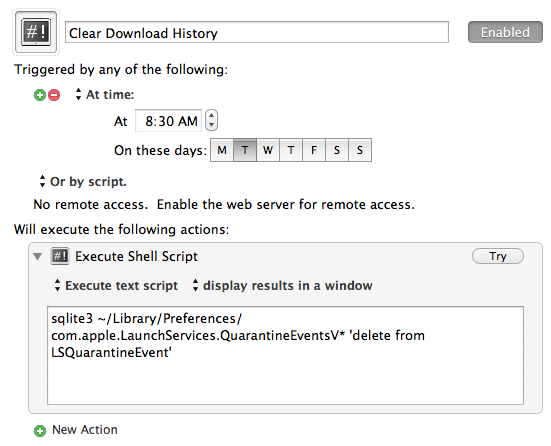
    Instead I created this Keyboard Maestro macro to clear it for me:

    The simplest macro I have I ever created.

    Now it will always be cleaned out, without me ever having to think about it.

    [You can download it here](http://c276381.r81.cf1.rackcdn.com/Clear_Download_History.kmmacros.zip).

  • Squarespace 6

    Squarespace recently launched version 6 of their web hosting/CMS system. I have personally used Squarespace for a while now for a personal site and for my company’s website — it’s a fantastic platform on rock solid hosting. [David Sparks now has MacSparky](http://macsparky.com/) on Squarespace 6, if you want a look at what a good blog…

    Squarespace recently launched version 6 of their web hosting/CMS system. I have personally used Squarespace for a while now for a personal site and for my company’s website — it’s a fantastic platform on rock solid hosting.

    [David Sparks now has MacSparky](http://macsparky.com/) on Squarespace 6, if you want a look at what a good blog looks like on it (including the ability to do proper linked list posts).

    If I were just getting started with blogging I would go with Squarespace without hesitation for a few reasons:

    1. The themes are stunning.
    2. Incredibly easy to build, with tons of later flexibility.
    3. Solid hosting, done inexpensively.

    What I don’t know, and what I would like to know more about, is how easy it is to move from Squarespace to WordPress — if it is as easy as it is to go the other way, then it is a no-brainer to go with Squarespace. (Unless of course you do something crazy like implement a paywall.)

  • ‘Append to Dropbox Note With Drafts App’

    Speaking of [Drafts](http://itunes.apple.com/us/app/drafts/id502385074) and Hazel, Gabe the Macdrifter as come up with a way to append text to a Dropbox note using Drafts. This looks way more complicated than just buying [Scratch](http://gokarbon.com/scratch/) and using both apps, but hey — pretty neat thing to figure out. One thing that I wish either Drafts or Scratch would…

    Speaking of [Drafts](http://itunes.apple.com/us/app/drafts/id502385074) and Hazel, Gabe the Macdrifter as come up with a way to append text to a Dropbox note using Drafts. This looks way more complicated than just buying [Scratch](http://gokarbon.com/scratch/) and using both apps, but hey — pretty neat thing to figure out.

    One thing that I wish either Drafts or Scratch would build, is a way for me to set and action that appends text to one specific note file — making it easier to keep a running log/note in a file. This tip is to hacky for my liking, and Scratch requires a lot of taps to do it.

  • ‘Skype Won’t Comment on Whether It Can Now Eavesdrop on Conversations’

    Ryan Gallagher on the ability of Skype to eavesdrop on conversations: >In May 2011, Microsoft bought over Skype for $8.5 billion. One month later, in June, Microsoft was granted a patent for “legal intercept” technology designed to be used with VOIP services like Skype to “silently copy communication transmitted via the communication session.” Whether this…

    Ryan Gallagher on the ability of Skype to eavesdrop on conversations:
    >In May 2011, Microsoft bought over Skype for $8.5 billion. One month later, in June, Microsoft was granted a patent for “legal intercept” technology designed to be used with VOIP services like Skype to “silently copy communication transmitted via the communication session.” Whether this technology was subsequently integrated into the Skype architecture, it’s impossible to say for sure.

    Software developers are complaining that a change in the Skype architecture looks to make it more readily available to law enforcement eavesdropping, but no comment from Skype. I take the no comment stance as confirmation that they can do it, but that law enforcement would rather they not say.

    Otherwise I think Skype would just market the technology as secure. This seems like a greasy used car salesmen saying: “You’re a terrorist, perfect app for you to use to plan things. What? Oh I can’t comment on that, but you *should* totally use this. Totally.”

    Best just to assume — as with most web services — that what you do will be made public one day.

  • ‘Core of the Disappointment’

    Rian van der Merwe responding to all the misplaced anger on the web about the Google acquisition of Sparrow: >It’s not about the $15 or less we spent on the apps. It’s not about the team’s well-deserved payout. It’s about the loss of faith in a philosophy that we thought was a sustainable way to…

    Rian van der Merwe responding to all the misplaced anger on the web about the Google acquisition of Sparrow:
    >It’s not about the $15 or less we spent on the apps. It’s not about the team’s well-deserved payout. It’s about the loss of faith in a philosophy that we thought was a sustainable way to ensure a healthy future for independent software development, where most innovation happens.

    [See also Matt Gemmell’s post about the misplaced anger](http://mattgemmell.com/2012/07/21/entitlement-and-acquisition/).

    I completely see where people are coming from, I own the Mac app, but the truth of the matter is that there is nothing you can do to keep a company from being acquired — at least not as a consumer. It doesn’t matter how much you pay, or how many times you pay, if the company gets an offer they like, they are going to take it. Paying doesn’t prevent this.

    My argument is that when the service or product is given away free, those that make that “thing” will have to actively seek a way to pay for their life. They will be looking for a way to make money. When you pay for an app the developer has already figured that part out, charge users, and now he just has to figure out how to get the paying users.

    I know it’s a very fine distinction, but I don’t think it is fair to be upset at the Sparrow team, or at the fact that you paid for an app. I stand with Gemmell on this one when he says:

    >Thanks for that $10. It did indeed keep the lights on between 09:30 and 09:35 this morning. So if you’ve used Sparrow for more than five minutes, I guess we’re even.

    Did you get value out of the app? Will you continue to get value out of the app until it stops working on your Mac? Likely yes to both questions. Just because the product is no longer actively developed, doesn’t mean the rational thing to do is delete it off your computer — that’s silly if you still love and want to use the product.

  • Quote of the Day: Matt Gemmell

    “You should be cheering these people on, not yelling ‘traitor’ in impotent fury like a jealous, confused teenager.” — Matt Gemmell

    “You should be cheering these people on, not yelling ‘traitor’ in impotent fury like a jealous, confused teenager.”
  • ‘Control Your Mac Remotely With Drafts, Hazel & AppleScript’

    Clever use of these tools by George Coghill, using Drafts to save text files quickly to Dropbox, Hazel to monitor the files for keywords and then execute AppleScript/Automator actions based on the contents of the file he saves. I’d go one further and say that you could setup LaunchCenter Pro to add the text in…

    Clever use of these tools by George Coghill, using Drafts to save text files quickly to Dropbox, Hazel to monitor the files for keywords and then execute AppleScript/Automator actions based on the contents of the file he saves.

    I’d go one further and say that you could setup LaunchCenter Pro to add the text in Drafts for you, for your common triggers — thus automating this a bit more. Pretty clever, now I just need to decide what I want my iPhone to be able to tell my Mac.