Year: 2012

  • Your Airport Is a Petri Dish

    Brian Fung reports on a new study about the spread of germs in airplanes and airports, finding this interesting tidbit about the air inside an airplane:
    >Between drawing in clean, fresh air from outside the cabin and passing old air through high-quality filters designed to catch 99.999 percent of germs, the air inside a cabin is replaced some 20 times an hour — far more often than in office buildings or in houses, which exchange air every 12 and 5 times an hour, respectively.

    Moreover planes are designed to drop the recycled air back into the same row from which it came — I had no clue. So what then did MIT find in their study? The airports are disgusting places to be, but then again we all knew that (right?). So which are the worst offenders of grime?

    >Leading the list: New York’s JFK International, followed by Los Angeles, Honolulu, San Francisco, Newark, and Chicago’s O’Hare and Washington’s Dulles International Airport.

    Sounds like you should book your next stop in Seattle instead.

  • USB Power Delivery Spec Upped to 100W

    Michael Gorman, for Engadget, reporting on a new USB 2/3 spec:
    >That’s ten times what Thunderbolt can do, and it means that you can charge up your laptop or power most any peripheral via Universal Serial Bus.

    That could change the way a lot of peripheral gadgets work, but it also causes problems for laptop users. If you are powering your monitor off your USB port, I would imagine your laptop battery would drain pretty fast.

    The brings me to something else that has been bugging me and an ask on Twitter yielded no answers. Why aren’t both sides of USB cables the size of microUSB ports instead of the huge rectangular annoyance that they currently are? Is it a speed/power issue on the smaller connector, or just a silly standard that no one has bothered to question?

  • Photo Archiving and Remote Photo Libraries

    A few days back now a reader asked a question that I get surprisingly often: how do you store and manage all of your photos? I have been constrained to 256GB SSDs since 2010, so I know how to manage GBs of photos, without having to keep them on my hard drive.

    I figured it was about time to share how I do all this — since it seems to be a question that many are interested it. The answer is actually pretty simple, here’s how:

    1. Get a big ass, fast as you can, external HD.
    2. Choose the photo management app of your choice.
    3. Archive the photos onto that external by moving the library folder (or the equivalent for that app) to the drive.
    4. Create a new library named after the current year.
    5. Every year move that library to the external drive and create a new library.

    I have been doing this for a while now, well before the HD constraint, as a way to keep library sizes down and thus the app running smoother.

    So why by year? Two reasons: one to make the app run faster when you load the library (especially if the library needs to update because of a change in the app) and secondly to make it easier to find *that* image when you need to. I don’t bother sorting out old years, instead I just massed moved it all to one file (for me I started in 2007).

    So why bother with this, well I shoot in RAW wherever I can, here’s the break down of the library sizes that I have:

    – pre-2007 through 2007: 55.23GB
    – 2008: 41.65GB
    – 2009: 21.26 (no clue why the dip).
    – 2010: 40.56GB
    – 2011: 177.9GB
    – So far for 2012: 30GB

    That’s why I can’t keep these on one computer, and those are only the library sizes of my Aperture library, most of 2012 has been shot in Lightroom.

    *[As I mentioned in a earlier post](https://brooksreview.net/2012/07/amazon-goflex/), I am now using a Thunderbolt HDD for this storage and it is fantastically fast.*

    ### A Word About Photo Apps

    As you can see I used Aperture exclusively for a while, but I am only now still using it because it is retina ready, while Lightroom is not. I actually prefer Lightroom to Aperture for the better noise control alone.

    However Aperture does make it very easy to store photos this way. Lightroom makes it easy to export out a folder of images to another drive and still be able to view them in the current library — when that drive is attached. Of course this can lead to a lot of images in Lightroom, but both Aperture and Lightroom have advantages.

    All this to say: it doesn’t matter what program you use, just figure out a reasonable way to off load the data in an easy to find manner. I prefer Lightroom because of the noise control and better image adjustments, but I prefer the layout and workflow of Aperture much more. It’s a mixed bag.

    ### For Photo Heavy Years

    I can assure you that I did not keep that entire 175GB library on my laptop at once. For times when the library starts to get bloated part way through the year, I will off load projects/folders inside the library to an archive library. Thus allowing me to keep *most* of this year’s library on my machine, while keeping storage requirements down.

    This is a pain in the ass to manage at year end, so I usually just keep two libraries for that year in the archive — which always comes back to bite me when I am looking for an image later. I don’t recommend this kind of laziness.

    ### Backups

    My obligatory note: external HDDs fail and fail often. Make several redundant copies of your data.

    ### Finally

    My workflow is very simple and fairly common for this task. The main objectives are:

    1. Get the GBs off my SSD.
    2. Make recalling a photo as simple as knowing the year it was taken.

    With camera file sizes growing, this is likely to become an issue for more and more people — even if all you use is iPhoto.
  • Canon EOS M Hands-on Preview from Digital Photography Review

    Interesting looking camera that shoves the guts of an entry level dSLR into a smaller camera of the size class that the micro 4/3s play in. When I saw the news of this my first reaction was “crap”, because having just bought the Panasonic GX1 I thought I really should have waited for this. I am a huge Canon fan, and given that you can buy an adapter to mount the Canon EF lenses on this, it looked like a great deal.

    The more I read about it though, the less I like it. First the controls are made to be set and fiddled with on the touchscreen, with the ability to do so in a very cumbersome manner via the few hardware buttons the camera has. The GX1 has touchscreen controls as well and I hate them. What I hate about them is two fold:

    1. I have to look at the screen to use the button. Whereas with physical buttons I can memorize the location and change settings without having to look at the camera. That may not be a big deal for many, but I change settings on my cameras all the time, so I expect this would be very annoying for me.
    2. On the GX1 you can set a focus point for the camera to lock to by tapping an area on the screen, but while this is a really nice feature, it’s incredibly frustrating when I accidentally hit the screen with my hand and guess what: I get an mis-focused image of a priceless face my daughter was making.

    I am not saying the EOS M will have these problems, but they are the two things that concern me most about the camera. However if reviews start coming in that this camera is substantially better than the GX1… well anyone want a GX1?

  • Cue

    The past week or two, there has a been a lot of chatter about archiving your Tweets into text files. [Dr. Drang just reminded me of this when I saw this follow-up post from him](http://www.leancrew.com/all-this/2012/07/archiving-tweets-without-ifttt/). I’ve used ThinkUp and implemented one of the IFTTT methods, but I have found Cue (formerly Greplin) to be the best way to find old tweets.

    I like that I can do a simple search on any device for a tweet and find it — it’s a pretty simple service with a decent iPhone app. I am not sure what they are trying to do with the new Cue service (since I only use it for Twitter), but the search functionality of your Twitter account works really well.

  • Quote of the Day: Chris Bowler

    “This issue of the big boys buying up all the talent is built upon the bedrock concept that widespread web services have to be free.”
  • Amazon Item of the Week: Seagate GoFlex Desk With Thunderbolt Adapter

    I purchased the GoFlex Desk 3TB a while back, when I bought the retina MacBook Pro, but I only went with the USB 3 version. The retina MacBook Pro had some USB 3 hiccups (now resolved for me) and so I never was happy with the USB 3 connection. It was quicker than USB 2, but wasn’t all that impressive. Luckily this drive can be [swapped out for a Thunderbolt connector](http://www.amazon.com/exec/obidos/ASIN/B007IJ7UKE/ref=nosim&tag=brooksreview-20), and I purchased that a few days back.

    Thunderbolt is fast, like move 5GB in “less than a minute” fast — and that’s to a spinning platter drive, not an SSD. It’s really expensive to go with Thunderbolt drives right now, which is why I only have one, but it is the future and makes a huge difference given that I keep my iTunes library and photo archives on the drive.

    I highly recommend this.

    [There’s also a portable version](http://www.amazon.com/exec/obidos/ASIN/B007IJ7T4G/ref=nosim&tag=brooksreview-20), but I haven’t tried it so I can’t speak to its quality.

  • ‘Marissa Mayer Has a Secret Weapon’

    Steven Levy following up his fantastic post about Mayer last week, adds this fuel to the fire:
    >In short, Marissa Mayer has developed a deep connection to over three hundred of most talented tech people in Silicon Valley. They may still be at Google, they may have moved to companies like Facebook or Dropbox, or they may have started their own budding enterprises like Optimizely. But in some sense they are all Marissa’s acolytes.

    He’s referring to the fact that Mayer ran the coveted APM program — the program that Google created to train future Google leaders. It was her program Levy notes and those then went through the program are “bonded” to Mayer.

    What’s interesting in the above quote is that Levy uses the term “Marissa’s acolytes” and not “Google’s acolytes”. Those two words are telling not just for the future of Yahoo, but for the future of Google.

    The more I reader about Mayer, the more obvious it is to me just how big of a loss she was for Google — what remains to be seen is if she can translate that value to another company.

  • Automatically Clear the Full Log of Your Mac Download History

    [Last week I saw this post on the Mac OS X Hints site](http://hints.macworld.com/article.php?story=20120717025305161), and I was concerned. I had no clue that your Mac kept a full log of your download history. I know I am more paranoid than most, but hey, even Mac OS X Hints recommends clearing it out.

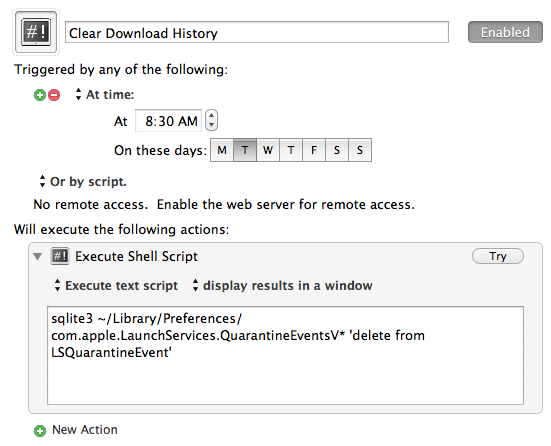
    It’s a quick terminal command, but I’ll never remember to do it.

    Instead I created this Keyboard Maestro macro to clear it for me:

    The simplest macro I have I ever created.

    Now it will always be cleaned out, without me ever having to think about it.

    [You can download it here](http://c276381.r81.cf1.rackcdn.com/Clear_Download_History.kmmacros.zip).

  • Squarespace 6

    Squarespace recently launched version 6 of their web hosting/CMS system. I have personally used Squarespace for a while now for a personal site and for my company’s website — it’s a fantastic platform on rock solid hosting.

    [David Sparks now has MacSparky](http://macsparky.com/) on Squarespace 6, if you want a look at what a good blog looks like on it (including the ability to do proper linked list posts).

    If I were just getting started with blogging I would go with Squarespace without hesitation for a few reasons:

    1. The themes are stunning.
    2. Incredibly easy to build, with tons of later flexibility.
    3. Solid hosting, done inexpensively.

    What I don’t know, and what I would like to know more about, is how easy it is to move from Squarespace to WordPress — if it is as easy as it is to go the other way, then it is a no-brainer to go with Squarespace. (Unless of course you do something crazy like implement a paywall.)

  • ‘Append to Dropbox Note With Drafts App’

    Speaking of [Drafts](http://itunes.apple.com/us/app/drafts/id502385074) and Hazel, Gabe the Macdrifter as come up with a way to append text to a Dropbox note using Drafts. This looks way more complicated than just buying [Scratch](http://gokarbon.com/scratch/) and using both apps, but hey — pretty neat thing to figure out.

    One thing that I wish either Drafts or Scratch would build, is a way for me to set and action that appends text to one specific note file — making it easier to keep a running log/note in a file. This tip is to hacky for my liking, and Scratch requires a lot of taps to do it.