Year: 2012

  • The Misleading Use of Rumors in News Journalism

    Anybody who follows Apple with any sort of regularity knows that two things:

    1. The company is tight-lipped about plans and products.
    2. Bloggers will go crazy trying to report rumors about anything Apple may do.

    That’s two incredibly simple facts that most any Apple watcher/lover knows. Hell most avid web article readers probably even know that.

    The one website that doesn’t seem to know that? The New York Times.

    [Nick Wingfield and Nick Bilton wrote an article yesterday title](http://www.nytimes.com/2012/07/16/technology/apple-may-meet-tablet-competition-with-smaller-ipad.html?_r=1&pagewanted=all): “As Tablet Race Heats Up, Apple May Try Smaller Device”. The title isn’t misleading at all because they used the word “may”.

    As you start to read the article though, that ‘may’ seems like a distant memory.

    Case in point #1:

    >The company is developing a new tablet with a 7.85-inch screen that is likely to sell for significantly less than the latest $499 iPad, with its 9.7-inch display, according to several people with knowledge of the project who declined to be named discussing confidential plans. The product is expected to be announced this year.

    This is just a terribly misleading paragraph. “The company is developing” is an outright incorrect statement, they are reporting on a rumor that they have now stated as fact. They only hedge that statement at the end by sourcing this to “people with knowledge”. So now all the casual readers of The New York Times are certain that Apple is making this device — when the one thing we know about Apple is that they don’t share these details.

    If it was just this one statement I would leave well enough alone, but it gets worse.

    Case in point #2:

    >Apple’s plan for a tablet with a smaller screen is part of a textbook business strategy: to lure customers who want different sizes of tablets into the iPad product family, say analysts and technology industry executives.

    Again they state as fact that Apple is doing this as part of a textbook strategy that they seem to “know” about — again only hedging that statement at the end by saying this info is from “analysts”. You know, the analysts that are wrong about every prediction they make regarding Apple — yeah those guys.

    Case in point #3:

    >Either way, Apple has warmed to the idea of a seven-inch device.

    Really they have, you now have gone from saying that this “may” happen and hedging statements by stating your information is from anonymous (to us) sources, to what, all of sudden knowing that Apple has “warmed” to seven-inch devices? What changed from the title to this line?

    I think Bilton is one of the better tech journalists out there, but this article is perpetuating rumors as if they are fact — and that is just egregious reporting.

  • ‘A Future Full-time Job’

    Marco Arment responding to [this post from Stephen Hackett](http://512pixels.net/part-time-gig-full-time-frustration/):

    >I think I’d have a hard time ever working for someone else again. Not because everyone else sucks, but because I suspect I’ve lost the ability, if I ever had it, to be a very good employee for anyone else.

    Fun fact, once I graduated from college I never worked for another person. I’ve been my own boss since 2005 and even before that I only had worked for my Dad’s company — so my traditional office experience is non-existent. Since college I have had half a dozen companies.

    Working for yourself isn’t for everyone, in fact the most crucial part is being able to own your fuck ups. By that I mean walking up to a client/customer/reader and saying: “I screwed up, it was my fault.” The second most crucial part is having a solution.

    I don’t say that to sound like I know it all, but I’ve started and failed at my share of companies and yet I support my family, with my wife, off of a company I created (she also created her own company). I do this because literally the only thing I knew about how I was going to make money when I graduated from college was that I wasn’t going to make money working at someone else’s company.

    The hardest part is making the decision to do it, everything else is just doing the work.

  • Free App Idea: Open Road

    I have been thinking about this idea for quite a while now, approached a few developers I know to see if they wanted to take the idea and run with it, but now I just want the app. So here is my idea, you can have and I only ask for two things in return for you taking this idea:

    1. That you get me on the beta.
    2. That you charge for the app.

    Now that that is out of the way, my idea is essentially a [Dark Sky](http://darkskyapp.com/) like app for traffic. The idea is simple: when I am driving down the road and I see traffic coming up I always have two questions, ‘how bad’ and ‘how long’. Of course right now I grab my iPhone and pop open Google Maps and take a look at the traffic. That’s not ideal though for a couple of reasons:

    1. I often turn off the traffic data on Google Maps so that I can see the street names.
    2. Google Maps zooms in on the area where you are, but that’s often too close to see the traffic ahead since Google centers your location on the screen.

    Google Maps is just too cumbersome to try and use (safely or not) while you are driving a car. Enter “Open Road” (you are welcomed to choose your own name, I just need something to refer to).

    ### The Idea

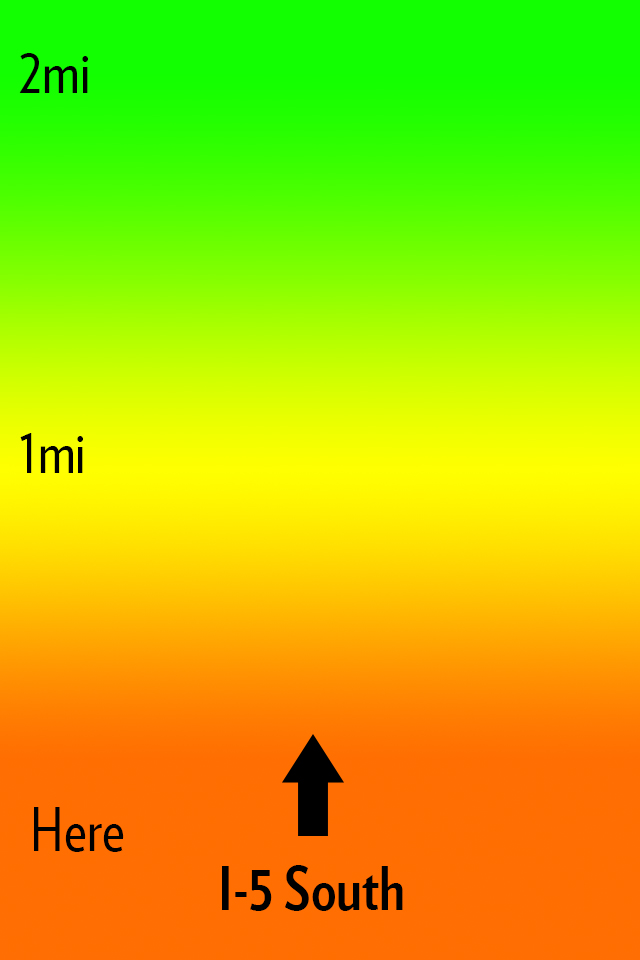
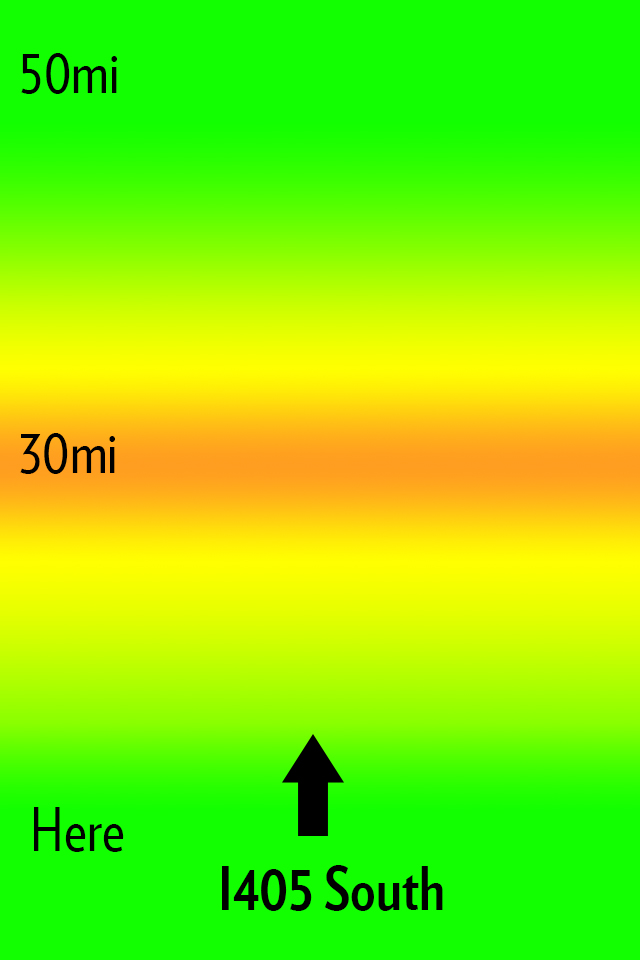
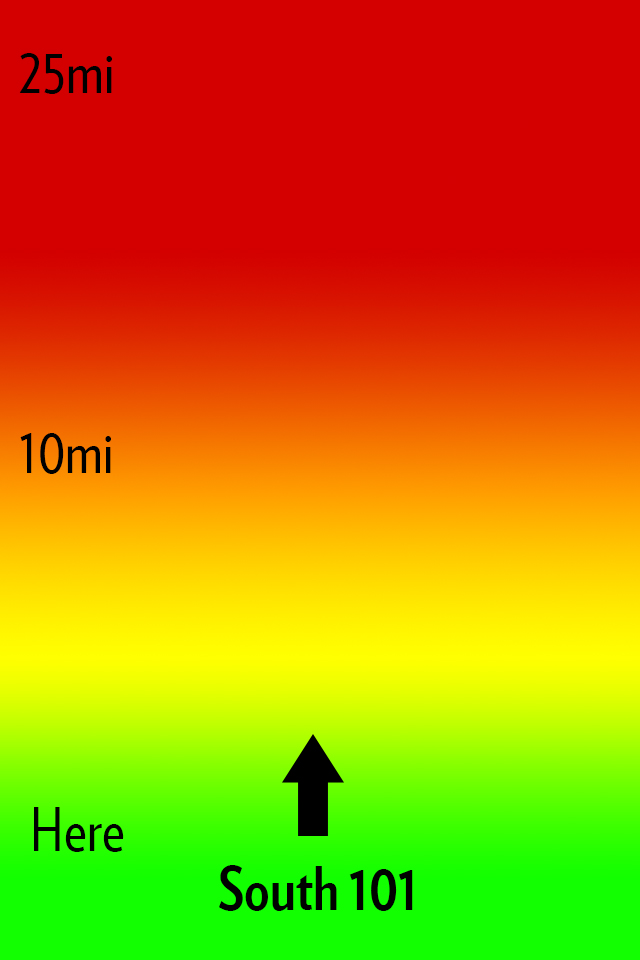
    My idea for Open Road is to create an app that does one thing: shows you the traffic ahead of you in a quick and glance-able format so that it can be used one handed without much thought or interaction while you drive. Here’s how I envision this looking:

    The main interface.

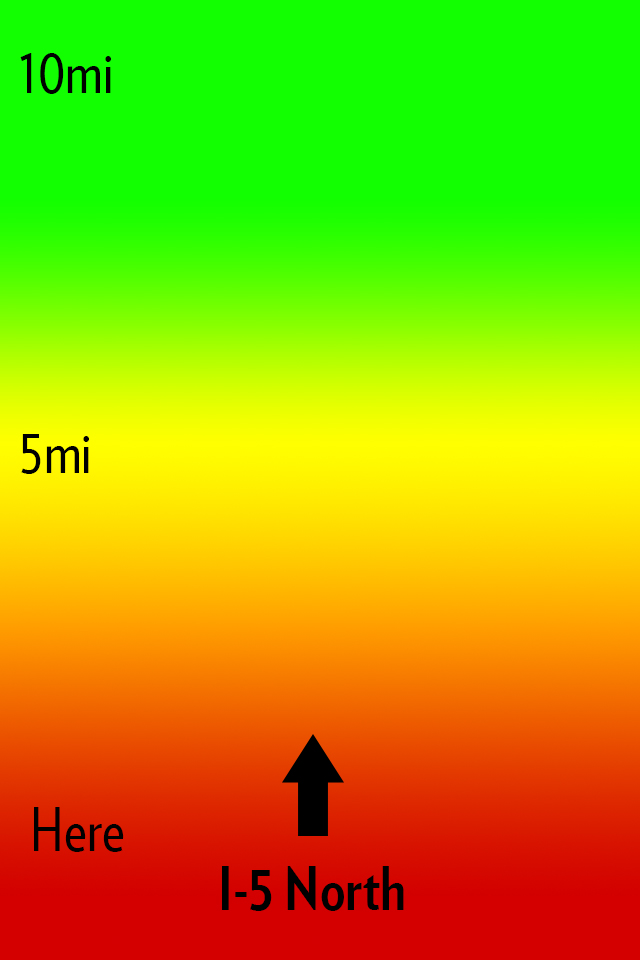
    All that you see is a screen with a heat map, the distances from you, and the road that the app thinks you are on. Green is open road, yellow is slower, orange sucks, red is the makings of a bad day. Pretty simple, here’s some more mockups:


    Now you might notice I changed the distances in the screenshots. The way I see the app working is that a driver can slide his finger up or down the screen to change the distance of the traffic from him. Perhaps I am only driving for another 5 miles on this road and I need to know if I can tough out the traffic — maybe I am on a long haul for 100 miles.

    This is the idea in a nutshell.

    ### The Warning

    iOS 6 is bringing a new map platform with crowd sourced traffic data. I have no clue how this looks or works, but there is potential it could compete with an app like this. I do not however see Apple making an app like this, but if they enabled push notifications of upcoming traffic then it’s game over.

    ### That’s All

    If you like the idea run with it. Good luck.

    *Let me just state again that I won’t pay for someone to develop this, and I certainly do not want any kind of equity or my name attached to any apps you may build. The idea is one I had, but the execution (the hard part) is all you.*

  • ‘Announcing an Audacious Proposal’

    Dalton Caldwell is fed up with being exploited by ads on social networks:
    >Why isn’t there an opportunity to pay money to get an ad-free feed from a company where the product is something you pay for, not, well, *you*. To be clear: I’m glad there are ad-supported options, but why does that seem like the *only* option? For example, I have the option of buying a Mac if I don’t want to buy a crapware-infested PC, right? I have no interest in completely opting-out of the social web. But please, I want a real alternative to advertising hell… *I would gladly pay for a service that treats me better*.

    He’s got a Kickstarter like campaign going where you can pledge $50 to get the project going. I’m in for $50. It’s for a Twitter like service, but one where they make the best product — not the most creative ways to inject ads. I like for pay services, so I am excited to see if this gets funded.\

    [More info about the project here](https://join.app.net).

  • Can Tumblr Embrace Ads Without Selling Out?

    The old adage is that a question in the title of an article can usually be answered with “no”, right?

    Here’s Rob Walker in an in-depth article for the New York Times on Tumblr’s founder and CEO, David Karp’s strategy to start making money:
    >This strategy means a brand must use Tumblr and use it well — which, actually, lots of brands already do, free. In fact, Tumblr helped many of them do so — again, free — during the years it was more concerned with boosting its audience than with making money. Karp argues that this is a strength: “A lot of these brands showed up on Tumblr, figured out how to use the tools, created value for our community and got a response.” Now they have the option to “elevate” what they’ve created within Tumblr, by way of a sponsorship.

    Everything about this idea seems to be akin to what Facebook is doing to business pages: charging business page owners a few bucks in order to show new updates to all of that pages fans. Guess what, that’s not going over so well with users.

    This is a tough issue, the same issue that I faced with changing the business model of this site. When you take away something that was previously free people get mad, and they get mad because you previously made them feel they were entitled to what you gave them for free.

    The difference between this site and Tumblr? I don’t have to answer to VCs that want to be repaid. Tumblr would be smart to just start charging for their service (at the very least to brands), but hey I don’t like ads so what do I know?

    Update: There is a [great post from Derek Powazek](http://powazek.com/posts/3024) about this very thing where he asks:

    >What if we designed a social network to be small, self-supporting, and independent from the outset?

    His entire post is worth a read, as he talks about what does and doesn’t work and what *has* worked for MetaFilter.

  • The Nifty MiniDrive

    Following my post I got [tipped off](http://twitter.com/vgoyle/status/223834365111705600) to this drive for MacBooks. Basically it is a converter for a microSD card, but specially designed to fit in the SD card slot of a MacBook without protruding. That alone is pretty neat, but why would you want this?

    Well they actually did a pretty good job of persuading me to get one: use it as an integrated backup drive. They note you can only get a 64GB microSD card right now, but that the Nifty MiniDrive supports up to 2TB — which would be slick.

    Anyways, I backed the project and look forward to putting my SD card slot to a lot more use. I plan on using the drive as my Aperture ‘vault’ location for backups.

    [via @vgoyle]
  • ‘Sneaker Net’

    Rob-ART Morgan analyzes USB3 thumb drives for new Mac owners and comes to this surprising conclusion:

    >If small size is the priority and you have a 2012 Apple laptop, you should consider using an SD card as your jump drive. That’s because the fastest SDHC card on the newest laptops is more than twice as fast as the same SD card in the SD slot of the 2011 and older Apple laptops.

    I didn’t see that coming. I griped on Twitter a week or so ago that I would really love to get my hands on a Thunderbolt powered thumb drive — something around 100GB — mainly because it would be a great medium to store my current working Aperture and LightRoom libraries on and would be fast as hell. I hadn’t even considered the SD card slot, but I like that solution (not, mind you, for my photo library just yet).

    I keep about 50GB worth of thumb drives in my backpack all the time and I cannot tell you the last time I used a single one. I am now to the point of giving them to people with data on them, and not caring if I get the drive back. SD cards would be even more disposable, and yet even more useful for other things — like my camera.

    Especially when you consider the Lexar 32GB thumb drive is $234 and 128GB Lexar Pro SDXC (they work in the Mac SD card slots on Retina machines) is only [$155 at Amazon](http://www.amazon.com/exec/obidos/ASIN/B007BZRXK2/ref=nosim&tag=brooksreview-20).

    Seems like a no brainer to go with an SD card — most Macs have a slot to read them now too. I would love that Thunderbolt thumb drive though if someone wants to build that for me.

    *Side note: I hadn’t heard the term sneaker net before, but I love it.*

  • Tap! Magazine

    [Craig Grannell writing about Tap! magazine](http://reverttosaved.com/2012/07/12/it-really-annoys-me-when-i-see-people-reviewing-ios-apps-badly/):
    >People still bang on about magazines being rubbish on the iPad (something I wrote about in March) and, more recently, argue the iPad’s corner in terms of content creation. Bizarrely, Tap! almost never gets a mention, despite being a magazine designed specifically for the iPad and that’s actually put together on an iPad and in the iPad simulator on a Mac.

    Grannell got me a free copy of Tap! back when they launched the app for the iPad (full disclosure and all) and he is right: Tap! is not like any other magazine you will find on the app store. I know I am among the lot that makes fun of iPad magazine apps. I make fun of them because for the most part they are a digital copy of what the magazine would normally print. Which is both boring and hostile towards the user (non-selectable text, huge files sizes, etc.). Tap! is different, but I have never been a huge fan of the kind of different that it is.

    It’s great that Tap! is specifically made for the iPad, that truly is great, but the UI is very odd. Print magazines have always been about three things that readers care about:

    1. The pictures.
    2. The ads (a lot of people used to buy magazines to see the ads, mostly women’s magazines I am told).
    3. The layouts.

    Magazines are visually interesting and compelling to look at, but when you get right down to it, they are usually pretty terrible to read. And on the iPad we *want* to read, because the iPad offers other *more compelling* things to just look at and drool over. So to **me** a good iPad magazine app is one that is highly readable.

    Does Tap! excel at this?

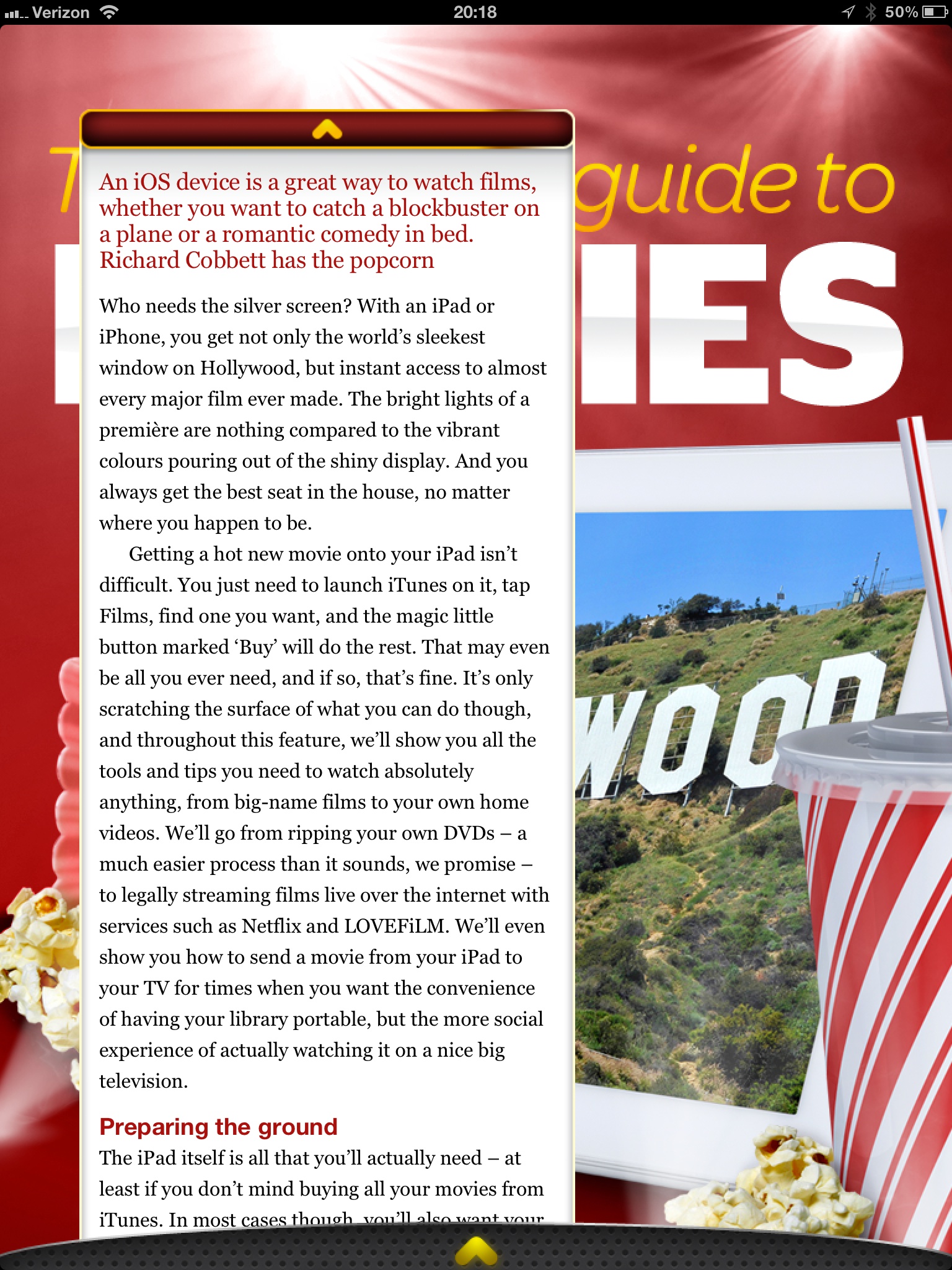
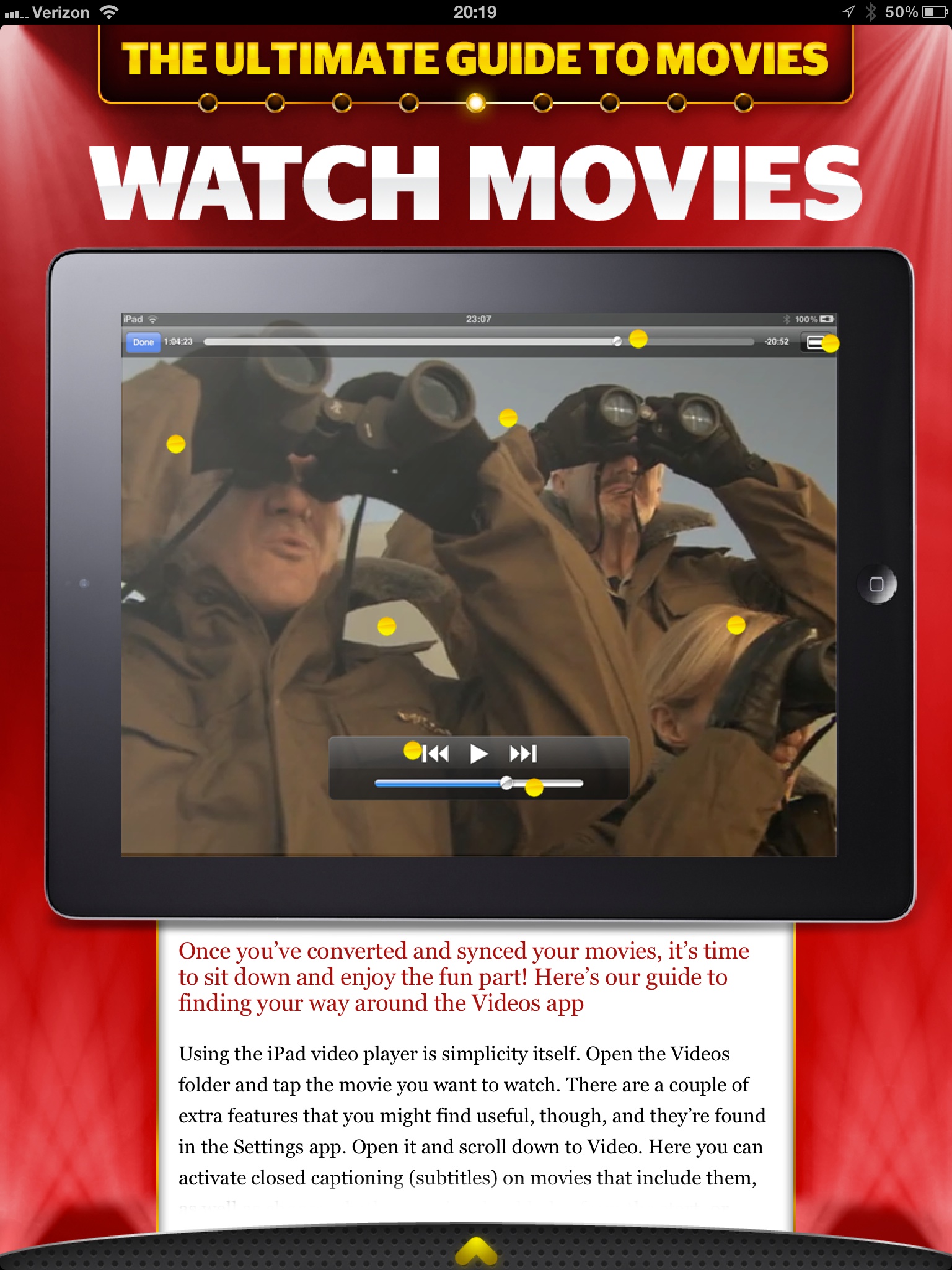
    To answer that I am going to let you see some screenshots taken from the March 2012 issue, but first you should know that Tap! is mostly short form articles about a bunch great little apps, tips, tricks, tools, and gadgets.

    The background “lights” blink and flash.
    Want that text box bigger? Too bad.
    Now this is the best reading experience on the app.

    I am really not trying to pick on Tap! here, because they did a great job to actually decide that PNGs is not an acceptable way to serve up text on the iPad. However, the bulk of the magazine looks more like the first two pictures than it does the latter two pictures. That’s where my problem with the magazine is: Tap! seems to be trying to sell based on the same merits that sold magazines and I am not sure that works on the iPad for me.

    I like the last picture of all the options, it shows the most text at once and fewest distractions, but again that’s not the majority of the magazine. With the short blurbs about apps I can understand the default to huge screenshots — they say more than what you would write — but even at that the text seems like an after thought. When the same trick is employed for howtos, I start to scratch my head.

    There’s both good and bad with Tap!, but ultimately I think it is probably the best general consumer grade magazine experience on the iPad. What that means is that this is the magazine I would tell my dad to buy, because I think he would appreciate it more than crafting his own magazine in Instapaper.

    This doesn’t make Tap! bad by any means, it just doesn’t make Tap! a magazine that is for me.

    *(I should also note that the download finished before my iPad screen went to sleep — which is a feat all by itself.)*

  • Sony RX100

    What happens when you try to make a pro level camera that fits in your jeans pocket without a bulge? Well if you are a normal camera company you make a decidedly non-pro camera, or you make a pro camera that decidedly does not fit in a pair of jeans pockets. But then there is Sony and the RX100. Which Luminous Landscape says packs:

    >Oh yes, did I mention that the RX100’s sensor is 20 Megapixels and that the lens, which fully retracts into the body, is a Carl Zeiss branded 28-100mm equivalent lens with a maximum aperture of f/1.8? Raw? Of course. Optical image stabilization? Ah huh. Video? Yup –1080P at 60P or 50P, depending on region.

    All in a camera that fits in your jeans pocket, all for $650 — not a bargain, but then again maybe it is, because again Luminous Landscape says:

    >The summary judgement for me is that the new Sony RX100 is hands-down the most appealing pocket-sized digital camera yet. Capable of producing DSLR grade images, it’s hard to find much to fault with this small pocket wonder.

    (Read the entire post if you are interested, it has some great detail.)

    So this is *the* pocket camera to have if you are serious, but it has one odd quirk that really caught my eye:

    >There is no charger supplied, because the batteries charge in-camera using either a USB connection to your computer or the supplied AC charger.

    Nothing revolutionary, except that this is pretty uncommon in the camera world. The thinking against this is that you don’t ever want to have to stop shooting to recharge, so it is easier if you just carry extra pre-charged batteries with you. However I really like the solution that Luminous Landscapes devised of using an iPhone battery pack to charge the camera — essentially extending your shooting battery for quite a while, and that is really handy.

  • The IRL Fetish

    Nathan Jurgenson writing an essay about the romanticized view that society now holds for “real life” and “offline”, culminating with a series of final paragraphs that are absolutely perfect. Jurgenson states near the end:

    >That is, we live in an augmented reality that exists at the intersection of materiality and information, physicality and digitality, bodies and technology, atoms and bits, the off and the online. It is wrong to say “IRL” to mean offline: *Facebook is real life.*

    This is a concept that I struggle with more and more now that I have a daughter. The idea of whether or not, and how to, introduce her to gadgets, computers, and digital life — these are the questions that I really struggle with. What compounds this, of course, is my love for always being connected and “online”.

    I have to think that this is just a phase in our societal norms. Was a horse carriage romanticized as the motor vehicle was taking over? Was the written letter romanticized as the telephone began to permeate society? Swords over guns? The shovel over tractor? The outhouse over indoor plumbing?

    My point is that — as Jurgenson writes — real, offline, life is so completely intertwined with technology that it borders on absurdity to think otherwise. That camping trip you took to get away from technology? Did you really take it to get away from technology, or did you actually take it to rid yourself of email access for a couple of days? Meaning: did you ditch GPS, flashlights, stoves, tents and the like? And if you really took it to “go offline”, were you truly ever offline, or was it a hiatus until you could post about these exploits on Facebook — wait your did take a picture while you were camping and select the perfect Instagram filter for it, didn’t you?

    I don’t buy the notion that we can ever fully unplug and I also think that is a very good thing that we never need to fully unplug.

    Of course, some people can be so nose down in their gadgets that they are maddening to be around, but you can always DM them if you need their attention…

    [via someone in the 5by5 chatroom]
  • The B&B Podcast #69: How Dead Was It?

    There were a lot of questions that people have about this transition to a paywall — Shawn does a good job scratching the surface with me on this week’s B&B Podcast. I think it is a really good episode where we talk a lot about the current state of blogging — and Mrs. Shawn Blanc’s lack of an iPad.

    Thanks to our sponsors: [Studio Neat](http://www.studioneat.com/) (and they may have a discount code if you listen to the show) and [Bartender](http://www.macbartender.com/). ((Yep, want to know why there are sponsors on the podcast and not my site? Listen to the podcast.))

  • ‘Twitter Is Building a Media Business Using Other People’s Content’

    Mathew Ingram writing about Twitter, and how Twitter sees itself, has this to say:
    >But as its advertising business grows larger — thanks in part to reports from advertisers of “staggering” levels of engagement with ad features like promoted tweets — and it continues to tighten the rules on its API to squeeze out third-party developers, it becomes more and more clear that Twitter’s future is based on controlling access to the information flowing through the network as closely as possible.

    I hadn’t seen the article that Ingram [linked to for the “staggering engagement” quote](http://online.wsj.com/article/SB10001424052702304458604577491170573156612.html), but in reading the link it is very encouraging news for Twitter. Perhaps all this talk about Twitter is starting to get old, but it is fascinating to me.

    Facebook is using the same old boring business model of display ads, and while Twitter is doing the same — Twitter’s platform is so very different from any other that we don’t yet know how this will play out. I was very worried when I heard Twitter was going to start injecting ads in people timelines, but in practice I hardly notice these ads.

    That said, I hardly *notice* the ads.

    Perhaps I am exceptionally good at filtering them out, or perhaps the ads being shown to be are mostly irrelevant to me. No matter which it is, this is the problem with ads for services like Twitter. Luckily(?) Twitter knows this and that is why they are trying to have complete control over how Tweets (and thus ads) are displayed.

    All of that you could likely guess, but then I was thinking about how to optimize the ads displayed on Twitter, and an interesting idea hit me. What if the ads shown in my Timeline were shown at the precise right moment when I might act on them?

    What if I tweet: “Looking for a good lunch spot in Portland…suggestions?” And in my mentions tab Twitter promotes a lunch deal from P.F. Chang’s which happens to be two blocks from me? I’d say there is a high probability ((I love me some P.F. Chang’s.)) that this ad would get me to P.F. Chang’s. What if I send a tweet asking about a product and that product then is promoted in my timeline? Now we are at a place where I am interested in something, wanting and ready to buy it.

    So that was my thought, then I realized: I bet Twitter could make more money by charging companies a fee and in return Twitter would serve up a site with all the chatter surrounding that company — which then the company could directly respond to. Now *that* seems like a killer feature. No need to keep searching for keywords, it’s all packaged up for you and delivered to your PR team. Someone tweets they want lunch in Portland, every paying restaurant has a chance to respond and try to get that customer in their door — I think that could be pretty cool for business *and* users.

  • ‘Why Tweetbot for Mac Matters’

    Marco Arment:
    >I use a Mac client all the time, for almost all of my Twitter use. Without a great Mac client, I’d use Twitter about as often as I use Instagram: in occasional bursts on my phone when I’m bored, but not regularly.

    Ditto, 9-5 Monday through Friday is all Mac usage of Twitter. I currently use Osfoora on the Mac, I don’t love it, but it’s better than Twitter for Mac. It’s clear to me that on mobile devices Twitter thinks you should be using a native client.

    What’s also, unfortunately, becoming clear to me is that on the desktop Twitter thinks you should be using the web view. Well guess what? I hate the web view because it sucks. I have to wonder if Twitter thinks TweetDeck is the native desktop solution (I hope not) because otherwise I don’t know why a company would waste such a great app in Twitter for Mac.

    I know many don’t think Twitter will kill off third party apps, but I honestly don’t see how you build a profitable business without killing them off. This is why I worry about Twitter’s future for nerds like me if Twitter forces to use the web view on our Mac/Windows/Linux boxes.

  • The New TBR Business Model

    I started writing this long before anyone knew about this change — in fact only a handful of people know about this change as I write this sentence. The change I am making today, has a huge potential to fail and this, I accept.

    Simply put: I hate the business model of this blog, well actually I *hated* the business model of this blog. It was simple, well known, and commonplace. It’s the standard blog business model:

    1. Build a readership.
    2. Sell ads those readers must see.

    In my case, here, I sold two ad spots: one to Fusion and one to RSS Sponsors. Both are very different types of advertisements.

    Before we go any further I want to be clear about something: I have no problem with ad supported websites — they play an important role and both Fusion and the Syndicate were nothing but great to me. Ad supported sites will always be around — and truthfully that is fine.

    But an ad supported site is, ultimately, not the site *I* want to run — so before I go any further I thought it prudent to craft the kind of site that I actually want to run, or as is actually the case: a site much closer to the one I want to run.

    I want a direct relationship with you, my readers.

    So starting today the business model becomes even more clear ((There are still Amazon Affiliate links, but those are still you directly deciding to pay me by using them.)) :

    1. You pay me.
    2. I write.

    Of course this model isn’t new either, we typically just call it a “paywall”. But a paywall in its basic form is ineffectual for what I want, because then it becomes a massive hurdle to gain new readers (since all my content would be hidden out of the public eye) — I don’t want that.

    ### The Challenge

    What I needed to solve was a few issues with a pure paywall model:

    1. How to continue to attract new readers and thus expose my writing to new people.
    2. How to keep my writing quotable and linkable by other sites.
    3. How to keep the current readers I have.
    4. Provide a firm reason why a membership model *is* better than the ad supported model, for those reading the site. (This was something I personally had to answer before I felt good about moving forward.)

    ### New Readers

    The first problem I hit with a paywall model was how I attract new readers. Word of mouth is just too slow, so I needed some way to offer potential new readers a taste of my writing. What I was strongly against doing was:

    – Truncated posts on my site.
    – Trial periods of any kind, or length.
    – Sample writing posts.

    All three of those methods seemed way too crappy for me to put up with and would personally piss me off. I needed something better. In looking at how other sites worked I honed in on *The New York Times*. They have a modified paywall that allows readers to view a certain amount of articles every month. That, I thought, was closer to what I needed, but I could do my readers one better.

    What I have going for me that *The New York Times* doesn’t have, is that I am *not* a news site. And since my opinions should stand the test of time, I do not need to move at the speed of light, therefore: time itself should really not be a big deal to me or the readers of this site.

    All non-members of the site will have access to *every* post that members have access too, with one caveat: non-members won’t see those posts until *seven* days after I posted them.

    Therefore, you can still enjoy this site, in full, without paying a dime or seeing a single ad — you just have to be OK with enjoying it seven days after members enjoy it.

    I realize this isn’t ideal, but being as what I write is not time relevant, I feel that this is a decent tradeoff. If you aren’t a member you won’t be able to see what you are, in fact, missing — thus the content is indeed new to you when it does become “unlocked”. (This is the plan at least.)

    I arrived at seven days because I think that is the minimum point of pain. Meaning I think that anything shorter would be too easy for a reader to decide it’s not worth becoming a member. Anything longer than seven days and I felt that I was being too punitive against readers who simply cannot afford to pay for a membership.

    ### Incoming Links

    This model brought about one other snag that really dumbfounded me: what happens to the readers of my site that want to link to one of my posts on their own site when my post is still behind the paywall? I could have easily forced those members to make their readers wait seven days, but that didn’t seem right to me and it didn’t seem like a site that I would want to link to.

    Again I turned to *The New York Times*.

    I have decided that if you are linking to my site, then a reader that comes here from your site can also view the article you link to, without having to become a member. ((Thus opening up a loophole for less than quality individuals to exploit, but I have provisions in place for this — don’t worry.))

    So if member Jim wants to link to a TBR article from his site, and his reader Bob wants to read my article — he can do so if he follows the link from Jim’s site to my site — even if Bob isn’t a member here.

    It’s not a perfect system, but the very last thing I wanted to do was close my content off from being commented on by other sites and shared around. ((If you notice a bug in this at all, or feel I have unfairly blacklisted your site — just get in touch.))

    ### Current Readers

    I wanted to make sure that what ever changes I made to the site, I made them in such a way that all current readers could continue to enjoy the site without having to pay. That’s why there is the “free after 7 days” mechanism built in.

    No matter if you pay for membership, or not, you can still read everything I write. The only difference now is that it isn’t the very latest thing I wrote, but you get the added benefit of *never* having to see an ad.

    ### The Benefit

    Why go this route? Why not stick with tried and true advertising? Why change? Why is this *better* for readers?

    Lots of good questions, and truthfully this is one big guess, but I do want to share my reasoning.

    No matter if I am the one booking advertising slots, or someone else is booking them: the companies I write about are the ones that must decide to book the spot and pay me (indirectly). Therefore if I write something negative (gasp!) about a company, that company may decide **not** to sponsor the ad network that is powering my site in the future. Likewise if a company is sponsoring the RSS feed in a given week and they do something stupid, I may feel that I need to refrain from making fun of said stupid move — that notion never sat well with me.

    I have always tried to never let this play a role in my writing, but it weighed on me. Even though the issue rarely came up, it always made me feel less genuine. It was upon that realization that I knew something had to change — I couldn’t and shouldn’t be held to worry about advertiser’s feelings when my first (self-imposed) duty is to write with complete honesty.

    That’s part one.

    Part two is that advertising is ugly and distracting on a page. I wanted a pure reading experience, one that is, from the outset, unbiased and direct. Removing all ads and designing a site that need only give room to the pixels I choose ((Because I didn’t get a say in what the square Fusion ads look like.)) : that’s the ultimate goal.

    And that, my friend, is the way it *should* work. It is a simple plan.

    ### Pricing

    The pricing is pretty simple: $4 a month. That gets you everything, ad free, without delay.

    It’s automatically billed through Stripe. Yep, no need to have to deal with PayPal for either of us. You sign up on my site, you get processed by Stripe, and you can cancel your account right here on my site. So you need only to come here if you want to cancel — it’s one click — no trying to figure how to cancel.

    Once you sign up you immediately get login credentials, a unique (to you) RSS feed for all the posts, and you are on your way.

    ### Changes to My Writing

    Before I wrap this up: the writing here is going to change.

    I can’t buy new things to review unless I have the money to do so — so that may taper off for a bit until the membership base (hopefully) grows. Also, since I am not worried about the timeliness of my linked items and articles, I am going to try and write all of them with a lasting and value added motivation (keen readers may have noticed that my commentary has slowly been getting longer on linked list posts — this is what I am talking about).

    Linking to a post and commenting “cool” is now against my own rules. If I can’t add value to a link with thoughtful analysis and opinion, then that post isn’t getting a link on this site.

    If my article or review won’t be as helpful in seven days as it is today, then it’s not worth posting at any point.

    I am going to hold myself to a higher standard. ((Additionally I will not be accepting promo codes for apps any longer either. Again, I want nothing influencing me. I will still be accepting beta invitations, but will always say so when writing about an app. The reason for accepting beta invites is simple: I feel I pay for a beta invite in the form of my direct feedback to the developer.))

    ### That’s a Wrap

    Enjoy the tweaked design. Enjoy the lack of ads. Become a member if you can and want to.

    A big thanks to [JR Tashjian](http://jrtashjian.com) for the coding.

    And a huge thank you to all of you — regardless of whether you become a member or not.

    To join up, [go here](https://brooksreview.net/members).

    #### Programming Note

    Just a heads up on a couple of things:

    1. Because of the new 7-day rule, this site would be a wasteland for the next 7 days if you aren’t a member. Of course that wouldn’t be OK with me, so I will be passing one post a day through the paywall for all to read. It will just be one of the linked list posts that I normally post — no articles. Now, this causes another problem to anyone that reads the site by visiting just the homepage: new posts will be appearing intermixed with the posts I pass through the paywall for a week, meaning the chronology of things will be messed up on the homepage for non-members. Sorry about that, but this is the best, albeit hacky, solution I could think of.
    2. If you use Twitter as your RSS reader, and Twitter is how you look to get updates on new posts, well things are going to be a bit different now. Non-members will still see tweets on the @brooksreview account, but they will show up (hopefully) when the actual posts are available for non-members to read. For members, the best solution I could come up with is a protected Twitter account @TBRmembers — request to follow that and if you are a member I will grant access.
  • ‘Petition the U.S. Government to Force the TSA to Follow the Law’

    There’s no reason to not sign this and even less of a reason not to take the time to sign it. This is important. This isn’t about the TSA being stupid, it’s about them defying a court order.

  • ‘Sitting for More Than Three Hours a Day Cuts Life Expectancy’

    Andrew Seidman:
    >Sitting down for more than three hours a day can shave a person’s life expectancy by two years, even if he or she is physically active and refrains from dangerous habits like smoking, according to a study to be published on Tuesday in the online journal BMJ Open.

    Converting to a standing desk is really tough for the first two weeks, but if you can get past that it really does feel great. I had some lower back problems completely disappear once I made the switch — and I was sitting in one of the best chairs money can buy. Do note that researchers relied on self reported data, and believe that many respondents lied about how much they actually sit, meaning the numbers are probably worse than they look.

    The other advantage to standing, if you work in an office with others, people that come to your desk are forced to stand if they want to talk to you. This means they tend to linger less since they are probably not comfortable just standing at a desk. This was a great fringe benefit for me.

  • Today, in RIM

    Lots of good stuff floating around the web today about RIM, no doubt because they held their annual shareholders meeting. There are four specific articles that I think need to be called out for their interconnectedness alone.

    ### MarketWatch

    Dan Gallagher for MarketWatch posts a short snippet titled: “[RIM board kicks off meeting with support for execs](http://www.marketwatch.com/story/rim-board-kicks-off-meeting-with-support-for-execs-2012-07-10).” Which is great all by itself, but his quote from RIM is great too:

    >The statement said the board believes the current team — led by CEO Thorsten Heins — is “well positioned to lead the company forward.”

    Keep that in mind for the next article about RIM.

    ### VentureBeat

    [Devindra Hardawar reports on VentureBeat that](http://venturebeat.com/2012/07/10/rim-hires-a-search-firm-to-find-more-tech-experience-for-its-board/):

    >Today at its annual shareholder meeting, RIM chairwoman Barbara Stymiest confirmed that the company is indeed seeking out new board members with technical experience with the help of a search firm.

    So just to get you on the same page as I am: RIM’s Board has complete faith in the executives running the company, **but** RIM’s board does **not** have complete faith in themselves.

    See the problem here?

    ### e27

    Shifting gears, [RIM announced that they will be bribing developers with a $100 million pool](http://e27.sg/2012/07/10/research-in-motion-announces-us100m-investment-to-grow-developer-community-for-blackberry-platform/) to get them to develop apps for BlackBerry 10. Joash Wee reports:

    >One of such programs incentivizes developers to build apps for BlackBerry 10 by guaranteeing the developers US$10,000 in revenues from the app.

    This is actually consistent with the arrogant and oblivious nature in which RIM conducts itself, but even more interesting is the implication of this. Are the best developers, the ones that actually make fantastic apps on other platforms, motivated by $10k in guaranteed revenue? Isn’t this likely to attract the second-tier developers, the ones who have solid apps, but not apps that motivate users to switch platforms?

    Paying developers to make apps for your platform is not inherently a bad a idea, but it has yet to prove effective ( `*cough*` Microsoft `*cough*` ).

    ### Bits Blog

    Lastly, as if to perfectly sum up everything that RIM has become, [Ian Austen has this to say about the annual meeting](http://bits.blogs.nytimes.com/2012/07/10/at-rims-annual-meeting-some-unpleasant-questions/):

    >So much new software was integrated into BlackBerry 10 over “the last few weeks and months” that the system had become “destabilized,” he said. He added that finishing BlackBerry 10 promptly is simply a matter of time — a process that cannot be accelerated by spending more money or hiring more developers.

    Austen is quoting RIM’s CEO, and there’s two phrases in that paragraph that sum up RIM nicely:

    1. “The system had become destabilized.”
    2. “A process that cannot be accelerated by spending more money.”

    RIM doesn’t seem to realize that it is RIM itself that is “destabilized” and yet (perhaps because of that) they are trying to right the ship by spending more money.

    Crazy.

    Ok, I can’t leave this post alone because this is another laugh out loud moment in it:

    >He said many wireless carriers were pleased with the delay because they won’t be unveiling higher speed networks that can fully exploit BlackBerry 10 until next year.

    *Riiiight.*

  • Is Retina a Pro Only Feature?

    With rumors going around [today of a 13″ MacBook Pro — retina — circling](http://www.appleinsider.com/articles/12/07/10/purported_13_retina_macbook_pro_benchmarks_appear_launch_rumored_before_oct.html) I thought about why Apple keeps that stupid 13″ MacBook Pro around — I mean the 13″ Air is almost better in every way. Then it occurred to me: what if in Apple’s eyes a retina screen is really just a “pro” feature for now?

    The rumor is that the iPhone 3GS will live another year — and the 3GS is the entry level iPhone. The entry level iPad is the iPad 2 — again, non-retina. The entry level laptop is the 11″ Air — non-retina.

    The 15″ MacBook Pro is the workhorse laptop for Pro Mac users, it is *the* machine and likely that is the reason it got the retina display first among Macs. The 13″ MacBook Pro is the entry level pro Mac laptop — just as the iPhone 4 (with its retina screen) is the entry level “pro” iPhone.

    So what if then, Apple sees retina screens as “pro only” while they wait for economies of scale to bring the price of the screens down?

    Well, that would mean that the MacBook Airs won’t be getting a retina screen any time soon — which is really too bad.

  • Quote of the Day: Dave Pell

    “All reality shows only feature the people pathetic and desperate enough to publicly humiliate themselves in exchange for 15 minutes of looking like an idiot.”
  • Soulver – the Notepad Calculator

    [This tweet from Marco Arment](http://twitter.com/marcoarment/status/222755117840089089), reminded me just how much I love and use Soulver. Without any exaggeration I use Soulver everyday that I am at my Mac. It is so good that I bought a second copy from the Mac App Store when I setup the retina MacBook Pro.

    Surprisingly the app is only $11.99 on the app store — it’s worth at least twice that. If you [buy the iOS version (and you should) for $2.99](http://itunes.apple.com/us/app/soulver-notepad-calculator/id348142037?mt=8) then iCloud will sync your calculations back and forth.

    Soulver is a bit more than your normal calculator, it’s almost like having an Excel scratchpad handy — without all the Microsoft junk that comes with excel.

    If you are reading this, you know I don’t normally gush about apps, but I *love* this app.