Year: 2013

  • ‘How Does This Not Blow Your Mind?’

    Jared Cosulich:

    > For the last 45 years Sudbury Valley schools (and before that Summerhill) have provided students with a K-12 educational environment where the students can do what ever they want, when ever they want all day long.

    Those students attend college at a higher rate than the national average too. Wow.

  • ‘Constraint and Creativity’

    Shawn Blanc on working from his iPad:

    > Never once have those limitations hindered me from doing some great work from my iPad. In fact, oftentimes it is the limitations of iOS which empower me to do better work. Because constraint breeds creativity.

    He lists out the apps he is using on his iPad, but the preamble leading up to that list is really worth the read.

  • Quote of the Day: Bruce Schneier

    “We no longer know whom to trust. This is the greatest damage the NSA has done to the Internet, and will be the hardest to fix.”
  • ‘7 Reasons the TSA Sucks (A Security Expert’s Perspective)’

    Holy fantastic post. Some choice quotes from Robert Evans, Rafi Sela’s post:

    > The TSA treats each traveler the same because of some stupid idea that everything needs to be fair. Security needs to be done due to risk — and risk means that in Israel we don’t check luggage, we check people. And I’m not talking about racial profiling here; that’s a product of poor training. Regardless of race or creed, people with bombs strapped to their body behave in similar ways.

    And:

    > But thanks to the layout of modern American airports, he doesn’t even have to get through security. The TSA conveniently packs hundreds of travelers together in cramped security lines. Terrorists love crowds because they can inflict the most harm that way. Anyone who watches the news knows that. So what does American airport security do? It gathers folks together in long lines BEFORE they’ve been scanned at all.

    Worth reading the entire post to understand just how woefully inept the TSA is.

    (via My Wife)
  • ‘”Patent Pending?” iA’s Militant Stance on Syntax Control in Writer Pro’

    [Weswanders in *The Verge* forums](http://www.theverge.com/2013/12/21/5234580/patent-pending-ias-militant-stance-on-syntax-control) (worth reading):

    >So, does iA actually have the exclusive right to the idea of Syntax Control, putting unsuspecting future developers on a collision course with iA? It appears the answer is no. What’s more, iA’s claims of beating everyone to the punch appear to be disingenuous at best.

    This is an absurd stance for iA to be taking with Writer Pro, because as it turns out the Syntax Control stuff is more or less baked into OS X and iOS. I can’t wait to see other developers add in Syntax Control.

    I am all for *every* writing app getting better. However, the hard part is always mixing and matching writing apps as more and more they want to play in their own sandboxes only.

    Writer Pro is the best writing app on iOS, but I think Ulysses III is likely still the best on OS X (I need more time with Writer Pro on OS X to make the a firm statement). But even if I wanted to use UIII and Writer Pro together — it would be easier to make my own writing app.

    The way I see it, right now:

    – Writer Pro is easily the prettiest of the lot.
    – Ulysses III has a fantastic organization and workflow system — the best of the lot.
    – Byword has the very wise ability to publish your writing to your blog.
    – Editorial makes my life easier with workflow automation.
    – Editorially makes shared editing a snap.

    I want the best of all this writing tools, but even if I wanted to use them all — I would be stuck copying and pasting all day long. Lame.

  • ‘White House Tries to Prevent Judge From Ruling on Surveillance Efforts’

    At this point I wonder if even the President believes their tactics are anything more than ass covering.

  • ‘Secret contract tied NSA and security industry pioneer’

    Joseph Menn:

    > As a key part of a campaign to embed encryption software that it could crack into widely used computer products, the U.S. National Security Agency arranged a secret $10 million contract with RSA, one of the most influential firms in the computer security industry, Reuters has learned.

    Well it was a good run RSA, hopefully you didn’t spend all $10 million yet — seems like you will need to hand it over to lawyers soon.

  • ‘Apple thinks different for Christmas’

    Ken Segall has the best take I’ve seen on Apple’s holiday ad:

    > This ad is a holiday card from Cupertino. It lines up perfectly with the values Apple has communicated for years. It’s not about technology — it’s about quality of life.

    I don’t think it is the world’s best ad, or even Apple’s best ad, I think it is a good ad — but let’s leave the hype at “good”.

  • ”Data Brokers’ Are Collecting and Selling Some Very Private Information About You’

    Sara Morrison:

    > While the data brokers say the information is used to put people in very general profiles such as “sports enthusiast” or “avid traveler,” the World Privacy Forum found a list of rape victims for sale at one data broker (the link now goes to an “updating” page. Maybe it’s a coincidence! Or maybe MEDbase200 decided it would be best to take its services offline for a while until this all blows over).

    Senator Rockefeller thinks this is maybe more worrisome than the NSA spying. I’d agree.

  • Switching to GetFlow.com (So Long OmniFocus)

    I’m a huge productivity nerd, wait, make that recovering productivity nerd — which means I am actually productive. (Doing work instead of fiddling with things heralded to make you more productive.)

    I got sidetracked there, sorry.

    I’ve used OmniFocus since it came out and kGTD before that. I also used Things for quite a while and I’ve had flings with other to-do systems in the meantime. I helped Kyle craft Begin into the simple to-do app it is today. New to-do list apps are familiar to me, I just tend to actively ignore them.

    Then Michael Lopp posted this:

    Over the course of the weekend, I moved everything I’m tracking into Asana. I’ve been using Asana on and off for a year. It’s added a little more friction and a little more religion to my task tracking process, but it’s also done something Things hasn’t done in years – it’s new bevy of functionality has me asking one of my favorite engineering questions, “How can I do this better?”

    There were some back and forth debates around Lopp’s post. I chimed in, saying I was going to look at other to-do options:

    My goal isn’t to try and leave OmniFocus, but to make sure OF still is the best solution for me. OF has gotten so ugly on the Mac and iPad I almost refuse to use it in those places. Which means I am essentially using the iPhone app, and even the new iPhone app isn’t the best looking app.

    I started with Asana and then tried almost every other multi-platform, modern, to-do list out there. Something full featured, something that can replace most of the functionality of OmniFocus, while also adding to it. In short: I was looking for an OmniFocus-like app that could also work with teams.

    I didn’t find one.

    What I found is Flow, a tool I hadn’t used in since it launched. Flow is primarily focused on team task management but I have been testing it as a standalone, single person, tool. While parts of the app are silly for a single user, it’s still useable as a personal tool, which means it passed my first test.

    Flow costs real money: An annual subscription instead of an upfront purchase, which I think is the main reason it has survived. Flow’s revenue depends on the company’s ability to keep the product moving forwards.

    The good news about Flow is that their most important app — the iPhone app — is the best of the lot. The iPad app is pretty good, but doesn’t support landscape orientation (odd). The Mac app is just a menubar quick entry app, which is quite nice because I can map it to a keyboard shortcut (like OmniFocus), but annoying that I have to run the Flow web app in a Fluid instance if I want a persistent view of my tasks. Overall the apps are solid.

    Flow is now mature and, with its team tools, feels like it’s trying hard to be anything but OmniFocus…

    On OmniFocus

    In testing, using, and helping to develop Begin I realized the shortcomings of OmniFocus. It’s a fantastic tool, but it’s long in the tooth. It needs more than a UI overhaul and I’m not confident that there is enough value in waiting for that. If OmniFocus is overhauled it will be top-notch once again.

    But why should I wait?

    The value I get using a better product while I wait for OmniFocus to be updated will far exceed the cost of shifting between tools if OmniFocus is ever improved. Not to mention that OmniFocus will seemingly never be multi-platform — it will always be within the realm of Apple.

    I love Apple but I loathe the idea of my important to-do lists being tied only to Apple products. Especially when it comes to teamwork — you just can’t force everyone to use Apple products (as much as I would love that) so multi-platform becomes a must have. ((Fair to say that Flow is a Mac tool with a web component, but that web component is all you really need these days to make something multi-platform.))

    The Flow

    I’m looking forward to rolling out Flow to all the people I work with as I think that will be the moment when it leap frogs OmniFocus in a big way.

    Flow has more structure than OmniFocus and, more importantly, a lot fewer GTD-styled features. While I’ve never been a strict GTD follower, I do appreciate many aspects of the system. It took quite a while to get comfortable in Flow given the change from a GTD focused system to a task/list focused system. Gone are contexts, projects, start dates, time estimates, etc. You have to make peace with the idea that you get your task, assign it to a list and set a due date. Basic to-do stuff, but it can feel shocking when you come from OmniFocus.

    Quick Reasons That I Really Like Flow

    Topping the list are features for teams. The lack of team functionality in full-featured to-do list apps is akin to the lack of cloud synchronization in to-do list apps just a couple of years ago.

    Team management is a must have feature for almost everyone working today.

    Beyond team functionality, here are two little things I love:

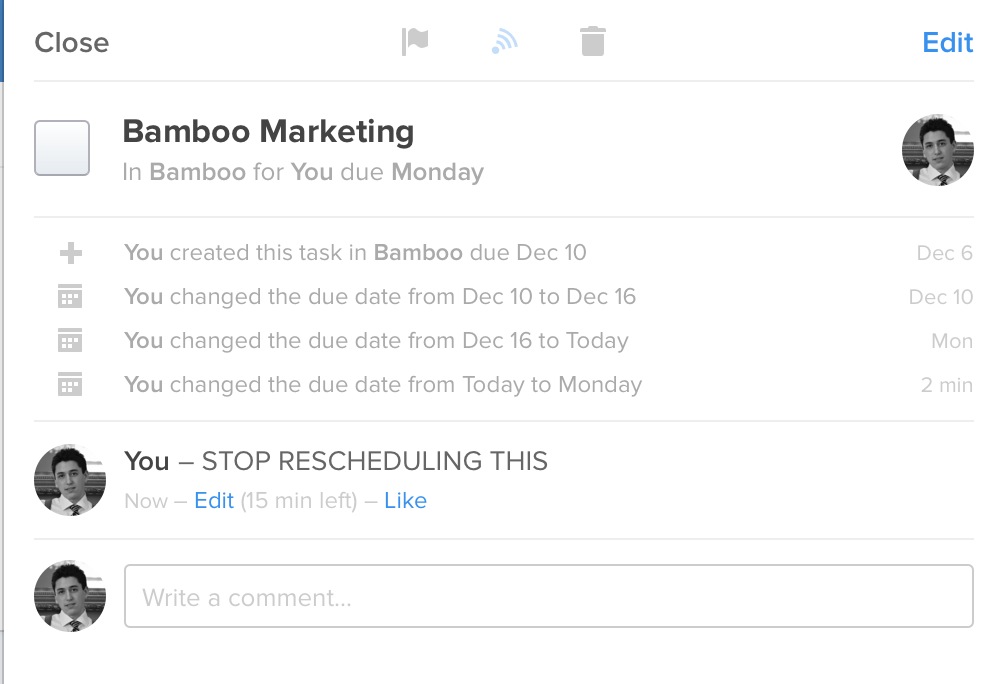
    • While OmniFocus supports notes on each task, I much prefer the comments field in Flow. I can use it as a running note log for myself on each non-team task. Say I have a task to call a person, but they don’t answer. The task is still important, so I reschedule it for tomorrow, but I still leave a note showing that I left a message. It becomes a quick activity log to tell me when I called, and how many times I called before I reached the person. Flow also shows a little log of who changed the due date, giving you a good idea of how badly you are delaying doing something.
    • Lists and Workspaces. OmniFocus uses Contexts, Projects, Groups, and Single Action Buckets. Ugh. Flow simplifies that to Workspaces and Lists. Changing workspaces changes everything, it’s like switching databases, and is a really great way to separate personal and professional to-do management within one app. Within each workspace you can have tons of separate lists for further to-do breakdowns. (You can view your tasks from different workspaces in one place too.) I’ve long abandoned using projects and contexts in OmniFocus, so lists are really all I need as a way to track things and I’m finding the simplicity of moving away from OmniFocus freeing.

    Overall I like Flow. My one complaint is that I truly do miss start dates. Due dates are great, but start dates are the way I love to work.

    For now, Flow is making me happier.

    Note

    I’m not prepared to do a full review of Flow just yet, I’ve only been using it for a few weeks. I am prepared to switch completely and start rolling it out to my office. I’ll report back after using it full-time for a while.

  • Sync and Backup over SFTP/S3

    > Dropbox-like Sync and Backup using only SFTP or Amazon S3

    Looks like a neat solution, but I haven’t tried it because they don’t have iOS apps.

    (via Matt H.)
  • ‘That podcast bombshell’

    Sid O’Neill, responding to [my post](https://brooksreview.net/2013/12/podcasts-worries) about podcasts:

    > It seems some people see podcasts as a medium solely for Conveying Information in an Efficient Manner. Cool. I think that if you’re looking for that, maybe written materials (or jacking into the Matrix training program) would be better and faster.

    Great points in his post.

  • Why Tech Podcasts Bother Me

    Right now, the most requested feature of this site (from both members, and non-members) is for a podcast. I started preparing one; creating live streaming, live chat, its own site, found a person to partner with, etc. All I needed was a little design, some sponsors, and to start recording.

    Except that was months ago and I have very little motivation to do a podcast. My reasoning — excuse — is that I don’t have time. That, though, is mostly a lie. I have plenty of time to do a weekly podcast if I want.

    No, the real reason that I am not podcasting is because I’ve come to loathe the medium.

    Every time I think “OK, time to do that podcast", I start listening to some podcasts, and then I quickly fall 20, 30, 40 episodes behind, because really podcasts are largely a pile of shit and they bore the crap out of me. ((I sometimes feel like they are only recorded so hosts can complement each other while they jerk-off.))

    I’ve been thinking about why I feel this way and I think it’s largely focused around the goal of most (but not all) podcasters. Whether explicitly stated, or implied, most tech podcasters seek to create "a podcast that allows you to listen in on two good friends chatting about topics you’re interested in". That sounds great on the surface but in reality I don’t want to listen in on two people I barely know talking about things.

    The reason I don’t want to listen in is because two friends talking are never on point. Subjects jump, there are insider jokes/back stories that I don’t get — but most of all I’d rather be a part of that conversation than a party eavesdropping on that conversation.

    If you’ve never listened to the This American Life podcast, then I apologize because the rest of this post will make little sense. TAL is the best podcast out there — the scripting, pacing, research, and editing is top notch. The show feels casual, but has enough format, flow, and scripting that it becomes comfortable to listen to, instead of wanting to join in on. I think this is what most people desire to create, but don’t understand why having a casual chat doesn’t create this. ((I am among those people.))

    The goal of a podcast should not be that the podcasters enjoy the show, but that the listeners enjoy the show. I think that’s lost on most podcast hosts.

    Who is talking should be less important than what’s being said — just like writing a blog — and yet that’s not the case.

    The who has become more important than the content.

    Most popular tech podcasts are between 60-120 minutes each, recorded weekly — which is just absurd if you think about how little content is actually being shared. If these podcasters took time to plan out their shows with their podcasting partners, I wouldn’t be surprised if the shows were on average 30-60 minutes — or half their current length. ((But then where would you fit all six sponsors? OUTRAGE!)) If any one of these hosts sat down and wrote about the topics they wanted to cover on the podcast, their blog posts would be about 500 words (or less) for each topic. But yeah, go ahead and ramble on for two hours.

    So here’s my proposal for making podcasts better: if you want me to spend 1-2 hours a week listening to your show, then you better spend at least that much time preparing for each show. Reading your RSS/Twitter feeds doesn’t count as preparation. ((You don’t actually have to do this, of course, because I don’t listen to a single podcast anymore.))

    And, to bring this back around to a podcast here, there’s no way I am doing that amount of preparation for a medium that is positively futile trying to turn a profit in — so I won’t waste your time. ((Or mine, for that matter.))

  • App Playlists

    Jared Sinclair:

    > App playlists should be rigorously simple: just a list of apps. Not all the apps ever downloaded, but the apps that a given user currently has installed on their device. The assumption is that if somebody has an app on their device, they probably like it. App playlists should be given top-level priority via their own tab in the App Store.

    This is a fantastic idea. I love it.

  • Daedalus Touch 1.7

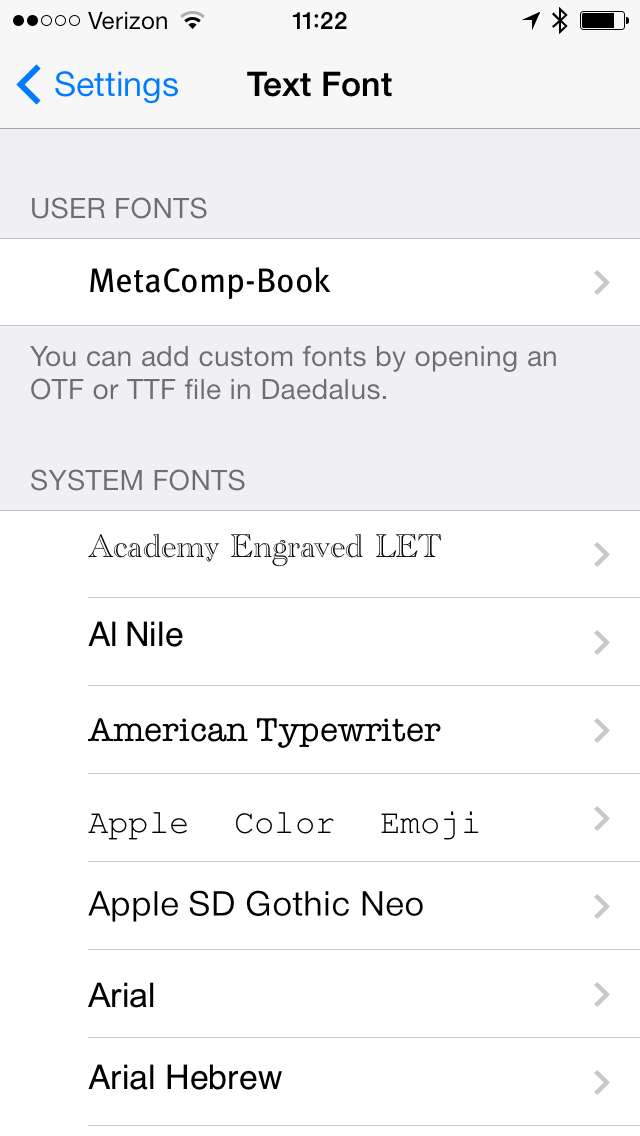
    The Soulmen released Daedalus Touch 1.7 today(isn) and while I still am not in love with the app it has a really awesome feature: custom fonts.

    No, not custom fonts built into the app — you can add your own fonts.

    I’ll say that again: you can add *your* own fonts.

    So how do you do that? Well according to the app: “You can add custom fonts by opening an OTF or TTF file in Daedalus.”

    So I tried it with Meta by grabbing the file from the BitTorrent Sync app and opening in Daedalus. And it worked, as stated.

    *Awesome.*

    I hope more iOS apps do this, this is fantastic.

  • So This is Writer Pro

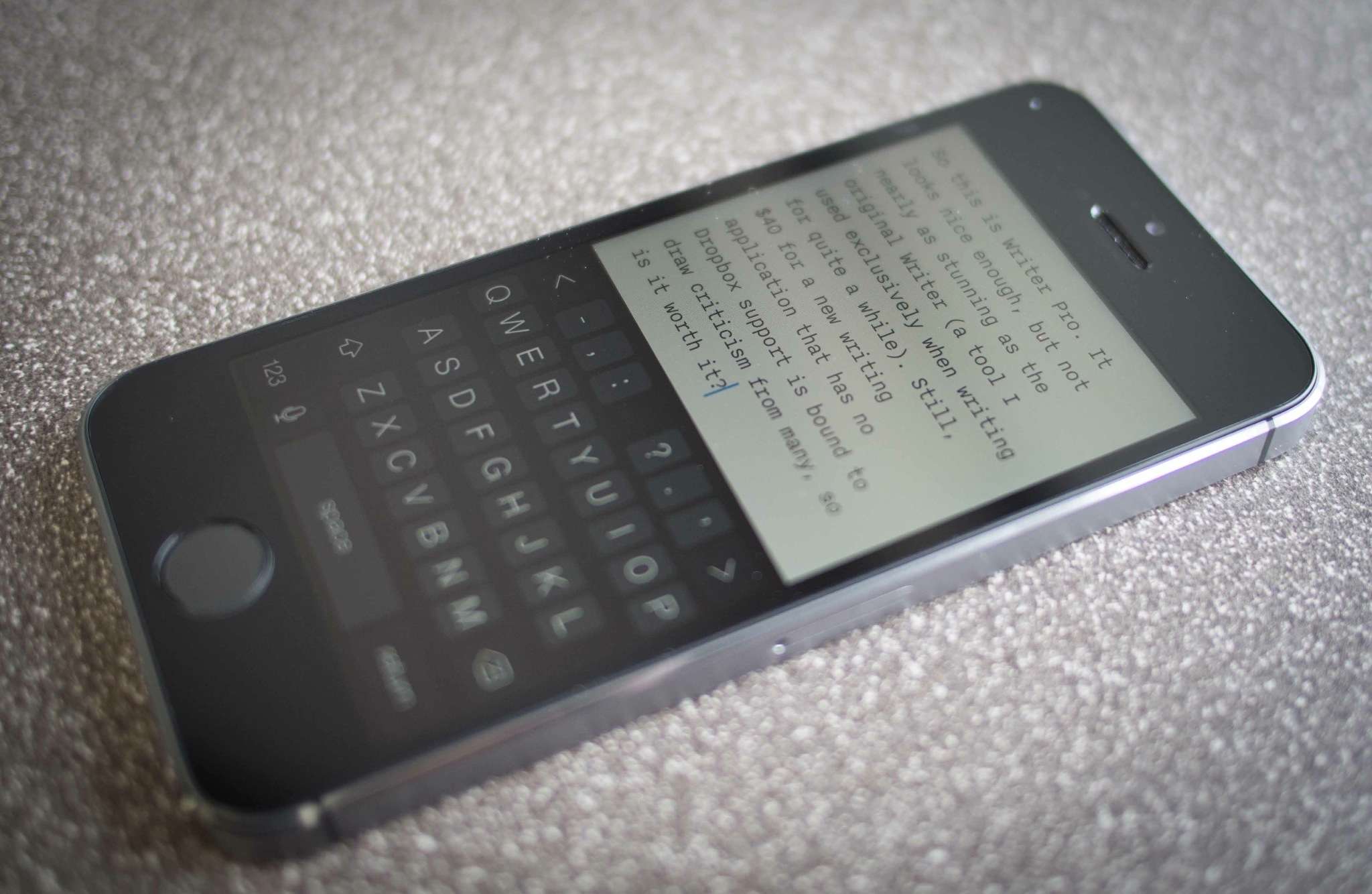
    So [this is Writer Pro](http://writer.pro). It looks nice enough, but not nearly as stunning as the original Writer (a tool I used exclusively when writing for quite a while). Still, $40 for a new writing application — one that has no Dropbox support — is bound to draw criticism from many, so is it worth it?

    There’s of course new features, the hallmark feature being the syntax highlighting mode. (Something I’ve never even thought about wanting, but was immediately intrigued by.) But otherwise it looks the same…

    Shawn Blanc, [in his first look at the app](http://shawnblanc.net/2013/12/first-thoughts-writer-pro-ios/), says that he is not likely to switch over to Writer Pro. This doesn’t surprise me as he never was a Writer fan to begin with, but what about me?

    Not only was I a Writer fan, but I was a heavy Writer user (and tweaked everything on my Mac workflow to accommodate that). So far I’ve only had Writer Pro for a very short while, but I’m not sure how I will use it long-term. I’m not immediately enamored or blown away by it like I was with the first Writer.

    I’m in love with Ulysses III on the Mac, but the integration that it has with iOS is horrid. I hate the way I have to manage sandboxes with it, and Daedalus Touch (even with the recent, *very nice*, update) isn’t a preferred writing environment for me. Neither though is anything else I have been using on iOS, which is split between writing in Poster, Daedalus Touch, Editorial, Editorially — all of those suck for one reason or another. I’ve missed the consistency of platforms that I had with Writer.
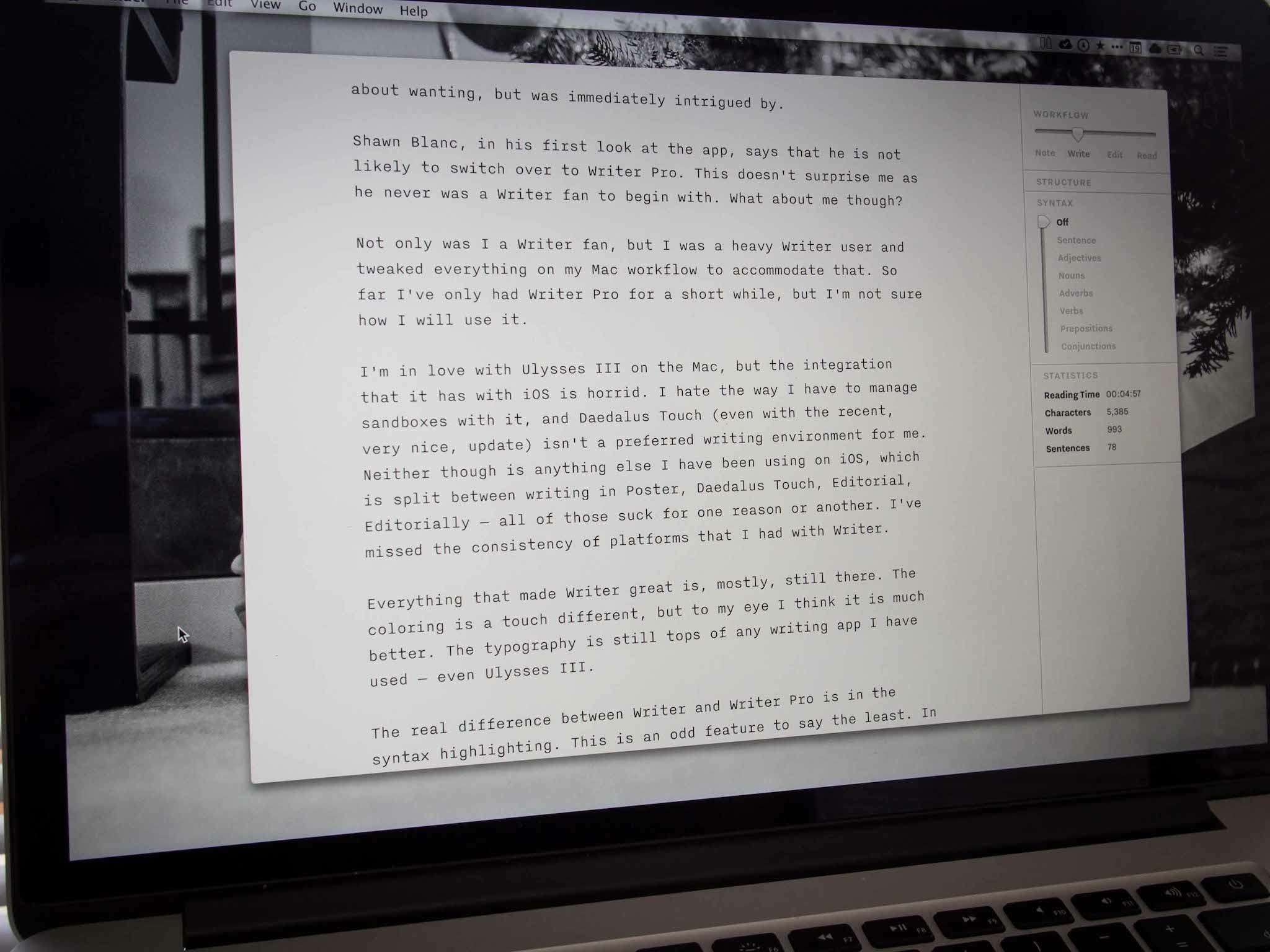
    Everything that made Writer great is, mostly, still there in Writer Pro. The coloring is a touch different, but to my eye I think it is much better. The typography is still tops of any writing app I have used — even Ulysses III.

    The real difference between Writer and Writer Pro is in the syntax highlighting. This is an odd feature to say the least. In Writer you could enter a focus mode where all text except the sentence you are currently working on is faded back a bit. This is now part of the new syntax mode and is labeled as “sentence” (shocker). However Writer Pro brings some additions (as you have likely seen), adding: adjectives, nouns, adverbs, verbs, prepositions, and conjunctions to the mix. Toggling between them effectively does the same trick as with sentence mode, but highlights *all* words in the selected categories.

    Clearly I am not a trained writer or journalist. I couldn’t tell you the last english class I took. ((Makes sense now, right?)) But honestly I am not sure if there is some underlying logic I am missing with these highlight modes, or if it is all marketing. I have been flicking them on and off to see what I can discern and I am still not sure of the value.

    I *assume* the benefit is to help show how stuffed and repetitive you may be, but again this is lost on me. So if syntax highlighting is the premier feature of Writer Pro, then I see no reason to be enamored — certainly I will use it to see if it makes my writing better, but I still don’t get it (and I won’t pretend to get it either).

    ## The Greatest Feature

    For me the best feature of Writer Pro is the four states of working that it offers: note, write, edit, read. From the videos I thought this was a way to keep versions of the same document, and then in someway move between them, but that’s not the case. When switching between these modes you are actually just toggling a view/style change in the app.

    Each mode has a different font (though I think Edit and Read are the same fonts) and a varying cursor color. And if that was all these modes did it would be another underwhelming feature, but it does a bit more that I find pretty neat.

    A lot of people have been, and will be, complaining that Writer Pro lacks Dropbox sync. In fact, Writer Pro lives in iCloud — I am a big fan of iCloud over Dropbox — so for me this wasn’t an issue. The documents are nicely presented in iOS with the four workflow states acting as lists of sorts, which allow you to view all documents in note mode together, while stashing away those you may have in edit mode. It’s a nice way to keep your app from overflowing with documents — something that I have always had trouble with. It seemed like Writer Pro was just attaching some metadata to detect which file was in which state, but that’s actually not the case.

    It wasn’t until I installed the Mac app that I saw the power of this tool — and saw how this is a great feature. When you open Writer Pro on the Mac you get the standard OS X iCloud file picker — except you will see four “folders” in your iCloud account labeled: Note, Write, Edit, Read.

    Ah ha.
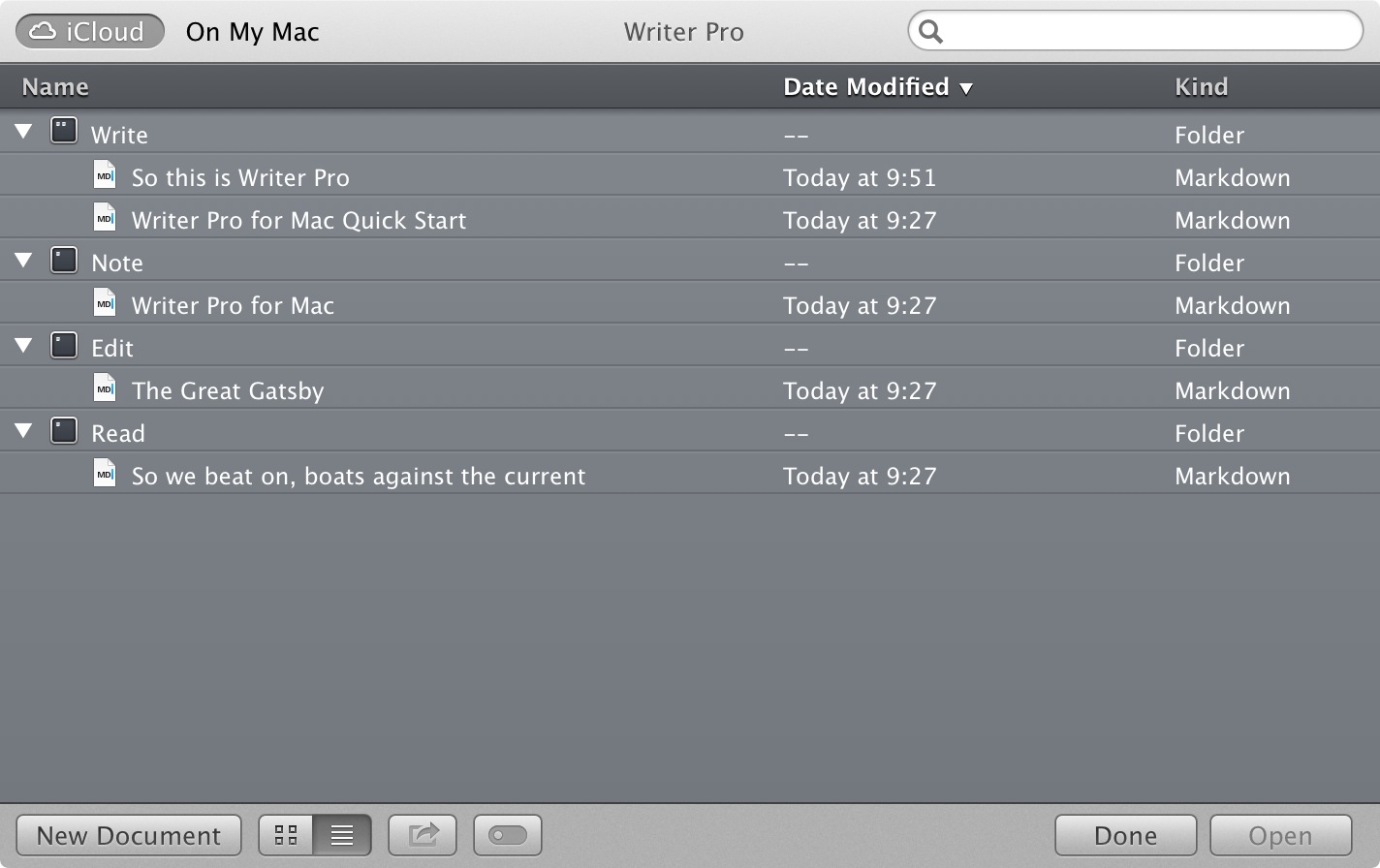
    Managing files in folders, and using tags, has always been cumbersome for any user, but what Writer Pro has done is exceedingly clever: they have created a slider for each document that moves the document location for you. While the user moves a documents from note workflow to write workflow — the app moves the document to the corresponding folder in iCloud. To me, that’s a bit of magic — and the outside the box thinking that I expect from iA.

    These moves are seamless and unseen to the user so effectively iA has recreated the hidden folder system that they use on iOS, on OS X. It’s a very slick setup.

    ## Until I Use It More
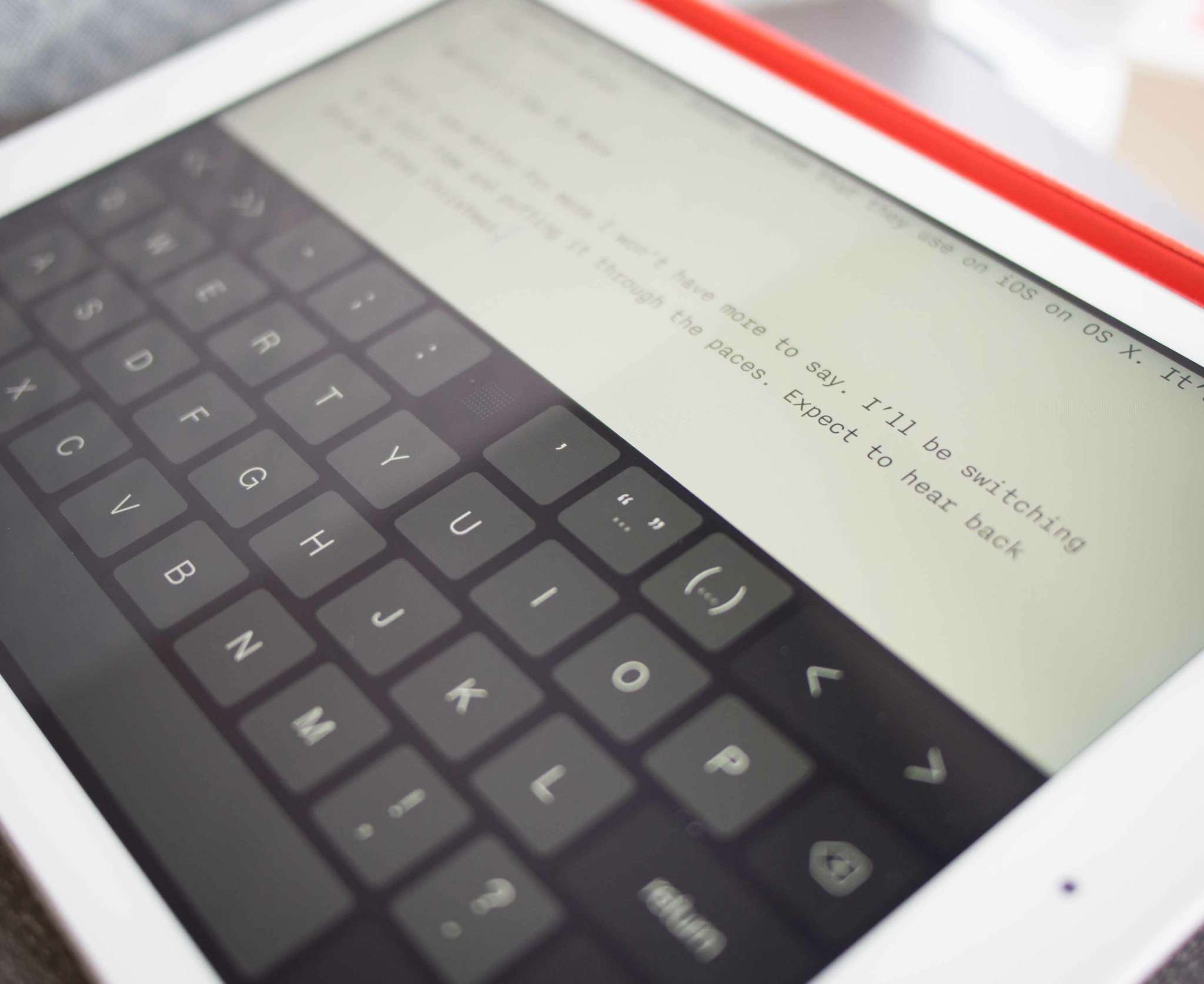
    Until I use Writer Pro more I won’t have more to say. I’ll be switching to it full-time and putting it through the paces. Expect to hear back from me after Christmas.

    ### Notes on ‘Missing’ Features

    – I’d guess that Dropbox support is forthcoming, if I recall correctly they did the same thing with the original Writer app. This is purely a guess.
    – There’s no internal versions within the app, so that’s a major bummer if you were hoping for track changes.
    – Likewise there is no collaboration feature, so Editorially is still your best bet by far.
    – There is no publish feature, which I find silly to omit at this point. What’s the point of a writing app if you can’t do anything with those words once you are done?
  • Glassboard Acquired By Second Gear

    Justin Williams:

    > From the moment NewsGator announced it was looking to give Glassboard a new home, we were jumping at the opportunity to bring some fresh ideas to one of our favorite apps. We couldn’t wait to let you in on our first steps toward modernizing Glassboard…

    This is great news. I love Glassboard, but it has been a bit long in the tooth for a while now. Kyle and I used Glassboard almost entirely while collaborating on Begin, and it was a savior for me. Can’t wait to see the updates.

  • ‘The best app for managing, editing, and reading PDFs on your iPad’

    I wrote up an iPad PDF roundup for The Sweet Setup. Go find out why PDF Expert is the best you can buy.

  • ‘In the Fukushima Fallout, Meet the Hackers Building a Sensor Network for Global Radiation’

    Joseph George:

    > On the software end they created a platform that allowed the data recorded by the counters to be uploaded via safecast.org to online maps where the readings could be viewable by all. The Safecast iOS app also allows people to find out what the radiation level is at their current position, based on the 12 million + unique data points they have collected so far.

    What a great program for keeping the government accountable.

  • Photos+

    Justin Williams:

    > This has been one of the hardest projects I’ve ever worked on. Simultaneously, it’s also the project I am most proud of. My partner in crime Jake Desaulniers and I set out to create a better photo browser for the iPhone, and I think we hit a home run.

    I downloaded it this morning, and now I am trying to find out how to make my Lightroom library sync with my iPhone. Nice little app.