Nicole Perlroth reporting on voter database vulnerabilities in Washington and Maryland has this gem of idiocy:
>Washington officials also cite their use of “captchas,” which are meant to help weed out humans from computer programs.
That seems like a valid response, until of course you take into account the rest of the story, like this bit:
>It took The New York Times less than three minutes to track down the information online needed to update the registrations of several prominent executives in Washington State.
That’s not a computer sniffing it out, just an untrained reporter, so in response to hearing that, Washington State, my home, said (basically) ‘But we have catpchas’. This actually is hurting my brain to think about.
Think of how much data states hold on every citizen and then think about how horribly that data is protected by them. I worry about what Google does, but at least they give two shits about protecting my data from prying eyes (or at least from eyes that don’t pay them), Washington State just protects my data with a fucking captcha. Granted, modern captchas are nearly impossible to read, so maybe Washington is on to something.
Here’s the app for all of you that miss Google maps, and some of you that just like maps. Really nice take on Google maps, I’ve not played with it much, but it has a couple of great features:
+ Pull to re-route. This was always a huge limitation of Maps before and now if you need to re-route you just pull down. Great feature.
+ The map follows you as you drive/walk along the route so you don’t have to swipe to keep up. Not quite turn by turn, but very nice.
Give it a try.
**Update:** I was mistaken in what was powering the backend. Google Maps is not there, Google Places is.
> For a new topic, my expectation is that the subject line gives me an inkling of what I’m about to read. “Question” is not a subject. “Question regarding the impending disaster in engineering” is a better subject. The best, “Calamity is a man’s true touchstone.”
This seems really cool, but I hope that no one sends me a work email like this — I’d hate it. The reason: it doesn’t work well for recalling the email.
Say a client wants to talk to me about strategies for getting a tenant to pay back rent, a poetic subject line, while fun to read, will end up making that email harder to find later. Yes I *can* find the email, but what if there are several threads talking about this issues, as there typically is in my job, then I’d have to go through each one to find the right thread. But with truly descriptive subjects lines I can usually find the email on first try.
So for a roof leak email, “Roof leak in suite 159” works far better than, “The heavens hath opened”.
I do like the rest of his thoughts especially this bit:
> I’ve noticed that we’ve taken to blasting through our paragraphs and either using a default signature or no signature at all and I’m of the opinion that an unsigned email is a lost opportunity to say something small and important.
I hate, hate default email signatures. If your email signature has an image of your company logo in it, I will be annoyed like you wouldn’t believe. That’s worse than a legal disclaimer, which are ridiculously idiotic to begin with. Here’s how I use email signatures: first email to you, you get my default signature filled with contact info; every other correspondence you get my name like this `-Ben`. I’ve never used things like ‘best’, occasionally, if warranted, it will say thanks, but mostly I just say: “Let me know if you need anything else” or “Let me know if you have any questions”. Both are TextExpander snippets.
Now that I think about it, I need to get better about signing off.
“If you find yourself mildly freaking out when you’re not near your phone, you might have nomophobia, otherwise known as the fear of losing or being unable to use a cellphone.”
A neat project that allows you to self-host your own Kickstarter type of project. I like that it is built to use Amazon payments, but can be tweaked to use something better (maybe Stripe). When I first saw this I chuckled and thought: “No way I would trust some random guy to charge me for a project, where’s the safety of Kickstarter?”
And then reality set in and I remembered that Kickstarter offers little to no protection for the backers of projects. Essentially: I don’t see how Selfstarter is any riskier for backers than Kickstarter.
In fact, it would seem, Selfstarter is a better solution because the fees will be less and therefore the threshold for successful funding should be less. I like this idea, let me know if you use it for a project.
I love this concept from Lennart Ziburski. He also astutely identifies why I laughed at every other smartwatch concept:
>First, for a smartwatch to makes sense, it shouldn’t just be a smaller iPhone. Instead, it actually needs to be better than the iPhone for the tasks you are going to use it for. You aren’t going to write an email on your watch, but you are going to check the weather on it – because that’s something you want to do on-the-go.
I’m one of those people that still wears and loves watches. Mine aren’t fancy digital watches, they are simple time+date watches. I love them, I use them, and I don’t want to replace them with a damn iPod nano strapped to a piece of rubber.
> In Silicon Valley, we first fall in love with start-ups and their vision. Then a few years later when they are successful, we consider them to be geniuses. And when they become too powerful, they become evil. And after the too-powerful phase comes a swift fall from grace.
Malik says Google is in the third phase, I’d agree and I think this is a great outline. Hard though to apply to Apple. Yes Apple is not a startup, but Malik uses Microsoft as supporting evidence, so I think it is fair game to look at this theory in light of Apple.
Is Apple in phase two, and if so then you think it *will* become evil. However hasn’t Apple been in the second phase for at least a decade now?
Either way I think Malik is right that this is coming at the worst possible time for Google given their rivalry with Apple.
I’ve never understood people not willing to pay to roam. Here I have a world class computer, that I rely on daily, but I’m not willing to spend a couple hundred bucks to keep it useful on a trip? Oh but souvenirs, sure.
Ok, so I have never actually paid for roaming before. But because I was spending a short three days, two nights, in Canada — and I knew I wouldn’t have time to go get a local SIM card — I decided to go with roaming data. Now Canada calling and texting is relatively cheap with Verizon and is covered under most of their normal U.S. plans, but not data.
When I called in to request international data, Verizon had to verify my identity and run a credit check before activating the $25/mo plan (keep in mind my normal plan is $100/mo and I *could* use international data with no plan at a massive rate with no credit check, but hey whatever). After that I verified that the [only plan](http://businessportals.verizonwireless.com/international/GlobalData/rates_coverage.html) I could get is $25/mo for 100mb or pay $2.05/mb. Yikes. I was also told that if I went over, I would just pay another $25 for another 100mb. Ok, $50 wouldn’t be bad for the reduced hassle. It’s [not as good as what AT&T offers](http://www.wireless.att.com/learn/international/roaming/affordable-world-packages.jsp?%20#data), but then again Verizon sold me an unlocked iPhone.
There are two things I learned:
1. I needed 200MB to be able to use my iPhone as I normally would.
2. The Verizon iPhone 5 does *not* roam on LTE. I was expecting LTE, but instead just got 3G. I don’t even know what network I was using because the normal carrier spot just said “Roaming”. I am told Rogers has LTE in Vancouver, but I believe that is the network AT&T phones roam on — not Verizon.
Either way I was glad to have the data, glad to not have to hassle with it at all, but I was disappointed in the slow speeds of the network. Next time I will be getting a SIM instead to get faster speeds and better rates.
> The government’s escalating pursuit of Google is the most far-reaching antitrust investigation of a corporation since the landmark federal case against Microsoft in the late 1990s. The agency’s central focus is whether Google manipulates search results to favor its own products, and makes it harder for competitors and their products to appear prominently on a results page.
That’s never the comparison you want to have. What’s interesting is that I didn’t think there was any question whether Google chose/chooses to promote its own products first. My question: is that wrong? It’s not fair, but it’s also Google’s service. Should I be required to link to another blogs post when I would normally link to one of my own? It’s not the same, but the principle seems the same.
The more interesting investigation is whether Google actively tried to prevent other search engines from gaining traction, outside of services under Google control. Did they actively seek to shut down others from getting a default spot on, say, Safari? That’s far more damning, I hope that’s what is being investigated not something about ordering search results.
Two years ago I would have laughed at the idea of writing a quick post to point out some email newsletters — after all, that’s not the way we get news now days. We have ADN, Twitter, RSS, Push notifications and on and on. Yet the email newsletters are the only ones that I never miss — they are great. Here are some that you should consider.
## NextDraft
[You are subscribed to this right](http://nextdraft.com), better yet you have the iOS app right? It’s fantastic. Dave Pell does an amazing job accumulating enough links everyday to keep your Instapaper queue overflowing.
## The Brief
What [Evening Edition is for news](http://evening-edition.com), [The Brief is for tech news](http://thebrief.io). Except you get the tech news first thing in the morning. This is a great way to get a handle on the day if you are going to be away from your RSS feed — at least it is for me. At a conference, away on vacation, but don’t want to miss out? Here is your solution.
## The Round Down
[This is a weekend newsletter with a more global](http://therounddown.com) (read: non-US centric) take on things. I’ve only been reading for a little while, but I do enjoy it quite a bit.
## Now I Know
[Dan Lewis’ newsletter is awesome](http://nowiknow.com). Short little stories that leave me with *at least* one thing I didn’t know before I read it. It’s like getting a Wikipedia summary from a random truly interesting page delivered to you everyday.
There’s four great newsletters to fill your inbox.
I asked on App.net for a tool to send stuff from Reading List to Instapaper, didn’t explain why, and Federico Viticci came up with a wonderful solution. Viticci figured out why I wanted it too:
>The interesting fact about this workflow is that, at first, I thought it would be useless: *why would I want to do this*? As TJ Luoma told me on App.net, though, Reading List is integrated on a system-wide level, while Instapaper isn’t. Sure, most third-party apps offer a “Save to Instapaper” feature nowadays, but it’s still very convenient to be able to add links to Reading List from Mail or Calendar.
Bingo. I can send things to Reading List really easily in Apple apps and avoid having to open the page in Safari and then invoke the Instapaper bookmarklet — thanks Viticci!
David Smith, well dressed man he is, [also came up with an app to do the same]( http://static.crossforward.com/ReadingListToInstapaper.app.zip) (that’s a zip file download link, FYI). The primary difference between the two is that with Viticci’s solution everything is automated, with Smith’s you have to manually send the items each time. Both work, and work well in my testing, they just are for different workflows. I’ll use both, but probably rely mostly on Viticci’s for the time being.
This is a neat enough update to the Weather app, Seasonality, that I thought it was worth sharing. They added “particle mode” to the wind maps that show you how something would move across a given map with the wind that is currently happening. It’s hard to describe, but looks pretty sweet, kind of mesmerizing. (Be sure to hit the options and up the amount of particles for the full effect.)
There’s been more than a few times where I will have a couple dozen tabs open in Safari, only to have to leave and want to send those tabs (back) into Instapaper. In the past I just CMD+W and then CMD+2 to cycle through closing windows and sending them to Instapaper. I recently lamented that I wish there was an Applescript to do such a thing — well now there is.
Martijn Engler put his Applescript that does just that on Github for all to enjoy. Sweet!
[Patrick Rhone pointed me to this knife on his blog](http://patrickrhone.com/2012/09/06/columbia-river-knife-and-tools-m16-02z-knife-review/), and encouraged me to get it. It is actually the first “tanto blade” knife that I have owned. This is the style of blade that looks a lot better, but gives you two sharp points: one where the blade breaks to form the “normal” point, and the last one where the point of the knife actually is.
I’ve been adverse to this type of blade simply because they didn’t seem as useful to me.
Now having carried this knife as my everyday knife for a month I will toss out the above statement. This is actually a really good knife, but also a really quirky knife.
### The Good
– Fast, I mean fast, deployment.
– Solid lock.
– Fantastic feeling handle.
– Good weight and balance.
– Good steel that ships really sharp.
### The Bad
– Too big for me to use as an everyday carry.
– The closing mechanism seems utterly ridiculous to me. Yes, you can close the knife with one hand — but that doesn’t explain why in the world I want a safety on the closing function. Essentially to close this knife blade you have to hold a little lever in place and then depress the inner blade lock. It works, but it’s clumsy and stupid — this knife opens so easily the safety should be on the opening, not closing side of the action.
### All-in-all
I truly like this knife, but it takes a lot of getting used to. It’s found a home on my workbench and I’ve been very happy with it. [At $35.68 with Prime shipping](http://www.amazon.com/exec/obidos/ASIN/B000WAC7RM/ref=nosim&tag=brooksreview-20), it’s a bargain.
For the last few days I was in Vancouver BC (Canada for those that don’t know). It’s a city I have been to a few times and I generally really like the city and the fact that I can drive to it in less than half a day. Even though I have been there a few times, I still have no sense of bearing in the city — it’s one of the few cities that I have driven in, that I have yet to figure out. ((San Francisco is another.)) This meant that for three days I was at the mercy of my iPhone and the (dun, dun, DUUUNnn) iOS 6 Maps application. I used turn-by-turn navigation the entire time, never once double checking the spot the iPhone was taking me to, here’s the result:
– Times lost: 0.
– Times frustrated: 0.
– Battery drain: far less than expected.
– Speed: fast.
– Times I questioned the GPS and was proven wrong: 1.5.
The one thing that actually blew me away about the navigation was just how fast the maps application loaded a route on the sluggish 3G network I was roaming on. ([Here’s just how slow that network was](https://f3a98a5aca88d28ed629-2f664c0697d743fb9a738111ab4002bd.ssl.cf1.rackcdn.com/maps-3.PNG), and [how fast my iPhone is only an hour back into Washington state](https://f3a98a5aca88d28ed629-2f664c0697d743fb9a738111ab4002bd.ssl.cf1.rackcdn.com/maps-2.PNG). Additionally are there no LTE networks in Vancouver, or can USA iPhone’s not roam to them?)
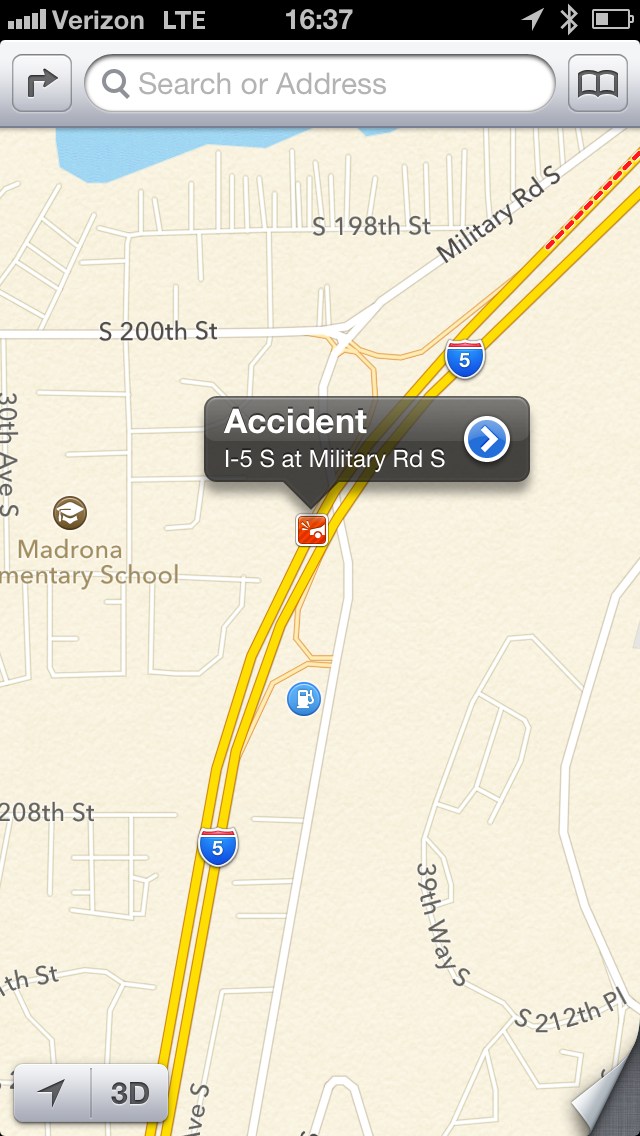
I wasn’t going to write any of this up, but an odd thing happened on my way home — something that absolutely made me fall in love with Apple’s mapping solution — I hit massive traffic long before I expected to and naturally I checked the traffic flow on the Maps.app and scrolled down to see this:
Accident icon.
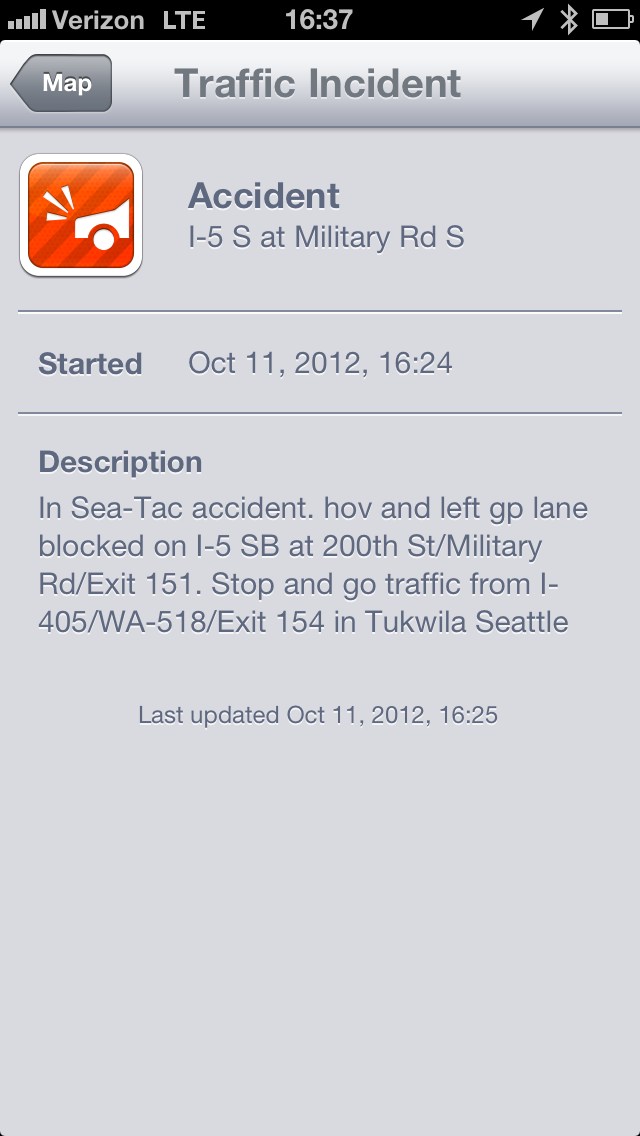
So I tapped the icon, here’s what came up:
Accident detail.
Holy. Shit.
That ladies and gentlemen is what I call useful information. Red, yellow, and green lines don’t tell you much other than what you likely already know. However knowing that there is an actual accident ahead, where it is, and the lane it is blocking is nothing short of awesome.
For me this was the equivalent of using visual voicemail for the first time.
#### The So You Don’t Email Me Section
1. Yes I know Maps isn’t that great in *your* country.
2. I don’t use public transit.
3. I know you rely on street view, I don’t, nor do most other people.
## Bottom Lining It
I never thought three days in Canada would make me fall in love with a maps application, but it did.