Top Posts

Leica Sofort 2June 13, 2024
Grand Seiko SBGX261February 23, 2023

Recent Articles

  • Member Journal — 5/4/2020

    I want to tell you about my revolutionary idea I have for the iPad, and other things of note.

    This week: Magic Keyboard part two; Trackpad is the real story; give me a Magic KVM; Kondo; restaurants are really wanting to go out of business; and let’s not forget what it was like to be alone.

    ## Magic Keyboard, Week 2

    I spent the last week only using my Magic Keyboard to do all my work, and all my personal writing (which there wasn’t any of until the weekend this go around). A simple desk, with just a powerful tablet, *Magic* Keyboard — and then you know another iPad and a trackpad next to it so I could monitor the rapidness with which the world around me is changing.

    You must be a member to read the rest of this article. (Already a member? Log In.)

  • Member Journal — 4/27/20

    The Magic Keyboard arrived for my iPad Pro and if only for that moment, this pandemic slipped away from my thoughts.

    This Week: magic keyboard is here; pandemic gadget; Zoom; the end of life hacking; bad bosses take two.

    ## iPad Magic Keyboard, Let’s Talk About It

    ![](https://f3a98a5aca88d28ed629-2f664c0697d743fb9a738111ab4002bd.ssl.cf1.rackcdn.com/2020-04-25-070800.jpeg)

    Like many of you, I have spent the past few days reading hot takes from around the web about the iPad Magic Keyboard — is it good, is it worth nearly $400 for the 12.9” version (after you account for taxes)? Will I like it?

    You must be a member to read the rest of this article. (Already a member? Log In.)

  • Member Journal — 4/20/2020

    We all want a better home office, let me talk about what I would change.

    This week: dreaming about a new home office; how to draw a line between personal and work at home; COVID is destroying things I hate; I love the trackpad; Magic Keyboard lust; changes to travel; bags for home?; Vanlife; shitty managers; go for a walk; and DNS stuff.

    ## Dreaming About a New Home Office

    As with most people right now, I spend a decent amount of time dreaming about a better home office. To be fair, I have a pretty nice home office as it is, it looks like this:

    You must be a member to read the rest of this article. (Already a member? Log In.)

  • A Thick Line of Ink

    For the broad strokes.

    Like many pen nerds, I used to reach for a nice thin ink cartridge. Rollerballs have always been my go to type, as they write smooth and dry fast enough that I can usually not destroy my hand with ink (I am left handed, you either get this or you don’t). A lot of people like ink that is 0.38mm, and most people find around 0.7mm to feel pretty good.

    (more…)

  • Member Journal — 4/13/2020

    You are ruining work from home for everyone, and more thoughts on quarantine miscellany.

    This week: post pandemic work from home thoughts; two iPad challenges for you; my WiFi 6 travails; Amazon or Walmart; Airbnb thoughts; and new Mac stuff.

    ## Future of WFH, Post Pandemic

    ![](https://f3a98a5aca88d28ed629-2f664c0697d743fb9a738111ab4002bd.ssl.cf1.rackcdn.com/2020-04-11-075655.jpeg)

    Those of us lucky enough to still have a job, are also likely those of us with a job where you can work remotely. We are certainly in the midst of a large scale work from home experiment, my company too. And the rhetoric is exhausting.

    I am in a unique position to comment on this. I likely know exactly what your situation is like. I’ve run a small business with limited financial and human resources. I’ve been at a fully remote company working with decidedly not remote companies. I am at a Fortune 500 where I have worked remotely with them, and recently in the office with them. I have likely seen, and won’t be surprised by, anything you are seeing.

    You must be a member to read the rest of this article. (Already a member? Log In.)

  • Twelve South Compass Pro

    I a really great stand, and well made once again.

    I have somewhat of a tortured relationship with the Compass lineup of stands from Twelve South. The first version was simply fantastic, but the follow up felt like a company trying to cut corners to increase profit margins. Because of that I went out and bought a few older original Compass stands to have on hand.

    (more…)

  • Member Journal — 4/6/2020

    For free: why you should not use USB-C hubs with iPads.Paywall: I bought a ring light for work calls.

    This week: I dive deeper into USB-C hubs destroying my iPad Pro battery life, a news app recommendation, Zoom (sigh), and then turn on the pay wall for the new gear I bought, productivity, thoughts on lasting impacts, and a note on walking. Enjoy…

    ## Power Drain from USB-C Hubs is Unreal

    Last week I complained about the state of USB-C hubs, and specifically the power drain I was seeing on my iPad Pro. None of you responded with a better hub suggestion, so I tried [Apple’s Digital AV multiport thing](https://www.amazon.com/exec/obidos/ASIN/B07WF96FY5/ref=nosim&tag=brooksreview-20) and it was just as bad. Here is the power drain chart from the Apple dongle attached to the USB-C Alt keyboard:

    ![](https://f3a98a5aca88d28ed629-2f664c0697d743fb9a738111ab4002bd.ssl.cf1.rackcdn.com/2020-04-01-132726.jpeg)

    This is quite something, showing the same keyboard with two different connection methods on the same day. The first arrow is when I plugged in the ALT via a USB-C to USB-A cable to the Apple dongle. The power drain was rapid and in line with what I have seen from *all* USB-C hubs. which means it makes the iPad Pro almost unusable because of how fast the power drains unless you keep the device constantly charging.

    The second arrow is when I switched the same keyboard to a USB-C to USB-C cable and plugged it directly in (after charging back up the device), no dongle or anything. The power drain is still there (this keyboard has many LEDs) but the decline is not that rapid and generally what I expect to see.

    That’s just one day, and maybe I was doing something else on my iPad, right? Here’s the next day, no dongles at all:

    ![](https://f3a98a5aca88d28ed629-2f664c0697d743fb9a738111ab4002bd.ssl.cf1.rackcdn.com/2020-04-01-133205.jpeg)

    The curve is roughly the same, which to me says that while this keyboard is power hungry, the USB-C hubs makes the problem drastically worse. So I tested a few more times with different setups. I tested the Vortex Pok3r and Vortex Core, both directly connected to the USB-C port with a cable.

    Here is the aggregate off all this:

    ![](https://f3a98a5aca88d28ed629-2f664c0697d743fb9a738111ab4002bd.ssl.cf1.rackcdn.com/2020-04-03-140508.jpeg)

    The big black bar at the bottom is the drain from using Apple’s USB-C hub with only my keyboard connected — it is terrible. Next the Greenish line is the ALT on a fresh day, the maroonish is the bar of the ALT from the same day as the black bar, the purpleish is the Pok3r, and the slate/blue is the Core. No doubt the diminutive Core which has but one LED makes it so I can almost last an entire day, even with video calls, and have no need to charge. The Pok3r comes close, I did turn off the LEDs half way through, but that didn’t seem to phase the power drain too much.

    What’s clear to me is that the power drain between the keyboards is very different — and enough so that you might think about it a little harder if you truly want to get the most battery out of your device — but at a desk it’s hardly much of a concern. (My tip: when on a call, plug in the iPad for the call, that way you don’t let anyone hear your typing, and you stay focused, and the battery charges back up. I use a 60w charger, you would be amazed how much power you get from that charge.)

    My big takeaway though is that you should simply not use a USB-C hub with your iPad Pro, unless you are also charging the iPad Pro, because the power drain is absolutely absurd. I am very used to my work iPad being around 30% at the end of the day, but with a USB-C hub plugged in and only powering a keyboard, I will be at 20% by lunch time. With direct connection I can make it through a work day on one charge. The ALT will most tank the entire battery, often to single digit percentages left, whereas the Core will leave me with about 23% left.

    ## Finimize

    A while back I learned about the Finimize newsletter and signed up for that, and then they posted something interesting which caused me to subscribe. I’m a huge fan. I have long paid for Economist’s Espresso app on iPhone, but I think Finimize is better and will replace that. They do great ‘insight’ pieces as well as distilling down the financial portion of the markets into two major points each day. Only downside it the iPhone only app. They also really only cover financial related news.

    It’s just right. [I recommend it](https://apps.apple.com/us/app/finimize-finance-simplified/id1335577505).

    ## Zoom Bye

    Holy shit, what a week for Zoom. Last week I cracked a joke that even with everything going on with Zoom, that I would still prefer it over Microsoft Teams. I apologize, as I had no clue how much worse it was going to get for Zoom. Here’s a smattering of why you should get away from Zoom as fast as you can:

    – [It’s not actually encrypted.](https://theintercept.com/2020/03/31/zoom-meeting-encryption/)(More about [security woes here](https://citizenlab.ca/2020/04/move-fast-roll-your-own-crypto-a-quick-look-at-the-confidentiality-of-zoom-meetings/).)
    – [Zoom is Leaking Peoples’ Email Addresses and Photos to Strangers – VICE](https://www.vice.com/en_us/article/k7e95m/zoom-leaking-email-addresses-photos)
    – [Axios is calling it their ‘tarnished moment of glory’](https://www.axios.com/zooms-tarnished-moment-of-glory-f1e2a46e-9ce2-4926-a0a0-ebb4b9e0d2fa.html)
    – [Even the FBI commented on Zoom](https://abcnews.go.com/US/fbi-warns-video-conference-hijacking-amid-coronavirus-pandemic/story?id=69901757)
    – [All your Zoom records are easy to find](https://www.washingtonpost.com/technology/2020/04/03/thousands-zoom-video-calls-left-exposed-open-web/)
    – [Here’s a big list with some things I probably missed](https://tidbits.com/2020/04/03/every-zoom-security-and-privacy-flaw-so-far-and-what-you-can-do-to-protect-yourself/) (too long for me)

    What a [nightmare](https://www.schneier.com/blog/archives/2020/04/security_and_pr_1.html), get away from it and fast. (One good thing, if you are stuck using this for work: they are reacting quickly so far to patch these bad decisions, so stay updated.) I will say that the CEO seems to be saying he is committed to fixing this, and that is actually great. But here’s the thing: why should we trust him? On what grounds has he earned any trust? We should not trust him, this is a get rid of Zoom and wait for security researchers to let us know it is all clear.

    Signal, and FaceTime are both secure. FaceTime does fantastic group calls. Microsoft Teams is basically free if you have Office 365 at your, erm, office — so if you need convince your boss, now is great time to pitch cost savings.
    You must be a member to read the rest of this article. (Already a member? Log In.)

  • Lochby Field Journal

    You are going to see me carrying this around, and this might be the most affordable thing I have reviewed in a long time.

    Note: Lochby provided this item for review at no cost.

    Lochby, the rebranded BOND Travel Gear, produces something which I really wanted to give a try: the Field Journal. I have this idea in my head, and that idea is that the A5 sized notebooks are roughly the perfect notebook size for carrying around and still being able to happily be used at a desk. But, me being me, I also wanted to know how you might accessorize such a nice little notebook.

    I am not alone in this thinking, as Lochby produces both the Field Journal, as well as A5-ish sized notebooks for it which utilize the coveted Tomoe River paper. I’ve been trying one out now for sometime, and long story short: this is a really good product which moves to incredible when you factor in the low pricing.

    (more…)

  • Hitch and Timber Runt 2.0 Organizer

    Adding more stuff to your pocket, somehow makes it feel like fewer things in your pocket. I know, right.

    A few weeks back, maybe more, I clued in members of something new I was trying. I wanted to try ‘organizing’ my everyday carry gear in my pocket. Specifically the issue I was having was related to what I carry at work.

    At any point, in my office, what I want to carry in my pocket is:

    So the way I went about this was by having my knife, flashlight, car key, and handkerchief in my left pocket, and my wallet and phone in the right pocket. This was ok, but the issue was the wallet and phone pocket was very bulky, and the knife pocket has everything bunching up at the bottom. Meaning that to anyone looking at my pants, they saw a huge lump of stuff in my left pocket, and large square protrusions in my right pocket.

    (more…)

  • Member Journal — 3/30/2020

    I had a lot of extra time to write, and stage my photos so they look more instagram like, but I don’t have instagram so I posted them here.

    It’s still March… Anyways, this week: some more work from home stuff (free for non-members) about the top gear I have at hand, USB-C hub power drain on iPad Pros, Zoom, UPS backups — then we jump over to a bunch of iPad Pro specific topics for members.

    Enjoy…

    ## WFH EDC

    Something rather comical I keep seeing on the “EDC” (everyday carry) SubReddit is people posting ‘my WFH EDC’ or ‘my quarantine EDC’ — now this sub is rather repetitive to begin with – but these posts are particularly amusing. The idea that you need a wallet, two knives, a multitool, and a gun in order to move around your home — well that is a special kind of ‘grow up’ for me. But it did get me thinking how what I carry around has changed.

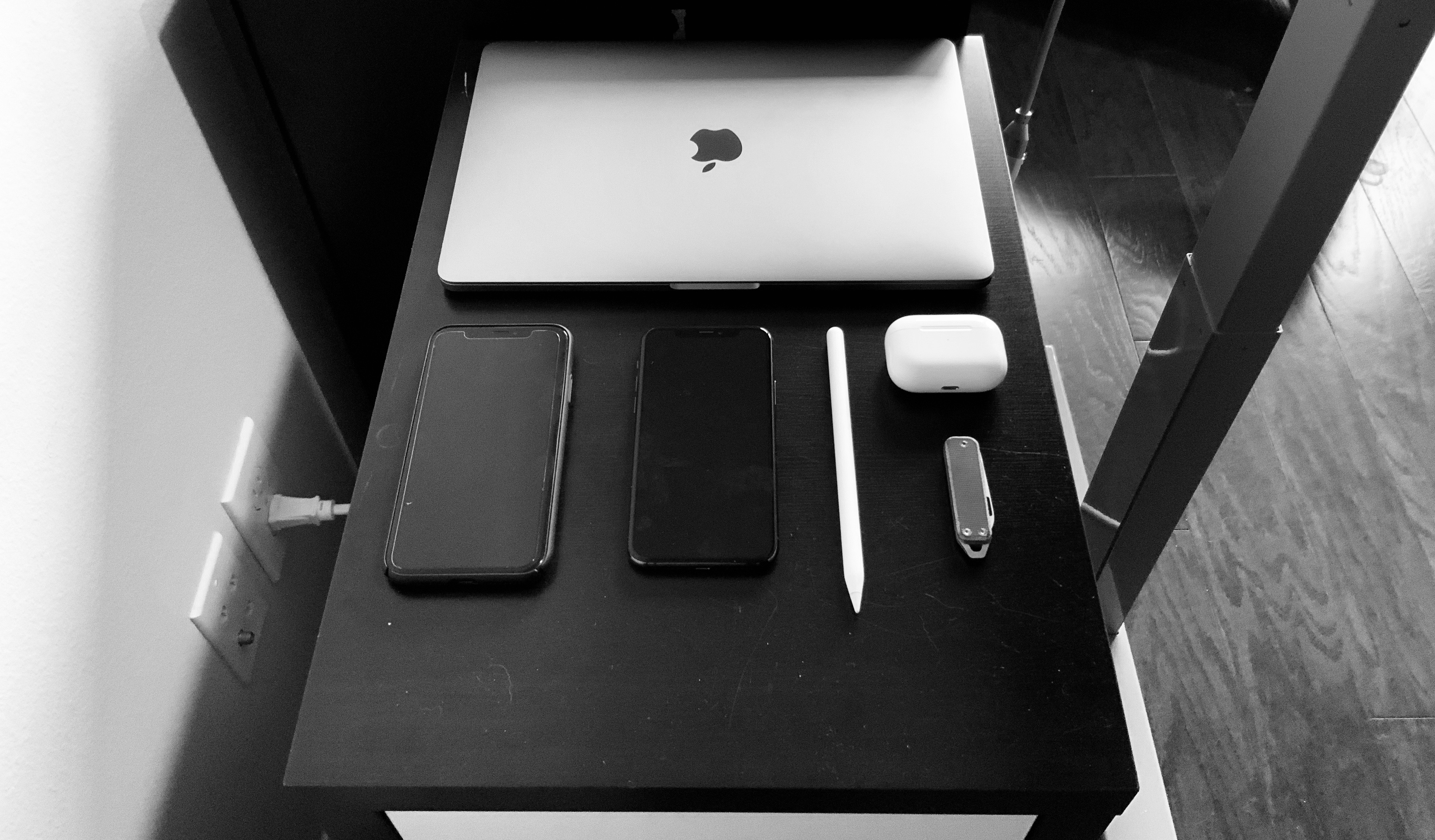
    Truth be told, I don’t really keep anything in my pockets when I am home, and if I am carrying something it is probably my iPad Pro — not even my iPhone that often. But, that doesn’t mean I don’t have a setup for myself, because I did find that as I worked throughout the day I needed *things* to help me. My home office is right next to the front door, and my wife and I have agreed that when a package comes I will open it at the door, dispose of the outer boxing, clean my hands and then distribute the delivery. For that I need a knife, but you know, I am not carrying one around my home because I don’t post to r/EDC — which is how this little area of my office formed:
    ![](https://f3a98a5aca88d28ed629-2f664c0697d743fb9a738111ab4002bd.ssl.cf1.rackcdn.com/2020-03-27-081812.jpeg)

    That’s a cabinet of drawers which sits to the left of my desk. It started the new WFH mandates with just the work issued MacBook Pro sitting on it — it’s the perfect size! — and then it morphed from there. I dropped my work and personal phone there, and that looked neat. Turns out having my AirPods Pro on that spot kept me from having to shuffle around looking for them before every call. I added the James Brand Elko knife so I could open packages — you don’t need more than that. And that’s the Apple Pencil for my *personal* iPad Pro — in case I need it.

    And I know what you are thinking: “I staged that for this blog post” and you are totally right. But what I staged was using a ruler to try and really make things aligned (I still messed that up), but in reality all those items really do sit there, really do sit in that arrangement and are almost always as neat and tidy as I can eyeball them. BECAUSE I HAVE SOME EXTRA TIME ON MY HANDS PEOPLE.

    The thing is, I need those items, but not that often. I need the MacBook Pro to test some web apps, but maybe once a week at most. I need my work and personal iPhones, but maybe once a day. [I use that knife](https://shop.thejamesbrand.com/products/the-elko?variant=3015957577768) about 3-4 times a day — deliveries seem to be constant right now, we got three different FedEx trucks on Friday alone. I rarely use the personal Apple Pencil, but I am trying to use it more so that’s a reminder.

    And those Airpods Pro are like work from home magic — [you should totally get them](https://www.amazon.com/exec/obidos/ASIN/B07ZPC9QD4/ref=nosim&tag=brooksreview-20). I keep a [charging](https://www.amazon.com/exec/obidos/ASIN/B0721DV7YX/ref=nosim&tag=brooksreview-20) cable stashed off to the side for the MacBook Pro and the Airpods Pro so that they don’t ever have to leave that spot.

    For me, this is not about what I carry *on* me (again, just the iPad Pro), but rather what I need *at hand*. And those are the items I have found that I need at hand. Yours may vary, but having them all in a neat area, arranged with extra compulsion, well that’s been nice for me.

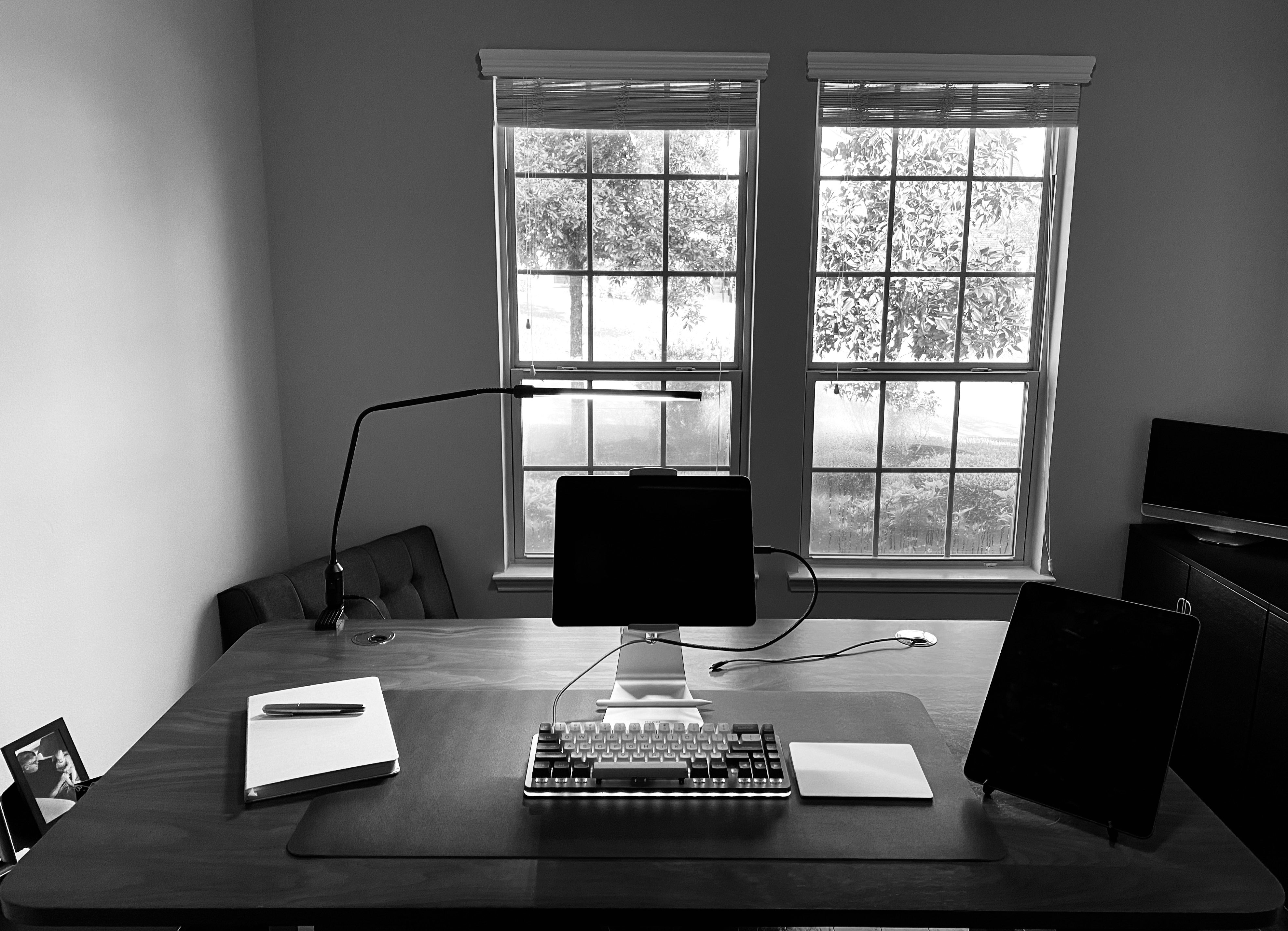
    And since you are wondering, this is what my desk setup looks like when I am working during the week:
    ![](https://f3a98a5aca88d28ed629-2f664c0697d743fb9a738111ab4002bd.ssl.cf1.rackcdn.com/2020-03-27-105510.jpeg)

    That’s a large Baron Fig, my Montblanc M Rollerball, Drop.com Alt keyboard, Apple Magic Trackpad, Viozon stand holding my work iPad Pro, and Compass Pro stand holding my personal iPad Pro (which is nervously keeping tabs on infection rates).

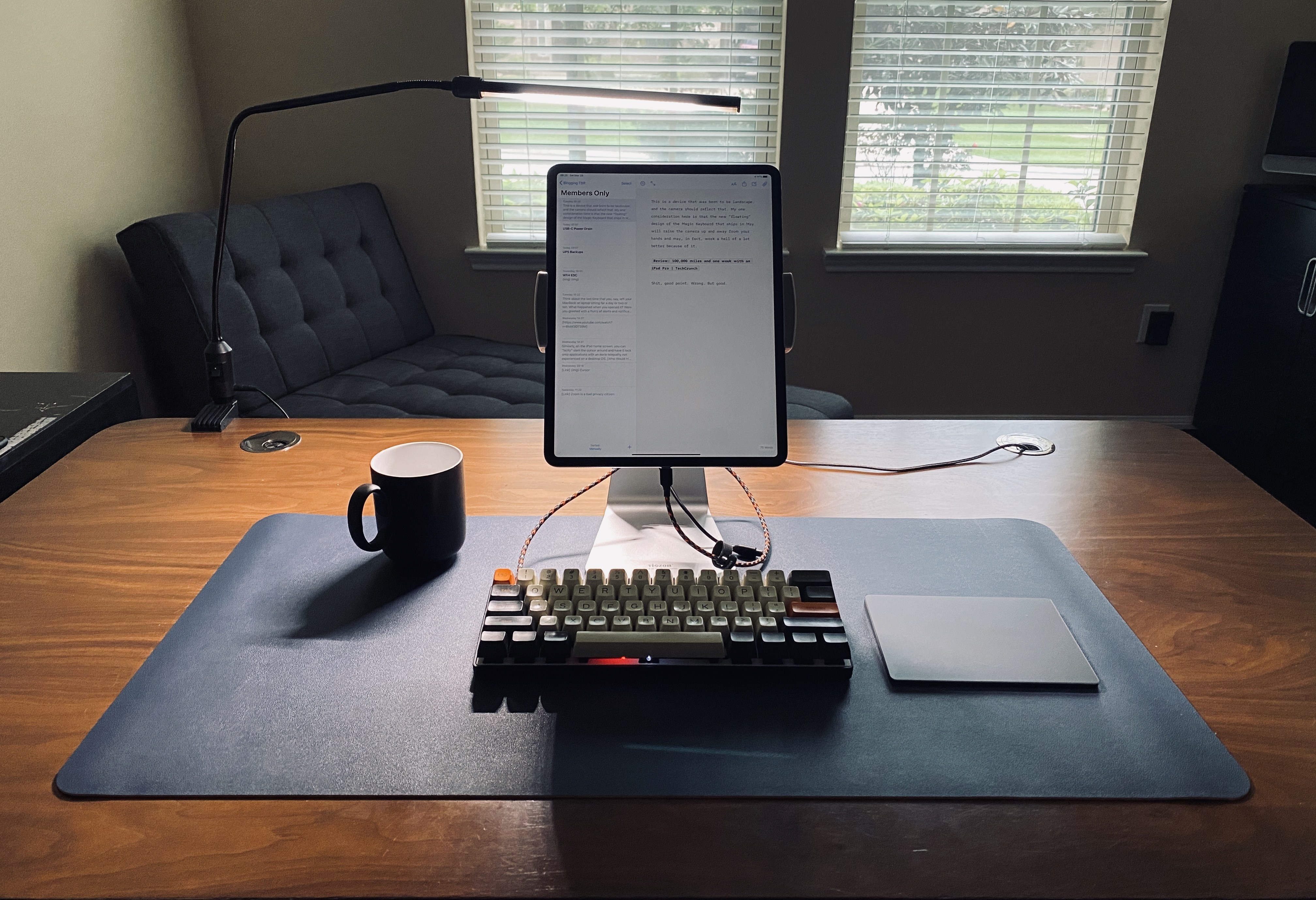
    And today, as I write these posts, here’s what it looks like:
    ![](https://f3a98a5aca88d28ed629-2f664c0697d743fb9a738111ab4002bd.ssl.cf1.rackcdn.com/2020-03-28-083712.jpeg)

    Coffee, Pok3er, Viozon stand with personal iPad Pro, and Magic Trackpad. And, yes, that little tool spot to the left of my desk, it holds different items on the weekend (I’ve got time people). You always need context shifts, which is why I changed the keyboard when I work on personal stuff, and took the time to completely put away my other keyboard in a cabinet. It tells my brain to get into writing mode, out of manager mode.

    One last note about my desks, because I know what type of emails people send me, the desk pad is [this one, in blue](https://www.amazon.com/exec/obidos/ASIN/B0794PSYSY/ref=nosim&tag=brooksreview-20). It was a sub $20 thing that made me happy-ish. It’s not super high quality or that impressive, but I wanted to know if a desk pad was something I wanted or not, before I went out and bought a [nice one from Grovemade](https://grovemade.com/desk-pad-collection/). I am still making up my mind on this, but the answer is likely: no, unnecessary.

    ## USB-C Power Drain

    Speaking of work from home stuff, I have been having some issues with my USB-C hub, it is a ‘cost effective’ UTechSmart USB-C hub that I attached to my iPad Pro with a ‘cost effective’ USB-C extension cable. From there I had my keyboard plugged in, as well as power off and on. But the battery life on my iPad Pro has been crazy bad going from 100% to 39% in about 2 hours. I know it is not my keyboard, because I use that at my office directly plugged in all the time. The only other variables would be:

    – Microsoft Teams (way higher usage and video call usage and I know that app was made with some crappy tooling)
    – The Trackpad
    – The OS update
    – The Hub

    So I decided to eliminate the hub and charged the iPad back up. I switched to a Bluetooth keyboard so I could keep working — my battery life span went back to normal. The USB-C hub, when not providing constant power to the iPad Pro is murdering the battery life.

    So, it could be the extension cable, it could be the hub — it’s probably both. But before I go out and spend a bunch of money on this: if anyone has a really great USB-C hub that they love using *with* their iPad Pro? [Let me know](mailto:benbrooks@protonmail.com).

    I have been reading around and it seems the TwelveSouth hub is one of the best as it offers a detachable USB-C cable so that you can place the location of the hub somewhere that is not dangling from my iPad Pro. And the reason I don’t constantly charge my iPad Pro battery? Well I am guessing that would not be good for long term battery life. But, educate me if I am wrong here, but leaving my iPad Pro plugged into power for 8 hours a day seems like it would not be good overall. (And internet research on this topic is shit.)

    ## Zoom, to Good to Be True?

    Zoom has been a hero during this work from home worldwide experiment. It has amazingly stayed up, and somehow not really pissed anyone off or done anything stupid. So while [this article tries to tamp the hype](https://www.vice.com/en_us/article/k7e599/zoom-ios-app-sends-data-to-facebook-even-if-you-dont-have-a-facebook-account), it’s actually not as abnormal as you might think.

    Basically, Zoom’s mobile app uses Facebook’s Graph API — likely to record as many analytics as can be had. This *could* be so they can make more informed product decisions, and this *could* be because data is data, and they want the data. It is likely both, and likely nothing they did with evil intentions. (A lot of times this stuff is added to commercial apps by developers pushing for them because they are asked to fix crashes without having access to users, and so they need as much possible information so they can actually fix bugs. So they choose a robust tool like this, without thinking through what else the tool itself might be collecting because they are trying to solve a problem *right now*.)

    But it is a good reminder that most apps use third party services (and many third party services at that) to collect data on your usage of the app — it’s not the fact that they want that data which concerns me, it’s that the third party also (often) gets that data too. So in the case of Zoom — well Facebook gets the data too, and as a company Facebook is a net bad for the world.

    So is Zoom too good to be true? No, but they should reconsider using Facebook tools to get what they need.

    At most, Zoom is a bad privacy citizen. But that’s not surprising given that they have a Freemium model and they give meeting hosts a ton of tools to tell what is going on in their meetings.

    What should you use instead: when and where possible FaceTime will always be your best bet. My company uses Teams, and I have to say the video calling is good quality with shit extras. I would prefer being tracked by Zoom.

    ## UPS Backups

    Not the delivery service, this is not about FedEx, but uninterruptible power supplies — battery backup surge protectors. I was reminded of my lax setup last night when the power went off in quite the dramatic sequence. Came back on a bit later, and then went off again — it did this a few times over the night. I have long kept a UPS on my internet setup so that I never really lose WiFi when the power goes out.

    This has been important in most of my houses as they have all had poor cell reception. The house we are currently in has the worst reception and yet last night I was reminded that my router stays up, but not the gigabit fiber connection. Because coming into the house is *another* part of the internet chain which needs power. So I picked up another UPS for that part to keep my entire network up when the power goes out.

    With everyone working at home, you should probably grab a UPS (CyberPower gets my vote, [I have one of these](https://www.amazon.com/exec/obidos/ASIN/B00095W91O/ref=nosim&tag=brooksreview-20)) and that way you can at least have internet to find out why the power is out and possibly for how long. The bigger the UPS, the longer the WiFi stays on, and usually the more likely it is to have a gauge to tell you how long. I would buy something larger than what I have, but mine meets my needs.

    One last pro tip: know how to turn off the alarm sound on your UPS, otherwise you will lose your mind one beep at a time. Oh, and just budget for needing to replace these every 12-18 months — they suck like that.

    You must be a member to read the rest of this article. (Already a member? Log In.)

  • Filson 48hr Duffle

    If traveling by backpacks is not your thing, then you would be crazy not to travel with this bag. It’s awesome.

    I want to start by restating the fact that I am a huge believer in two things when it comes to travel: carrying just one bag is ideal, and backpacks are always better than anything else. But, in this post we are going to talk about a duffle bag, and a bag which also requires that I travel with two bags. There is a reason for this, and that is a topic for another post. That said, this bag is simply fantastic.

    So having said all that, I want to talk about the expensive, beautiful, Filson 48hr Duffle. This bag is designed to carry everything you need for a weekend away, and thus it fits firmly in the weekender category. I have long wanted this bag, and picked one up while in Seattle over the holidays. The only problem I have with this bag is that I want to use it more than I can because every element of it speaks to me.

    (more…)

  • Member Journal — 3/23/2020

    What kind of sick joke is it to show off the best product since AirPods Pro, and then say I cannot have it until May?

    This week: new iPad Pros, Apple released new iPad Pros. Other stuff too like WFH, iPad stands, APPLE RELEASED NEW IPAD PROS.

    Anyways…

    You must be a member to read the rest of this article. (Already a member? Log In.)

  • Drop.com ALT Keyboard

    This is the keyboard I recommend for basically anyone.

    It is funny to me that I feel like I have been talking about this keyboard from Drop.com for a while now, but I never officially wrote a review of it. The entire time I have been thinking I had reviewed this already, and yet I hadn’t. Allow me to rectify that oversight now.

    (more…)

  • Lochby Tool Roll and Pocket Notebook

    Some great products, updated with even better materials.

    At the end of 2019, Bond Travel Gear rebranded to Lochby. I had previously tried a bunch of their gear, and was interested to see where they went with the rebrand. Ostensibly the rebrand was a nod to two things: that the focus was moving from travel to everyday carry items, and the materials to more heritage away from full out Cordura.

    I am a big fan of the new look of the gear, and asked them to send over the new stuff for me to check out, they did. Today I want to look at two items I have previously reviewed: the Tool Roll and the Pocket Journal.

    (more…)

  • Better Zipper Pulls

    Let’s spend some of your free time making your bags better for when you can get out and use them again.

    One aspect that can make or break a bag is the zipper pulls: those little metal, plastic, or rope tabs we yank on to open our bags. There are a myriad of options out there for these, and my favorite are the GORUCK style pulls. They are paracord shells with heatshrink tubing and a knot at the end. No metal, or any other stuff. GORUCK calls them “silent zipper pulls” which is to say they don’t jingle around when you move the bag about.

    (more…)

  • Member Journal — 3/16/20

    Free for all, my tips on working from home, before we dive into a normal-ish update.

    Special Coronavirus edition, first part is free for all to read, as it is full of tips for working and managing teams from home. Free free *free*. And then we dive into a few other things like Apple News+ value, nothing is as secure as you hope, my purse, and a sale pick up.

    ## That WFH Thing

    Many people are finding themselves (or will be finding themselves) in a work from home situation in the coming weeks (or more, who knows) and my company is even doing a limited amount. Being someone who has run a team of distributed workers, and as someone who is not currently setup for working at home — well let’s just say all the advice I have been seeing is a crock of shit. I’ve got three sets of advice, for you as an employee, as a manager, and tech things. Hopefully it all helps you out.

    For you, the employee:

    1. It’s not easy to work from home, even if you have been doing it for years, or simply dreaming of doing it. What is easy is underestimating this, do not underestimate the ease of working from home.
    2. Say no to TV. Even if it is just to follow the news, or for background noise. If you wouldn’t have done it at your office, don’t do it at your home.
    3. No family, package delivery errands, or pet care while you are home and working. It might seem easy to take your dog for extra walks, or play with the kids. This is a bad idea, I don’t care what the justification. It also is going to be a pain for most people in the current situation to follow this advice as many parents find their kids home while they work. I get it, but do your best.
    4. Take breaks. Not like a lot of breaks, but you take a ton at the office, and you should do so at home too. If someone pings you while you are taking a break, just wait to respond. Don’t waste everyone’s time (including yours) trying to convince people you are constantly working. That is counterproductive.
    5. Don’t kill your day with small things that add up. Yes, you can move over the laundry in a few minutes, but you never stop there. Likewise, you don’t prep dinner while working at the office, so don’t do so here too. If you couldn’t do it from the office before, pretend you can’t do it now. You get extra time in your day, by virtue of the fact you don’t have to commute. Not by taking random breaks throughout the day.
    6. Headphones are a must when kids are in the house. AirPods will offer better quality audio calls than most alternate options.
    7. Clean up the space you are going to work in, and keep it tidy. You need room to work.
    8. No bed should be in sight. I know this isn’t possible for everyone, but try to make it as possible as you can. Get away from the area in which you sleep. I mentioned this on twitter and a few people chimed in to say it wasn’t economically feasible for most, and I agree. In short, this crisis notwithstanding, remote work should be reserved for only those with the space to have a dedicated office. I know that’s not the popular opinion, and rather elitist, but I will expand on this later. In short, for now, try to stay out of your bedroom if at all possible. Even the kitchen is better. Those with a studio apartment, Godspeed.
    9. No couch or bed working. Under no circumstances should you lounge on the couch or your bed to do work. That’s a scenario where you will get less done. Don’t do it. I don’t care. Sit on the floor if you have to.
    10. I am mixed about saying this because people will strongly disagree, but… Who gives a fuck what you wear, I don’t. People on your calls don’t. I hate the advice that you need to get fully dressed and all that. Brush your teeth, and wear what you want. But you should definitely brush your teeth, otherwise gross. If you need to dress like you are going into an office just to get work done, then you have some other problem that you should address. That said, you should be presentable for video calls, but like that could just be a nice t-shirt.
    11. Step away to eat. Don’t eat at the desk out of guilt that you get to work from home. You take a real lunch break at the office, do so here and don’t apologize. Step away.
    12. Over communicate. If you are stepping away for lunch set a status, let your team know and so on. Keep people informed of your availability. What drives managers crazy about working from home setups is that they often have no clue when you will be back at your desk. So make sure there is a way for people to know that, without them having to reach out to ask you. Status messages are key here.

    For managers:

    1. Drop notes to check in on your team, not so you know they are working, but so they have a chance to vent.
    2. Force video chat: audio only is for savages. Video is substantially better, so use it — always have your video on, and ask others to turn theirs on too. But warn them before you initiate a video chat.
    3. Monitor for misunderstandings in chat and get a call for those not ‘hearing’ each other. When you see that two people are going back and forth and not getting it, step in and get them on a call.
    4. Make sure people do sign off when work hours are over. Often people will feel the need to show up earlier and leave later, set an example by signing off in a group chat to everyone. And make sure others sign off too. E.g. “Ok, I am off for the day, everyone have a nice evening.” That little message will give everyone else permission to leave as well.
    5. Make sure people leave to eat at lunch. The best way to do this is to post something like “I’m taking lunch, back online in 30m” or something like that. Again, lead by example, but unlike in the office you need to explicitly state things.
    6. All team remote or no team remote. Those are best options. A mix of people in the office and people remote when you are not already setup for working like that is a recipe for disaster. Try to avoid this.

    Tech things:

    1. Standing desk more better, but not necessary to buy right now. If you work from home full time, that’s when you invest. Same with a ‘good’ chair, but like standing desk removes the need for a good chair. Win win. Think of it like this: you can buy the top chair and top desk people recommend for like $1000+ or you can buy a [great standing desk](https://www.standdesk.co/black-adjustable-height-desk/) and [sign up](https://brooksreview.net/join/) for a year membership to this site for like $550 and have an extra $450. You are welcome.
    2. Lots of power to charge. Get your chargers and such setup right away in the spot you are going to work in and leave them there. Don’t wait until you need the power. Route the cables nicely too, Velcro cable tie things are dirt cheap on Amazon.
    3. Good light is a must. 2700k or 3000k bulbs are ideal, make sure your home office has more light than you think you need and turn them on. Working in the dark is horrible for so many reasons. Also consider having a light behind your display to help your eyes.
    4. Monitor/laptop/iPad stands: get your device to a comfortable height and angle. These are worth buying and don’t cost much on Amazon. Cheaper than toilet paper right now it seems.
    5. Loud and proud keyboards can be used! Blue switch lovers can rejoice, smart people can keep using their clear switches.
    6. Prioritize your work devices on the WiFi network to beat back kids sucking your bandwidth on the network. Look at your router for QoS settings and prioritize the devices you use to work and drop the priority of your kids devices. Each router is different so search around to find out what each setting means, also not all routers have this feature.
    7. WiFi calling for smooth calls. In you cellphones turn on WiFi calling as that will often been a crisper and more consistent call quality when you are in your home. Especially if your are moving about.
    8. Pick one device for calls and one for everything else. When I do calls I use a secondary device, not my primary work device, for the call. This means I can keep using the primary device while letting the call be full screen on another device. For me that’s using a Mac for calls and an iPad for real work. For you, I don’t know.
    9. Eat chips or otherwise finger grease prone snacks with chopsticks to keep your keyboard clean. And pour them in a bowl for easy grabbing. No reason to get your fingers and keyboards gross when there is a proper tool for the job already. And every reason to eat nacho cheese Doritos when you work from home. You be you.

    Look, work from home isn’t science and you don’t need to go out and buy more stuff. But it does require you to focus and commit. So if you get to your desk and you can’t bring yourself to work, maybe give yourself the option of working, or of doing the worst chore in your home.

    Best of luck.

    ![](https://f3a98a5aca88d28ed629-2f664c0697d743fb9a738111ab4002bd.ssl.cf1.rackcdn.com/2020-03-15-130314.jpeg)
    *All I need to be productive.*

    ## Apple News+ is Killing It

    You must be a member to read the rest of this article.

  • Drop EDC Valet

    I’ve been using one for a while and think it’s great. Holds a ton without looking like it. And organizes it well. I use it to limit what I have and use for EDC: it has to fit in this valet. Recommended.

    I’ve been using one for a while and think it’s great. Holds a ton without looking like it. And organizes it well. I use it to limit what I have and use for EDC: it has to fit in this valet. Recommended.

  • Member Journal — 3/9/2020

    Outlining on paper because OmniOutliner is still a heap of garbage on iOS.

    This week: notebook thinking, iBackpack, Slack, hankies, malware apps, and location tracking.

    You must be a member to read the rest of this article.

  • Member Journal — 3/2/20

    iPad kickstands, Gruber really just wants a Mac, unlimited time off is a con, and a preview of gear I am testing.

    This week: my kickstand argument; I pick on John Gruber’s lack of iPad understanding; show you how unlimited time off is really an open office concept for HR policies; and preview some goods I am testing out.

    You must be a member to read the rest of this article.

  • The Best Things for Everyday Life

    Some of my favorite things, that you really should consider owning.

    Starting around 2011, or roughly 9 years ago, I embarked on a journey with this site to find the best things. Things which would make my life easier in all the roles I play. To that end, those things are spread out all over the place on the site, in various articles and reviews, while members have access to them in ‘The Best‘ page. So I broke down three categories which I feel, I have a very good handle on, and want to offer you some items for each of those categories.

    These items are not only that which I consider to be the best, but things which I think genuinely make your life better/easier for having. Here we go…

    (more…)