Category: Articles

  • iPad Productivity Report – 1/2/17

    ## I Can’t Use an iPad, But Thanks

    Last week, I published [this article](https://brooksreview.net/2016/12/evovling-ipad-desktop-usage/) on the overall state of desktop iPad usage. The best part about publishing articles like this is fielding the myriad of questions which inevitably hit my inbox — while I can’t get to them all, I do try to read them all. Here’s the most common email/DM/tweet response I got:

    > I do XYZ thing every day, and because of that it’s rather obvious I can’t use an iPad. I think iPads are amazing and I love to screw around on my iPad, but my Mac is essential. I wish I could use an iPad, but it’s just not an option for me/most people who aren’t writers.

    You must be a member to view the rest of this content.
  • Evolving iPad Desktop Usage

    As I write this, it is a frigid Saturday morning, the type of morning where you just don’t want to think about going outside but you also kind of do want to go outside just to feel the piercing cold on your lungs. It has been over a year of full time iPad usage for me, and in that year I have had my iPad in a plethora of configurations. From the simple Smart Keyboard Cover to nearly duct taping it to the wall. What I have come to realize over this past year, is how portable and manageable the iPad as a desktop machine is.

    (more…)

  • iPad Productivity Report – 12/26/2016

    ## App News Reading

    A couple of months ago we moved into a new house, different location, different style, but more importantly for the purposes of this post: bigger, and two stories. Our old house was all one story and thus we couldn’t ever spread out very far from each other. In the new house, we can, and we do.

    Practically speaking I knew this would be different, but I didn’t realize the impact it would have on my morning routine. That took over a month to settle in to something new, and now that I have — more than ever — it has become apparent to me how little I use my iPads in the morning.

    You must be a member to read the rest of this post.

  • Yohann Stand

    (Note: I received these items in exchange for a review. And all photography is courteous of Erin Brooks.)

    I’ve been on quite a kick looking for the perfect iPad stand. I’ve had my woes with a great many stands so far, so when Yohann reached out to me asking to send over stands for my iPad Pro. I gladly accepted and they quickly sent me a 12.9″ stand and 9.7″ stand.

    This is a rather unique stand in that it is one piece of wood which offers three positions for the iPad. A near vertical position, and desk angle, and a looking down at the iPad angle. It also weighs only what the wood itself weighs. From looking at the stand it is hard to believe the claims listed on the site, but I can tell you it lives up to all of its promises.

    (more…)

  • iPad Productivity Report – 12/19/16

    ### Using the iPad Pro in Portrait

    If you take a moment to think back to the first iPad, you might remember Apple shipping a keyboard stand accessory for it. *Macworld* has an [entire article](http://www.macworld.com/article/2984018/input-keyboards/apples-first-ipad-keyboard-and-the-power-of-the-portrait-display.html) about it, but the important part was that the stand *only* held the iPad in portrait orientation. I think that broke a lot of people’s minds at the time, mine included.

    Many people speculated of iPads with dock connectors on both portrait and landscape — seems like such stupid speculation now, but at the time a lot of people would have put money on that happening. With the iPad Pro and the Smart Keyboard Cover, Apple changed things: making an iPad keyboard which *only* works in landscape.

    *You must be a member to view the rest of this content.*

  • The Curious Case of iPad Headphone Jacks

    The iPhone 7 dropped the headphone jack completely, moving on to being a Lightning port based device for headphones and all other things (except Bluetooth, which is still a thing). The new MacBook Pros with Touchbars came out, and even as they dropped every other port for USB-C, Apple kept around the headphone jack, as it is something they felt which could not be handled by the other new ports.

    All of this makes me wonder what will happen in the next iteration of iPad models. Will the headphone jack stay, or will it go?

    (more…)

  • Oliver’s Porter Hoodie

    (Note: this item was provided to me at no cost for the purpose of this review.)

    A few weeks ago Oliver’s contacted me to ask if I would be interested in testing their Merino Porter Hoodie — I was actually quite delighted by this as the weather is now getting much cooler here in Washington State. Since getting this hoodie, it’s quickly become one of my most worn pieces of clothing — it looks quite nice, and is supremely comfortable.

    Even so, it still is a hoodie, so don’t come to reading this expecting me to say it’s anything more than that. But, like all hoodies, it’s a different beast.

    (more…)

  • Clothing Arts Cubed Travel Jacket

    (Note: This item was provided to me at no cost for the purpose of this review.)

    A lot of companies produce jackets which are geared towards travel, but most seasoned travelers will trend towards light weight hiking jackets instead, as they pack down much more than most travel jackets. Partly because of this, I’ve always been skeptical of any travel jackets, so it is with that bias that Clothing Arts sent me their new Cubed Travel Jacket.

    This jacket uses eVent material (like GoreTex) to keep you dry, and well vented. It features a zip off hood, and a ton of secure interior pockets. But more than that, this is supposed to be the only jacket you need to take when you travel, so is it?

    I tested it in the famous Seattle rain to see how it performed.

    (more…)

  • iPad Productivity Report – 12/12/16

    ### Some Updates

    This past week was a massively busy one for me, so today a little bit different of a format is needed. I want to update you on two of my latest adventures.

    #### iPad Keyboard

    I published my review of the Pok3r [here](https://brooksreview.net/2016/12/the-pok3r/), and in short it’s fantastic. If I am at home, and writing, you can be certain I am writing using the Pok3r. I could not be happier with this keyboard and even though I take a hit on battery life — it is all worth it.

    You must be a member to view the rest of this content.

  • The Pok3r

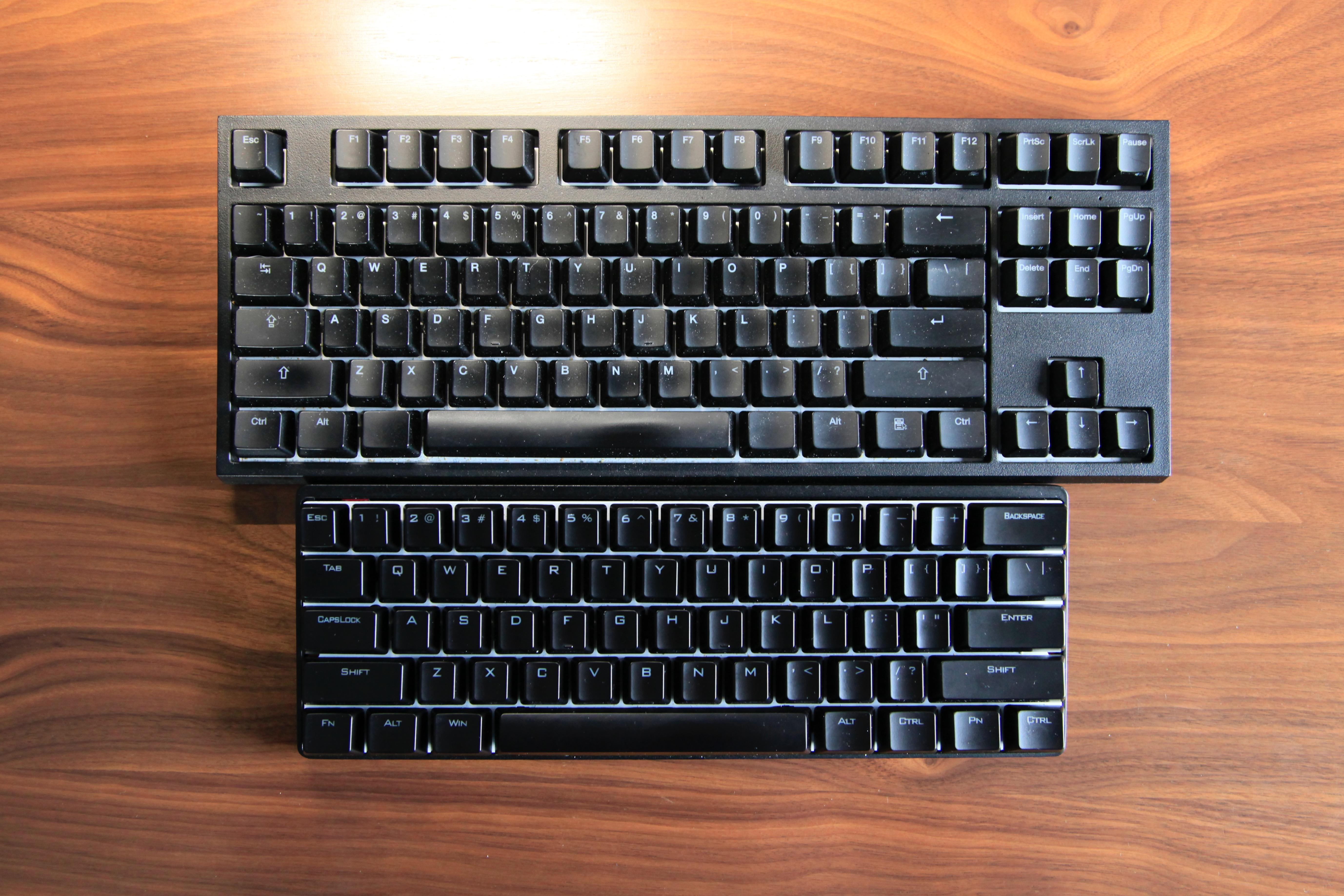
    When I was using a Mac full time, I almost always used a CODE keyboard for all my typing. That lead me to find something better to use with my iPad, and I snagged a Poker II with MX Clear switches. It was a good keyboard for occasional iPad use, but it had a few fatal flaws: it was ugly, and the CMD key was unchangeably in the wrong location.

    I had given up on a mechanical keyboard for the iPad when I switched to it full time — I just hated the way all of them looked. However, over the last few weeks I have come back to wanting a better typing experience. I hooked up the CODE and remembered why I loved it so much, but the same problem with the CODE + iPad Pro remains: scale. The keyboard is just too large compared to the iPad Pro.

    (more…)

  • My ‘he will keep telling other people about this stuff’ Gift List

    For whatever reason, this year I have been looking through a lot of gift lists, and overall I have been really disappointed with them. Because of this I thought I’d make a gift list for a change — the idea behind this list is: if I didn’t have any of the stuff I currently have, what could someone give me where I would end up being so happy with it, I would tell other people they need to get it.

    (more…)

  • iPad Productivity Report – 12/5/2016

    ## A Year iPad Only

    A little over a year ago, [I wrote in a post](https://brooksreview.net/2015/11/the-full-ipad/) about going to the iPad Pro as a full time computer and made this prediction:

    > The iPad Pro right now might not be for you, but come this time next year, I am guessing we will be seeing a lot more people starting to shift their computing to iPads.

    It’s now been that year, and I think you know where I am going with this — there has indeed been a lot more people picking up the iPad as either their primary, or only, computing device. Not the wave I had hoped for, but a far greater amount of people than my most pessimistic parts expected.

    You must be a member to view the rest of this content.

  • Misen

    It’s likely no surprise to readers of this site that my love for knives is not just limited to pocket knives and survival knives, but also to the two kitchen drawers I have stuffed with kitchen knives. I want to talk about the Misen knife, which had a well funded Kickstarter campaign. The sell is this: it has better steel, it has a better edge, superior design, free sharpening for life, and all at a very affordable price of $65.

    It’s a really good pitch, and I backed the campaign because I wanted to see if the knife really lived up to the hype. I know a lot about knifes, but not as much about kitchen knives. I did, however, immediately recognize the steel this knife is made from: AUS-8. Let’s just say that as steels go, it is middle of the road and a steel I would personally stay away from in pocket and survival knives because of its rather run of the mill qualities.

    (more…)

  • The Compass 1 versus Compass 2

    One of the best products Twelve South has ever made is the Compass. A collapsible stand for iPads which can hold it at two angles, but really you just use it to hold it at an easel like angle. I’ve had one, off and on for years, and swear by them.

    However, at some point Twelve South revised the design and launched the Compass 2. The new design looks very much the same, but is worse in just about every aspect (I’m being generous here, because I honestly can’t think of a way that it is better). I hate it.

    (more…)

  • Clarks Desert Boots

    I’ve never been a boot guy, always sneakers or some type of low cut dressier looking shoe. I didn’t understand boots, unless I was hiking or doing something which specifically required boots. But I needed new shoes and travelers seem to universally hail the Desert Boot as not only a great staple, but as really the only shoe most people need.

    (more…)

  • iPad Productivity Report – 11/28/2016

    ### The Question

    “So can you actually work from an iPad?” I hear that question a lot from friends and family, and I usually annoy them with my response. I respond with a version of “I only own iPads”. Which is my way of saying: yeah, I work only from an iPad.

    It’s not the answer people want to hear though, what they want to hear is “you probably can’t” or “no”, and sometimes “yes”. Telling most people they can work from an iPad challenges too much of their knowledge about the way the world works, and they can’t easily grasp it. So telling them it’s not something they have to worry about, is the equivalent of the “it’s not you, it’s me” break up line.

    Also it helps get you out of a series of questions if you respond they can work from an iPad: what about X, what about Y, what about Q, what about X but in E way? And on and on they go.

    *You must be a member to view the rest of this content.*

  • The Wrist

    I stopped wearing my Apple Watch on November 6th, 2016. It wasn’t an eventful day, a planned day, or even something which I put much thought into. But on that day, or perhaps the evening before, I was handed a gift — as some of you may have picked up on, my grandfather passed away recently — and my grandmother handed me my grandfather’s watch and said “I’d like you to have this.” It wasn’t expected, or something I had thought about. The watch isn’t particularly old, but it is the only watch he owned where I actually remember him wearing it all the time.

    When you receive a gift like this, you take off that Apple Watch and you put on the watch you were gifted — it’s the polite thing to do — hell my grandmother probably would have hit me if I hadn’t. So I started wearing the watch all night, then the next morning I found a safe spot to keep the watch and dutifully put back on the Apple Watch.

    (more…)

  • iPad Productivity Report – 11/21/2016

    This past Saturday I received the Pok3r mechanical keyboard for my iPad setup. My initial impressions of this keyboard are very high — I *think* this maybe the keyboard for my iOS setup. I’ll have more to report on this in the coming weeks, but I will say that my shift away from the Smart Keyboard to a mechanical keyboard seems to have been the right move on the surface of it. But also a costly one, as I am now trying to find out how to get one of [these keyboards](https://thevankeyboards.com/products/minivan-keyboard-kit?variant=23068593411).

    On thing I do need to point about about the Pok3r is that it can be powered (with backlight) from of the non-powered USB Camera Connection kit. This greatly simplifies the setup and overall aesthetics of having a mechanical keyboard and iPad Pro.

    You must be a member to view the rest of this content. Already a member? Sign in to your account.

  • Outlier Strongworks

    A few weeks after I received my Outlier Futureworks, I knew they would be the pants I wear the most, and the pants I like wearing the most. They certainly are the most comfortable pants I own, but they are also the most versatile. I love them.

    I have been looking to get a second pair of pants which I could split the wear with for a little more variety. I was set to buy many different brands — as the other pants I have just aren’t as comfortable as the Futureworks. Luckily for me Outlier released the Strongworks. Styled similarly to the Futureworks, but made out of a decidedly heavier material — much closer to the thickness of denim.

    (more…)

  • iPad Productivity Report – 11/14/16

    Welcome to the first of many, weekly reports on iPad Productivity — a new bonus for members of the site. First: thank you for being a member. Just the fact that one person, who isn’t my mom, is willing to pay to read my site is amazing.

    ### You Never Forget Your First Love

    I’m afraid though, I have to jump right into the thick of it and address [this comment from Jason Snell](http://www.macworld.com/article/3140144/macs/what-the-touch-bar-tells-us-about-the-macs-future.html) — a comment I see all to often:

    > Which is my way of saying, though the Mac will continue to evolve in the future, it may finally become irrelevant only when the iPad is capable of doing all the work people currently use their Macs for. And on that front, iOS still has a long way yet to go.

    You must be a member to view the rest of this content.